Manual Switel M270 Mobile Phone

Need a manual for your Switel M270 Mobile Phone? Below you can view and download the PDF manual for free in English. This product currently has 15 frequently asked questions, 16 comments and has 13 votes with an average product rating of 15/100. If this is not the manual you want, please contact us.

Is your product defective and the manual offers no solution? Go to a Repair Café for free repair services.

Manual

Loading…
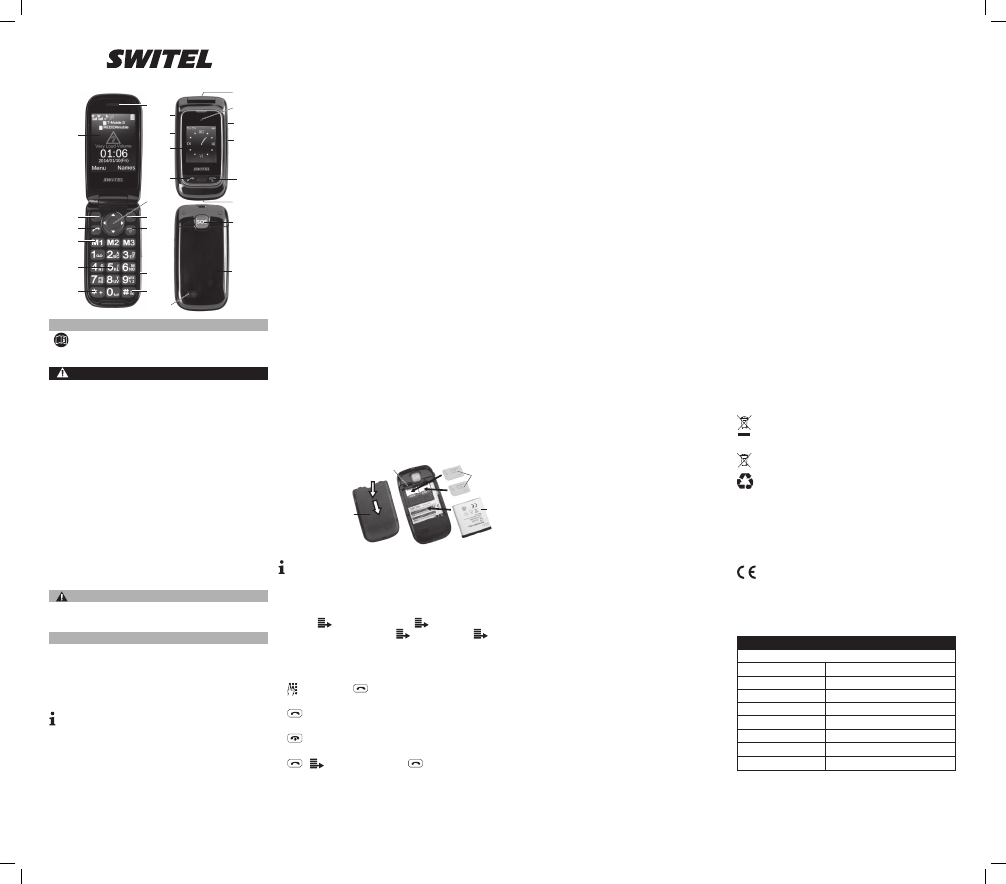
22
23
19
25
1
1
7
8
9
9
10
11
17
13
14
16
24
12
15
18
19
21
2
3
3
4
5
6
20
MISE EN SERVICE
Insérer la carte SIM, Micro-SD et la pile
ATTENTION !
LacarteSIM/Micro-SDpeutêtreendommagée.
Assurez-vousquecelle-cirestepropreetintacte.Insérezcartedu
côtécorrect.
Lapileouletéléphonepeuventêtreendommagés.
Assurez-vousquelapileestinséréecorrectement.
Éteignezvotretéléphoneportableavantderetirerlecachepile.Rallumez-
le lorsque vous avez remis le cache.
Retirerlecachepile,
insérerlacarteSIM.
Insérerlapile,poser
le cache pile.
Charger la pile rechargeable
Lapremièrechargedelapiledoitdureraumoins12heures;chargez
etdéchargez-lacomplètementpendantquelquescycles.Elledureraainsi
pluslongtemps.Placezletéléphonemobiledanslechargeurouutilisezle
port mini-USB.
ATTENTION !
Ligne d‘assistance directe
En cas de problèmes techniques, adressez-vous à notre ligne d‘assistance
directe.Suisse:Tél.0900001675(fraisSwisscomàl‘impressiondece
moded‘emploi:CHF2,60/min).Encasderecoursengarantie,adressez-
vous à votre revendeur.
Remarques d‘entretien
Nettoyez les surfaces du boîtier avec un chiffon doux et non pelucheux.
N‘utilisez pas de produits d‘entretien ou de solvants.
Garantie
LesappareilsSWITELsontcontrôlésetfabriquéssuivantlesmeilleurs
procédés.Desmatériauxsélectionnésetdestechnologiesdepointeleur
garantissentunfonctionnementirréprochableetunelongueduréedevie.
La garantie ne s‘applique pas si la cause d‘une erreur de fonctionnement
dutéléphoneportablereposesurl‘opérateurderéseaudetéléphonie
mobile. La garantie ne s‘applique pas aux piles et piles rechargeables
utiliséesdanslesproduits.Laduréedelagarantieestde24moisàpartir
de la date
d‘achat.Pendantladuréedelagarantie,touslesdéfautsdusàdes
vicesdematérieloudefabricationserontéliminésgratuitement.Ledroit
à la garantie expire en cas d‘intervention de l‘acheteur ou de tiers. Les
dommages provenant d‘un maniement ou d‘une manipulation incorrects,
d‘une usure naturelle, d‘une mauvaise mise en place ou d‘une mauvaise
conservation, d‘un raccordement ou d‘une installation incorrects ainsi que
d‘uncasdeforcemajeureouautresinuencesextérieuressontexclus
delagarantie.Encasderéclamations,nousnousréservonsledroitde
réparer,deremplacerlespiècesdéfectueusesoud‘échangerl‘appareil.
Lescomposantsremplacésoulesappareilséchangésdeviennentnotre
propriété.Lesdemandesdedommagesetintérêtssontexcluestantque
lesdéfautsnereposentpassurunefauteintentionnelleouunenégligence
grossièredufabricant.SivotreappareilSWITELprésentecependantun
défautpendantlapériodedegarantie,veuillezvousadresserexclusive-
mentaumagasinoùvousl‘avezachetéenprésentantvotrebond‘achat.
Vousnepouvezfairevaloirvosdroitsàlagarantierépondantàces
dispositions qu‘exclusivement auprès de votre revendeur. Deux ans après
l‘achat et la remise de nos produits, il n‘est plus possible de faire valoir les
droits à la garantie.
Mettre l‘appareil au rebut
Si vous ne voulez plus servir de votre appareil, veuillez l‘apporter au
centredecollectedel‘organismedetraitementdesdéchetsdevotre
commune(parex.centrederecyclage).D‘aprèslaloirelativeaux
appareilsélectriquesetélectroniques,lespropriétairesd‘appareils
usagéssonttenusdemettretouslesappareilsélectriqueset
électroniquesusagésdansuncollecteurséparé.L‘icôneci-contre
signiequevousnedevezenaucuncasjetervotreappareildans
lesorduresménagères!Vousêtestenusparlaloid‘éliminervos
piles et piles rechargeables auprès d‘un revendeur de piles ainsi
qu‘auprèsdecentresdecollecteresponsablesdeleurélimination
quimettentàdispositiondesconteneursadéquats.Leuréliminationest
gratuite.L‘icôneci-contresigniequevousnedevezenaucuncasjeter
lespilesetpilesrechargeablesdanslesorduresménagères,maisque
vous devez les apporter à un centre de collecte. Éliminez les fournitures
d‘emballage selon les règlements locaux.
Déclaration de conformité
Cetappareilestenconformitéavecladirective1999/5/CEsurles
installationsderadioetdetélécommunicationetlareconnaissance
réciproquedeleurconformité.Laconformitéavecladirective
mentionnéeci-dessusestconrméesurl‘appareilparlamarqeCE.Vous
avezlapossibilitédetéléchargergratuitementladéclarationintégralede
conformitésurnotresiteInternetwww.switel.com.
FRANÇAIS
Téléphone portable M 270 MAPA
Notezquevouspouvezcertainsservicesàpartirdevotretéléphone
cellulaire devez activer ce fournisseur avant de pouvoir l‘utiliser.
MODE D’EMPLOI
Veuillez lire et observer les informations suivantes et conserver ce
moded‘emploiandepouvoirleconsulterencasdebesoin!
CONSIGNES DE SÉCURITÉ
Risqued‘explosion!
N‘utilisez que les blocs secteur faisant partie du coffret !
N‘utilisez que les piles ou batteries vendues avec les appareils ou de
types semblables !
Traiteztoujourslespilesetbatteriesavecprudenceetutilisez-les
uniquementcommedécritsurleuremballage.
N‘utilisezjamaisdepilesetbatteriesensemble.
N‘utilisezjamaisdepilesetbatteriesdecapacitéoud‘étatdecharge
différents.
N‘utilisezpasdepilesoubatteriesendommagées.
Danger de mort pour les porteurs de stimulateurs cardiaques !
Veuillezmaintenirunedistancedesécuritéd‘aumoins15cmpar
rapport à ces appareils.
Risqued‘étouffementliéàdesélémentsdepetitetaille,deslms
d‘emballage et de protection !
Tenezlesenfantsàl‘écartduproduitetdesonemballage!
Risquepourlasantédel‘êtrehumainetl‘environnementliéauxpileset
batteries !
Nejamaisouvrir,endommager,avalerlespilesetbatteriesoufaire
pénétrerleurcontenudansl‘environnement.Ilspeuventcontenirdes
métauxlourdstoxiquesetpolluants.
Menacesdedommagesmatériels.
Évitezdesinuencesprovenantdel‘environnementtellesquefumée,
poussière,vibrations,produitschimiques,humidité,grandechaleurou
ensoleillement direct.
Faireexécuterlesréparationsuniquementpardupersonnelspécialisé
etqualié.
UTILISATION CONFORME AUX PRESCRIPTIONS
CetéléphoneportableconvientpourtéléphoneretenvoyerdesSMSà
l‘intérieurd‘unréseaudetéléphoniemobile.Touteautreutilisationest
considéréecommenonconformeauxprescriptions.Tenezcomptedes
règlementsetdispositionslocaux.Toutemodicationoutransformation
arbitraire est interdite. N‘ouvrez en aucun cas l‘appareil et n‘essayez pas
deleréparervous-même.
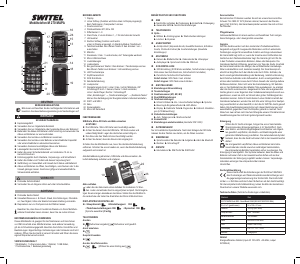
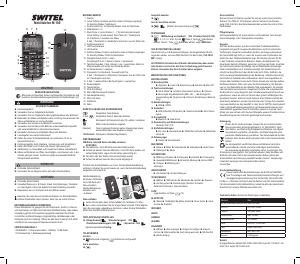
ELÉMENTS DE COMMANDE
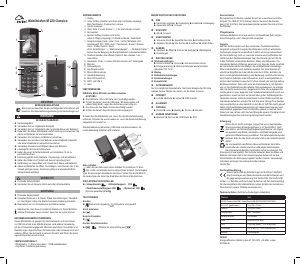
1 Écran
2 Softkeygauche(Lafonctionestafchéeaubasdel‘écran)
Lorsd‘untéléphone„mainslibres“on/off
3 Touche d’appel
4 Touchesd’appeldirectM1,M2,M3
5 Clavier
6 Toucheétoile,2xappuicourt=„+“pourlepréxeinternational
7 Oreillette
8 Softkeydroite,(Lafonctionestafchéeenbasàdroite)
Enmodestand-by:Répertoire
9 ToucheRaccrocher.Avecuntéléphoneouvertappuyez3sec=on/off
10 Microphone
11 Touchedièse,appuyez3sec.=Sonnerie„Silencieux“
12 PrisedechargementmicroUSB
13 Régulateurduvolume
14 Contactsdechargement
15 Avecletéléphoneferméappuyez3sec=lampedepocheon/off
Avecuntéléphoneouvertappuicourt=Boosteron/off
16 LED Lampe de poche
17 Prise pour casquen
18 Bouton d’appel d’urgence
19 Cachepile
20 Haut-parleur
21 Boutondenavigation(haut/bas/gauche/droite)et„OK“
Sélectionrapide:Haut=Caméra,Bas=Alarme,
Gauche=LecteurAudio,Droite=Raccourcis
Sous„Paramètres“→„Réglagedutéléphone“→„Cléspécialisée“,
vouspouvezdénirl‘affectationdestouchesdenavigationindividuelle.
22 SIM1etSIM2
23 Pilerechargeable
24 Objectifdelacaméra
25 Micro-SDfente
STRUCTURE ET FONCTIONS MENU
MESSAGES
►Ecrireunmessage►Boîtederéception►Brouillons►Boîte
desortie►Messagesenvoyés►Diffuserunmessage►Réglages
message
RÉPERTOIRE TÉLÉPHONIQUE
Optio...
►Choisir►Groupes►Réglagesdurépertoire►Supprimer
►Copie
CENTRE D‘APPELS
►Historiquedesappels(Appelsenabsence,Appelseffectués,Appels
reçus,Supprimerlesjournauxdesappels)►Paramétresd‘appel(SIM
paramètresd‘appel,Paramétresavancés)
MULTIMÉDIA
►Caméra►Visualiseurd‘image►Enregistreurvidéo►Lecteur
vidéo►Lecteuraudio►Enregistreurdeson►RadioFM
SOS SETTING
►RéglageSOS(RéglagemodedeSOS,RéglagenuméroSOS,
Nombrecentrald‘appel,Réglagemessagedesonsortie
►MessageSOSrecord
Démarrer SOSFunktionappuyezSOSbouton3sec.
Arrêtez SOSFunktionappuyezSOS-Boutondenouveau.
PARAMÈTRES
Booster conguration
Paramètrage de la sonnerie
Numéro de famille (M1, M2, M3)
Réglages SIM double
Réglage du téléphone
►DateetHeure►Planaficationdel‘énergieon/off►Langue
►Méthodesfavoritesdesaisie►ModeLED►Afficher
►Cléspécialisée►Modeavion►Réglagesdivers
Paramètrage de la sécurité
►Verrouillageautomatiqueduclavier►Sécuritétéléphone
Connectivité
Restaurer les réglage (PINfabricant:0000)
GESTIONNAIRE DE FICHIERS
Uniquementavecunecartemémoiresupplémentaire.Aprèsavoirinséréla
carteSD,letéléphonedoitêtreredémarrépourvoirlesdonnées.
OUTILS
►Assistantvocal►Calendrier►Tâches►Alarme
►Bluetooth►Calculatrice►Raccourcis
SERVICES
►WAP►BôiteàoutilsSIM►BôiteàoutilsSIM
CONTENU DU COFFRET
1Téléphoneportable,1Blocd’alimentation,1Soclechargeur,1Adapta-
teur secteur, 1 Pile rechargeable lithium-ions, 1 Mode d’emploi
Caractéristique Valeur
M270MAPADoublecarteSIM-Quad-bandeGSM(850/900/1800/1900MHz)
HxLxP(fermé) 50x100x21mm
Poids 102,5g(avecpiles)
Pile 850 mAH Li-ion Akku
Temps de conversation max. 7 heures
Temps de veille 190 heures
SAR Head:0.550W/Kg
Display 2.4”/1.77”TFT–LCD
Appareil photo 3 Megapixel
Données techniques(Sousréservedemodicationstechniques)
Bloc secteur
Enutilisantd‘adaptateurd‘alimentationàhautrendementénergétique
(inputAC100-240V~50-60Hz,outputDC5V/500mA)
RÉGLEZ LA LANGUE D‘AFFICHAGE
<Menu> <Paramètres>OK
<Réglage du téléphone> OK <Langue> OK
[Sélectionnezunelangue] Terminè
TÉLÉPHONER
Composer le numéro de téléphone
 [Entrerlenuméro] Lenuméroentréestappelé
Répondre à un appel

Fin d‘un appel

Appel à partir de la liste d‘appels
 [Sélectionnezuneentrée]
PRUDENCE !
Menaces de troubles de l‘audition !
Évitezuneécoutetroplongueàfortvolumesonore.
Download manual in English (PDF, 0.87 MB)
(Consider the environment and only print this manual if it is really necessary)

Loading…

Rating

Let us know what you think about the Switel M270 Mobile Phone by leaving a product rating. Want to share your experiences with this product or ask a question? Please leave a comment at the bottom of the page.
Are you satisfied with the Switel M270 Mobile Phone?
Yes No
15%
85%
13 votes

Join the conversation about this product

Here you can share what you think about the Switel M270 Mobile Phone. If you have a question, first carefully read the manual. Requesting a manual can be done by using our contact form.

[email protected] 04-02-2019
Hello. I am unable to interpret the user manual to memorize the M1 M2 M3 family numbers. Please contact me for explanations cordially

reply | This was helpful (5) (Translated by Google)
Monique Schorderet 26-06-2020
My switel M270 MAPA laptop is almost new and I can't get communication anymore, is it possibly because of 5G? what can I do ? Thanks for your help by your future reply.

reply | This was helpful (2) (Translated by Google)
Bill 19-02-2019
I have forgotten my password. What should I do?

reply | This was helpful (0)
Anna maria 15-06-2019
I don't know how to enter the address book

reply | This was helpful (0) (Translated by Google)
Giuliana 15-09-2019
I can't call emergency number yellow cross

reply | This was helpful (0) (Translated by Google)

Loading…

alie 02-11-2019
hello, I bought it for Canada and I can't change the schedule

reply | This was helpful (0) (Translated by Google)
LEON burel 23-03-2020
I bought this product for my wife for her figures, next to my Samsung it's a real "brothel" to use. at all levels. the instructions are succinct, you need bac plus 5. I spent a hundred hours there! the alarm clock is very loud, moreover it repeats constantly! to stop it I have found nothing but to reset the program to zero and this every day. The crossed out bell is useless. She gives the photos before the directory! these stupid technicians!

reply | This was helpful (0) (Translated by Google)
leon burel 23-03-2020
I repeat "LE BORDEL!" the PDF manual for Nitropro is released in Italian, english, deutsch; and in French ! moreover, the top is truncated! unheard of, these technicians are weird! In addition your device is symmetrical from both ends, when you take it in hand you have to look at it to know its meaning! etc. I am 88 years old and have handled all kinds of devices >> unheard of!

reply | This was helpful (0) (Translated by Google)
Rosella 27-03-2020
What does modus DEL grazie mean

reply | This was helpful (0) (Translated by Google)
jean-paul CORET 07-05-2020
I bought a switel D200. the product looks good but the instructions are not understandable enough for people of my age (85 years) can you give me a phone number of an advisor in the field thanking you in advance jp coret

reply | This was helpful (0) (Translated by Google)
maryse carpentier 17-09-2020
hello, I press the menu key to change the language, but I directly access the voicemail, what should be done

reply | This was helpful (0) (Translated by Google)
Lorenzo Cecchini 13-11-2020
I can't send SMS but only receive them

reply | This was helpful (0) (Translated by Google)
claudine culot 26-02-2021
The phone turns off by itself at midnight after a resounding ringing which wakes us up properly !!!

reply | This was helpful (0) (Translated by Google)
PIERRE ALAIN FAVRE BULLE 06-12-2021
My new second SIM card is not registering. Message on the phone screen: "Card inserted...." Before this last card change, the two SIM cards were working simultaneously without any problem.

reply | This was helpful (0) (Translated by Google)
Silvana 05-08-2022
How do i remove airplane mode from my swittel mobile phone?

reply | This was helpful (0) (Translated by Google)
Danny Berton 20-07-2023
The phone displays unable to connect. What should I do?

reply | This was helpful (0) (Translated by Google)

More about this manual

We understand that it’s nice to have a paper manual for your Switel M270 Mobile Phone. You can always download the manual from our website and print it yourself. If you would like to have an original manual, we recommend you contact Switel. They might be able to provide an original manual. Are you looking for the manual of your Switel M270 Mobile Phone in a different language? Choose your preferred language on our homepage and search for the model number to see if we have it available.

Specifications

Brand Switel
Model M270
Category Mobile Phones
File type PDF
File size 0.87 MB

All manuals for Switel Mobile Phones
More manuals of Mobile Phones

Frequently Asked Questions about Switel M270 Mobile Phone

Our support team searches for useful product information and answers to frequently asked questions. If you find an inaccuracy in our frequently asked questions, please let us know by using our contact form.

My SIM card doesn't fit my mobile phone, why is that? Verified

There are several SIM card sizes, regular, micro and nano. It is possible to use an adapter or to have the SIM card made smaller.

This was helpful (1532) Read more

Can I use my mobile phone while charging it? Verified

Yes, you can use your mobiele phone while charging it. The charging process will go slower when you do this.

This was helpful (1352) Read more

What is a PUK code? Verified

PUK stands for Personal Unblocking Code and is needed to unblock your phone after entering an incorrect PIN code three times. If the PUK is no longer available it can often be requested from the provider.

This was helpful (788) Read more

My phone is in good condition, but when I call people the have trouble hearing me, why is that? Verified

It is possible that dirt has amassed in the grid of the microphone, muting the sound. The best way to clean this is with compressed air. When in doubt, have this done by a professional.

This was helpful (682) Read more

When I connect my device to the charger it charges bad or not at all, why is that? Verified

It is possible that dirt has amassed in the opening where the charger is connected, preventing it from making proper contact. The best way to clean this is with compressed air. When in doubt, have this done by a professional.

This was helpful (374) Read more

Is it necessary to drain my lithium-ion battery before recharging it again? Verified

No, this is not necessary. With older batteries this was the case. Lithium-ion batteries can be charged after use and be taken off the charger when needed.

This was helpful (370) Read more

What does IMEI stand for? Verified

IMEI stands for International Mobile Equipment Identity and is a (often) unique number that is used to identify mobile devices such as tablets and smartphones and protect them against theft.

This was helpful (332) Read more

When I connect a headphone to my device it doesn't work properly, what can I do? Verified

It is possible that dirt has amassed in the opening where the headphone is connected, preventing it from making proper contact. The best way to clean this is with compressed air. When in doubt, have this done by a professional.

This was helpful (291) Read more

Does bluetooth work through walls and ceilings? Verified

A bluetooth signal will work through walls and ceiling, unless these are made from metal. Depending on the thickness and the material of the wall the signal can lose in strength.

This was helpful (273) Read more

The battery of my phone runs out quickly when I am outside, why is that? Verified

Lithium-ion batteries can't handle low temperatures. If the outside temperatures are close to freezing, the battery will get depleted faster than normal, even without using the phone. When the phone has returned to room temperature, it will probably show a battery percentage close to what it was.

This was helpful (263) Read more

What can I best use to clean the screen of my mobile device? Verified

It's best to use a microfiber cloth, possibly with a specialized detergent. Never use kitchen towels or other paper cloths, these will leave scratches!

This was helpful (246) Read more

What is the best way to store a lithium-ion battery for a long period? Verified

The best way to store a lithium-ion battery is at a temperature between 5 and 45 degrees Celcius. It's also a good idea make sure the battery is about 67% charged before it is stored away.

This was helpful (241) Read more

What does VoIP mean? Verified

VoIP stands for Voice over IP (Internet Protocol) and is a technology that transports speech over the internet or other IP-networks.

This was helpful (240) Read more

Under what conditions will my lithium-ion battery function optimally? Verified

Lithium-ion batteries function optimally at a temperature between 5 and 45 degrees Celcius. With very cold or warm weather you may notice that the battery will drain quicker. Charging is not recommended at temperatures lower than 5 or higher than 45 degrees Celcius.

This was helpful (237) Read more

Do I need to clean the screen of my device before I apply a screen protector? Verified

Yes, a screen protector attaches best to grease and dust free surfaces.

This was helpful (231) Read more
Manual Switel M270 Mobile Phone

Related products

Related categories

×
Download