ENGLISH
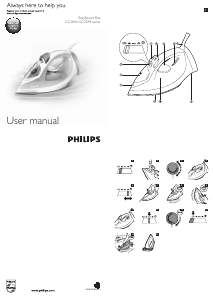
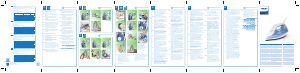
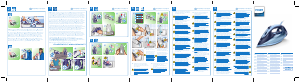
General description (Fig. 1)
1 Spray nozzle
2 Capofllingopening
3 Steam control
- CALC CLEAN = Calc-Clean function
- t=dryironing
- ECO = optimal steam
- ; = maximum steam
-
= turbo steam
4 Steam boost button
5 Spray button
6 Temperature dial
7 Temperaturelight(specictypesonly:withsafety-autooffindication)
8 Mains cord
9 Type plate
10 WatertankwithMAXwaterlevelindication
11 Soleplate
Using the appliance
Filling the water tank
Note: Your appliance has been designed to be used with tap water. If you live in an area with very hard water,
fast scale build-up may occur. In this case, it is recommended to mix 50% distilled water and 50% tap water to
prolong the lifetime of your appliance.
Note: Do not put perfume, vinegar, starch, descaling agents, ironing aids, chemically descaled water or other
chemicals in the water tank.
1 Set the steam control to position t (dry ironing). (Fig. 2)
2 Fill the water tank up to the MAX indication (Fig. 3).
3 Closethecapofthellingopening.
Selecting temperature and steam setting
Table 1
Fabric type Temperature
setting
Steam setting Steam boost Spray
Linen MAX
;,
Ye s Yes
Cotton
3
;,
Ye s Ye s
Wool
2
ECO No Ye s
Silk
1
t No No
Syntheticfabrics(e.g.
acrylic, nylon, polyamide,
polyester).
1
t No No
1 Consult table 1 to set the temperature dial to the appropriate setting for your garment (Fig. 4).
2 Put the iron on its heel and plug it in. The temperature light goes on to indicate that the iron is
heating up (Fig. 5).
3 When the temperature light goes out, the iron has reached the correct temperature.
4 Consult table 1 to select a steam setting that corresponds to the temperature you have set (Fig. 6).
Note: To use turbo steam
, keep the steam control pressed to the turbo steam position continuously.
Caution: Do not set the steam control to a steam setting if the set temperature is below 2 or when
the iron is still heating up (when the temperature light is on). Otherwise water may leak from the iron.
Features
Spray function
- Pressthespraybuttontomoistenthearticletobeironed.Thishelpsremovestubborncreases(Fig.7).
Steam boost function
- Pressandreleasethesteamboostbuttonforapowerfulboostofsteamtoremovestubborn
creases(Fig.8).
Vertical steam
-
Youcanusethesteamboostfunctionwhenyouholdtheironinverticalpositionforremovingcreases
fromhangingclothes,curtainsetc(Fig.9).
Safety auto-off function (specic types only)
-
Theironswitchesoffautomaticallyifithasnotbeenmovedfor30seconds
inhorizontalpositionor
8minutesinverticalposition.Theauto-offlightstartsashing(Fig.10).
- Tolettheironheatupagain,pickuptheironormoveitslightlyuntiltheauto-offlightgoesout.
ECO steam setting
- SelecttheECOsteamsettinginsteadofthemaximumsteamsetting;tosaveenergy,yettoachieve
satisfactoryironingresults.(Fig.11)
Dry ironing
- Setthesteamcontroltot(dryironing)toironwithoutsteam.(Fig.2)
Cleaning and maintenance
Cleaning
1 Set the steam control to t (dry ironing), unplug the iron and let it cool down. (Fig. 2)
2 Pour any remaining water out of the water tank.
3 Wipeakesandanyotherdepositsoffthesoleplatewithadampclothandanon-abrasive(liquid)
cleaning agent.
Caution: To keep the soleplate smooth, avoid hard contact with metal objects. Never use a scouring pad,
vinegar or other chemicals to clean the soleplate.
Note: Regularly rinse the water tank with tap water. Empty the water tank after rinsing it.
Calc-Clean function
IMPORTANT: To prolong the lifetime of your appliance and to maintain good steaming
performance, use the Calc-Clean function once every two weeks. If the water in your area
is very hard (i.e. when akes come out of the soleplate during ironing), use the Calc-Clean
function more frequently.
1 Make sure the appliance is unplugged and the steam control is set to t (dry ironing). (Fig. 2)
2 Fill the water tank to the MAX indication (Fig. 3).
Do not pour vinegar or other descaling agents into the water tank.
3 Plug in the iron and set the temperature dial to MAX (Fig. 12).
4 Unplug the iron when the temperature light goes out.
5 Holdtheironoverthesink.PushthesteamcontroltotheCalc-Cleanpositionandholdit(Fig.13).
6 Gently shake the iron until all water in the water tank has been used up (Fig. 14).
Caution:Whilescaleisushedout,steamandboilingwateralsocomeoutofthesoleplate.
7 Set the steam control back to t (dry ironing). (Fig. 2)
Note: Repeat the Calc-Clean process if the water that comes out of the iron still contains scale particles.
After the Calc-Clean process
1 Plug in the iron. Let the iron heat up to let the soleplate dry.
2 Unplug the iron when the temperature light goes out.
3 Move the iron gently over a piece of cloth to remove any water stains on the soleplate.
4 Let the iron cool down before you store it.
Storage
1 Unplug the iron and set the steam control to t (dry ironing). (Fig. 2)
2 Wind the mains cord round the cord storage facility and store the iron on its heel (Fig. 15).
Troubleshooting
Thischaptersummarisesthemostcommonproblemsyoucouldencounterwiththeappliance.Ifyou
areunabletosolvetheproblemwiththeinformationbelow,visitwww.philips.com/supportforalistof
frequentlyaskedquestionsorcontacttheConsumerCareCentreinyourcountry(seetheworldwide
guaranteeleaetforcontactdetails).
Problem Possible cause Solution
Waterdripsfromthe
soleplateorwetspots
appearonthegarment
duringironing.
Thesettemperatureistoo
lowforsteamironing.
Setanironingtemperaturethatis
suitableforsteamironing.Seetable1.
Youhaveputanadditivein
thewatertank.
Rinsethewatertankanddonotputany
additiveinthewatertank.
Thesteamboostfunction
doesnotworkproperly
(waterleaksoutofthe
soleplate).
Youhaveusedthesteam
boost function too often
withinaveryshortperiod.
Waitawhilebeforeyouusethesteam
boostfunctionagain.
Youhaveusedthesteam
boostfunctionatatoolow
temperature.
Setanironingtemperatureatwhichthe
steam boost function can be used
(2toMAX).
Flakesandimpuritiescome
outofthesoleplateduring
ironing.
Hardwaterformsakes
insidethesoleplate.
UsetheCalc-Cleanfunction(seechapter
‘Cleaningandmaintenance’,section
‘Calc-Cleanfunction’).
Waterdripsfromthe
soleplateaftertheironhas
cooleddownorhasbeen
stored.
Youhaveputtheironin
horizontalpositionwhile
therewasstillwaterinthe
watertank.
Emptythewatertankandsetthesteam
controltoposition‘dry’afteruse.
Storetheirononitsheel.
Waterleaksfromthecapof
thellingopening.
Youhaveoverlledthe
watertank.
Donotllthewatertankbeyondthe
MAXindication.Pourexcesswaterout
ofthewatertank.
WhenIpushthesteam
controltotheturbosteam
position,thesteamcontrol
jumpsback.
Youdidnotkeepthesteam
controlintheturbosteam
position.
Ifyouwanttouseturbosteam,youhave
tokeepthesteamcontrolintheturbo
steampositioncontinuously.Forother
steamsettings,thisisnotnecessary.


Join the conversation about this product
Here you can share what you think about the Philips GC2046 EasySpeed Iron. If you have a question, first carefully read the manual. Requesting a manual can be done by using our contact form.
reply | This was helpful (0) (Translated by Google)