Manual Panasonic RC-CD300PC CD Player

Need a manual for your Panasonic RC-CD300PC CD Player? Below you can view and download the PDF manual for free in English. This product currently has 1 frequently asked question, 0 comments and has 0 votes. If this is not the manual you want, please contact us.

Is your product defective and the manual offers no solution? Go to a Repair Café for free repair services.

Manual

Loading…
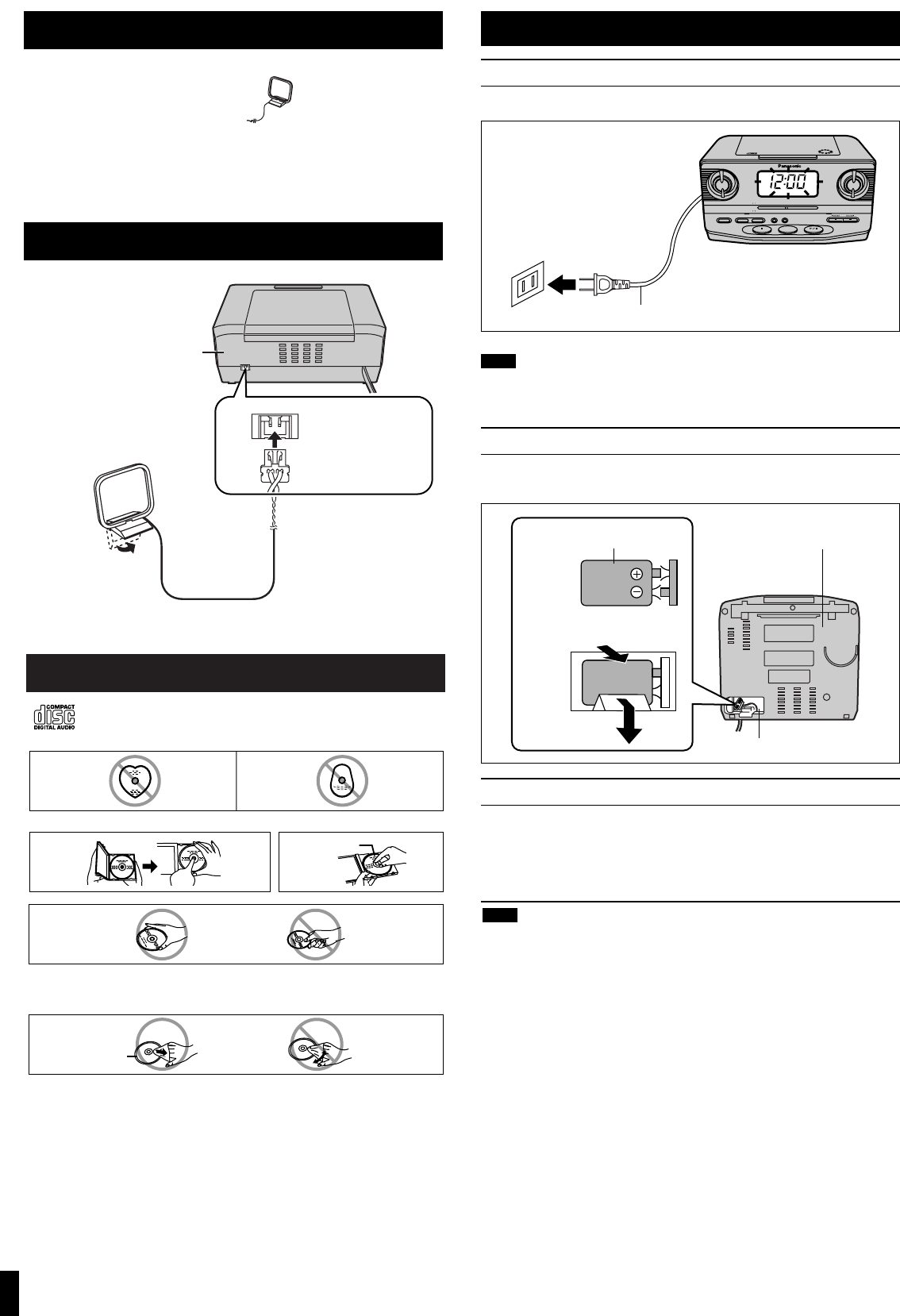
Concerning Compact Discs
Only compact discs bearing this mark can be used with this unit.
However, continued use of irregularly shaped CDs can damage the unit.
If the surface is dirty
Wipe it with a damp cloth and then wipe dry.
Wipe from the center toward the outer circumference.
How to hold a disc
How to store the disc in its caseHow to remove a disc from its case
Play surface
(shiny surface)
Label side up
Handling precautions
If you are taking the CD from a cold to
a warm environment, moisture may
form on the CD. Wipe this off with a
soft, dry, lint-free cloth before using the
CD.
Do not write on the label side with a
ball-point pen or other writing instru-
ment.
Do not use record cleaning sprays,
benzine, thinner, static electricity pre-
vention liquids or any other solvent.
Do not attach labels or stickers to CDs.
(Do not use CDs with exposed adhe-
sive from tape or left over peeled off
stickers.)
Do not use scratch-proof protectors or
covers other than those specified for
use with this unit.
Storage precautions
Be sure to store CDs in their cases to
protect them from dust, scratches, and
warping.
Do not place or store CDs in the fol-
lowing places
Locations exposed to direct sunlight
Humid or dusty locations
Locations directly exposed to a heat
vent or heating appliance
In the glove compartment or on the
rear deck of an automobile
Supplied accessories
Please check and identify the supplied accessories.
1 FM/AM loop antenna (RSA0031)
Use numbers in parentheses when asking for replacement parts.
(Only for U.S.A.)
To order accessories, contact 1-800-332-5368 or the website
(http://www.panasonic.com
).
EXT ANT
2
AC power supply cord
Connect the AC power supply cord to a household AC outlet.
These speakers do not have magnetic shielding. Do not place them near
televisions, personal computers or other devices easily influenced by mag-
netism.
Memory back-up battery (not included)
This battery saves the clock and alarm settings if there is a power
interruption.
Replacing the battery
The battery lasts about a year.
The battery lasts about a month if the unit is disconnected from the
household AC outlet.
Protect the memory by connecting the AC power cord before changing
the battery.
Align the poles (- and +) properly when inserting the battery.
Do not heat or disassemble batteries. Do not allow them to contact flame
or water.
Remove the battery if the unit is not to be used for a long time.
Do not use the battery if the covering has been peeled off.
Mishandling of batteries can cause electrolyte leakage which can damage
items the fluid contacts and may cause a fire.
If electrolyte leaks from the batteries, consult your dealer.
Wash thoroughly with water if electrolyte comes in contact with any part of
your body.
Note
Power sources
SLEEPDISP /
-
TIME SET AL 1 /
-
SET AL 2 /
-
SET MODE
OFF RADIO
FM/AM
CD
FM
88 92 96 100 104 108
MHz
53 60 70 80 100 130 170
kHz
X10
AM
RC
-
CD300
CD CLOCK RADIO
DOZE
AM
AC power supply cord
1
2
6F22/6LR61
006P 9V
(not included)
1
2
Plug in firmly.
Bottom of the main unit
Note
Back of the main unit
Stand the antenna up
so it clicks into place.
ª
When disconnecting
Pull firmly.
No battery cover is used.
Connecting the FM/AM loop antenna
Download manual in English (PDF, 0.47 MB)
(Consider the environment and only print this manual if it is really necessary)

Loading…

Rating

Let us know what you think about the Panasonic RC-CD300PC CD Player by leaving a product rating. Want to share your experiences with this product or ask a question? Please leave a comment at the bottom of the page.
Are you satisfied with the Panasonic RC-CD300PC CD Player?
Yes No
Be the first to rate this product
0 votes

Join the conversation about this product

Here you can share what you think about the Panasonic RC-CD300PC CD Player. If you have a question, first carefully read the manual. Requesting a manual can be done by using our contact form.

More about this manual

We understand that it’s nice to have a paper manual for your Panasonic RC-CD300PC CD Player. You can always download the manual from our website and print it yourself. If you would like to have an original manual, we recommend you contact Panasonic. They might be able to provide an original manual. Are you looking for the manual of your Panasonic RC-CD300PC CD Player in a different language? Choose your preferred language on our homepage and search for the model number to see if we have it available.

Specifications

Brand Panasonic
Model RC-CD300PC
Category CD Players
File type PDF
File size 0.47 MB

All manuals for Panasonic CD Players
More manuals of CD Players

Frequently Asked Questions about Panasonic RC-CD300PC CD Player

Our support team searches for useful product information and answers to frequently asked questions. If you find an inaccuracy in our frequently asked questions, please let us know by using our contact form.

Can I repair scratches on a CD myself? Verified

Scratches prevent de laser from reading the disc correctly. When the scratches are only superficial it is possible to repair them yourself by polishing the disc with a slightly abrasive compound. Ideally you use a professional abrasive compound but it’s also possible to use regular toothpaste. After polishing the disc it needs to be washed and let to dry. There are specialised businesses that can do this.

This was helpful (42) Read more
Manual Panasonic RC-CD300PC CD Player

Related products

Related categories

×
Download