Manual Nintendo DS Pokemon Ranger - Shadows of Almia

Need a manual for your Nintendo DS Pokemon Ranger - Shadows of Almia? Below you can view and download the PDF manual for free in English. This product currently has 0 frequently asked questions, 0 comments and has 0 votes. If this is not the manual you want, please contact us.

Is your product defective and the manual offers no solution? Go to a Repair Café for free repair services.

Manual

Loading…
18
19
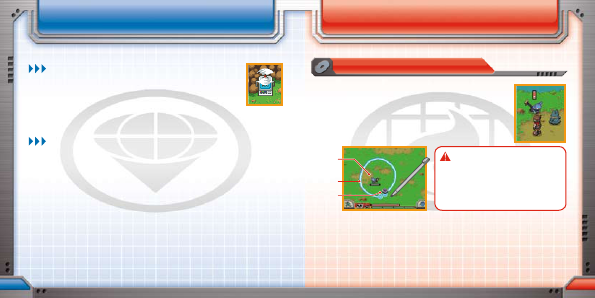
SAVE MACHINE
POKÉMON
CAPTURE LINE
CAPTURE DISC
caPtURIng PokémonsavIng the game
You can save your adventure so you can resume playing later in two ways.
SAVE MACHINE
You can save your game by touching any Save Machine in a Ranger
facility or in the field. (You will be asked if you want to save, “Yes/No.”)
You can resume play from the saved spot by choosing “Continue” the
next time you play.
If you start playing a “New Game” and then save, any previous game data will
be overwritten. (The old “Continue” data will be lost.)
QUICKSAVE
Touch “Quicksave” on the Styler Screen to save the game on the spot. (You will be
asked if you want to quicksave, “Yes/No.”) When the Nintendo DS is turned on later, it
is possible to resume play using the quicksave data.
* The quicksave data does not overwrite the “Continue” data.
* Don’t turn off the power while you are saving.
The next time you start this game, you will be asked if you would like to resume play
from where you quicksaved. If you reply “Yes,” you will be asked if it is okay to delete
the quicksaved data. Replying “Yes” will start the game from where you quicksaved
and delete the quicksave data.
If you use the quicksaved data to resume play, it will be deleted. Save your game by using a
Save Machine after you resume your play. Replying “No” will return you to the “Resume Play from
Quicksave” screen.
levelIng UP the styleR
A “capture” is the process of befriending a Pokémon by
establishing an emotional bond. Once captured, the Pokémon will
travel with the hero until it provides help and/or is released. A
capture is performed using the stylus (the Styler).
The Touch Screen switches to the Capture Screen when the hero
makes contact with a Pokémon in the field.
CAUTION - STYLUS USE
To avoid fatigue and discomfort when using
the stylus, do not grip it tightly or press it hard
against the screen. Keep your fingers, hand, wrist
and arm relaxed. Long, steady, gentle strokes
work just as well as many short, hard strokes.
When the Capture Screen appears, touch the stylus to the ground on-screen. The
Capture Disc will appear where the stylus is touching; it disappears if the stylus is
lifted from the screen.
Keeping the stylus touching the screen, slide it to move the Capture Disc. It will leave
the Capture Line in its wake. Use the Capture Line to draw loops around the Pokémon
you want to capture.
Download manual in English (PDF, 3.1 MB)
(Consider the environment and only print this manual if it is really necessary)

Loading…

Rating

Let us know what you think about the Nintendo DS Pokemon Ranger - Shadows of Almia by leaving a product rating. Want to share your experiences with this product or ask a question? Please leave a comment at the bottom of the page.
Are you satisfied with the Nintendo DS Pokemon Ranger - Shadows of Almia?
Yes No
Be the first to rate this product
0 votes

Join the conversation about this product

Here you can share what you think about the Nintendo DS Pokemon Ranger - Shadows of Almia. If you have a question, first carefully read the manual. Requesting a manual can be done by using our contact form.

More about this manual

We understand that it’s nice to have a paper manual for your Nintendo DS Pokemon Ranger - Shadows of Almia. You can always download the manual from our website and print it yourself. If you would like to have an original manual, we recommend you contact Nintendo DS. They might be able to provide an original manual. Are you looking for the manual of your Nintendo DS Pokemon Ranger - Shadows of Almia in a different language? Choose your preferred language on our homepage and search for the model number to see if we have it available.

Specifications

Brand Nintendo DS
Model Pokemon Ranger - Shadows of Almia
Category Games
File type PDF
File size 3.1 MB

All manuals for Nintendo DS Games
More manuals of Games
Manual Nintendo DS Pokemon Ranger - Shadows of Almia

Related products

Related categories

×
Download