Manual Nintendo DS Pokemon Ranger - Shadows of Almia

Need a manual for your Nintendo DS Pokemon Ranger - Shadows of Almia? Below you can view and download the PDF manual for free in English. This product currently has 0 frequently asked questions, 0 comments and has 0 votes. If this is not the manual you want, please contact us.

Is your product defective and the manual offers no solution? Go to a Repair Café for free repair services.

Manual

Loading…
16
17
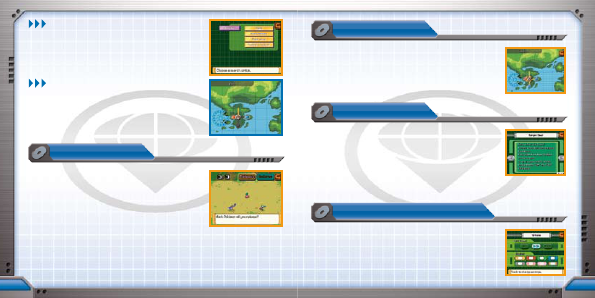
RELEASING POKÉMON:
SEE PAGE 25
maP
Friend Pokémon can be released anytime by touching
the “Release” icon. You may also be forced to release
Pokémon if you capture more than you are allowed. When
releasing Pokémon, your Friend Pokémon are shown at
once. Select those to be released by touching them, then
touch the “Release” icon at the center-top part of the
Touch Screen. The released Pokémon return to wherever
they were originally captured.
If a wild Pokémon helps the hero with a Poké Assist or a Field Move,
it is automatically released.
SEARCH
Touch the “Search” icon to search for Pokémon by name,
Poké Assist, Field Move, or by their Pokémon Number.
Poké Assists: See page 23
Field Moves: See page 27
AREA
Touch the “Area” icon to indicate the selected Pokémon’s
location on the map on the top screen. The location is
indicated with a highlight color.
* The location of some Pokémon will not be revealed.
Release
A map of the entire Almia region is displayed on the Touch
Screen. The hero’s present location is indicated with a flashing
icon. As the hero progresses through the story, the places the
hero visits are added to the map. Touching a location displays
a snapshot from that location on the top screen.
glossaRy
The Glossary provides detailed descriptions of special terms
and techniques used in Pokémon Ranger: Shadows of Almia.
The entries in the Glossary are listed in the three categories:
“Field,” “Capture,” and “Terms.” Touch the heading you want
to check to access information on it. When an entry is opened,
touch the arrows on the Touch Screen to flip pages. The Glossary
is automatically updated as you progress through the game.
QUIcksave & oPtIons
You can quicksave your game and resume play from that point.
Using Quicksave: See page 18
The text speed and window design can be changed in Options.
Download manual in English (PDF, 3.1 MB)
(Consider the environment and only print this manual if it is really necessary)

Loading…

Rating

Let us know what you think about the Nintendo DS Pokemon Ranger - Shadows of Almia by leaving a product rating. Want to share your experiences with this product or ask a question? Please leave a comment at the bottom of the page.
Are you satisfied with the Nintendo DS Pokemon Ranger - Shadows of Almia?
Yes No
Be the first to rate this product
0 votes

Join the conversation about this product

Here you can share what you think about the Nintendo DS Pokemon Ranger - Shadows of Almia. If you have a question, first carefully read the manual. Requesting a manual can be done by using our contact form.

More about this manual

We understand that it’s nice to have a paper manual for your Nintendo DS Pokemon Ranger - Shadows of Almia. You can always download the manual from our website and print it yourself. If you would like to have an original manual, we recommend you contact Nintendo DS. They might be able to provide an original manual. Are you looking for the manual of your Nintendo DS Pokemon Ranger - Shadows of Almia in a different language? Choose your preferred language on our homepage and search for the model number to see if we have it available.

Specifications

Brand Nintendo DS
Model Pokemon Ranger - Shadows of Almia
Category Games
File type PDF
File size 3.1 MB

All manuals for Nintendo DS Games
More manuals of Games
Manual Nintendo DS Pokemon Ranger - Shadows of Almia

Related products

Related categories

×
Download