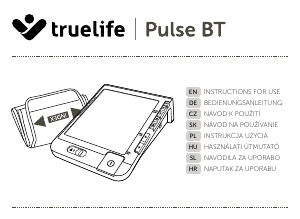
Manual Truelife Pulse B-Vision Blood Pressure Monitor

Need a manual for your Truelife Pulse B-Vision Blood Pressure Monitor? Below you can view and download the PDF manual for free in English. This product currently has 2 frequently asked questions, 0 comments and has 0 votes. If this is not the manual you want, please contact us.

Is your product defective and the manual offers no solution? Go to a Repair Café for free repair services.

Manual

Loading…
3
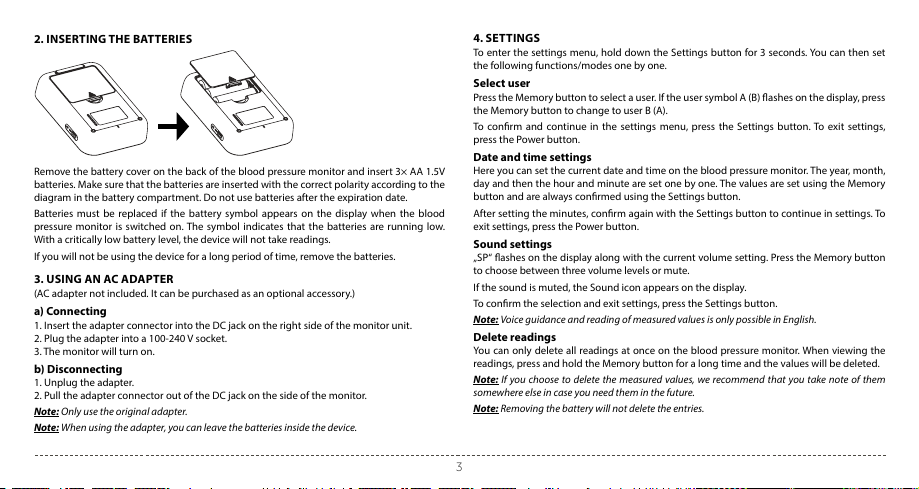
2. INSERTING THE BATTERIES
Remove the battery cover on the back of the blood pressure monitor and insert 3× AA 1.5V
batteries. Make sure that the batteries are inserted with the correct polarity according to the
diagram in the battery compartment. Do not use batteries after the expiration date.
Batteries must be replaced if the battery symbol appears on the display when the blood
pressure monitor is switched on. The symbol indicates that the batteries are running low.
With a critically low battery level, the device will not take readings.
If you will not be using the device for a long period of time, remove the batteries.
3. USING AN AC ADAPTER
(AC adapter not included. It can be purchased as an optional accessory.)
a) Connecting
1. Insert the adapter connector into the DC jack on the right side of the monitor unit.
2. Plug the adapter into a 100-240 V socket.
3. The monitor will turn on.
b) Disconnecting
1. Unplug the adapter.
2. Pull the adapter connector out of the DC jack on the side of the monitor.
Note: Only use the original adapter.
Note: When using the adapter, you can leave the batteries inside the device.
4. SETTINGS
To enter the settings menu, hold down the Settings button for 3 seconds. You can then set
the following functions/modes one by one.
Select user
Press the Memory button to select a user. If the user symbol A (B) ashes on the display, press
the Memory button to change to user B (A).
To conrm and continue in the settings menu, press the Settings button. To exit settings,
press the Power button.
Date and time settings
Here you can set the current date and time on the blood pressure monitor. The year, month,
day and then the hour and minute are set one by one. The values are set using the Memory
button and are always conrmed using the Settings button.
After setting the minutes, conrm again with the Settings button to continue in settings. To
exit settings, press the Power button.
Sound settings
„SP“ ashes on the display along with the current volume setting. Press the Memory button
to choose between three volume levels or mute.
If the sound is muted, the Sound icon appears on the display.
To conrm the selection and exit settings, press the Settings button.
Note: Voice guidance and reading of measured values is only possible in English.
Delete readings
You can only delete all readings at once on the blood pressure monitor. When viewing the
readings, press and hold the Memory button for a long time and the values will be deleted.
Note: If you choose to delete the measured values, we recommend that you take note of them
somewhere else in case you need them in the future.
Note: Removing the battery will not delete the entries.
Download manual in English (PDF, 1.22 MB)
(Consider the environment and only print this manual if it is really necessary)

Loading…

Rating

Let us know what you think about the Truelife Pulse B-Vision Blood Pressure Monitor by leaving a product rating. Want to share your experiences with this product or ask a question? Please leave a comment at the bottom of the page.
Are you satisfied with the Truelife Pulse B-Vision Blood Pressure Monitor?
Yes No
Be the first to rate this product
0 votes

Join the conversation about this product

Here you can share what you think about the Truelife Pulse B-Vision Blood Pressure Monitor. If you have a question, first carefully read the manual. Requesting a manual can be done by using our contact form.

More about this manual

We understand that it’s nice to have a paper manual for your Truelife Pulse B-Vision Blood Pressure Monitor. You can always download the manual from our website and print it yourself. If you would like to have an original manual, we recommend you contact Truelife. They might be able to provide an original manual. Are you looking for the manual of your Truelife Pulse B-Vision Blood Pressure Monitor in a different language? Choose your preferred language on our homepage and search for the model number to see if we have it available.

Specifications

Brand Truelife
Model Pulse B-Vision
Category Blood Pressure Monitors
File type PDF
File size 1.22 MB

All manuals for Truelife Blood Pressure Monitors
More manuals of Blood Pressure Monitors

Frequently Asked Questions about Truelife Pulse B-Vision Blood Pressure Monitor

Our support team searches for useful product information and answers to frequently asked questions. If you find an inaccuracy in our frequently asked questions, please let us know by using our contact form.

I just measured my blood pressure with a blood pressure monitor, but what is considered a 'normal' blood pressure? Verified

In general a systolic pressure of 120 and a diastolic pressure of 80 is considered normal or healthy. People aged 60 and over can have a slightly higher blood pressure.

This was helpful (1295) Read more

What are systolic and diastolic blood pressure? Verified

When measuring blood pressure two values are displayed, systolic and diastolic pressure. Systolic pressure is the pressure on the veins when the heart contracts and diastolic pressure is the pressure on the veins then the heart relaxes.

This was helpful (549) Read more
Manual Truelife Pulse B-Vision Blood Pressure Monitor

Related products

Related categories

×
Download