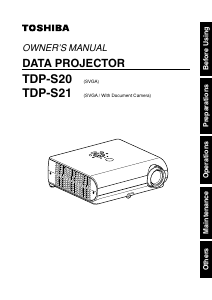
Manual Toshiba TLP-S20 Projector

Need a manual for your Toshiba TLP-S20 Projector? Below you can view and download the PDF manual for free in English. This product currently has 3 frequently asked questions, 0 comments and has 0 votes. If this is not the manual you want, please contact us.

Is your product defective and the manual offers no solution? Go to a Repair Café for free repair services.

Manual

Loading…
31
Operations
30
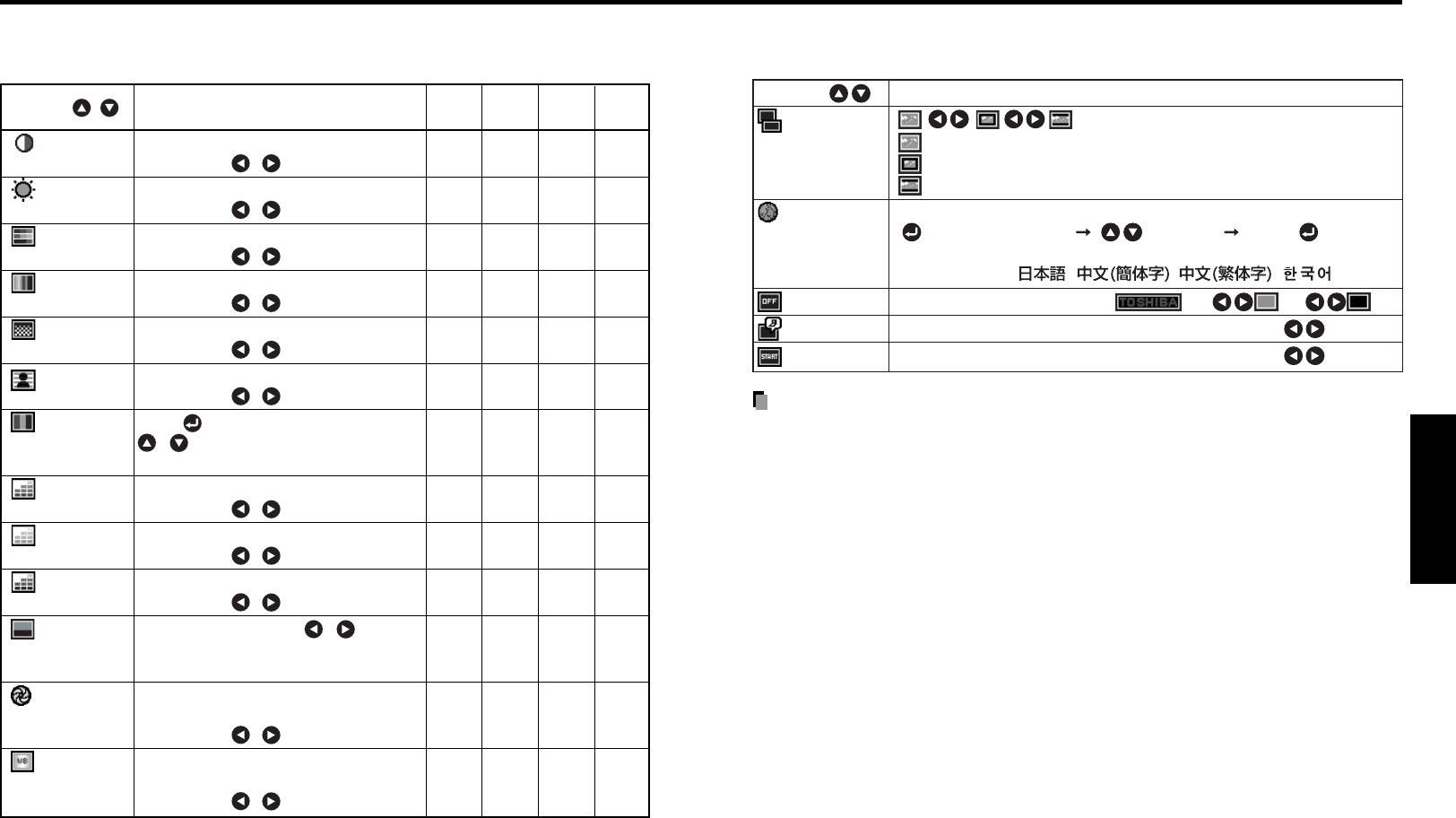
The image adjustment menu
Use this menu to adjust image-related items.
Items that can be adjusted are marked with “Yes”, and those that cannot are marked with “No”.
Item Description
Computer
Y/PB/PR
Video
Camera
S-video
Contrast Adjust the image contrast. Yes Yes Yes Yes
Lower
Higher
Brightness Adjust the brightness of the image. Yes Yes Yes Yes
Darker
Brighter
Color Adjust the color of the image. No Yes Yes No
Lighter
Deeper
Tint
*1
Adjust the tint of the image color. No No Yes No
Reddish
Greenish
Sharpness Adjust the sharpness of the image. No Yes Yes Yes
Softer
Sharper
Noise Set the function to reduce screen noise. No Yes Yes No
reduction
On (Enable)
Off (Disable)
Picture Press . Toggle the picture mode with Yes Yes Yes No
mode
/ .
Bright/Standard/True color
R-level Adjust red of the image color. Yes Yes Yes Yes
Less red
More red
G-level Adjust green of the image color. Yes Yes Yes Yes
Less green
More green
B-level Adjust blue of the image color. Yes Yes Yes Yes
Less blue
More blue
NTSC mode
*1
Set the black level with / button. No No Yes No
US: NTSC (US) mode
Japan: NTSC (JAPAN) mode
Shutter Set the shutter speed of the camera to No No No Yes
the local power frequency.
(TDP-S21) 50 Hz
60 Hz
White Set the white balance of the document No No No Yes
balance
*2
camera.
(TDP-S21) Auto
Lock
*1: [Tint] and [NTSC mode] can be displayed and adjusted only when the video signal is set to
[NTSC] and [NTSC4.43]. (NTSC mode is set to JAPAN when the language is set to Japanese. It is
set to US for other languages.)
*2: Even if the white balance is set to [Lock], turning the projector off disables this function and
turning it on again the next time resets the menu to [Auto]. (TDP-S21)
Using the menu (Continued)
The display setting menu
Use this menu to set screen display-related items.
(Full): Display with 800 × 600 dot resolution
(Thru):
Display with sampling resolution (for computer/camera input)
(Wide): Wide-screen display (for Video, S-video, and Y/P
B
/P
R
)
Select one of the languages below to use for displaying the menu and messages
[ : Enter setting mode] [ :Selection] [Apply: ]
English/Français/Deutsch/Italiano/Español/Português/Russian/
Swedish/Türkçe/ / / /
Screen to display when there is no input signal
(Logo) (Blue) (Black)
Display icons as function guides On Off
Display start-up screen when power is turned on On Off
Description
Item
Screen size
Note
If “Thru” is selected for screen size, portions exceeding the native resolution (800 × 600
pixels) will not appear on the screen. Note that for RGB signals with clock frequency
110MHz or lower, all input pixel signals are sampled. However, if the clock speed is
higher than this, the RGB pixel signal is thinned before sampling.
Download manual in English (PDF, 5.73 MB)
(Consider the environment and only print this manual if it is really necessary)

Loading…

Rating

Let us know what you think about the Toshiba TLP-S20 Projector by leaving a product rating. Want to share your experiences with this product or ask a question? Please leave a comment at the bottom of the page.
Are you satisfied with the Toshiba TLP-S20 Projector?
Yes No
Be the first to rate this product
0 votes

Join the conversation about this product

Here you can share what you think about the Toshiba TLP-S20 Projector. If you have a question, first carefully read the manual. Requesting a manual can be done by using our contact form.

More about this manual

We understand that it’s nice to have a paper manual for your Toshiba TLP-S20 Projector. You can always download the manual from our website and print it yourself. If you would like to have an original manual, we recommend you contact Toshiba. They might be able to provide an original manual. Are you looking for the manual of your Toshiba TLP-S20 Projector in a different language? Choose your preferred language on our homepage and search for the model number to see if we have it available.

Specifications

Brand Toshiba
Model TLP-S20
Category Projectors
File type PDF
File size 5.73 MB

All manuals for Toshiba Projectors
More manuals of Projectors

Frequently Asked Questions about Toshiba TLP-S20 Projector

Our support team searches for useful product information and answers to frequently asked questions. If you find an inaccuracy in our frequently asked questions, please let us know by using our contact form.

Can I power off my projector immediately after use? Verified

After using the projector the lamp is still very hot. It is best to leave the projector on after use, giving the internal fan time to do it's work and cool the lamp. This will extend the lifetime of the lamp.

This was helpful (215) Read more

What is keystone correction? Verified

A projector can often not be placed straight in front of a screen or wall. The projected image can become distorted because of this. This is the keystone effect. Keystone correction is a feature that addresses this distortion. Not all projectors offer keystone correction.

This was helpful (159) Read more

What is the contrast ratio? Verified

The contrast ratio tells how far the whitest white is from the blackest black. A contrast ratio of for example 400:1 means that the blackest black on screen is 400 times darker than the whitest white. A high contrast ratio contributes to the sharpness of the image.

This was helpful (105) Read more
Manual Toshiba TLP-S20 Projector

Related products

Related categories

×
Download