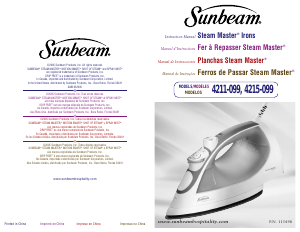
Manual Sunbeam 4215-099 Steam Master Iron

Need a manual for your Sunbeam 4215-099 Steam Master Iron? Below you can view and download the PDF manual for free in English. This product currently has 4 frequently asked questions, 0 comments and has 0 votes. If this is not the manual you want, please contact us.

Is your product defective and the manual offers no solution? Go to a Repair Café for free repair services.

Manual

Loading…

54
TO FILL THE WATER RESERVOIR
1. Make sure the iron is unplugged. Set the Steam Lever to
O
/Off (Dry) and the
Fabric Select Dial to OFF.
2. Lift the Water Fill Hole Cover.
3. Fill water cup with water. Pour water into iron water reservoir. Do not fill water
reservoir beyond maximum fill level.
W
ARNING
:
To prevent the risk of burns, be careful when filling a hot iron with water.
Hot metal parts, hot water and steam can cause injuries.
DRY IRONING
1. Make sure the Steam Lever is turned to the
O
/Off (Dry) setting.
2. Plug the cord into a 120-Volt AC outlet.
3. Turn the large Fabric Select Dial to the fabric setting you desire (Silk or Synthetics).
Allow the iron to heat for 2 minutes. While the iron is heating, make sure it is sitting
on its heel rest on a stable, protected surface.
N
OTE
:
While the Steam Lever is turned to the
O
/Off (Dry) setting, you may still use
the SHOT OF STEAM
®
or SPRAY MIST
®
feature. Please make sure the water reservoir
is 1/4 full of water.
T
IP
:
Refer to the Ironing Guide (on Page 8) for the recommended setting for your fabric.
STEAM IRONING
1.
Follow the instructions for “Filling the Water Reservoir”.
2. Plug the cord into a 120-Volt AC outlet.
3. Turn the large Fabric Select Dial to the fabric setting you desire (Synthetic, Silk, Linen,
Cotton or Wool). Allow the iron to heat for 2 minutes. While the iron is heating,
make sure it is sitting on its heel rest on a stable, protected surface.
4. Allow the iron to heat for 2 minutes, and then turn the Steam lever to the
appropriate setting.
T
IP
:
Refer to the Ironing Guide
(on Page 8)
for the recommended setting for your fabric.
I
MPORTANT
:
When not ironing, always set the Steam Lever to
O
/Off (Dry) and the
Fabric Select Dial to OFF.
USING THE IRONS SPECIAL FEATURES
SPRAY MIST
®
FEATURE
The SPRAY MIST
®
feature is a powerful water spray mist that dampens the fabric to aid in
removing wrinkles from heavy fabrics and for setting creases.
To use the SPRAY MIST
®
Feature:
Press the SPRAY MIST
®
button firmly.
SHOT OF STEAM
®
FEATURE
The SHOT OF STEAM
®
feature provides an extra burst of steam for deep penetration
of stubborn wrinkles. You can use this feature while Dry or Steam ironing, but the water
reservoir must be at least 1/4 full of water.
To use the SHOT OF STEAM
®
Feature:
Place the iron on top of the wrinkle and press the SHOT OF STEAM
®
button each time
you would like an extra burst of steam. The SHOT OF STEAM
®
feature may be used
continuously with just a short pause between shots.
VERTICAL STEAM (Select Models Only)
The vertical steam feature allows your iron to function as a garment steamer.
T
IP
:
When using the vertical steam on clothing, hang the clothing on a clothes hanger
for best results. Hanging curtains and drapes may also be steamed.
To use Vertical Steam:
1. Make sure that the iron has heated up (2 minutes).
2. Hold the iron in a vertical position, with the iron close to but not touching the fabric
you want to steam.
3. With your other hand, pull the fabric tight.
4. Press the SHOT OF STEAM
®
button for approximately 3-second intervals as you
move the iron across the wrinkled area.
WARNING:
To prevent the risk of burns, keep your hand away from the area being
steamed.
WARNING:
DO NOT steam garments while wearing them; this may result in injuries.
PATENTED MOTION SMART
®
AUTO-OFF FEATURE
When the iron is plugged in, the Power Indicator will light steadily, indicating that there
is power to the iron.
If you leave the iron:
•i
n a horizontal position without moving it, or accidentally tip the iron over, it will
automatically
stop heating after 30 seconds. The Power Indicator will blink to let you
know that the iron has stopped heating.
in a vertical position (on its heel rest) without moving it, the iron will automatically
turn off after 15 minutes. The Power Indicator will blink to let you know that the iron
has stopped heating.
I
MPORTANT
:
The Power Indicator will continue to blink until the iron is unplugged
or reset.
To reset the iron:
Move the iron back and forth and allow it to reheat for 2 minutes. The indicator will stop
blinking and the iron will start heating again.
WARNING:
The patented MOTION SMART
®
Auto-Off is a safety feature, not a
recommended
means for turning your iron off. See “Caring for Your Iron After Use”
(on Page 6) for information on turning off your iron and storing it safely between use.
ANTI-CALCIUM SYSTEM (Select Models Only)
The Anti-Calcium System is a permanent system located inside the water reservoir.
This system removes calcium from the water and reduces calcium build-up on the soleplate.
Download manual in English (PDF, 0.38 MB)
(Consider the environment and only print this manual if it is really necessary)

Loading…

Rating

Let us know what you think about the Sunbeam 4215-099 Steam Master Iron by leaving a product rating. Want to share your experiences with this product or ask a question? Please leave a comment at the bottom of the page.
Are you satisfied with the Sunbeam 4215-099 Steam Master Iron?
Yes No
Be the first to rate this product
0 votes

Join the conversation about this product

Here you can share what you think about the Sunbeam 4215-099 Steam Master Iron. If you have a question, first carefully read the manual. Requesting a manual can be done by using our contact form.

More about this manual

We understand that it’s nice to have a paper manual for your Sunbeam 4215-099 Steam Master Iron. You can always download the manual from our website and print it yourself. If you would like to have an original manual, we recommend you contact Sunbeam. They might be able to provide an original manual. Are you looking for the manual of your Sunbeam 4215-099 Steam Master Iron in a different language? Choose your preferred language on our homepage and search for the model number to see if we have it available.

Specifications

Brand Sunbeam
Model 4215-099 Steam Master
Category Irons
File type PDF
File size 0.38 MB

All manuals for Sunbeam Irons
More manuals of Irons

Frequently Asked Questions about Sunbeam 4215-099 Steam Master Iron

Our support team searches for useful product information and answers to frequently asked questions. If you find an inaccuracy in our frequently asked questions, please let us know by using our contact form.

Can I clean the bottom of my iron with a scourer? Verified

No, this might damage the bottom. Use a moist cloth or a soft sponge to clean it.

This was helpful (425) Read more

What are the differences between a steam iron and a regular iron? Verified

The biggest advantage of a steam iron is that it removes wrinkles easier due to the use of steam. A regular iron on the contrary is much lighter and often cheaper.

This was helpful (347) Read more

The sole of my iron is discoloured, can I still iron with it? Verified

That is possible, but there is a chance it will rub off on light coloured clothing.

This was helpful (288) Read more

Can I iron over buttons? Verified

No, this will damage the sole of the iron and that will prevent the iron from working correctly. Never iron over buttons, zippers or other hard objects.

This was helpful (239) Read more
Manual Sunbeam 4215-099 Steam Master Iron

Related products

Related categories

×
Download