Manual Sony NWZ-WS613 Mp3 Player

Need a manual for your Sony NWZ-WS613 Mp3 Player? Below you can view and download the PDF manual for free in English. This product currently has 4 frequently asked questions, 0 comments and has 0 votes. If this is not the manual you want, please contact us.

Is your product defective and the manual offers no solution? Go to a Repair Café for free repair services.

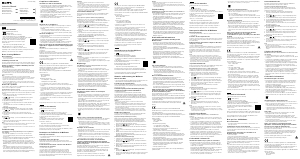
Manual

Loading…
Main Functions of Your Walkman
Listening to music on your Walkman
Enjoy music transferred to your Walkman by operating the buttons on
the Walkman.
Operating your Walkman by remote
Just turn the Remote Commander on and you can operate your Walkman
by remote.
Using your Walkman with your smartphone
Connect your smartphone and your Walkman via a Bluetooth connection
so you can listen to music stored on your smartphone using the
Walkman or answer incoming calls to the smartphone.
Mix mode allows you to listen to sounds from a smartphone application
and the Walkman at the same time.
You can also use SongPal, a smartphone application that allows you to
operate the Walkman using your smartphone.
Refer to the Help Guide installed on your computer or at the URL
mentioned in the About the manuals” section on the cover page of this
manual for details.
Contents
Please check the items in the package.
Walkman (1)
Remote Commander (1)
USB cradle (1)
Earbuds (1 set)
Swimming earbuds (1 set)
Adjustment band (1)
Holder (1)
Quick Start Guide (this manual)
Using your Walkman while Swimming
Quick Start Guide
NWZ-WS613/WS615
About the manuals
To see the detailed information about WALKMAN®, access to Help
Guide on the internet.
http://rd1.sony.net/help/dmp/nwzws610/h_ww/
While browsing is free, you may be charged a
communication fee according to your carrier contract.
Regarding the basic operations, the customer support website URL
and Important Information, refer to “How to Install and Read the
Help Guide” section on this manual.
4-536-905-13(1)©2014 Sony Corporation Printed in Malaysia
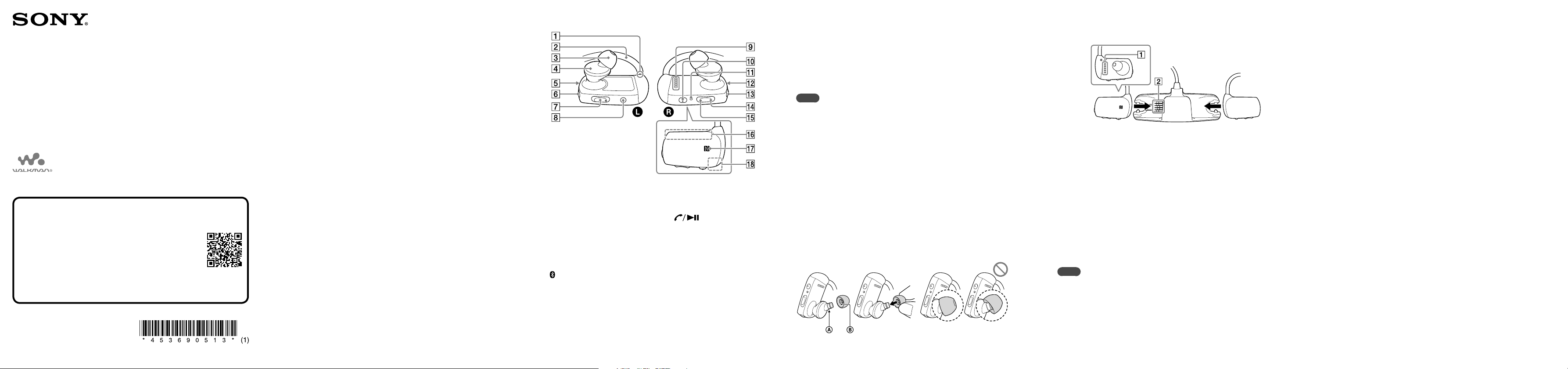
Attaching Your Walkman to the USB Cradle
(Supplied) and Charging the Battery
1 Dry and clean the terminals of your
Walkman () using a soft dry cloth, if the
terminal is wet or dirty.
2 Attach your Walkman to the USB cradle in
the order of the left () part first, then the
right () part.
Make sure that the terminals of your Walkman () and the
USB cradle () are in contact with each other.
3 Connect your Walkman to an operating
computer using the USB cradle.
It takes about 1.5hours to fully charge the battery.
Note
To prevent battery deterioration, charge the battery at least once every six
months or every year.
Hint
The Remote Commander cannot be charged because a lithium coin cell
battery is used in it. If the remaining battery power is low or insufficient,
replace the battery of the Remote Commander. For details on how to
replace the battery of the Remote Commander, refer to the Help Guide
installed on your computer or at the URL mentioned in the About the
manuals” section on the cover page of this manual.
Parts and Controls
The illustrations shown are for reference only and may differ from the
actual product.
Tactile dot
Neckband
Earbud
Headphone section
Bluetooth lamp
(Bluetooth) button
VOL (Volume) +*
1
/– button
Press the VOL+ button to
turn up and the VOL–
button to turn down the
volume.
MODE button
Terminals
(Play) button*
1
RESET button
OPR (Operation) lamp
(Power) button
(Previous) button
(Next) button
Built-in Bluetooth antenna
N-mark
Built-in microphone
*
1
There are tactile dots. Use them to help with button operations.
About volume operation (Only for countries/areas
complying with European and Korean Directives)
The voice guidance “Check the volume level” is meant to protect your
ears when you turn the volume up to a level that is harmful for your ears
for the first time. You can cancel the alarm and warning by pressing any
button.
Note
You can turn up the volume after canceling the alarm and warning.
After the initial warning, the alarm and warning repeat every 20 cumulative
hours that the volume is set to a level that is harmful for your ears. When
this happens, the volume is turned down automatically.
If the volume is set to a level that is harmful for your ears and you turn off
the Walkman, the volume is turned down to a level that is safe for your ears
automatically.
How to install the earbuds
To enjoy better sound quality, or to fit your ears, change the size of the
earbuds or adjust the earbud position to fit comfortably and snugly in
your left and right ears separately.
Optional replacement earbuds can be ordered from your nearest Sony
dealer.
Install the earbuds onto the headphones so that the tip of the inner
part of the earbuds fits into the position on the projection of the
headphones.
Make sure that the earbuds fit straight on, not at an angle, to prevent
the earbuds from detaching and remaining in your ears.
Tip of the inner part
How to Install and Read the Help Guide
Install the “Help Guide” on your computer. This contains basic operations
of your Walkman, the customer support website URL, and how to
transfer content such as music to the Walkman.
1 Connect your Walkman to a running
computer.
2 Open the following folders and double-click
the executable file on your Walkman.
Windows 7 or earlier: [Start] – [Computer] – [WALKMAN] –
[FOR_WINDOWS] – [Help_Guide_Installer(.exe)].
Windows 8: [Start screen] – [Desktop] – [File Explorer] –
[Computer] – [WALKMAN] – [FOR_WINDOWS] – [Help_
Guide_Installer(.exe)].
Windows 8.1: [Desktop] – [File Explorer] – [This PC] –
[WALKMAN] – [FOR_WINDOWS] – [Help_Guide_Installer
(.exe)].
Mac: [Finder] – [WALKMAN] – [FOR_MAC] – [Help_Guide_
Installer_for_mac].
3 Follow the on-screen instructions to
complete the installation.
4 To read the Help Guide, double-click the
shortcut or the alias icon generated on your
computer.
Download manual in English (PDF, 0.74 MB)
(Consider the environment and only print this manual if it is really necessary)

Loading…

Rating

Let us know what you think about the Sony NWZ-WS613 Mp3 Player by leaving a product rating. Want to share your experiences with this product or ask a question? Please leave a comment at the bottom of the page.
Are you satisfied with the Sony NWZ-WS613 Mp3 Player?
Yes No
Be the first to rate this product
0 votes

Join the conversation about this product

Here you can share what you think about the Sony NWZ-WS613 Mp3 Player. If you have a question, first carefully read the manual. Requesting a manual can be done by using our contact form.

More about this manual

We understand that it’s nice to have a paper manual for your Sony NWZ-WS613 Mp3 Player. You can always download the manual from our website and print it yourself. If you would like to have an original manual, we recommend you contact Sony. They might be able to provide an original manual. Are you looking for the manual of your Sony NWZ-WS613 Mp3 Player in a different language? Choose your preferred language on our homepage and search for the model number to see if we have it available.

Specifications

Brand Sony
Model NWZ-WS613
Category Mp3 Players
File type PDF
File size 0.74 MB

All manuals for Sony Mp3 Players
More manuals of Mp3 Players

Frequently Asked Questions about Sony NWZ-WS613 Mp3 Player

Our support team searches for useful product information and answers to frequently asked questions. If you find an inaccuracy in our frequently asked questions, please let us know by using our contact form.

When I connect a headphone to my device it doesn't work properly, what can I do? Verified

It is possible that dirt has amassed in the opening where the headphone is connected, preventing it from making proper contact. The best way to clean this is with compressed air. When in doubt, have this done by a professional.

This was helpful (51) Read more

What is the difference between Mp3, WAV, AIFF and FLAC? Verified

The difference is that WAV, AIFF and FLAC are lossless filetypes where Mp3 is a 'lossy' filetype. This means that to create an Mp3, a higher amount of compression is applied. This makes the files smaller, but also results in a loss of quality.

This was helpful (37) Read more

What does Mp3 stand for? Verified

Mp3 is short for MPEG3. This stands for Moving Picture Experts Group Layer-3 Audio. Mp3 is the most used file format for storing and playing music or other forms of audio.

This was helpful (26) Read more

How much are kilobyte, megabyte, gigabyte and terabyte? Verified

One kilobyte consists of 1000 bytes. 1 megabyte = 1000 kilobyte. 1 gigabyte = 1000 megabyte. 1 terabyte = 1000 gigabyte.

This was helpful (22) Read more
Manual Sony NWZ-WS613 Mp3 Player

Related products

Related categories

×
Download