
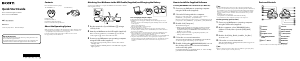
Playing Music
(Power) button
Next button
Previous button
button
Troubleshooting
If your Walkman does not function as expected, try the following steps to resolve
the issue.
1 Find the symptoms of the issue in “Troubleshooting” in the
Help guide (HTML document), and try any corrective
actions listed.
For details on troubleshooting, see the tables on the right too.
2 Press the RESET button with a pen or
paper clip, etc.
When you reset your Walkman, please make sure
of the following.
Your Walkman is not connected to your
computer.
Your Walkman is not playing back music.
RESET buttonRESET button
Symptom Cause/Remedy
The computer does not
recognize your
Walkman.
Your Walkman is not attached to the USB cradle
(supplied) properly.
Attach your Walkman to the USB cradle (supplied)
properly and firmly. Charging will start (the OPR
lamp lights up in red) even if the connection was not
made properly, but there is a possibility that the
computer has not recognized the Walkman. In such a
case, remove the Walkman from the USB cradle
(supplied) and then attach to the USB cradle
(supplied) again.
The remaining battery power is low or insufficient.
Recharge the battery. When you use your Walkman
for the first time, or if you have not used the
Walkman for a long time, it may take a few minutes
to be recognized by the computer, even if charging
has already started (the OPR lamp lights up in red).
Check that the computer recognizes the Walkman
after you have connected it to the computer for
about 5 minutes.
The computer is running another software other than
that used for transferring.
Disconnect the USB cradle (supplied), wait for a
few minutes, and reconnect it. If the problem
persists, disconnect the USB cradle (supplied),
restart the computer, and then reconnect the USB
cradle (supplied).
When double-clicking
[Setup.exe] to install the
supplied software to your
Windows computer,
[Setup.exe] does not
execute, and the
Properties window
opens.
Install the supplied software after installing Windows
Media Player 11 or later into your Windows
computer. For details on Windows Media Player, refer
to the following web site:
http://support.microsoft.com/
During playback of a
song, the next song is
suddenly started.
Your Walkman may perform ZAPPIN playback. For
details, refer to the Help guide.
Precautions
About the in-ear headphones
The earbuds seal your ears. Therefore, be aware that there is a risk of damage to your ears
or eardrums if strong pressure is applied to the earbuds, or the earbuds are suddenly
removed from your ears. After use, be sure to take the earbuds off your ears gently.
About the headphones
Avoid playing the unit at so loud a volume that extended play might affect your hearing.
At a high volume outside sounds may become inaudible. Avoid listening to the unit in
situations where hearing must not be impaired, for example, while driving or cycling.
As the supplied headphones are of open-air design, sounds go out through the
headphones. Remember not to disturb those close to you.
License and Trademark Notice
Refer to the Help guide (HTML document).
At high volume, prolonged listening to the personal audio player can
damage the user’s hearing.
Owner’s Record
The model and serial numbers are located on the back of the player. Record them in the
space provided below. Refer to these numbers in the spaces whenever you call upon your
Sony dealer regarding this product.
Model No. ________________________
Serial No._________________________
For the latest information
If you have any questions or issues with this product, or would like information on
compatible items with this product, visit the following web sites.
For customers in the USA:
http://www.sony.com/walkmansupport
For customers in Canada:
http://esupport.sony.com/ca/
For customers in Europe:
http://support.sony-europe.com/DNA
For customers in Latin America:
http://www.sony-latin.com/index.crp
For customers in other countries/regions:
http://www.sony-asia.com/support
For customers who purchased the overseas models:
http://www.sony.co.jp/overseas/support/
Turning your Walkman on and off
Press and hold the (Power) button
for about 3 seconds to turn your
Walkman on or off.
After you turn off the power, make sure
to slide the Power lock switch to lock
the
(Power) button.
Note
When carrying your Walkman, make
sure to slide the Power lock switch to
lock the
(Power) button to prevent
the Walkman from being turned on
accidentally.
Playing songs
Press the button.
To pause playback
Press the button.
Skipping to the previous/next song
Press the Previous or Next button.
1 Check the left () and right () parts of your Walkman.
2 Slide the Power lock switch to unlock the (Power)
button.
3 Press and hold the (Power) button located on the right
() part for about 3 seconds to turn on your Walkman.
4 Hang the neckband over the back of your ears.
5 Place the headphone sections into your ears.
6 Adjust your Walkman so it feels comfortable.
Note
If your Walkman does not feel comfortable, replace the earbuds. Refer to “How to install
the earbuds.”
To prevent your Walkman from accidently coming off your
ears
Attach the supplied adjustment band to the neckband part before placing your
Walkman on your ears.
Note
After wearing your Walkman with the adjustment band attached, adjust the position of
the adjustment band to a position where it feels comfortable.
Hint
If your Walkman comes off your ears while you are swimming, stabilize the adjustment
band using the band of your swimming goggles.
Taking your Walkman off
Gently take your Walkman off your ears.
How to Turn the Power On and Place Your Walkman on Your Ears
About volume operation (Only for countries/areas
complying with European Directives)
An alarm (beep) and warning “Check the volume level” are meant to protect your
ears when you raise the volume setting beyond a specific level*
1
for the first time.
You can cancel the alarm and warning by pressing any button.
Note
You can turn up the volume beyond the specific level*
1
after canceling the alarm and
warning.
After the initial warning, the alarm and warning repeat for every 20 cumulative hours
that the volume is set beyond the specific level*
1
; when this happens, the volume is
changed to level [7] automatically.
If the volume is set beyond the specific level*
1
and you turn off the Walkman, the
volume returns to the specific level*
1
automatically.
*
1
Specific level = [18]
How to install the earbuds
To enjoy better sound quality, or to fit your ears, change the size of the earbuds or
adjust the earbud position to fit comfortably and snugly in your left and right ears
separately.
When you change the earbuds, turn them to install firmly on your Walkman and
prevent the earbud from detaching and remaining in your ear.
Optional replacement earbuds can be ordered from your nearest Sony dealer.




Join the conversation about this product
Here you can share what you think about the Sony NWZ-W273 Walkman Mp3 Player. If you have a question, first carefully read the manual. Requesting a manual can be done by using our contact form.