Manual Sony NWZ-S773BT Mp3 Player

Need a manual for your Sony NWZ-S773BT Mp3 Player? Below you can view and download the PDF manual for free in English. This product currently has 4 frequently asked questions, 0 comments and has 0 votes. If this is not the manual you want, please contact us.

Is your product defective and the manual offers no solution? Go to a Repair Café for free repair services.

Manual

Loading…

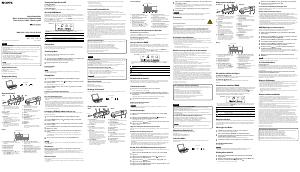
Quick Start Guide
1 Connect your Walkman to your computer using
the Micro USB cable (
) and charge cable ().
2 Select the following order with the computer.
Select [start] - [Computer] or [My Computer] - [WALKMAN] -
[Storage Media].
3 Double-click [Setup.exe].
The install wizard appears.
When you execute [Setup.exe], the [Setup.exe] file stored in the
[Storage Media] folder of your Walkman is copied to your computer
for backup, and WALKMAN Guide and Media Go are installed to
your computer.
If [Setup.exe] does not start, copy the [Setup.exe] file to your
desktop, then double-click it.
4 Follow the on-screen instructions.
After the install wizard finishes, the WALKMAN Guide shortcut
appears on the desktop of your computer.
5 Double-click (WALKMAN Guide) on the
desktop to start the WALKMAN Guide.
For details on transferring music, etc., refer to the Help guide included
in the WALKMAN Guide.
©2012 Sony Corporation Printed in Malaysia
Contents
Please check the items in the package.
“WALKMAN” (1)
Headphones (1)
Earbuds (Size S, L) (1)
Wireless Stereo Headphones (1)
Earbuds for Wireless Stereo Headphones (Size S, L) (1)
Micro USB cable (1)
Charge cable (1)
Holder (1)
Use when carrying your Wireless Stereo Headphones to prevent accidental
button operation.
Quick Start Guide (this manual)
User Guide for Wireless Stereo Headphones
Software
The software is stored in the built-in flash memory of your Walkman, and
includes the following items:
Media Go
WALKMAN Guide
Help guide, etc.
For details on how to install it, see “How to Install the Bundled Software (Help
guide included)”.
About Windows Operating System
Make sure that the OS is Windows XP (Service Pack 3 or later), Windows Vista*
1
(Service Pack 2 or later) or Windows 7*
1
(Service Pack 1 or later).
*
1
[Compatibility mode] for Windows XP is not supported.
How to Use your WALKMAN”
BACK/HOME button
5-way button
OPTION/PWR OFF button
Charging the Battery
The battery for your Walkman is recharged while the Walkman is connected to a
running computer.
Charging...
About
3 hours
Charging
Fully-charged
Turning your WALKMAN” On and Off
To turn on Press any button.
To turn off Press and hold the OPTION/PWR OFF
button.
Hint
You can start the WALKMAN Guide and Media Go from the [start] menu (displayed by
clicking [start]).
You can install the supplied software on another computer through the following
procedure even if you delete the [Setup.exe] file by formatting the built-in flash memory
of your Walkman. Copy the [Setup.exe] file and the [Install] folder from the [Backup]
folder of your computer to your Walkman. Then, connect your Walkman to another
computer on which you want to install the software and follow the above procedure
from step 2. The [Backup] folder can be found at
C:\Program Files*
1
\Sony\WALKMAN Guide\NWZ-S770BT\Backup
*
1
[Program Files(x86)] may be displayed depending on the computer OS.
What can you do with the WALKMAN Guide ?
The WALKMAN Guide includes the following items:
Help guide
The following contents can be viewed in your web browser.
Details on how to use your Walkman
How to use software to transfer content to your Walkman
Troubleshooting
Customer Registration Link
Customer Support Link
Other useful Links
Includes link information, etc., on the download site.
The bundled items differ depending on the country/region of purchase.
Hint
After executing [Setup.exe], you can use the free space in the [Storage Media] folder
more effectively by formatting the built-in flash memory of your Walkman. To format
the built-in flash memory of the Walkman, see “To initialize (format) your
“WALKMAN”” on the backside.
Transferring Music
From CDs, etc., using Media Go
Media Go supports data transfer from iTunes 10 to your Walkman.
By drag-and-drop using Windows Explorer
For details on transferring music, videos, photos or podcasts, refer to the Help
guide. The Help guide can be readily viewed from the WALKMAN Guide.
How to Install the Bundled Software (Help guide included)
Home menu
SensMe™ Channels
FM Radio
Photos
Settings
Voice Recording
Videos
Music
Go to song
playback screen
Podcasts
Playlists
Bluetooth
Music
Unlimited*
1
*
1
: This icon may not appear depending on the country/region in which you have
purchased your Walkman.
How to use the Home menu
The Home menu appears when you press and hold the BACK/HOME button. The
Home menu is the starting point to play audio, search for songs, changing settings,
etc.
From the Home menu, you can select the desired item on the screen by using the 5-
way button.
Confirm.
Return to the previous screen.
About the manuals
In addition to this Quick Start Guide, this model is accompanied by the Help
guide (HTML document) which you can view from the WALKMAN Guide.
For details, refer to “How to Install the Bundled Software (Help guide
included).
4-425-364-11(1)
How to Install the Bundled Software
How to Use Your “WALKMAN”
NWZ-S773BT/S774BT/S775BT
Download manual in English (PDF, 0.7 MB)
(Consider the environment and only print this manual if it is really necessary)

Loading…

Rating

Let us know what you think about the Sony NWZ-S773BT Mp3 Player by leaving a product rating. Want to share your experiences with this product or ask a question? Please leave a comment at the bottom of the page.
Are you satisfied with the Sony NWZ-S773BT Mp3 Player?
Yes No
Be the first to rate this product
0 votes

Join the conversation about this product

Here you can share what you think about the Sony NWZ-S773BT Mp3 Player. If you have a question, first carefully read the manual. Requesting a manual can be done by using our contact form.

More about this manual

We understand that it’s nice to have a paper manual for your Sony NWZ-S773BT Mp3 Player. You can always download the manual from our website and print it yourself. If you would like to have an original manual, we recommend you contact Sony. They might be able to provide an original manual. Are you looking for the manual of your Sony NWZ-S773BT Mp3 Player in a different language? Choose your preferred language on our homepage and search for the model number to see if we have it available.

Specifications

Brand Sony
Model NWZ-S773BT
Category Mp3 Players
File type PDF
File size 0.7 MB

All manuals for Sony Mp3 Players
More manuals of Mp3 Players

Frequently Asked Questions about Sony NWZ-S773BT Mp3 Player

Our support team searches for useful product information and answers to frequently asked questions. If you find an inaccuracy in our frequently asked questions, please let us know by using our contact form.

When I connect a headphone to my device it doesn't work properly, what can I do? Verified

It is possible that dirt has amassed in the opening where the headphone is connected, preventing it from making proper contact. The best way to clean this is with compressed air. When in doubt, have this done by a professional.

This was helpful (52) Read more

What is the difference between Mp3, WAV, AIFF and FLAC? Verified

The difference is that WAV, AIFF and FLAC are lossless filetypes where Mp3 is a 'lossy' filetype. This means that to create an Mp3, a higher amount of compression is applied. This makes the files smaller, but also results in a loss of quality.

This was helpful (38) Read more

What does Mp3 stand for? Verified

Mp3 is short for MPEG3. This stands for Moving Picture Experts Group Layer-3 Audio. Mp3 is the most used file format for storing and playing music or other forms of audio.

This was helpful (27) Read more

How much are kilobyte, megabyte, gigabyte and terabyte? Verified

One kilobyte consists of 1000 bytes. 1 megabyte = 1000 kilobyte. 1 gigabyte = 1000 megabyte. 1 terabyte = 1000 gigabyte.

This was helpful (23) Read more

Manual Sony NWZ-S773BT Mp3 Player

Related products

Related categories

×
Download