MDR-ZX780DC 4-596-342-11(1)
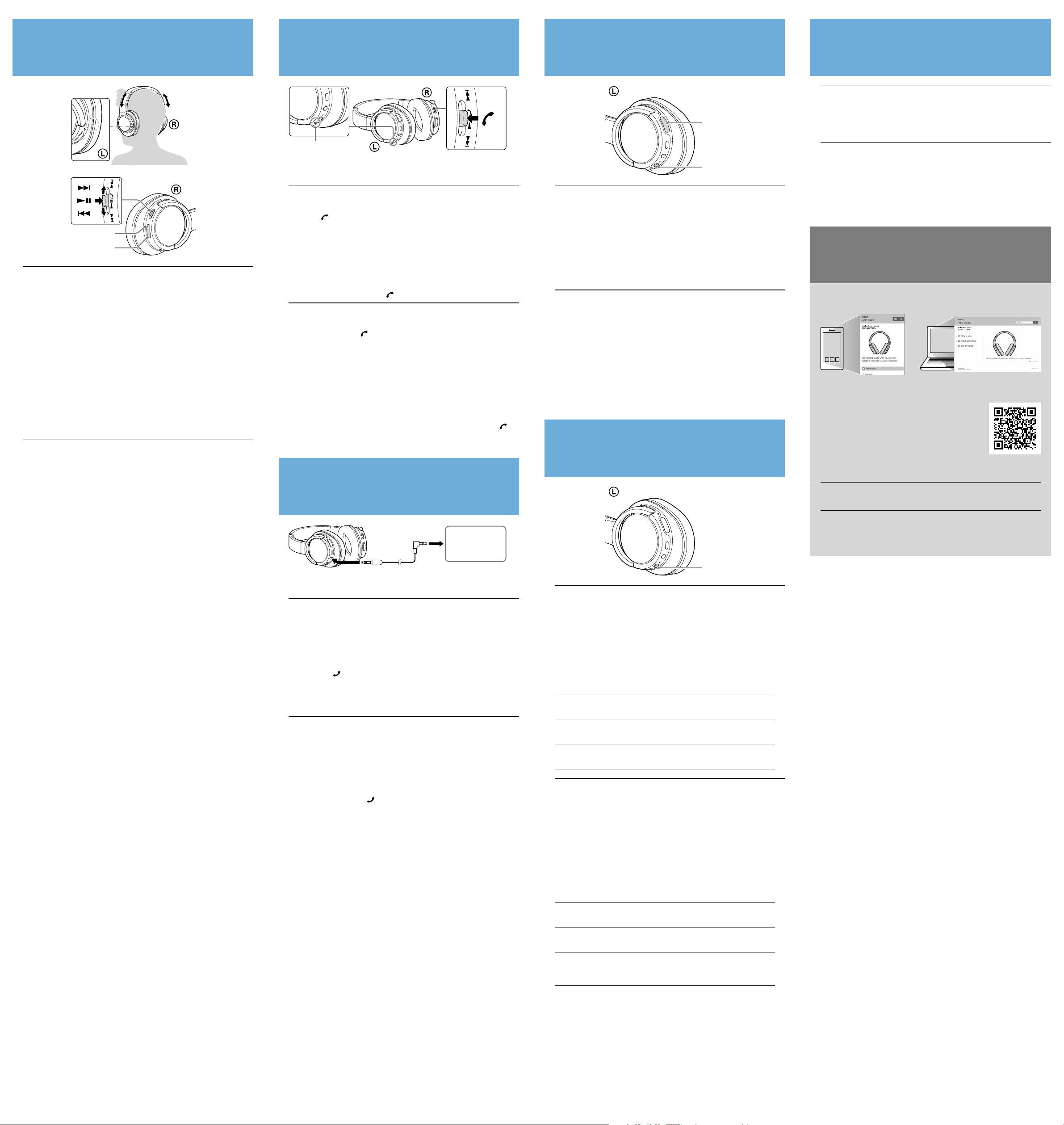
Making or receiving a call/
Passer ou recevoir un appel
Microphone/
Micro
Operate your mobile phone to make a call.
Profile: HSP, HFP
Press the button on the unit when an incoming call arrives.
Operate in the same way when an incoming call arrives while you are listening
to the music.
The music playback pauses during a call and resumes automatically when the call is over.
The microphone is omni directional. You do not need to worry about the
position of the microphone when you speak.
Notes
Music playback may not resume automatically with some BLUETOOTH devices.
Volume for a call and listening to music can be adjusted independently.
To terminate a call, press the button on the unit again.
Utilisez votre téléphone portable pour passer un appel.
Profil: HSP, HFP
Appuyez sur le bouton sur l’appareil lorsqu’un appel entrant se produit.
Procédez de la même façon lorsqu’un appel entrant se produit quand vous
écoutez de la musique.
La lecture de musique se met en pause pendant un appel et reprend
automatiquement lorsque l’appel est terminé.
Le micro est omnidirectionnel. Vous n’avez pas à vous soucier de la position du
micro lorsque vous parlez.
Remarques
La lecture de musique pourra ne pas reprendre automatiquement sur certains
périphériques BLUETOOTH.
Le volume sonore d’un appel et celui de la musique peuvent être réglés séparément.
Pour mettre fin à un appel, appuyez de nouveau sur le bouton de
l’appareil.
Using the supplied headphone cable/
Utilisation du câble de casque d’écoute fourni
Headphone cable (supplied)/
Câble de casque d’écoute (fourni)
Player/Lecteur
You can use the unit as ordinary noise canceling headphones by connecting
the supplied headphone cable where use of BLUETOOTH devices is
restricted, such as on airplanes.
You will no longer be able to use the BLUETOOTH function.
See "Using the noise canceling" to use the unit as noise canceling headphones.
Notes
Make sure you insert the plug firmly.
Make sure you connect the L-shaped plug to the playback device.
VOL +/−, / and / buttons cannot be used. Perform playback
operations on the playback device connected.
When the built-in rechargeable battery power becomes low or the unit is turned off,
you can use the unit as ordinary headphones by connecting the headphone cable. In
this case, the noise canceling function will not work. Also, the sound quality will be
lower than that when the unit is turned on.
Vous pouvez utiliser l’appareil comme un casque réducteur de bruits
ordinaire en branchant le câble de casque d’écoute fourni lorsque
l’utilisation de périphériques BLUETOOTH est interdite, comme dans un avion.
Vous ne pourrez plus utiliser la fonction BLUETOOTH.
Consultez la section «Utilisation de la réduction des bruits» pour utiliser
l’appareil comme un casque réducteur de bruits.
Remarques
Assurez-vous d’insérer fermement la prise.
Assurez-vous de connecter la fiche en L au périphérique de lecture.
Les boutons VOL +/−, / et / ne peuvent pas être utilisés. Exécutez les
opérations de lecture avec l’appareil de lecture connecté.
Lorsque la charge de la batterie rechargeable intégrée est faible ou lorsque l’appareil est
mis hors tension, vous pouvez utiliser l’appareil comme un casque d’écoute ordinaire en
branchant le câble de casque d’écoute. Dans ce cas, la fonction de réduction de bruits ne
fonctionne pas. De plus, la qualité sonore est inférieure à celle de l’appareil sous tension.
Using the noise canceling/
Utilisation de la réduction des bruits
POWER
NC
Enter the noise canceling mode on this unit.
Press and hold the POWER button for about 2 seconds when the unit is turned
off. The unit turns on. When the noise canceling function turns on, the NC
button lights up. The noise canceling mode is set to NC mode B.
In the case of One-touch connection (NFC), the noise canceling function (NC
mode B) turns on simultaneously when the unit turns on.
To turn off the noise canceling function
When using via the BLUETOOTH connection: Press the NC button. The NC button
goes off. (To turn on the function, press the NC button again.)
When the supplied headphone cable is connected: Press the POWER button for
more than 2 seconds. (The power and the noise canceling function are turned off.)
Entrez en mode de réduction des bruits sur l’appareil.
Appuyez sur le boutonPOWER et maintenez-le enfoncé environ 2secondes
lorsque l’appareil est hors tension. L’appareil s’active. Lorsque la fonction de
réduction des bruits s’active, le bouton NC s’allume. Le mode de réduction des
bruits est réglé sur mode B NC.
Dans le cas de la Connexion une touche (NFC), la fonction de réduction des bruits
(modeB NC) s
’
active simultanément lorsque l
’
appareil est mis sous tension.
Pour désactiver la fonction de réduction des bruits
Lors de l’utilisation via la connexion BLUETOOTH: Appuyez sur le bouton NC. Le
bouton NC s’éteint. (Pour activer la fonction, appuyez de nouveau sur le bouton NC.)
Lorsque le câble de casque d’écoute fourni est connecté: Appuyez sur le bouton
POWER pendant plus de 2secondes. (L’alimentation et la fonction de réduction des
bruits sont désactivées.)
Using the AI noise canceling/
Utilisation de la réduction des bruits AI
NC
AI noise canceling is a useful function that automatically selects one of
the noise canceling modes. This function provides the most effective noise
canceling mode by immediately analyzing ambient sound components.
Press and hold the NC button.
When the unit is on, press and hold the NC button until beep sounds come from
the headphones. The unit starts analyzing ambient sound components (approx.
3 seconds). During analysis, sound volume from the headphones is lowered and
the NC button blinks.
When analysis is completed, the most effective noise canceling mode is set
automatically, and sound volume from the headphones returns to the normal.
Noise canceling mode types
NC mode A: Reduces noise containing a large amount of middle to low
frequency sounds. Ambient noise in the environment is
effectively reduced.
NC mode B: Reduces noise containing a large amount of super low
frequency sounds. For example, background noise heard
mainly on a bus or a train is effectively reduced.
NC mode C:
Reduces noise of relatively quiet and wide range of
frequency sounds. Background noise mainly present in an
office environment (PCs, copiers, etc.) is effectively reduced.
La réduction des bruits AI est une fonction utile qui sélectionne
automatiquement l’un des modes de réduction des bruits. Cette fonction
propose le mode de réduction des bruits le plus efficace en analysant
immédiatement les composants sonores ambiants.
Appuyez sur le bouton NC et maintenez-le enfoncé.
Lorsque l’appareil est activé, appuyez et maintenez enfoncé le bouton NC jusqu’à
ce qu’un bip soit émis par le casque d’écoute. L’appareil commence à analyser les
composants sonores ambiants (environ 3secondes). Lors de l’analyse, le volume
sonore du casque d’écoute est réduit et le bouton NC clignote.
Lorsque l’analyse est terminée, le mode de réduction des bruits le plus efficace
est réglé automatiquement et le volume sonore du casque d’écoute retourne
au niveau normal.
Types de mode de réduction des bruits
Mode A NC: Réduit les bruits contenant beaucoup de sons avec
une fréquence moyenne à faible. Le bruit ambiant dans
l’environnement est réduit de façon efficace.
Mode B NC:
Réduit les bruits contenant beaucoup de sons avec une fréquence
très faible. Par exemple, le bruit ambiant présent principalement
dans les bus ou les trains est réduit de façon efficace.
Mode C NC:
Réduit les bruits contenant des bruits calmes dans une
plage de fréquence relativement large. Le bruit ambiant
principalement présent dans les bureaux (ordinateurs,
imprimantes, etc.) est réduit de façon efficace.
Listening to music/
Écoute de musique
VOL +
VOL −
1 Put on the headset.
The left unit and the VOL+ button have a tactile dot. Use them as a guide
during operation.
2 Start playback on the BLUETOOTH device.
Profile: A2DP, AVRCP
3 Operate the headset.
Play/pause: Press .
Stop: Hold down.
Next/previous: Press /.
Fast forward/fast reverse: Hold / down.
Notes
The available functions may vary depending on the BLUETOOTH device. When you
operate the button illustrated above, it may operate differently or may not work at
all.
The sound quality is set to the standard mode (SBC high quality mode) before
shipment. When you connect a BLUETOOTH device compatible with AAC or
Qualcomm® aptX™ audio, you can change the setting as described in the Help
Guide to enjoy music playback at a higher level of sound quality.
1 Mettez le casque sur vos oreilles.
Le module de gauche et le bouton VOL + disposent d’un point tactile.
Utilisez-les comme d’un guide lors de l’utilisation.
2 Démarrez la lecture sur le périphérique BLUETOOTH.
Profil: A2DP, AVRCP
3 Faites fonctionner le casque.
Lecture/pause: Appuyez sur .
Stop: Maintenez enfoncé.
Suivant/précédent: Appuyez sur /.
Avance rapide/retour rapide: Maintenez / enfoncé.
Remarques
Les fonctions disponibles peuvent varier selon l’appareil BLUETOOTH. Lorsque vous
utilisez le bouton illustré ci-dessus, celui-ci pourra fonctionner différemment ou ne
pas fonctionner du tout.
La qualité sonore est réglée sur le mode standard (mode haute qualité SBC) avant
expédition. Lorsque vous connectez un périphérique BLUETOOTH compatible avec
AAC ou Qualcomm® aptX™ audio, vous pouvez modifier le réglage comme décrit
dans le Manuel d’aide pour profiter de la musique à un niveau supérieur de qualité
sonore.
After use/
Après utilisation
1 Terminate the BLUETOOTH connection by touching the
smartphone or operating the BLUETOOTH device.
2 Press and hold the POWER button for about 2 seconds.
The indicator (blue) goes off and the unit turns off.
1 Arrêtez la connexion BLUETOOTH en mettant de nouveau
le smartphone en contact avec l’appareil ou en utilisant le
périphérique BLUETOOTH.
2 Maintenez le bouton POWER enfoncé pendant environ
2secondes.
Le témoin (bleu) s’éteint puis l’appareil est mis hors tension.
Refer to the Help Guide/
Consultez le Manuel d’aide
http://rd1.sony.net/help/mdr/zx780dc/h_uc/
On how to operate the unit in detail, please read the Help Guide on your
computer or smartphone.
Pour des détails sur le fonctionnement de l’unité, veuillez lire le Manuel
d’aide sur votre ordinateur ou votre smartphone.



Join the conversation about this product
Here you can share what you think about the Sony MDR-ZX780DC Headphone. If you have a question, first carefully read the manual. Requesting a manual can be done by using our contact form.