Manual SilverCrest IAN 288641 Headphone

Need a manual for your SilverCrest IAN 288641 Headphone? Below you can view and download the PDF manual for free in English. This product currently has 7 frequently asked questions, 0 comments and has 0 votes. If this is not the manual you want, please contact us.

Is your product defective and the manual offers no solution? Go to a Repair Café for free repair services.

Manual

Loading…
Long press when using as a headset/with
hands-free kit:
Start voice control, e.g. with
smartphones or tablets
reject incoming call.
With a call in progress, a long press
ends the call.
Please note that the functions of the
multifunction button (5) essentially
depend on the audio source used,
particularly on the operating system of
smartphones or tablets for example. Refer
to the operating instructions of your audio
source.
Changing the
ear cushions
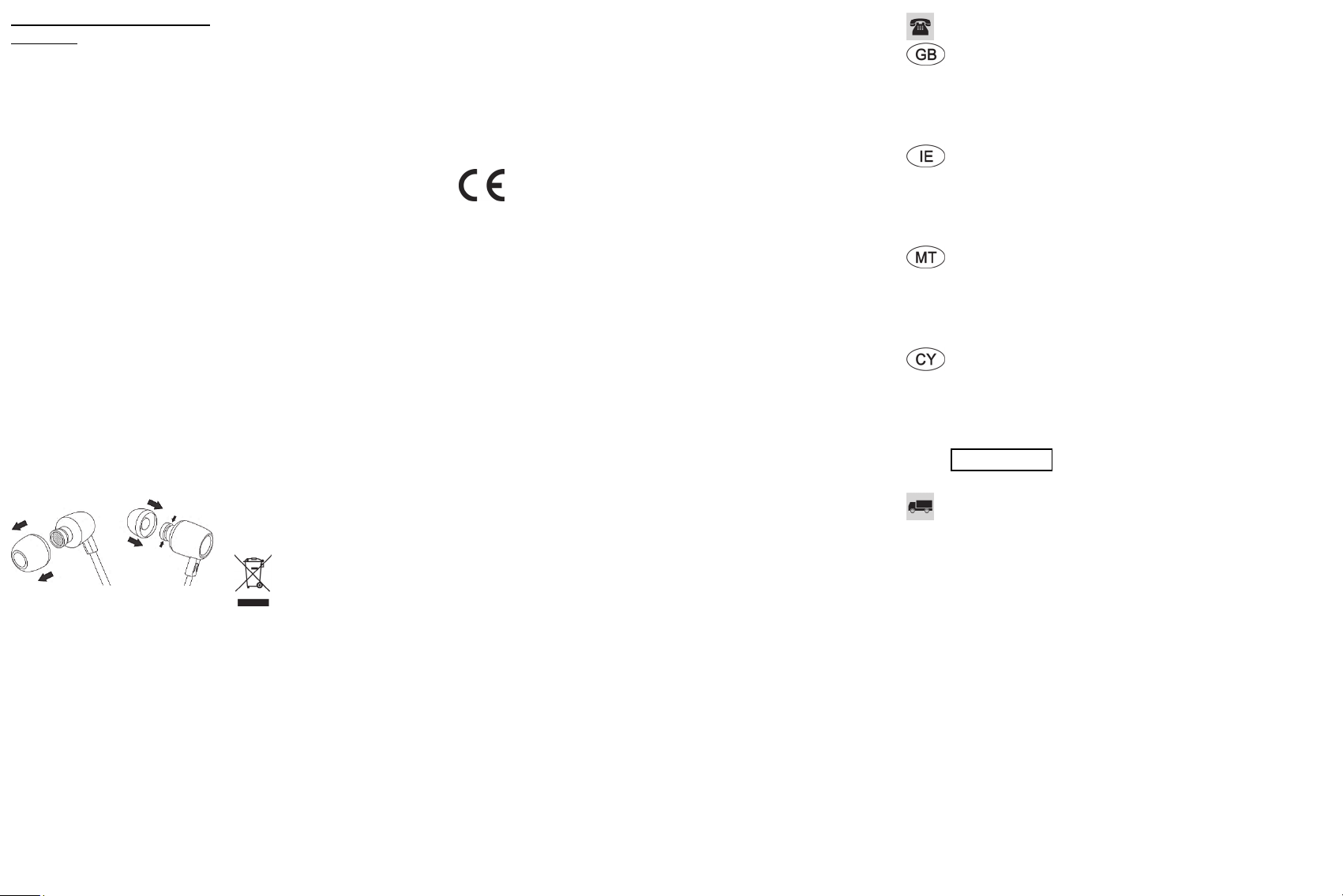
When delivered, the headphones come
with the medium ear cushions (1) fitted. If
the ear cushions do not fit properly,
change them. Proceed as follows to
change the ear cushions:
Carefully remove the ear cushion from
the earbud (2) using your fingers.
Select the correctly sized ear cushion
(6 or 7) and push it on to the earbud
(2) until it slides into the recess.
Troubleshooting
No sound
Check the volume that is set on the
playback device. If necessary, increase
the volume and, if necessary, start
playback on the playback device.
Check that the 3.5 mm jack plug (3) is
inserted correctly in the socket on the
playback device.
Sound only on one side
Check the stereo balance control on
the playback device.
Check that the 3.5 mm jack plug (3) is
inserted correctly in the socket on the
playback device.
Maintenance
The device does not contain any
components that require maintenance. Do
not try to open the housing of the device,
as this will void your guarantee.
Cleaning
To clean the headphones use a slightly
damp cloth and never use solvents or
cleaning agents that react with plastics.
Ensure that no liquids enter the housing.
Remove the ear cushions to clean them.
Wash the ear cushions under running
water. Dry the ear cushions thoroughly.
Wait until the ear cushions are completely
dry before putting them back on the
earbuds (2)
Storing the device when
not in use
If the headphones are not going to be
used for some time, keep them in a clean,
dry place.
Environmental information
The product bears a symbol of
a crossed-through waste bin. It
is therefore subject to European
Directive 2012/19/EU.
Electrical and electronic equipment must
not be put in the household waste, but
must be disposed of via designated
public disposal centres. By properly
disposing of the device, you can avoid
environmental damage and hazards to
health. Further information on disposing
of old devices can be obtained from your
local authority or the shop where you
purchased the product. Make sure the
packaging is disposed of in an
environmentally friendly manner.
Cardboard packaging can be put out for
waste-paper collection or taken to public
collection points for recycling. The plastic
packaging used for your device is
collected by your local waste
management company and disposed of
in an environmentally sound manner.
Marks of conformity
This device conforms to the
basic requirements and other
relevant regulations of the EMC Directive
2014/30/EU and RoHS Directive
2011/65/EU.
You can download the full EU declaration
of conformity at the following link:
www.targa.de/downloads/conformity/
288641.pdf
Guarantee
Warranty of TARGA GmbH
This device is sold with three years
warranty from the date of purchase.
Please keep the original receipt in a safe
place as proof of purchase. Before using
your product for the first time, please read
the enclosed documentation. Should any
problems arise which cannot be solved in
this way, please call our hotline. Please
have the article number and, if available,
the serial number to hand for all
enquiries. If it is not possible to solve the
problem on the phone, our hotline
support staff will initiate further servicing
procedures depending on the fault.
Within the warranty period the product
will be repaired or replaced free of
charge as we deem appropriate. No new
warranty period commences if the
product is repaired or replaced.
Consumables such as batteries,
rechargeable batteries and lamps are not
covered by the warranty.
Your statutory rights towards the seller
are not affected or restricted by this
warranty.
Service
Phone:
020 – 70 49 04 03
E-Mail:
Phone:
01 - 4370121
E-Mail:
Phone:
027 78 11 03
E-Mail:
Phone:
02 – 20 09 025
E-Mail:
IAN: 288641
Manufacturer
TARGA GmbH
Coesterweg 45
DE-59494 Soest
GERMANY
Download manual in English (PDF, 0.91 MB)
(Consider the environment and only print this manual if it is really necessary)

Loading…

Rating

Let us know what you think about the SilverCrest IAN 288641 Headphone by leaving a product rating. Want to share your experiences with this product or ask a question? Please leave a comment at the bottom of the page.
Are you satisfied with the SilverCrest IAN 288641 Headphone?
Yes No
Be the first to rate this product
0 votes

Join the conversation about this product

Here you can share what you think about the SilverCrest IAN 288641 Headphone. If you have a question, first carefully read the manual. Requesting a manual can be done by using our contact form.

More about this manual

We understand that it’s nice to have a paper manual for your SilverCrest IAN 288641 Headphone. You can always download the manual from our website and print it yourself. If you would like to have an original manual, we recommend you contact SilverCrest. They might be able to provide an original manual. Are you looking for the manual of your SilverCrest IAN 288641 Headphone in a different language? Choose your preferred language on our homepage and search for the model number to see if we have it available.

Specifications

Brand SilverCrest
Model IAN 288641
Category Headphones
File type PDF
File size 0.91 MB

All manuals for SilverCrest Headphones
More manuals of Headphones

Frequently Asked Questions about SilverCrest IAN 288641 Headphone

Our support team searches for useful product information and answers to frequently asked questions. If you find an inaccuracy in our frequently asked questions, please let us know by using our contact form.

What is the model number of my SilverCrest product? Verified

Although some SilverCrest products have an alternative model number, all of them have an IAN number with which the product can be identified.

This was helpful (3760) Read more

When I connect a headphone to my device it doesn't work properly, what can I do? Verified

It is possible that dirt has amassed in the opening where the headphone is connected, preventing it from making proper contact. The best way to clean this is with compressed air. When in doubt, have this done by a professional.

This was helpful (1159) Read more

When is my music too loud? Verified

Sounds over 80 decibel (dB) can start to damage hearing. Sounds over 120 dB immediately damage hearing. The severity of the damage depens on how often and how long the sound is present.

This was helpful (1048) Read more

What is Noise Cancelling? Verified

Noise Canceling is a technique that is mainly used in headphones. Active noise control is used to lower or eliminate the influence of ambient noise.

This was helpful (639) Read more

Does bluetooth work through walls and ceilings? Verified

A bluetooth signal will work through walls and ceiling, unless these are made from metal. Depending on the thickness and the material of the wall the signal can lose in strength.

This was helpful (251) Read more

Up to what noise level is it safe for children? Verified

Children get their hearing damaged quicker than adults. Therefore it is important to never expose children to noise louder than 85dB. In the case of headphones there are special models for children. In case of speakers or other situations you have to be watchful the noise does not exceed that level.

This was helpful (181) Read more

Can I wrap the cord around the device after use? Verified

It's better not to do this, because it can damage the cord. The best thing to do is wrap the cord the way it was when the product was packaged.

This was helpful (181) Read more
Manual SilverCrest IAN 288641 Headphone

Related products

Related categories

×
Download