1
6
x
1
.
7
5
x
2
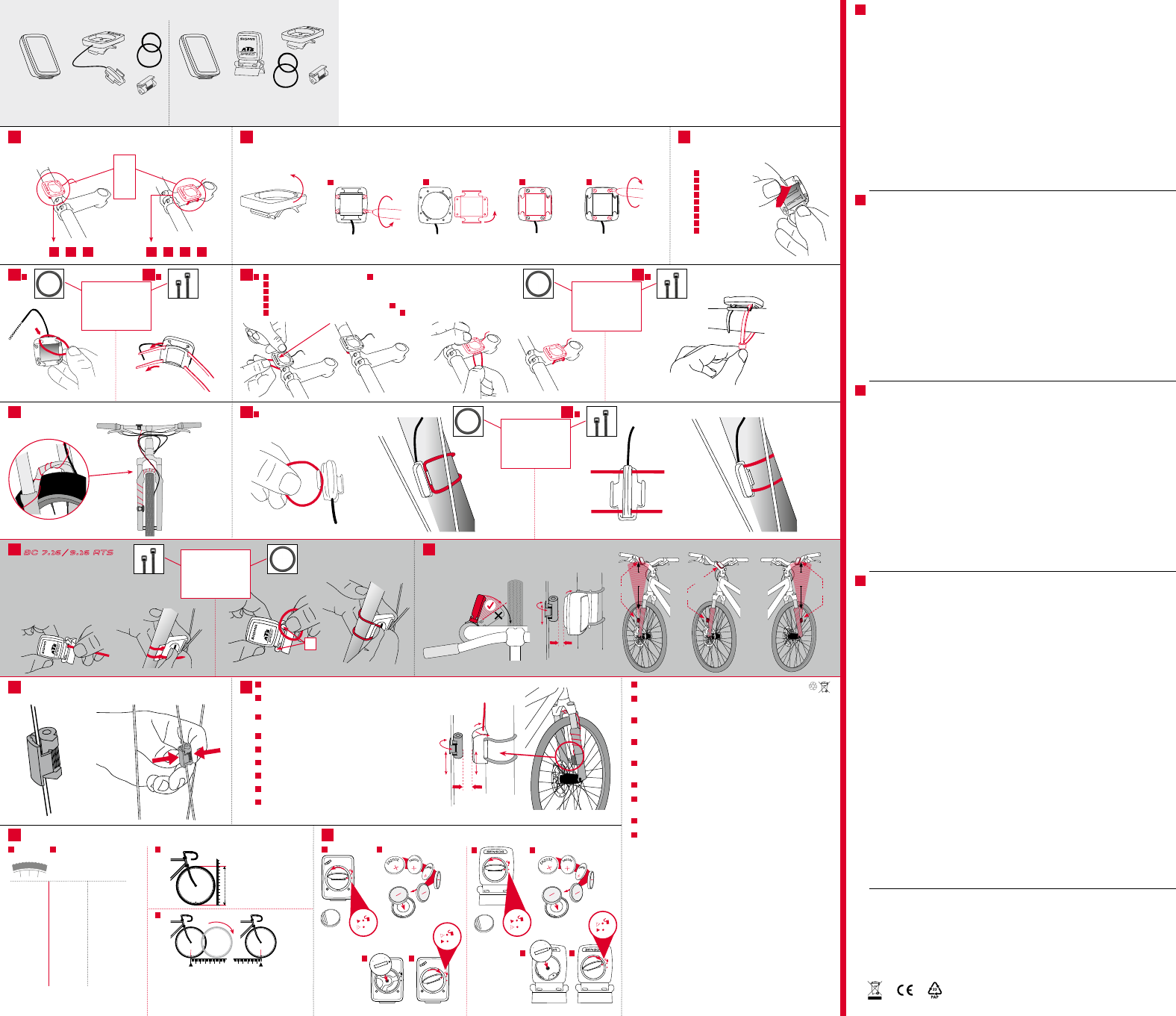
Stem or handlebar? / Lenker oder Vorbau? / Guidon ou cadre? / Manubrio o attacco? /
¿Manillar o tija? / Guiador ou parte dianteira? / Stuur of voorbouw? /
Kierownica czy sztyca kierownicy? / Řídítka nebo představec?
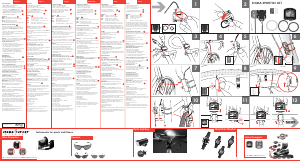
Installation on stem / Montage auf dem Vorbau / Montage sur le cadre / Montaggio sull’attacco /
Montaje en la tija / Montagem na parte dianteira / Montage op de voorbouw / Montaż na sztycy kierownicy /
Montáž na představci
Installation of the bracket / Montage des Halters /
Montage du support / Montaggio del supporto /
Montaje del soporte / Montagem do suporte /
Montage van de houder / Montaż uchwytu /
Montáž držáku
or
oder
ou
o
ou
of
lub
nebo
3 2 3 4 54 5
90°
4 x
A
B C
4 x
D
Optional, not included/
Optional, nicht im
Lieferumfang enthalten
Optional, not included/
Optional, nicht im
Lieferumfang enthalten
A A
A B
B
B
Installation of the wired sensor / Montage des Kabelsensor /
Montage du capteur filaire / Montaggio del sensore a cavo /
Montaje del sensor del cable / Montagem do sensor do cabo /
Montage van de kabelsensor / Montaż czujnika kablowego /
Montáž kabelového snímače
Wiring / Kabel verlegen / Poser le câble / Posare il cavo / Tendido del cable /
Dispor cabo / Kabel verplaatsen / Poprowadzenie kabla / Vedení kabelu
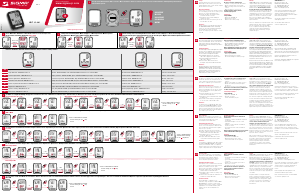
Wheel size / Radumfang / Circonférence de la roue / Circonferenza ruota / Tamaño de la rueda / Perímetro da roda /
Wielmaat / Obwód koła / Rozměr kola
EN
Batteries may not be disposed of in household waste
(European Battery Law). Please dispose of properly per local ordinance.
DE
Batterien dürfen nicht im Hausmüll entsorgt werden
(Batteriegesetz – BattG)! Bitte geben Sie die Batterien
an einer benannten Übergabestelle zur Entsorgung ab.
FR
Ne pas jeter les piles aux ordures ménagères (loi relative aux piles et
accumulateurs). Veuillez rapporter vos piles usagées dans un centre de
collecte agréé.
IT
Le batterie non devono essere smaltite nei rifiuti domestici
(legge europea sulle batterie). Si prega di consegnare le batterie esaurite
presso i punti di raccolta previsti per lo smaltimento.
ES
Las baterías no deben ser eliminadas en la basura doméstica (Ley de baterías).
Por favor entregue las baterías en un lugar de recogida mencionado para su
posterior eliminación.
NL
Batterijen horen niet thuis bij het restafval (Europese richtlijn batterijen).
Geeft u de batterijen mee met de chemokar.
PT
As pilhas não devem eliminadas em conjunto com o lixo doméstico
(lei relativa a pilhas). Entregue as pilhas num ponto de recolha correspondente
para a sua correcta eliminação.
PL
Baterii nie wolno wyrzucać do śmieci (ustawa o bateriach).
Baterie należy oddać do utylizacji w odpowiednim punkcie zbiórki odpadów.
CZ
Baterie se nesmí likvidovat s domovním odpadem (zákon o bateriích).
Odevzdejte prosím baterie na jmenovaném sběrném místě k likvidaci.
LI=Lithium
LI
A
C
SIGMA-ELEKTRO GmbH
Dr.-Julius-Leber-Straße 15
D-67433 Neustadt /Weinstraße
SIGMA SPORT ASIA
4F, No.192, Zhonggong 2
nd
Rd.,
Xitun Dist., Taichung City 407, Taiwan
SIGMA SPORT USA
1860B Dean St.
St. Charles, IL 60174, U.S.A.
B
EN
Remove the foil
DE
Folie entfernen
FR
Retirer le film
IT
Rimuovere la pellicola
ES
Remover la lámina
PT
Remover a película
NL
Folie verwijderen
PL
Usunąć folię
CZ
Odstranění fólie
EN
To achieve the required distance, you may have to move
the magnet and transmitter up or down on the fork.
DE
Um den gewünschten Abstand zu erreichen, müssen Sie
den Magneten und Kabel-Sensor auf der Gabel nach oben,
bzw. unten bewegen.
FR
Pour obtenir la distance requise, il peut être nécessaire
de déplacer l‘aimant et le transmetteur vers le haut ou
le bas sur la fourche.
IT
Per ottenere la distanza necessaria, occorre spostare
il magnete e il trasmettitore su e giù sulla forcella
ES
Para lograr la distancia requerida deberá mover el imán
y el sensor hacia arriba o hacia abajo en la tija.
PT
Para atingir a distância pretendida deve mover o íman
e o emissor na forquilha para cima ou para baixo.
NL
Voor de vereiste afstand is het wellicht nodig magneet
en zender op de vork op en neer te bewegen.
PL
Aby osiągnąć zakładany dystans, konieczne może być podniesienie
lub obniżenie magnesu i nadajnika na widelcu rowerowym.
CZ
Pro dosažení požadované vzdálenosti je popř. nutné pohnout
magnetem avysílačem po vidlici nahoru, resp. dolů.
BC 7.16 / 9.16 ATS
Mounting Instructions / Montage / Mise en place / Fissaggio / Instalación / Montagem / Bevestiging / Zamocowanie / Upevnění
Battery change / Batteriewechsel / Remplacement des piles / Sostituzione della batteria / Cambio de baterías /
Substituição da pilha / Batterijwissel / Wymiana baterii / Výměna baterie
A B
D
A
C
B
D
16" 1253 49,3
18" 1411 55,6
20" 1590 62,6
22" 1770 69,7
24" 1907 75,1
26" 2085 82,1
27" 2195 86,4
27.5" 2180 85,8
28" 2200 86,6
29" 2300 90,5
700C 2095 82,5
mm inch
1
4
6
8
10
12 13
11
9
5
7 7
54
2 3
!
90° – 45°
Wireless
transmitter /
Funk-Sender
O-ring or zip ties
O-Ring oder Kabelbinder
Caoutchouc ou Rilsan
Anelli O o fascetta
Correa o precinto
O-Ring ou agrupadores de cabos
O-ring of kabelbinder
Oringów lub opaska kablowa
O-kroužek nebo kabelová příchytka
Max. 10 mm
(0,4 inch)
Power Magnet
C
SET
o
p
e
n
-
c
l
o
s
e
o
p
e
n
-
c
l
o
s
e
o
p
e
n
-
c
l
o
s
e
Min.: 500 mm / Max. 3999 mm
o
p
e
n
-
c
l
o
s
e
Optional, not included/
Optional, nicht im
Lieferumfang enthalten
10
C
ENT
10
C
ENT
Installation of the magnet / Montage des Magneten / Montage de l‘aimant /
Montaggio dei magneti / Montaje del imán / Montagem do íman / Montage van de magneet /
Montaż magnesu / Montáž magnetu
Installation of the wireless transmitter /
Montage des Funk-Sender /
Montage du capteur radio /
Montaggio della radiotrasmittente /
Montaje del radiotransmisor /
Montagem do transmissor de comunicação por rádio /
Montage van de zender /
Montaż nadajnika radiowego /
Montáž rádiového vysílače
O-ring or zip ties
O-Ring oder Kabelbinder
Caoutchouc ou Rilsan
Anelli O o fascetta
Correa o precinto
O-Ring ou agrupadores de cabos
O-ring of kabelbinder
Oringów lub opaska kablowa
O-kroužek nebo kabelová příchytka
O-ring or zip ties
O-Ring oder Kabelbinder
Caoutchouc ou Rilsan
Anelli O o fascetta
Correa o precinto
O-Ring ou agrupadores de cabos
O-ring of kabelbinder
Oringów lub opaska kablowa
O-kroužek nebo kabelová příchytka
O-ring or zip ties
O-Ring oder Kabelbinder
Caoutchouc ou Rilsan
Anelli O o fascetta
Correa o precinto
O-Ring ou agrupadores de cabos
O-ring of kabelbinder
Oringów lub opaska kablowa
O-kroužek nebo kabelová příchytka
Optional, not included/
Optional, nicht im
Lieferumfang enthalten
Ingebruikname:
Bij levering bevindt de fietscomputer zich in een
zogenaamde diepeslaapmodus.
Bij de eerste ingebruikname eerst de SET-toets
5 seconden ingedrukt houden. De fietscomputer
komt dan in de actieve modus.
Bepaling van wielgrootte:
Om een nauwkeurige snelheidsmeting mogelijk te maken,
moet de wielgrootte ingesteld worden aan de hand van
het formaat band. Daarvoor kunt u:
A – kies uit vooringestelde wielmaten
B – De wielmaat berekenen op basis van de in de tabel
„Wheel Size“ gegeven formule.
C – De waarde volgens de tekeningen van „Wheel Size“
berekenen.
D – Uit de tabel „Wheel Size“ de met uw
bandmaat overeenkomende waarde halen.
PC-interface:
De fietscomputer is PC-compatibel. Wanneer u de
software SIGMA DATA CENTER en het dockingstation
hebt gekocht, kunt u de totale en huidige waarden
eenvoudig en moeiteloos op uw PC analyseren.
Bovendien kunt u de instellingen van de fietscomputer
op de PC configureren.
Problemen oplossen:
Geen of onjuiste snelheidsweergave:
– Computer op de juiste manier in de houder
geschoven?
– Afstand tot magneet en sensor gecontroleerd?
– Magneet op de juiste manier ten opzichte van
de sensor geplaatst?
– Wielmaat correct ingesteld?
U vindt nog meer oplossingen in onze Veelgestelde
vragen (FAQ) onder www.sigmasport.com
Technische gegevens:
Computer MET KABEL:
– Batterijtype: CR 2032, 3V
– Batterijduur: 3-4 jaar
(Bij gebruik van 1 uur per dag)
Computer ZONDER KABEL:
– Batterijtype: CR 2032, 3V
– Batterijduur: 1 jaar (Bij gebruik van 1 uur per dag)
Zender:
– Batterijtype: CR 2032, 3V
– Batterijduur: 1,5 jaar (Bij gebruik van 1 uur per dag)
Garantie:
SIGMA SPORT geeft op uw computer 2 jaar garantie
vanaf de aankoopdatum. De garantie geldt voor
materiaal- en fabricagefouten aan de computer zelf,
aan de sensor/zender en aan de stuurhouder. Kabels,
batterijen en montage-materialen zijn uitgesloten van
garantie. De garantie is alleen geldig als de betreffende
onderdelen niet geopend werden (uitgezonderd het
batterijvak van de computer/zender), er geen geweld
gebruikt werd en er geen sprake is van opzettelijke
beschadiging. Bewaar de aankoopbon zorgvuldig, want in
geval van een klacht, moet deze getoond worden. Bij een
terechte klacht, ontvangt u van ons een vergelijkbaar
vervangend model.
Aanspraak op vervanging door een identiek model
bestaat niet, als door modelwijziging de productie van
het gereclameerde model stopgezet werd. Neem voor
alle klachten en aanspraken op garantie, contact op met
het verkooppunt waar u de computer gekocht heeft.
Of stuur uw klacht direct aan:
SIGMA-ELEKTRO GmbH
Dr.-Julius-Leber-Strasse 15
D-67433 Neustadt/Weinstraße
Tel.: +49-(0) 63 21-91 20-1 18
Fax.: +49-(0) 63 21-91 20-34
Bij terechte garantie-aanspraken ontvangt u een
vervangend model. Er bestaat alleen aanspraak op het
op dat moment actuele model. De fabrikant behoudt zich
technische wijzigingen voor.
Een klachtenformulier is te vinden op onze website:
claim.sigmasport.com
U kunt de CE-certificering vinden op:
certificates.sigmasport.com
Colocação em funcionamento:
Nas condições de expedição o computador de bicicleta
encontra-se no chamado modo de hibernar.
Na primeira colocação em funcionamento manter
premida a tecla SET durante 5 segundos. O computador
de ciclismo entra no modo ativo.
Determinação da dimensão da roda:
Para alcançar a medição de velocidade com exactidão,
a dimensão da roda deve ser ajustada à dimensão do
pneu. Para isso pode:
A – Escolher a partir das dimensões de roda
predefinidas.
B – Calcular a dimensão da roda com base na fórmula
indicada na tabela “Wheel Size”.
C – Determinar o valor de acordo com os desenhos do
“Wheel Size”.
D – Assumir o valor correspondente à dimensão do seu
pneu a partir da tabela “Wheel Size”.
Interface PC:
O computador de bicicleta é compatível com o PC.
Após a compra do software SIGMA DATA CENTER
e da estação de ancoragem pode protocolar os valores
totais e actuais de forma simples e sem esforço no
seu PC. Para além disso pode efectuar os ajustes do
computador de bicicleta no PC.
Solução do problema:
Sem indicação de velocidade ou indicação de velocidade
incorrecta:
– O computador está bem encaixado no suporte?
– Verificou a distância para o íman e sensor?
– O íman está corretamente posicionado relativamente
ao sensor?
– O perímetro da roda está ajustado corretamente?
Pode consultar outras soluções para problemas nas
nossas FAQ em www.sigmasport.com
Dados técnicos:
Computador COM FIOS:
– Tipo de pilha: CR 2032, 3V
– Vida útil da pilha: entre 3 e 4 anos
(numa utilização de 1 hora por dia)
Computador SEM FIOS:
– Tipo de pilha: CR 2032, 3V
– Vida útil da pilha: 1 ano
(numa utilização de 1 hora por dia)
Transmissor:
– Tipo de pilha: CR 2032, 3V
– Vida útil da pilha: 1,5 anos
(numa utilização de 1 hora por dia)
Garantia:
A SIGMA SPORT concede-lhe uma garantia de 2 anos
para o computador a partir da data de compra.
A garantia abrange erros de material e de produção
no próprio computador, no emissor/transmissor e no
suporte do guiador. O cabo e as pilhas, bem como os
materiais de montagem, não são abrangidos pela
garantia. A garantia só é válida se as peças afetadas
não tiverem sido abertas (exceção: compartimento das
pilhas no computador/transmissor), se não tiver sido
aplicada força nem existir qualquer dano deliberado.
Guarde bem o comprovativo de compra, pois este terá
de ser apresentado numa situação de reclamação. Em
caso de reclamação legítima, receberá da nossa parte
um aparelho de substituição equivalente.
A substituição por um modelo idêntico não é um direito
garantido, caso a produção do modelo reclamado tenha
sido suspensa devido à mudança de modelo. Em caso
de reclamações e reivindicações de garantia, contacte
o seu revendedor especializado, junto do qual adquiriu o
aparelho. Ou envie a sua reclamação diretamente para:
SIGMA-ELEKTRO GmbH
Dr.-Julius-Leber-Strasse 15
D-67433 Neustadt/Weinstraße
Tel.: +49-(0) 63 21-91 20-1 18
Fax.: +49-(0) 63 21-91 20-34
No caso de reivindicações legítimas de garantia,
receberá um aparelho de substituição.
O direito de garantia apenas se aplica ao modelo actual
nesse momento. O fabricante reserva-se o direito
a alterações técnicas.
Pode obter um formulário de reclamação no nosso
website claim.sigmasport.com
Poderá encontrar a declaração CE em:
certificates.sigmasport.com
Uruchomienie:
Dostarczony komputer rowerowy znajduje się w tak
zwanym trybie głębokiego uśpienia. Podczas pierwszego
uruchomienia należy nacisnąć i przytrzymać wciśnięty
przez 5 sekund przycisk SET. Następnie komputer
rowerowy przechodzi w tryb aktywny.
Określanie wielkości kół:
Aby dokonać dokładnych pomiarów prędkości, należy
ustawić wielkość kół odpowiednio do wielkości kół
posiadanego roweru. W tym celu można:
A – Wybrać określony rozmiar koła.
B – Obliczyć wielkość kół za pomocą formuły
zamieszczonej w tabeli „Wheel Size”.
C – Określić wartość zgodnie z rysunkami z tabeli
„Wheel Size”.
D – Przyjąć wartość z tabeli „Wheel Size”,
odpowiadającą wielkości kół posiadanego roweru.
PC Interface:
Komputer rowerowy można podłączyć do komputera.
Po zakupie oprogramowania SIGMA DATA CENTER
i stacji dokującej można łatwo zapisywać na komputerze
osobistym wartości aktualne i całkowite. Ponadto
komputer rowerowy można programować z poziomu
komputera osobistego.
Rozwiązywanie problemów:
Błędna informacja o prędkości lub jej brak:
– Czy komputer prawidłowo zablokowano w uchwycie?
– Czy sprawdzono odstęp od magnesu i czujnika?
– Czy magnes jest umieszczony w odpowiedniej
odległości od czujnika?
– Czy prawidłowo ustawiono obwód koła?
Pozostałe rozwiązania problemów znajdują się w FAQ
opublikowanych na stronie www.sigmasport.com
Dane techniczne:
Komputer PRZEWODOWY:
– Typ baterii: CR 2032, 3 V
– Żywotność baterii: 3 do 4 lat
(przy użytkowaniu przez 1 godzinę dziennie)
Komputer BEZPRZEWODOWY:
– Typ baterii: CR 2032, 3 V
– Żywotność baterii: 1 rok
(przy użytkowaniu przez 1 godzinę dziennie)
Nadajnik:
– Typ baterii: CR 2032, 3 V
– Żywotność baterii: 1,5 roku
(przy użytkowaniu przez 1 godzinę dziennie)
Gwarancja:
SIGMA SPORT udziela 2-letniej gwarancji na swój
komputer, liczonej od daty kupna. Gwarancja obejmuje
wady materiału oraz wady produkcji komputera,
czujników/nadajników i uchwytu na kierownicę. Kabel
i baterie, a także materiały służące do montażu, nie są
objęte gwarancją. Gwarancja jest ważna tylko wtedy,
gdy części, których ona dotyczy, nie były otwierane
(wyjątek: komora na baterie komputera/nadajnik),
nie użyto siły, ani nie doszło do celowego uszkodzenia.
Należy zachować dowód zakupu, aby w razie reklamacji
móc go przedłożyć. W razie uprawnionej reklamacji firma
udostępnia porównywalne urządzenie zastępcze.
Prawo do zastąpienia komputera modelem identycznym
nie przysługuje, jeśli w wyniku wymiany modeli produkcja
reklamowanego modelu została wstrzymana. Wszelkie
reklamacje należy zgłaszać do punktu handlowego,
w którym urządzenie zostało kupione. Reklamację można
także przesłać bezpośrednio do producenta:
SIGMA-ELEKTRO GmbH
Dr.-Julius-Leber-Strasse 15
D-67433 Neustadt/Weinstraße
Tel.: +49-(0) 63 21-91 20-1 18
Fax: +49-(0) 63 21-91 20-34
W przypadku uprawnionych roszczeń gwarancyjnych
urządzenie zostanie wymienione.
Roszczenia mogą odnosić się tylko do aktualnych modeli.
Producent zastrzega sobie prawo do zmian technicznych.
Formularz reklamacyjny znajduje się na naszej stronie
internetowej: claim.sigmasport.com
Deklaracja CE znajduje się na stronie:
certificates.sigmasport.com
Uvedení do provozu:
Ve stavu při dodání se cyklistický computer nachází
vrežimu takzvaného hlubokého spánku. Při prvním
uvedení do provozu prosím přidržte po dobu 5sekund
tlačítko SET. Cyklistický computer pak přejde do
aktivního režimu.
Stanovení rozměrů kola:
K docílení přesného měření rychlosti musejí být rozměry
kola nastaveny podle rozměrů vašich pneumatik.
K tomuto účelu můžete:
A – Vybrat zpředem stanovených rozměrů kol.
B – Vypočítat rozměry kola pomocí vzorce vycházejícího
ztabulky „Wheel Size“.
C – Zjistit hodnotu podle nákresů z„Wheel Size“.
D – Převzít ztabulky „Wheel Size“ hodnotu
odpovídající vaší velikosti pneumatik.
Počítačové rozhraní:
Cyklistický computer může být připojen k počítači. Po
zakoupení softwaru SIGMA DATA CENTER a Dokovací
Stanice můžete jednoduše a bez problémů zaznamenávat
celkové a aktuální hodnoty na svém počítači. Navíc
můžete na počítači provádět nastavení cyklistického
computeru.
Řešení problémů:
Žádné nebo nesprávné zobrazení rychlosti:
– Je computer správně zaklapnutý do držáku?
– Je zkontrolována vzdálenost mezi magnetem a
snímačem?
– Je magnet správně umístěný vzhledem ke snímači?
– Je správně nastavený obvod kola?
Další řešení problémů najdete v našich odpovědích na
často kladené otázky na adrese www.sigmasport.com.
Technické údaje:
Computer SKABELOVÝM PŘIPOJENÍM:
– Typ baterie: CR 2032, 3V
– Životnost baterie: 3až 4roky
(při používání 1 hodinu denně)
BEZDRÁTOVÝ computer:
– Typ baterie: CR 2032, 3V
– Životnost baterie: 1 rok
(při používání 1 hodinu denně)
Vysílač:
– Typ baterie: CR 2032, 3V
– Životnost baterie: 1,5 roku
(při používání 1 hodinu denně)
Záruka:
SIGMA SPORT poskytuje na computer záruku po dobu
2 let od data nákupu. Záruka se vztahuje na vady
materiálu a chyby zpracování u samotného computeru,
snímače/vysílače a držáku na řídítka. Kabel a baterie
stejně tak jako i montážní materiál jsou ze záruky
vyloučeny. Záruka je platná pouze v případě, že příslušné
díly nebyly otevřeny (s výjimkou přihrádky pro baterii
computeru/vysílač), na zařízení nebylo vyvinuto násilí a
nebylo poškozeno svévolně. Uschovejte prosím pečlivě
doklad o nákupu, který musí být předložen v případě
reklamace. Při oprávněné reklamaci od nás obdržíte
výměnou srovnatelné zařízení.
Nárok na náhradu shodným modelem nevzniká, pokud
byla výroba reklamovaného modelu zastavena v důsledku
změny modelu. Se všemi reklamacemi a požadavky na
poskytnutí záruky se prosím obracejte na speciali-
zovaného prodejce, u kterého jste zařízení koupili.
Nebo svou reklamaci odešlete přímo na adresu:
SIGMA-ELEKTRO
GmbH
Dr.-Julius-Leber-Strasse 15
D-67433 Neustadt/Weinstraße
Tel.: +49-(0) 63 21-91 20-1 18
Fax.: +49-(0) 63 21-91 20-34
Při oprávněném nároku na poskytnutí záruky obdržíte
zařízení výměnou.
Nárok vzniká pouze na model, který je v současné době
aktuální. Výrobce si vyhrazuje právo na technické změny.
Formulář pro reklamaci najdete na našich
internetových stránkách claim.sigmasport.com.
ES prohlášení najdete na adrese:
certificates.sigmasport.com
NL
PT
PL
CZ
Contents / Inhalt / Contenu / Contenuto / Contenido / Conteúdo / Inhoud / Zawartość / Obsah
BC 7.16 / BC 9.16 BC 7.16 ATS / BC 9.16 ATS
Battery installed / Batterie eingebaut / Pile installée /
Batteria integrata / Batería montada / Pilhas montadas /
Batterij gemonteerd / Używane baterii / Vložená baterie
Batteries installed / Batterien eingebaut / Piles installée /
Batterie integrata / Baterías montada / Pilhas montadas /
Batterijen gemonteerd / Używane baterii / Vložená baterie
EU-Konformitätserklärung
Hiermit erklärt SIGMA-ELEKTRO GmbH, dass sich
die kabellosen Fahrradcomputer BC 7.16 ATS/
BC 9.16 ATS in Übereinstimmung mit den grundle-
genden Anforderungen und den anderen relevanten
Vorschriften der Richtlinie 2014/53/EU befinden.
Die kabelgebundenen Fahrradcomputer BC 7.16/
BC 9.16 befinden sich in Übereinstimmung mit den
relevanten Vorschriften der Richtlinie 2014/30/EU.
Weitere Informationen: certificates.sigmasport.com
EU-Declaration of Conformity
SIGMA-ELEKTRO GmbH hereby declares that the
wireless bike computers BC 7.16 ATS/BC 9.16 ATS
comply with the fundamental requirements and
other relevant regulations of Directive 2014/53/EU.
The wired version of BC 7.16/BC 9.16 is in
compliance with the fundamental requirements and
other relevant regulations of directive 2014/30/EU.
For further information see:
certificates.sigmasport.com
FCC Addendum:
This device complies with part 15 of the FCC Rules.
Operation is subject to the following two conditions:
(1) This device may not cause harmful
interference,and
(2) this device must accept any interference
received, including interference that may cause
undesired operation.
NOTE:
This equipment has been tested and found to
comply with the limits for a Class B digital device,
pursuant to part 15 of the FCC Rules. These limits
are designed to provide reasonable protection
against harmful interference in a residential
installation. This equipment generates, uses and
can radiate radio frequency energy and, if not
installed and used in accordance with the instruc-
tions, may cause harmful interference to radio
communications. However, there is no guarantee
that interference will not occur in a particular
installation. If this equipment does cause harmful
interference to radio or television reception, which
can be determined by turning the equipment off
and on, the user is encouraged to try to correct
the interference by one or more of the following
measures:
– Reorient or relocate the receiving antenna.
– Increase the separation between the equipment
and receiver.
– Connect the equipment into an outlet on
a circuit different from that to which the
receiver is connected.
– Consult the dealer or an experienced radio/TV
technician for help.
Changes or modifications not expressly approved by
the party responsible for compliance could void the
user’s authority to operate the equipment.
IC Statement
IC: 7580A-SPD1ATS
This device complies with Industry Canada licence-
exempt RSS standard(s). Operation is subject to
the following two conditions:
(1) this device may not cause interference, and
(2) this device must accept any interference,
including interference that may cause undesired
operation of the device. CAN ICES-3(B)/NMB-3(B)
Le présent appareil est conforme aux CNR
d‘Industrie Canada applicables aux appareils radio
exempts de licence. L‘exploitation est autorisée aux
deux conditions suivantes:
(1) il ne doit pas produire de brouillage et
(2) l’ utilisateur du dispositif doit étre prêt à
accepter tout brouillage radioélectrique reçu, même
si ce brouillage est susceptible de compromettre
le fomctionnement du dispositif. CAN ICES-3(B)/
NMB-3(B)
The device meets the exemption from the routine
evaluation limits in section 2.5 of RSS 102 and
compliance with RSS-102 RF exposure, users can
obtain Canadian information on RF exposure and
compliance.
Le dispositif rencontre l‘exemption des limites
courantes d‘évaluation dans la section 2.5 de RSS
102 et la conformité à l‘exposition de RSS-102 rf,
utilisateurs peut obtenir l‘information canadienne
sur l‘exposition et la conformité de rf.
This transmitter must not be co-located or
operating in conjunction with any other antenna
or transmitter. This equipment should be installed
and operated with a minimum distance of
20 millimeters between the radiator and your body.
Cet émetteur ne doit pas être Co-placé ou ne
fonctionnant en même temps qu‘aucune autre
antenne ou émetteur. Cet équipement devrait être
installé et actionné avec une distance minimum de
20 milliimètres entre le radiateur et votre corps.
= WS (mm)
1x
km/h:
WS = mm
mph:
WS = mm
Note: 1 inch = 25.4 mm
mm x 3,14
km/h:
WS = mm x 3,14
mph:
WS = mm x 3,14
D
Max. 5 mm
(0,2 inch)
EN
Note: “SIGMA” faces to front of Bike
DE
Hinweis: „SIGMA-Logo“ zeigt nach vorne
FR
Remarque : le “logo SIGMA” doit être orienté vers l‘avant
IT
Nota: il “logo SIGMA” guarda verso la parte anteriore
ES
Observación: El logotipo de “SIGMA” debe mirar al frente.
PT
Nota: “Logotipo SIGMA” virado para a frente
NL
Tip: „SIGMA-logo“ is naar voren gericht.
PL
Uwaga: logo „SIGMA” skierowane jest do przodu.
CZ
Poznámka: „logo SIGMA“ směřuje dopředu
LEFT
STEM
LEFT
RIGHT
max
70 cm
27"
max
70 cm
27"
o
p
e
n
-
c
l
o
s
e
SET
o
p
e
n
-
c
l
o
s
e
SET


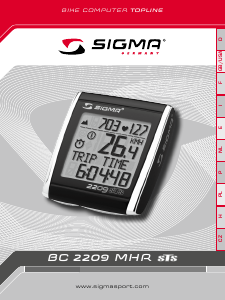
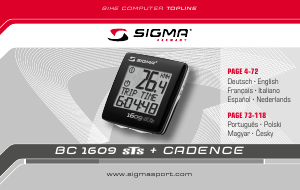
Join the conversation about this product
Here you can share what you think about the Sigma BC 7.16 ATS Cycling Computer. If you have a question, first carefully read the manual. Requesting a manual can be done by using our contact form.
reply | This was helpful (197) Read more (Translated by Google)
This was helpful (81) (Translated by Google)
This was helpful (7) (Translated by Google)
reply | This was helpful (165) Read more (Translated by Google)
This was helpful (159) (Translated by Google)
reply | This was helpful (126) (Translated by Google)
reply | This was helpful (111) (Translated by Google)
reply | This was helpful (99) Read more (Translated by Google)
This was helpful (15) (Translated by Google)
Loading…
reply | This was helpful (71) Read more (Translated by Google)
This was helpful (81) (Translated by Google)
reply | This was helpful (50) (Translated by Google)
reply | This was helpful (42) Read more (Translated by Google)
This was helpful (34) (Translated by Google)
reply | This was helpful (41) (Translated by Google)
reply | This was helpful (38) (Translated by Google)
reply | This was helpful (29) (Translated by Google)
reply | This was helpful (28)
reply | This was helpful (28) (Translated by Google)
reply | This was helpful (23) (Translated by Google)
reply | This was helpful (21) (Translated by Google)
reply | This was helpful (20) (Translated by Google)
reply | This was helpful (17) (Translated by Google)
reply | This was helpful (16) (Translated by Google)
reply | This was helpful (16) (Translated by Google)
reply | This was helpful (15) (Translated by Google)
reply | This was helpful (13) (Translated by Google)
reply | This was helpful (13) (Translated by Google)
reply | This was helpful (12) (Translated by Google)
reply | This was helpful (12) (Translated by Google)
reply | This was helpful (7) Read more (Translated by Google)
This was helpful (1) (Translated by Google)
reply | This was helpful (6) (Translated by Google)
reply | This was helpful (5)
reply | This was helpful (4) Read more (Translated by Google)
This was helpful (1) (Translated by Google)
reply | This was helpful (4) (Translated by Google)
reply | This was helpful (4) (Translated by Google)
reply | This was helpful (4) (Translated by Google)
reply | This was helpful (3) (Translated by Google)
reply | This was helpful (3) (Translated by Google)
reply | This was helpful (3) (Translated by Google)
reply | This was helpful (3) (Translated by Google)
reply | This was helpful (3) (Translated by Google)
reply | This was helpful (3) (Translated by Google)
reply | This was helpful (2) (Translated by Google)
reply | This was helpful (2) (Translated by Google)
reply | This was helpful (2) Read more (Translated by Google)
This was helpful (0) (Translated by Google)
reply | This was helpful (2) (Translated by Google)
reply | This was helpful (1) (Translated by Google)
reply | This was helpful (1) (Translated by Google)
reply | This was helpful (0) (Translated by Google)
reply | This was helpful (0) (Translated by Google)
reply | This was helpful (0) (Translated by Google)
reply | This was helpful (0) (Translated by Google)
reply | This was helpful (0) (Translated by Google)