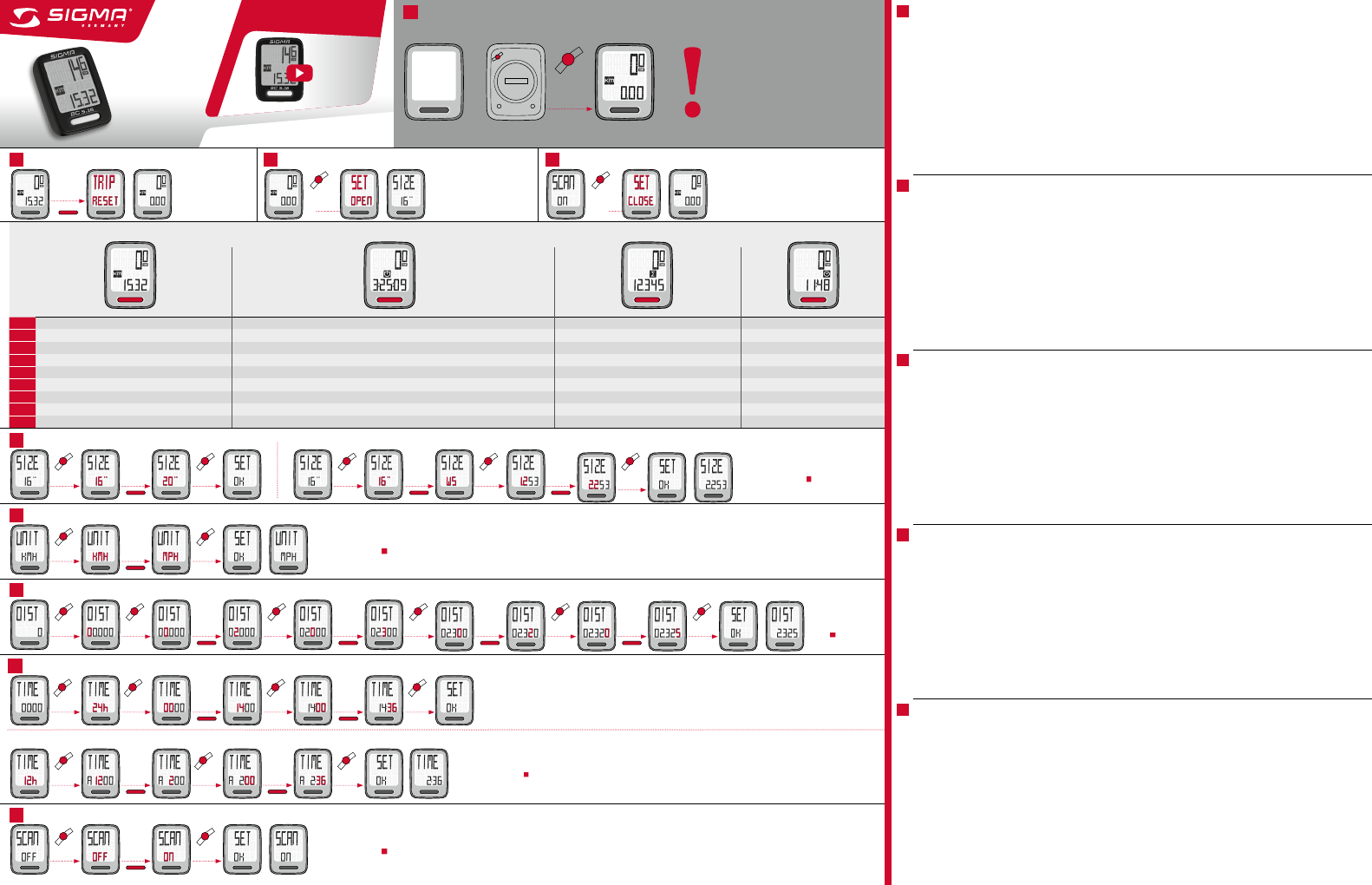
EN Trip distance: 999,99 km or mi
Ride Time: 99:59 HH:MM, after 9:59:59 H:MM:SS change to 10:00 HH:MM Total Distance: 99999 KM or mi Clock: 12h or 24 h
DE Tageskilometer: 999,99 km oder mi
Fahrzeit: 99:59 HH:MM, nach 9:59:59 H:MM:SS Wechsel zu 10:00 HH:MM Gesamtstrecke: 99999 KM oder mi Uhrzeit: 12h oder 24 h
FR Distance journalière : 999,99 km ou mi
Temps parcouru : 99:59 HH:MM, après 9:59:59 H:MM:SS passage à 10:00 HH:MM Distance totale : 99999 KM ou mi Heure : 12h ou 24 h
IT Distanza giornaliera: 999,99 km o mi
Durata corsa parziale: 99:59 HH:MM, dopo 9:59:59 H:MM:SS cambio a 10:00 HH:MM Chilometri totali: 99999 KM o mi Orario: 12h o 24 h
ES Kilómetros del recorrido: 999,99 km o mi
Tiempo del recorrido: 99:59 HH:MM, después de 9:59:59 H:MM:SS cambia a 10:00 HH:MM Kilómetros totales: 99999 KM o mi Hora: 12h o 24 h
PT Percurso percorrido diariamente: 999,99 km ou mi
Tempo percorrido: 99:59 HH:MM, conforme 9:59:59 H:MM:SS mudança para 10:00 HH:MM Distância total: 99999 KM ou mi Relógio: 12h ou 24 h
NL Dagafstand: 999,99 km of mi
Rittijd: 99:59 HH:MM, na 9:59:59 H:MM:SS omschakeling naar 10:00 HH:MM Totaalafstand: 99999 KM of mi Klok: 12h of 24 h
PL Dystans dzienny: 999,99 km lub mi
Czas jazdy: 99:59 HH:MM, po 9:59:59 H:MM:SS zmiana na 10:00 HH:MM Lącznie przejechany dystans: 99999 KM lub mi Zegar: 12h lub 24 h
CZ Denní trasa: 999,99 km nebo mi
Doba jízdy: 99:59 HH:MM, po 9:59:59 H:MM:SS změna na 10:00 HH:MM Celkové kilometry: 99999 KM nebo mi Hodiny: 12h nebo 24 h
Start-up / Erste Inbetriebnahme / Mise en service / Messa in funzione / Puesta en servicio / Primeira colocação em funcionamento / Inbedrijfstelling / Uruchomienie /
První uvedení do provozu
IMPORTANT
WICHTIG
IMPORTANTE
BELANGRIJK
WAŻNE
Press and hold
for
5 sec.
SET
Setting menu / Einstellungsmenü / Menu «Réglages» / Menu impostazioni / Menú de ajustes /
Instellingsmenu / Menu de ajuste / Menu ustawień / Menu nastavení
Exit the settings menu / Einstellungsmenü verlassen / Quitter le menu «Réglages» / Uscire dal menu impostazioni /
Salir del menú de ajustes / Exit instellingsmenu / Sair do menu de ajuste / Wyjdź z menu ustawień / Opuštění menu nastavení
Reset / Nullstellen / Réinitialiser / Azzeramento / Colocar en cero / Posições zero /
Op nul instellen / Zerowanie / Vynulování 15.32
0.00
SET
SET
Press and
hold for
5 sec.
Press and
hold for
4 sec.
Press and
hold for
4 sec.
1
32
4
BC 5.16
MORE INFORMATION:
www.sigma-qr.com
www.sigmasport.com
Functions / Funktionen / Fonctions / Funzioni / Funciones / Funções / Functies / Funkcje / Funkce
Set Unit of Measurement / Einheit festlegen / Définir l‘unité / Impostazione unità / Determinar unidad / Definir a unidade / Eenheid vastleggen / Ustalenie jednostki / Stanovení jednotky
KMH
MPH
Set scan mode, on /off / Scan Modus ein-/ausschalten / Activer / Désactiver le mode scan / Attivazione/disattivazione modalità scansione / Encender/apagar modo scan / Ligar/desligar o modo scan / Scanmodus in-/uitschakelen / Włączanie / wyłączanie trybu skanowania / Zapnutí/vypnutí režimu Scan
OFF
ON
6
9
5
7
Press mode button to advance
to next setting, or see
4
step
to exit.
x 1
x 1 x 1x 1
x 1 x 1
x 1
Set clock / Uhrzeit einstellen / Régler l‘heure / Impostazione orario / Ajustar hora / Ajustar hora / Kloktijd instellen / Ustawienie czasu / Nastavení hodin
24 h setting (14:36)
12 h setting (2:36)
SET
SET
SET
SET
SET
SET
SET
8
Press mode button to advance
to next setting, or see
4
step
to exit.
x 3x 1
Set wheel size / Eingabe Radumfang / Reglage de la circonference de la roue / Immissione circonferenza ruota / Introducción de las dimensiones de la rueda / Introdução do perímetro da roda / Invoer wielomtrek / Zadání obvodu kola / Zadání obvodu kola
Tire-Size-Selection: 16“
20“ Alternatively: Set Wheel Circumference WS 1,253 2,253
SET
SET
x 1 x 2
x 1
x 2
x 14
press long
x 36
press long
x 3 x 2 x 5
x 11 x 10x 1x 1
SET
SET
SET
Press mode button to advance
to next setting, or see
4
step
to exit.
Press mode button to advance
to next setting, or see
4
step
to exit.
x 1
x 1
x 1
x 1
SET
SET
SET
SET
Press mode button to
advance to next setting,
or see
4
step to exit.
x 1x 1x 1
Set total distance / Gesamtstrecke einstellen / Régler la distance totale / Impostazione percorso totale / Ajustar tramos totales / Ajustar percurso total / Totale afstand instellen / Ustawienie całkowitej długości dystansu / Nastavení celkové trasy
0
2325
SET
SET
SET
x 1 x 1 x 1
SET
SET
SET
SET
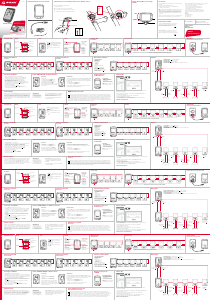
Start-up:
Your bike computer comes in “deep sleep mode”.
When using it for the first time, please press and
hold the SET button for 5 seconds. The bike computer
will then switch to active mode.
Wheel size determination:
To measure the speed precisely, the wheel size must
be set according to your tire size. To do this, you can:
A – Select one of the predefined wheel sizes.
B – Calculate the wheel size using the formula
provided in the wheel size chart.
C – Determine the value from the drawings in
the wheel size chart.
D – Take the value that corresponds to your tire size
from the wheel size chart.
PC interface:
The bike computer is PC-compatible. By purchasing
the SIGMA DATA CENTER software and docking
station, you can effortlessly download and analyze
your total and current values on your PC.
You can also configure your bike computer’s settings
on the PC.
Troubleshooting:
No Speed, or incorrect speed displayed:
– Computer correctly fastened into the bracket?
– Distance to magnet and sensor checked?
– Magnet correctly positioned in relation to the
sensor?
– Wheel circumference correctly set?
For FAQs and trouble shooting solutions,
visit www.sigmasport.com
Technical data:
Computer WIRED:
– Battery type: CR 2032, 3V
– Battery life: 3 to 4 years
(When used for 1 hour per day)
Warranty:
SIGMA SPORT provides a 2 year warranty for your
computer from the date of purchase. The warranty
covers material and workmanship defects on the
computer itself, the sensor/transmitter and the
handlebar bracket. The warranty does not cover
the cable, the batteries or any assembly materials.
The warranty is only valid if the affected parts have
not been opened (exception: computer’s battery
compartment), no force has been used and there is
no intentional damage. Please store your receipt of
purchase in a safe place as it must be presented
in the event of a complaint. If your complaint is
justified, we will provide you with you a comparable
replacement device.
There is no entitlement to a replacement device in the
identical model if the model subject to complaint has
gone out of production due to a model change.
In case of complaints or warranty claims, please
contact the specialist retailer from whom you
purchased the device. Alternatively, send your
complaint directly to:
SIGMA-ELEKTRO GmbH
Dr.-Julius-Leber-Strasse 15
D-67433 Neustadt/Weinstraße
Tel.: +49-(0) 63 21-91 20-1 18
Fax.: +49-(0) 63 21-91 20-34
In the event of justified warranty claims, you will
receive wa replacement device. You will only be
entitled to the model available at the time of
replacement. The manufacturer retains the right to
make technical modifications.
You can find a complaints form on our website:
claim.sigmasport.com
You can find the CE declaration at:
certificates.sigmasport.com
EN
Erste Inbetriebnahme:
Im Lieferzustand befindet sich der Fahrrad Computer
in einem Tiefschlaf-Modus. Bei der ersten Inbetrieb-
nahme bitte die SET-Taste für 5 Sekunden lang
gedrückt halten. Der Fahrrad Computer geht dann in
den aktiven Modus.
Radgrößenbestimmung:
Um die Genauigkeit der Geschwindigkeitsmessung zu
erreichen, muss die Radgröße entsprechend Ihrer
Reifengröße eingestellt werden. Dafür können Sie:
A – aus vordefinierten Radgrößen auswählen.
B – Die Radgröße anhand der aus der Tabelle
„Wheel Size“ angegebenen Formel berechnen.
C – Den Wert gemäß den Zeichnungen aus
„Wheel Size“ ermitteln.
D – Aus der Tabelle „Wheel Size“ den Ihrer
Reifengöße entsprechenden Wert übernehmen.
PC Interface:
Der Fahrrad Computer ist PC-fähig. Nach Kauf der
SIGMA DATA CENTER Software und der Docking
Station können Sie die Gesamt- und aktuellen Werte
einfach und mühelos auf Ihrem PC protokollieren.
Darüber hinaus können Sie die Einstellungen des
Fahrradcomputers am PC vornehmen.
Problemlösung:
Keine oder falsche Geschwindigkeitsanzeige:
– Computer richtig in der Halterung eingerastet?
– Abstand zu Magnet und Sensor überprüft?
– Magnet zum Sensor richtig positioniert?
– Radumfang richtig eingestellt?
Weitere Problemlösungen erhalten Sie aus unseren
Fragen und Antworten unter www.sigmasport.com
Technische Daten:
Computer KABELGEBUNDEN:
– Batterietyp: CR 2032, 3V
– Batterielebensdauer: 3 bis 4 Jahre
(Bei einer Benutzung von 1 Stunde pro Tag)
Garantiebestimmungen:
SIGMA SPORT gewährt für Ihren Computer eine
Garantie von 2 Jahren ab Kaufdatum. Die Garantie
erstreckt sich auf Material- und Verarbeitungsfehler
am Computer selbst, am Sensor/Sender und an der
Lenkerhalterung. Kabel und Batterien sowie Montage-
materialien sind von der Garantie ausgeschlossen.
Die Garantie ist nur dann gültig, wenn die betroffenen
Teile nicht geöffnet wurden (Ausnahme: Batteriefach
des Computers), keine Gewalt angewendet wurde
und keine mutwillige Beschädigung vorliegt. Bitte
bewahren Sie den Kaufbeleg sorgfältig auf, da er im
Reklamationsfall vorgelegt werden muss. Bei einer
berechtigten Reklamation erhalten Sie von uns ein
vergleichbares Austauschgerät.
Anspruch auf Ersatz des identischen Modells besteht
nicht, wenn durch Modellwechsel die Produktion des
reklamierten Modells eingestellt wurde. Bitte wenden
Sie sich mit allen Reklamationen und Garantieansprü-
chen an Ihren Fachhändler, bei dem Sie das Gerät
gekauft haben. Oder senden Sie Ihre Reklamation
direkt an:
SIGMA-ELEKTRO GmbH
Dr.-Julius-Leber-Strasse 15
D-67433 Neustadt/Weinstraße
Tel.: +49-(0) 63 21-91 20-1 18
Fax.: +49-(0) 63 21-91 20-34
Bei berechtigten Ansprüchen auf Gewährleistung
erhalten Sie ein Austauschgerät. Es besteht nur
Anspruch auf das zu diesem Zeitpunkt aktuelle Modell.
Der Hersteller behält sich technische Änderungen vor.
Sie finden ein Reklamations-Formular auf unserer
Website claim.sigmasport.com
Sie finden die Konformitäts-Erklärung unter folgendem
Link: certificates.sigmasport.com
DE
Mise en service :
A la livraison, le compteur cycle se trouve dans un
état de veille profonde. Lors de la première mise en
service, maintenir la touche SET enfoncée pendant
5 secondes. Le compteur cycle est ensuite actif.
Détermination de la taille des roues :
Pour obtenir une mesure précise de la vitesse, la
taille des roues doit être réglée en fonction de la
taille de vos pneumatiques. A cette fin, vous pouvez :
A – Sélectionner parmi une liste de grandeurs des
roues prédéfinies.
B – Calculer la grandeur des roues au moyen de la
formule du tableau “Wheel Size”.
C – Déterminer la valeur conformément aux schémas
du “Wheel Size”.
D – Reprendre la valeur adéquate pour la grandeur
de vos roues dans le tableau “Wheel Size”.
PC Interface :
Le compteur cycle est compatible PC. Après avoir
acheté le logiciel SIGMA DATA CENTER et la station
de connexion, vous pouvez enregistrer les valeurs
totales et actuelles aisément et sans effort sur votre
PC. Vous pouvez également procéder aux réglages de
votre compteur cycle sur votre PC.
Résolution des problèmes :
Pas d‘affichage de la vitesse ou affichage erroné :
– Compteur correctement enclenché dans son
support ?
– Distance entre l‘aimant et le capteur correcte ?
– Aimant correctement positionné par rapport
au capteur ?
– Circonférence de la roue correctement réglée ?
Vous trouverez la résolution d‘autres problèmes dans
nos FAQ, à l‘adresse www.sigmasport.com
Caractéristiques techniques :
Compteur AVEC FIL:
– Type de pile : CR 2032, 3V
– Autonomie : 3 à 4 ans
(1 heure d‘utilisation par jour)
Garantie :
SIGMA SPORT octroie une garantie de 2 ans à
compter de la date d‘achat sur tous ses compteurs.
Cette garantie couvre les défauts matériels et de
fabrication sur le compteur lui-même, le capteur /
l‘émetteur et le support pour guidon. Les câbles,
piles et matériel de fixation sont exclus de la garantie.
La garantie n‘est valable que lorsque les pièces
concernées n‘ont pas été ouvertes (exception:
compartiment à pile du compteur), il n‘a pas été
fait usage de la force et aucun dommage volontaire
n‘existe. Veuillez conserver soigneusement la preuve
d‘achat car celle-ci devra être présentée en cas de
réclamation. En cas de réclamation justifiée, nous
vous enverrons un appareil de rechange comparable.
Il n‘existe aucun droit au remplacement du modèle
à l‘identique lorsque la production du modèle faisant
l‘objet d‘une réclamation a été arrêtée pour des
raisons liées à des changements de modèle. Veuillez
adresser toutes vos réclamations et demandes en
garantie au revendeur auprès duquel vous avez acheté
l‘appareil. Ou envoyer votre réclamation directement à :
SIGMA-ELEKTRO GmbH
Dr.-Julius-Leber-Strasse 15
D-67433 Neustadt/Weinstraße
Tél.: +49-(0) 63 21-91 20-1 18
Fax: +49-(0) 63 21-91 20-34
Un appareil de remplacement vous sera envoyé si
votre requête est justifiée. Les demandes en garantie
ne peuvent concerner que les modèles actuels. Sous
réserve de modifications techniques par le fabricant.
Vous trouverez un formulaire de réclamation sur notre
site Web, à l‘adresse : claim.sigmasport.com
Vous trouverez la déclaration CE à l’adresse :
certificates.sigmasport.com
FR
Messa in funzione:
Al momento della consegna, il ciclocomputer è in
modalità deep-sleep. Dalla prima messa in servizio,
tenere premuti il tasto SET per 5 secondi.
Il ciclocomputer va in modalità attiva.
Determinazione della misura ruote:
Per avere risultati precisi nella misurazione della
velocità, è necessario impostare le dimensioni delle
ruote conformemente alle dimensioni delle gomme.
A questo scopo è possibile:
A – Scegliere fra misure delle ruote predefinite.
B – Calcolare le dimensioni delle ruote in base alla
formula indicata nella tabella “Wheel Size”.
C – Determinare il valore secondo i disegni nel
documento “Wheel Size”.
D – Acquisire dalla tabella “Wheel Size” il valore
corrispondente alle dimensioni delle gomme
PC Interface:
Il ciclocomputer è compatibile con PC. Dopo l’acquisto
del software SIGMA DATA CENTER e della docking
station, potrete archiviare sul PC, con semplicità e
praticità, i valori totali e i valori attuali. Inoltre, potrete
eseguire le impostazioni del ciclo computer dal PC.
Risoluzione dei problemi:
Nessuna indicazione di velocità o indicazione di
velocità errata:
– Il computer è scattato correttamente in posizione
nel supporto?
– La distanza fra magnete e sensore è stata
verificata?
– Il magnete è stato posizionato correttamente
rispetto al sensore?
– La circonferenza ruota è stata correttamente
impostata?
Ulteriori soluzioni ai problemi possono essere acquisite
tramite le FAQ all’indirizzo www.sigmasport.com
Dati tecnici:
Computer DOTATO DI CAVI:
– Tipo di batteria: CR 2032, 3V
– Durata della batteria: da 3 e 4 anni
(a fronte di un utilizzo di 1 ora al giorno)
Garanzia:
Per il vostro computer SIGMA SPORT offre una
garanzia di 2 anni dalla data d’acquisto. La garanzia
si estende ai difetti di materiali e di fabbricazione del
computer, del sensore e del supporto per manubrio.
I cavi e le batterie, nonché il materiale per il
montaggio, sono esclusi dalla garanzia. La garanzia
è valida soltanto quando le parti interessate non sono
state aperte (eccezione: vano batteria del computer),
non è stata esercitata forza e non è presente alcun
danno intenzionale. Conservare con cura la ricevuta
d‘acquisto, in quanto è necessario esibirla in caso di
reclamo. Se il reclamo viene accettato, riceverete un
dispositivo simile in sostituzione.
Non è possibile rivendicare la sostituzione con un
modello identico, se la produzione del modello oggetto
del reclamo è stata interrotta per un cambio del
modello. Per qualsiasi reclamo o richiesta di
intervento in garanzia rivolgersi al rivenditore
specializzato presso il quale è stato effettuato
l‘acquisto. In alternativa inviare il proprio reclamo
direttamente a:
SIGMA-ELEKTRO GmbH
Dr.-Julius-Leber-Strasse 15
D-67433 Neustadt/Weinstraße
Tel.: +49-(0) 63 21-91 20-1 18
Fax.: +49-(0) 63 21-91 20-34
In caso di legittimo diritto alla garanzia, potrete
ottenere un apparecchio sostitutivo. Sussiste solo
il diritto al modello corrente, al momento corrente.
Il produttore si riserva il diritto di apportare modifiche
tecniche.
È possibile trovare un modulo di reclamo sul nostro
sito web: claim.sigmasport.com
La dichiarazione CE è disponibile all‘indirizzo:
certificates.sigmasport.com
Puesta en servicio:
En el estado de suministro, el ciclocomputador se
encuentra en el modo llamado “de sueño profundo”.
En la primera puesta en marcha, mantener
presionada la tecla SET durante 5 segundos.
El ciclo computador pasará al modo activo.
Determinación del tamaño de rueda:
Para lograr precisión en la medición de la velocidad
se debe ajustar el tamaño de la rueda de acuerdo al
tamaño de su neumático. Para ello, puede:
A – Seleccionar entre tamaños de rueda predefinidos.
B – Calcular el tamaño de rueda con ayuda de la
fórmula citada en la tabla “Wheel Size”.
C – Determinar el valor conforme a los dibujos de la
tabla “Wheel Size”.
D – Tomar el valor correspondiente al tamaño de su
neumático de la tabla “Wheel Size”.
Interfaz del ordenador:
El ciclocomputador es compatible con los
ordenadores. Luego de adquirir el software SIGMA
DATA CENTER y la estación de conexión, podrá
registrar los valores totales y actuales sin problema
y rápidamente en su ordenador. Además, podrá
realizar los ajustes del ciclocomputador en el
ordenador.
Solución de problemas:
Ninguna indicación de velocidad o indicación
incorrecta:
– ¿El ordenador está correctamente encastrado en
el soporte?
– ¿Se ha verificado la distancia entre el imán
y el sensor?
– ¿El imán está correctamente posicionado en
relación con el sensor?
– ¿El tamaño de la rueda está bien ajustado?
Podrá obtener más soluciones de problemas en
nuestra sección de preguntas frecuentes en
www.sigmasport.com
Datos Técnicos:
Ordenador CON CABLE:
– Tipo de batería: CR 2032, 3V
– Duración de la batería: 3 a 4 años
(Con un uso de 1 hora diaria)
Garantía:
SIGMA SPORT le brinda garantía sobre su ordenador
por 2 años a partir de la fecha de compra. La
garantía comprende defectos del material y de
fabricación del ordenador en sí, del sensor/transmisor
y del soporte del manillar. Los cables y baterías, así
como los materiales de montaje no están incluidos en
la garantía. La garantía solo será válida siempre que
no se hayan abierto las piezas afectadas (excepción:
compartimento de la pila del ordenador), no se haya
empleado la fuerza y no exista daño intencionado.
Conserve el comprobante de compra para presentarlo
en caso de reclamo. En caso de un reclamo fundado,
recibirá de nuestra parte un equipo equiparable para
su recambio.
No podrá reclamarse el reemplazo del mismo
modelo si la producción del modelo reclamado se
ha suspendido por haber cambiado el modelo. Por
cualquier reclamo o derecho de garantía, póngase
en contacto con el comercio especializado en el
que compró el aparato o bien envíe su reclamo
directamente a:
SIGMA-ELEKTRO GmbH
Dr.-Julius-Leber-Strasse 15
D-67433 Neustadt/Weinstraße
Tel.: +49-(0) 63 21-91 20-1 18
Fax.: +49-(0) 63 21-91 20-34
Si su reclamo de garantía está justificado, recibirá un
aparato nuevo de recambio. Solo puede reclamarse
el modelo actual de ese momento. El fabricante se
reserva el derecho a realizar modificaciones
técnicas.
En nuestra página web claim.sigmasport.com
encontrará un formulario para reclamos.
Puede encontrar la declaración de conformidad CE
en: certificates.sigmasport.com
IT
ES
x 36
press long
x 2
x 1
095160/1
SP 1


Join the conversation about this product
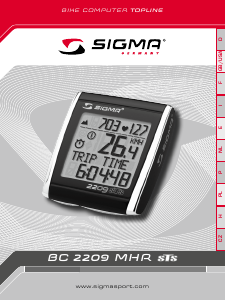
Here you can share what you think about the Sigma BC 5.16 Cycling Computer. If you have a question, first carefully read the manual. Requesting a manual can be done by using our contact form.
reply | This was helpful (126) (Translated by Google)
reply | This was helpful (117) Read more (Translated by Google)
This was helpful (18) (Translated by Google)
reply | This was helpful (80) (Translated by Google)
reply | This was helpful (65) Read more (Translated by Google)
This was helpful (93) (Translated by Google)
reply | This was helpful (56) Read more (Translated by Google)
This was helpful (18) (Translated by Google)
This was helpful (9) (Translated by Google)
Loading…
reply | This was helpful (44) (Translated by Google)
reply | This was helpful (43) (Translated by Google)
reply | This was helpful (36) (Translated by Google)
reply | This was helpful (20) (Translated by Google)
reply | This was helpful (17) (Translated by Google)
reply | This was helpful (10) Read more (Translated by Google)
This was helpful (16) (Translated by Google)
This was helpful (7) (Translated by Google)
This was helpful (6) (Translated by Google)
reply | This was helpful (9) (Translated by Google)
reply | This was helpful (7) (Translated by Google)
reply | This was helpful (5) Read more (Translated by Google)
This was helpful (1) (Translated by Google)
reply | This was helpful (5) Read more (Translated by Google)
This was helpful (1) (Translated by Google)
reply | This was helpful (5) (Translated by Google)
reply | This was helpful (2) Read more (Translated by Google)
This was helpful (3) (Translated by Google)
reply | This was helpful (2)
reply | This was helpful (2) (Translated by Google)
reply | This was helpful (1) (Translated by Google)
reply | This was helpful (1) Read more (Translated by Google)
This was helpful (4) (Translated by Google)
reply | This was helpful (1) (Translated by Google)
reply | This was helpful (0) Read more (Translated by Google)
This was helpful (0) (Translated by Google)
reply | This was helpful (0) (Translated by Google)
reply | This was helpful (0) (Translated by Google)
reply | This was helpful (0) (Translated by Google)
reply | This was helpful (0) Read more (Translated by Google)
This was helpful (0) (Translated by Google)
reply | This was helpful (0) (Translated by Google)
reply | This was helpful (0) (Translated by Google)
reply | This was helpful (0)
reply | This was helpful (0) Read more (Translated by Google)
This was helpful (0) (Translated by Google)
reply | This was helpful (0) (Translated by Google)
reply | This was helpful (0) (Translated by Google)
reply | This was helpful (0) (Translated by Google)
reply | This was helpful (0) Read more (Translated by Google)
This was helpful (0) (Translated by Google)
reply | This was helpful (0) (Translated by Google)
reply | This was helpful (0) (Translated by Google)
reply | This was helpful (0) (Translated by Google)