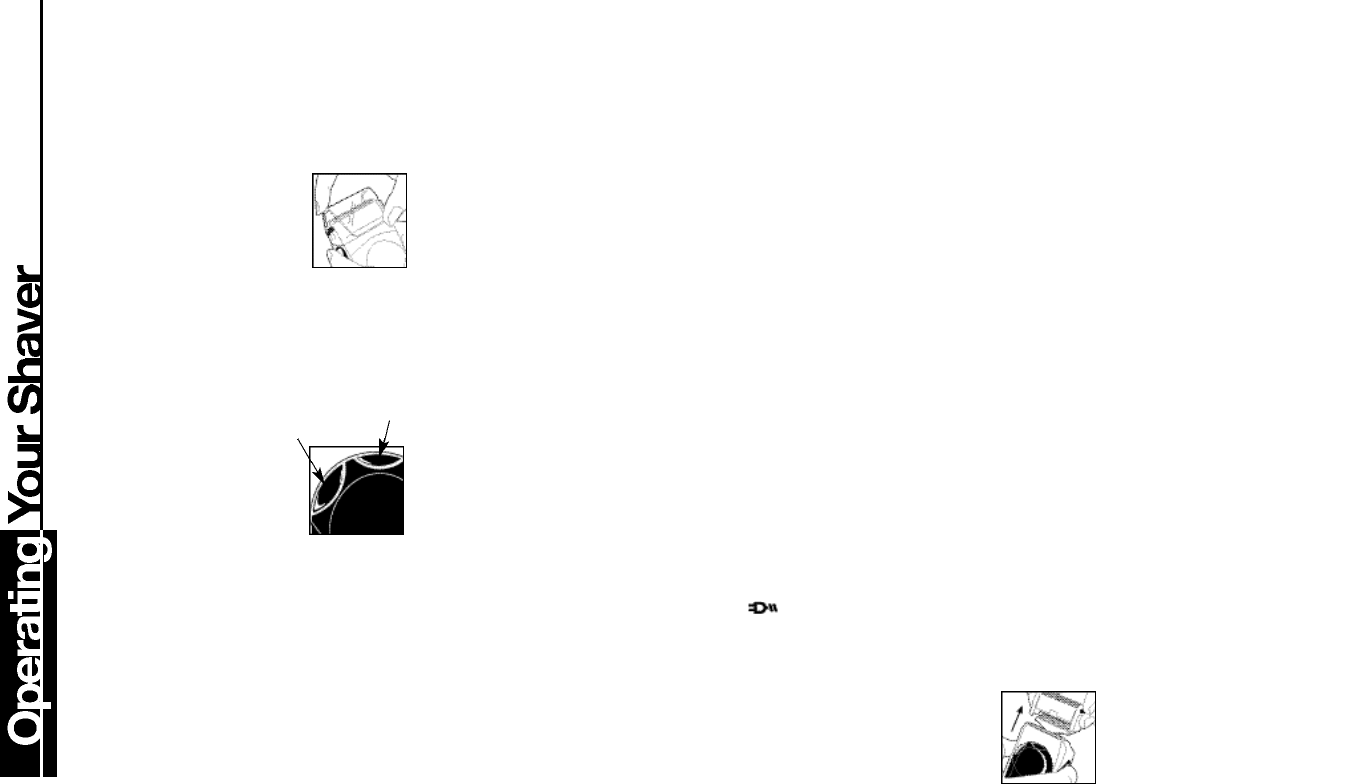
Removing the headguard
Before operating your MicroScreen
®
3 TCT
®
Shaver,
remove the headguard,which protects the screen and
cutter assembly. It is important to remove the headguard
correctly to avoid damaging the clips that hold it firmly to
the shaver.
■ Press lightly on the top of the
head guard.
■ Lift the lower rear edge.
■ Pull the headguard aw ay from
the shaver.
Shaver Operation
Your shaver has a To ggle Power Button that has diff e r e n t
o p e r a ting characteristics depending on which model
shaver you have.
Models MS3-1000 & MS3-2000:
Lower side:ON; Upper side:OFF
Models MS3-3000/MS3-4000/MS3-0004/MS3-3500/
MS3-4500:
Lower side:ON/OFF; Upper side:
Activates & Deactivates the High
Speed Turbo setting.
Trimmer Operation
Your MicroScreen
®
3 TCT
®
shaver is
equipped with a 3-position trimmer.
Position 1: Retracted and out of the way.
Position 2: Long hair intercept with floating action.
(Deployed by pressing LEFT side of trimmer button)
Position 3: Sideburn / Mustache Trimmer
(Deployed by pressing RIGHT side of trimmer button)
The Trimmer can be manually retracted to setting 1
from either setting 2 or setting 3,by pressing down
on the trimmer.
Charging
Prior to using your shaver for the first time, put it on
charge for 24 hours.
To charge your shaver:
■ Make sure your shaver is turned off.
■ Connect the cord to the shaver and then the charging adapter
to the electric outlet.A charging indicator light will come on.
■ Your shaver cannot be overcharged,so you can leave it plugged
in and charging between shaves.
■ Use only the charging adapter supplied with the shaver.
■ The MS3-1000 is designed for cordless operation only. Plugging
in the cord will not provide the power to shave.The MS3-2000/-
3000/-4000/-0004/-3500/-4500 on the other hand,come with a
special feature that allows you to run the shaver directly off the
cord. Your shaver will not recharge while you are shaving,so after
shaving directly from the cord,turn the unit off and set aside to
charge.
■ The MS3-2000/-3000/-4000/-0004/-3500/-4500 will provide
up to two weeks worth of shaving after a one hour charge or a
single shave after five minutes of charging.
Model MS3-1000
The green light indicates that the shaver is chargi n g . Full charge
is achieved in 16 hours.
Model MS3-2000
has a green indicator light to show whether the shaver is either fully
charged or charging.A red low-battery indicator illuminates to show
when the shaver needs rechargi n g . This also indicates ap p r o x i m at e ly
5 minutes of shaving time left when indicator first comes on.
Model MS3-3000/-3500
features a green lighted fuel gauge that displays the amount of
charge remaining in 20% increments.When only 20% of the charge
remains,the recharge red warning light illuminates.
Model MS3-4000/-0004/-4500
has an LCD display numeric indicator to show shaver charge status
in minutes remaining. When the Plug icon comes on, it
indicates approximately 5 to 6 minutes of shaving time left.
Troubleshooting:
■ If your MS3-2000/-3000/-4000/-0004/-3500/-4500 shaver
battery is completely discharged or the shaver has not been used
for an extended period of time,the shaver may not start when
operated using the cord.If this condition occurs, charge the
s h aver for ap p r o x i m at e ly five minutes before shaving.
■ Your MS3-2000/-3000/-4000/-0004/-3500/-4500 cord/cord-
less shaver should not be used strictly as a cord-operated shaver,
as continued cord only use will result in reduction of battery life.
■ In order to preserve the life of the batteries,they should be fully
discharged every six months and then fully charged for 24 hours.
World Wide Voltage (MS3-2000/-3000/-4000/
-0004/-3500/-4500 ONLY)
You can take your MS3-2000/-3000/-4000/-0004/-3500/-4500
shaver with you when you travel to just about anywhere in the world.
Your MicroScreen
®
3 TCT
®
shaver features worldwide automatic dual
voltage conversion providing AC current between 100-240 volts AC,
50-60 Hz.Just plug it in to the local outlet (you may need an
a d apter plug) and use as usual. Your shaver will convert
a u t o m at i c a l l y to the local current requirements.
The MS3-1000 model is a single voltage model (120 VAC,60 Hz).
Battery Removal:
When your rechargeable shaver reaches the end of its useful life,
the batteries must be removed from the shaver and be recycled
or disposed of properly in accordance with your state and local
requirements.
THE FOLLOWING PROCEDURE SHOULD BE FOLLOWED
FOR BATTERY REMOVAL:
■ To avoid a possible electric shock hazard,unplug cord from elec-
tric outlet and shaver.
■ Remove screen assembly by pressing the two side buttons until
the head assembly pulls off.
■ Remove the four corner screws holding the upper housing in
p l a c e . Squeeze the ends of the two blade assemblies to bring
them into alignment with each other. Pull the housing upward to
remove.
Power
Button
Trimmer
Button










Join the conversation about this product
Here you can share what you think about the Remington MS3-4500 MicroScreen 3 Shaver. If you have a question, first carefully read the manual. Requesting a manual can be done by using our contact form.