Manual Remington MS3-4500 MicroScreen 3 Shaver

Need a manual for your Remington MS3-4500 MicroScreen 3 Shaver? Below you can view and download the PDF manual for free in English. This product currently has 2 frequently asked questions, 0 comments and has 0 votes. If this is not the manual you want, please contact us.

Is your product defective and the manual offers no solution? Go to a Repair Café for free repair services.

Manual

Loading…
Cleaning your shaver:
TO ASSURE OPTIMAL PERFORMANCE,IT IS RECOM-
MENDED T H AT YOU CLEAN YOUR SHAVER AFTER EACH
USE.The cutting system of this shaver was designed
to be cleaned by rinsing under warm running water or
by b r u s h i n g .
Cleaning your Remington
®
MicroScreen
®
3 TCT
®
Shaver is
easy. (NOTE: With the MS3-4000,MS3-4500 and MS3-0004
model,the brush icon will blink to remind
you to clean your shaver.)
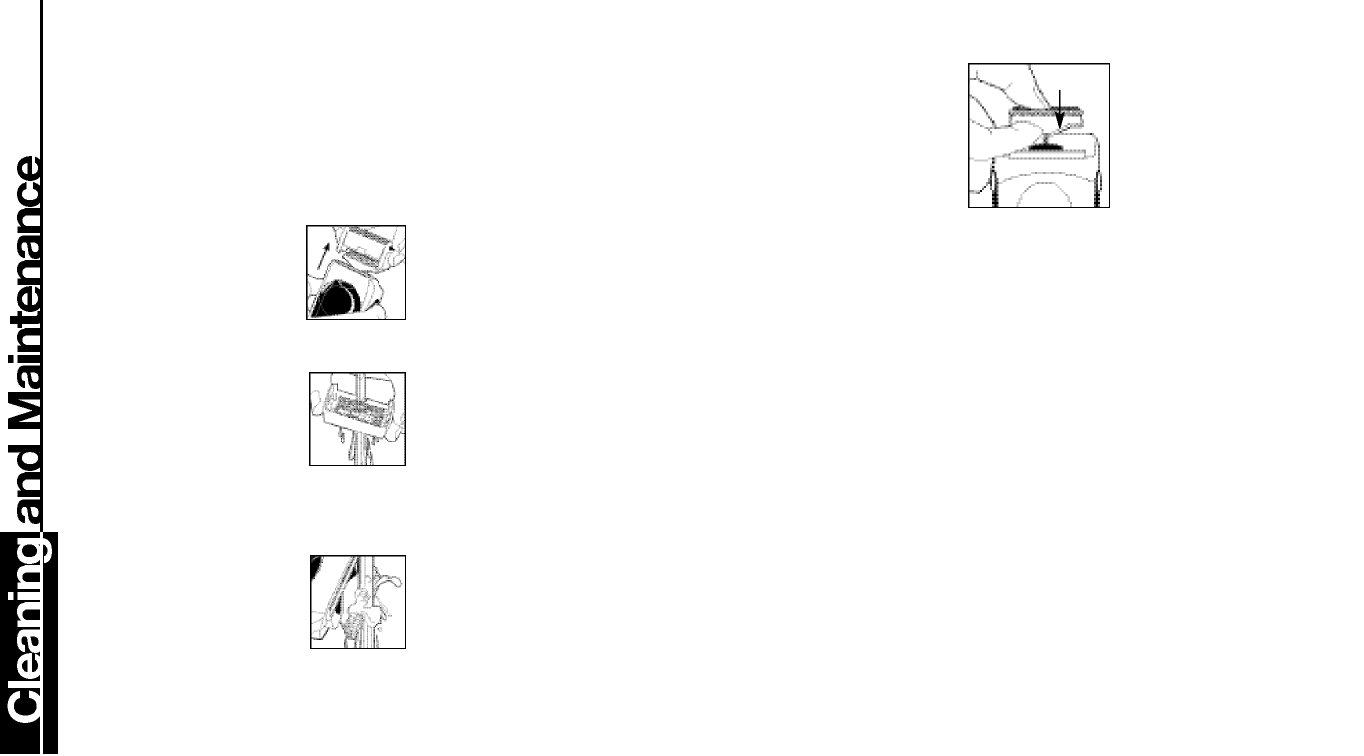
Remove the shaver head by
squeezing on both side buttons and
pulling away from the body of the
shaver. You may blow out the stubble
thoroughly, or rinse the shaver head in water.
Important: Never clean the screen
with the enclosed brush as damage
may occur to the holes in the screen.
At least once a week,the cutters and
the trimmer should be cleaned with the
cleaning brush. You can also rinse the
cutter under running water, like the screen.
Caution: Never put the shaver completely under water.
Do not use any aggressive cleansing agent as this may
destroy the shaver coatings.
To clean and lubricate your shaver’s
cutters and head assembly, apply
Remington Shaver Sav e r
®
( S P - 4 )
L u b r i c a n t . The lubricant helps remove
hair clippings while reducing wear.A
quick spray after each shave keeps your shaver
operating at peak
performance.
Caution: Do not remove or replace the head assembly while shaver
is running as it may cause damage to the unit’s screens or cutters.
Worn or damaged parts should be replaced with Remington
®
replacement parts only.
Replacing Screens and Cutters
Because they are subject to daily use,the cutters and screens
of your Remington
®
MicroScreen
®
3 TCT
®
Shaver will wear and
e v e n t ually require replacement to maintain a close,comfortable
s h av e . Depending on your shaving technique and hab i t s ,t h e
screens will usually last six months; the cutters,one year. (Note:
Model MS3-4000,MS3-4500 and MS3-0004,the screen icon will
blink when it is time to replace the screens). Some signs that your
screens and cutters need replacing are:
Irritation. As screens get worn,you may notice your skin feels
more sensitive after a shave,particularly when you apply aftershave.
Pulling. As cutters wear, your shave may not feel as close,and
you may feel your shaver is pulling at your whiskers.
Wear-through.You may notice that the cutters have worn
through the screens.
To prevent inadvertent damage to the Screen and Cutter
Assembly, do not attempt to remove them unless you are
replacing them. To remove the old screens and cutters follow the
instructions that come with the screen and cutter replacement
package. It’s always a good idea to replace the screens when you
replace the cutters.
To Replace a Cutter Assembly That is Removed
Unintentionally:
Hold the assembly in the middle of
the "T".
Gently slide the plastic portion of the
cutter assembly over the top of the
oscillator tip.
Do not push downward on the ends of
the cutters,as you may bend the cutter,
reducing its ability to operate smoothly.
Do not remove cutters from the plastic
pieces to which they are attached,as you
may damage the assembly.
Download manual in English (PDF, 0.52 MB)
(Consider the environment and only print this manual if it is really necessary)

Loading…

Rating

Let us know what you think about the Remington MS3-4500 MicroScreen 3 Shaver by leaving a product rating. Want to share your experiences with this product or ask a question? Please leave a comment at the bottom of the page.
Are you satisfied with the Remington MS3-4500 MicroScreen 3 Shaver?
Yes No
Be the first to rate this product
0 votes

Join the conversation about this product

Here you can share what you think about the Remington MS3-4500 MicroScreen 3 Shaver. If you have a question, first carefully read the manual. Requesting a manual can be done by using our contact form.

More about this manual

We understand that it’s nice to have a paper manual for your Remington MS3-4500 MicroScreen 3 Shaver. You can always download the manual from our website and print it yourself. If you would like to have an original manual, we recommend you contact Remington. They might be able to provide an original manual. Are you looking for the manual of your Remington MS3-4500 MicroScreen 3 Shaver in a different language? Choose your preferred language on our homepage and search for the model number to see if we have it available.

Specifications

Brand Remington
Model MS3-4500 MicroScreen 3
Category Shavers
File type PDF
File size 0.52 MB

All manuals for Remington Shavers
More manuals of Shavers

Frequently Asked Questions about Remington MS3-4500 MicroScreen 3 Shaver

Our support team searches for useful product information and answers to frequently asked questions. If you find an inaccuracy in our frequently asked questions, please let us know by using our contact form.

In what direction should I shave? Verified

In most cases it is recommended to shave with the direction of hair growth. This reduces the risk of irritated skin and ingrown hair.

This was helpful (207) Read more

What is the difference between vibrating and rotating shaver heads? Verified

This is mostly a matter of personal needs and preference, but in general it can be said that the blades in vibrating shaver heads move faster and therefor offer quicker results. A rotating shaver head can reach certain areas of the face more easily.

This was helpful (190) Read more


Manual Remington MS3-4500 MicroScreen 3 Shaver

Related products

Related categories

×
Download