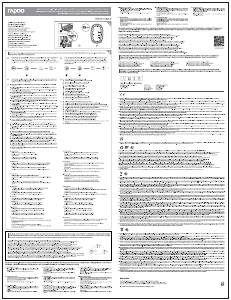
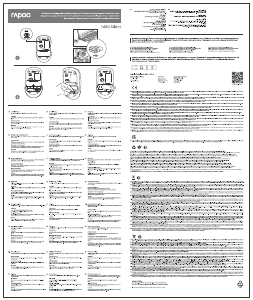
Press device switching button to switch among up to 4 devices including a 2.4G device and 3 Bluetooth devices.
When MT550 connects with the receiver, press device switching button to switch to the most recently paired
Bluetooth device.
Mit Geräteumschalttaste zwischen 4 Geräten umschalten, wozu ein 2,4-GHz-Gerät und 3 Bluetooth-Geräte
zählen. Wenn MT550 eine Verbindung mit dem Empfänger herstellt, wechselt die Geräteumschalttaste zu dem
zuletzt gekoppelten Bluetooth-Gerät wechselt.
Presione el botón de cambio del dispositivo para cambiar entre 4 dispositivos, incluido un dispositivo de 2,4 G y
3 dispositivos Bluetooth. Cuando MT550 se conecte con el receptor, presione el botón de cambio del dispositivo
para cambiar al dispositivo Bluetooth recién asociado.
Нажмите кнопку переключения на устройстве, чтобы переключать до 4 устройств, включая устройство
2.4G и 3 устройства Bluetooth. При подключении MT550 к приемнику нажмите кнопку переключения на
устройстве для переключения на самое последнее устройство сопряжения Bluetooth.
Appuyez sur le bouton de commutation d'appareil pour basculer sur 4 appareils au maximum, dont un appareil
2.4G et 3 appareils Bluetooth. Lorsque la MT550 se connecte avec le récepteur, appuyez sur le bouton de commutation
d'appareil pour basculer sur l'appareil Bluetooth appairé le plus récemment.
Premere il tasto di commutazione dispositivo per passare tra max. 4 dispositivi, inclusi dispositivo 2.4G e 3
dispositivi Bluetooth. Quando l'MT550 si collega al ricevitore, premere il tasto di commutazione del dispositivo
per passare al dispositivo Bluetooth associato più di recente.
Druk op de knop voor het schakelen van het apparaat om te schakelen tussen 4 apparaten, inclusief een
2.4G-apparaat en 3 Bluetooth-apparaten. Wanneer MT550 verbinding maakt met de ontvanger, drukt u op de
knop voor het schakelen van het apparaat om te schakelen naar het meest recent gekoppelde Bluetooth-appa-
raat.
Device switching button
/
Bouton de commutation d'appareil / Geräteumschalttaste
/
Tasto di commutazione dispositivo
/
Botón de cambio del
dispositivo / Knop voor apparaat schakelen / Кнопка переключения устройства
Status LED
/
LED de statut / Status-LED
/
LED di stato
/
LED de estado / Status-LED / Светодиодный индикатор состояния
1. 2.4G indicator
Green LED blinks once.
2. Bluetooth mode
The status of the blue LED remains the same as the
device light.
3. DPI switching indicator
Green LED blinks. It blinks once when you switch to
the first DPI,
blinks twice for the second DPI, blinks three times
for the third
DPI and blinks four times for the fourth DPI.
4. Low power indicator
Green LED blinks twice rapidly every two seconds
when MT550 is working.
1. Indicateur 2.4G
La LED verte clignote une fois.
2. Mode Bluetooth
Le statut de la LED bleue reste le même que l'indicateur
lumineux d'appareil.
3. Indicateur de commutation DPI
La LED verte clignote. Elle clignote une fois lorsque
vous passez sur le premier DPI, clignote deux fois pour
le deuxième DPI, clignote trois fois pour la troisième
DPI et clignote quatre fois pour le quatrième DPI.
4. Indicateur de puissance faible
La LED verte clignote deux fois rapidement toutes les
deux secondes lorsque la MT550 fonctionne.
1. 2,4-GHz-Anzeige
Grüne LED blinkt einmal.
2. Bluetooth-Modus
Der Status der blauen LED bleibt mit dem der
Geräteleuchte identisch.
3. DPI-Umschaltanzeige
Grüne LED blinkt. Sie blinkt einmal, wenn Sie
zum ersten DPI-Wert wechseln, zweimal beim
zweiten DPI-Wert, dreimal beim dritten
DPI-Wert und viermal beim vierten DPI-Wert.
4. Geringe-Leistung-Anzeige
Grüne LED blinkt schnell zweimal alle zwei
Sekunden, wenn MT550 arbeitet.
1. 2.4G индикатор
Светодиодный индикатор зеленого цвета мигает один раз.
2. Режим Bluetooth
Состояние светодиодного индикатора синего цвета остается
таким же, как и подсветки на устройстве.
3. Индикатор переключения DPI
Мигание светодиодного индикатора зеленого цвета. Он мигает
один раз при переключении на первый DPI, мигает два раза при
переключении на второй DPI, мигает три раза при переключении
на третий DPI и четыре раза — на четвертый DPI.
4. Индикатор низкой мощности
Светодиодный индикатор зеленого цвета мигает быстро два раза
каждые две секунды при работе MT550.
1. Indicatore 2.4G
Il LED verde lampeggia una volta.
2. Modalità Bluetooth
Lo stato del LED blu rimane come la spia del
dispositivo.
3. Indicatore di commutazione DPI
Il LED verde lampeggia. Lampeggia una volta
quando si passa al primo DPI, due volte per il
secondo DPI, tre volte per il terzo DPI e quattro
volte per il quarto DPI.
4. Indicatore di carica bassa
Il LED verde lampeggia rapidamente due volte
ogni due secondi quando l'MT550 è in funzione.
1. Indicador de 2,4 G
El LED verde parpadea una vez.
2. Modo Bluetooth
El estado del LED azul permanece igual que la luz
del dispositivo.
3. Indicador de cambio de PPP
El LED verde parpadea. Parpadea una vez cuando
cambia al primer PPP; parpadea dos veces para el
segundo PPP; parpadea tres veces para el tercer
PPP y parpadea cuatro veces para el cuarto PPP.
4. Indicador de carga baja
El LED verde parpadea dos veces rápidamente cada
dos segundos cuando su MT550 está funcionando.
1. 2.4G-indicator
Groene LED knippert één keer.
2. Bluetooth-modus
De status van de blauwe LED blijft dezelfde als de
apparaatlamp.
3. DPI-switch-indicator
Groene LED knippert. Deze knippert eenmaal wanneer
u schakelt naar de eerste DPI, twee keer voor de
tweede DPI, drie keer voor de derde DPI en vier keer
voor de vierde DPI.
4. Indicator laag vermogen
Groene LED knippert twee keer snel elke twee
seconden wanneer MT550 werkt.
A.1.1_5601-09H04-222
We, the manufacturer
Shenzhen Rapoo Technology Co., Ltd.
Fax: +86-0755-2858 8555
Declare that the product
Product Name :Multi-mode Wireless Mouse
Model No :MT550
Complies with the following norms of :
Kai Guo, Manager
R&D Department Date of Issue: Mar.
31, 2018
Declaration of Conformity
Manufacturer/Authorised representative
EN 62479:2010
EN 60950-1:2006+A11:2009+A1:2010+A12:2011+A2:2013
The product is in compliance with the essential requirements of Radio
Equipment Directive 2014/53/EU,and the RoHS Directive 2011/65/EU.
It is forbidden to reproduce any part of this quick start guide without the permission of Shenzhen
Rapoo Technology Co., Ltd.
FCC Statement
This equipment has been tested and found to comply with the limits for a Class B digital device, pursuant to part 15 of the FCC rules. These limits are designed to provide
reasonable protection against harmful interference in a residential installation. This equipment generates, uses and can radiate radio frequency energy and, if not installed
and used in accordance with the instructions, may cause harmful interference to radio communications. However, there is no guarantee that interference will not occur in a
particular installation. If this equipment does cause harmful interference
to radio or television reception, which can be determined by turning the equipment off and on, the user is encouraged to try to correct the interference by one or more of the
following measures:
-Reorient or relocate the receiving antenna.
-Increase the separation between the equipment and receiver.
-Connect the equipment into an outlet on a circuit different from that to which the receiver is connected.
-Consult the dealer or an experienced radio/TV technician for help.
To assure continued compliance, any changes or modifications not expressly approved by the party responsible for compliance could void the user’s authority to operate this
equipment. (Example- use only shielded interface cables when connecting to computer or peripheral devices).
FCC Radiation Exposure Statement
This equipment complies with FCC RF radiation exposure limits set forth for an uncontrolled environment. This transmitter must not be co-located or operating in conjunction
with any other antenna or transmitter.
This equipment complies with Part 15 of the FCC Rules.Operation is subject to the following two conditions:
(1) This device may not cause harmful interference, and
(2) This device must accept any interference received, including interference that may cause undesired operation.
Caution!
The manufacturer is not responsible for any radio or TV interference caused by unauthorized modifications to this equipment. Such modifications could void the user
authority to operate the equipment.
IC RSS warning
This device complies with Industry Canada licence-exempt RSS standard (s). Operation is subject to the following two conditions:
(1) this device may not cause interference, and
(2) this device must accept any interference,including interference that may cause undesired operation of the device.
Le présent appareil est conforme aux CNR d'Industrie Canada applicables aux appareils radio exempts de licence.
L'exploitation est autorisée aux deux conditions suivantes:
(1) l'appareil ne doit pas produire de brouillage, et
(2) l'utilisateur de l'appareil doit accepter tout brouillage radioélectrique subi, même si le brouillage est susceptible d'en compromettre le fonctionnement.
IC Radiation Exposure Statement:
This equipment complies with IC RF radiation exposure limits set forth for an uncontrolled environment. This transmitter must not be co-located or operating in conjunction
with any other antenna or transmitter.
Any Changes or modifications not expressly approved by the party responsible for compliance could void the user’s authority to operate the equipment.
The device is provided with two-year limited hardware warranty from the purchase day. Please see www.rapoo.com for more information.
Wir gewähren eine zweijährige, eingeschränkte Hardware-Garantie ab Kaufdatum. Weitere Informationen finden Sie hier: www.rapoo.com.
L'appareil est fourni avec deux ans de garantie matérielle limitée à compter du jour d'achat. Merci de consulter www.rapoo.com pour plus d'informations.
il dispositivo viene fornito con due anni di garanzia hardware limitata a parite dalla data di acquisto. Per ulteriori informazioni consultare www.rapoo.com.
El dispositivo se proporciona con una garantía de hardware limitada de dos años a partir de la fecha de compra. Consulte la dirección www.rapoo.com para obtener más información.
Het toestel wordt met een tweejarige beperkte hardware-garantie vanaf de aankoopdatum geleverd. Raadpleeg www.rapoo.com voor meer informatie.
Данное устройство предоставляется с ограниченной гарантией на аппаратное обеспечение сроком два года со дня покупки. Более подробную информацию можно найти по адресу www.rapoo.com.
Warranty / Garantie / Garantie / Garanzia / Garantía / Garantie / Гарантия
EN 300 440 V2.1.1(2017-03)
EN 300328 V2.1.1(2016-11)
EN 301 489-1 V2.2.0(2017-03)
EN 301 489-3 V2.1.1(2017-03)
EN 301 489-17 V3.2.0(2017-03)


Join the conversation about this product
Here you can share what you think about the Rapoo MT550 Mouse. If you have a question, first carefully read the manual. Requesting a manual can be done by using our contact form.
reply | This was helpful (0) (Translated by Google)