1
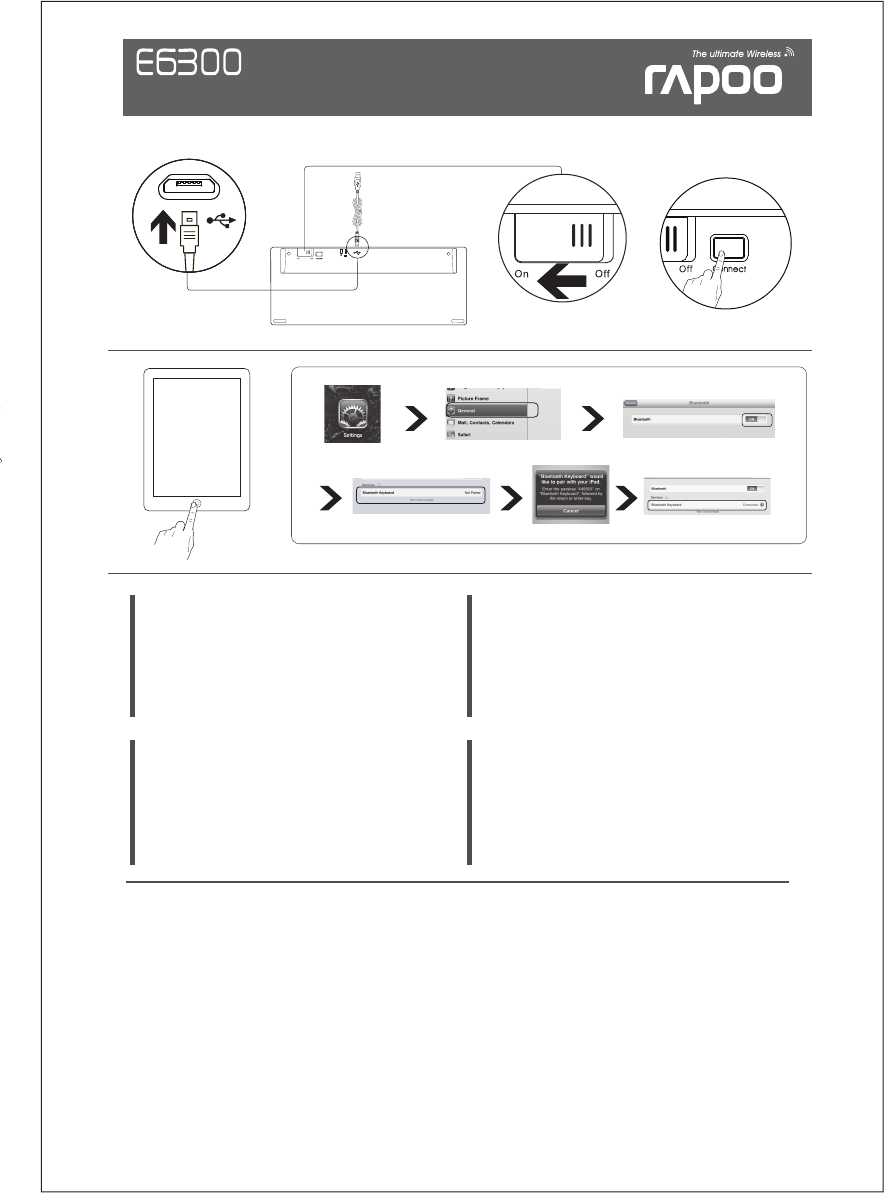
BT Ultra-slim Keyboard for iPad
Quick Start Guide(V1.0)
Warranty
The device is provided with two-year limited hardware warranty from the purchase day. Please see
www.rapoo.com/warranty for more information.
See www.rapoo.com/E6300/faq for latest FAQs, drivers and quick start guide. For extensive service,
register at www.rapoo.com/register.
Troubleshooting
Do not open or repair this device. Do not use the device in a damp environment. Clean the device
with a dry cloth.
Safety instructions
Copyright
It is forbidden to reproduce any part of this quick start guide without the permission of
Rapoo Technology Co., Ltd.
FCC Statement
Canada Statement
Caution!
Garantie
L'appareil est fourni avec deux ans de garantie matérielle limitée à compter du jour d'achat.
Merci de consulter www.rapoo.com/warranty pour plus d'informations.
Consulter www.rapoo.com/E6300/faq pour les toutes dernières questions, les pilotes et le guide de
démarrage rapide. Pour des services étendus, s'inscrire sur www.rapoo.com /register.
Dépannage
Ne pas ouvrir ou réparer cet appareil. Ne pas utiliser l'appareil dans un environnement humide.
Nettoyer l'appareil avec un chiffon sec.
Consignes de sécurité
Droit réservés
Il est interdit de reproduire une quelconque partie de ce guide de démarrage rapide sans la
permission de Rapoo Technology Co., Ltd.
Instruções de segurança
Não abra nem efectue reparações a este dispositivo. Não utilize o dispositivo em ambientes húmidos.
Utilize um pano seco para limpar o dispositivo.
Garantia
Este dispositivo é fornecido com uma garantia de hardware limitada de dois anos com início no dia da compra.
Consulte www.rapoo.com/warranty para mais informações.
Direitos de autor
É proibido reproduzir qualquer parte deste guia de consulta rápida sem a permissão da Rapoo
Technology Co., Ltd.
Visite www.rapoo.com/E6300/faq para consultar as perguntas frequentes, os mais recentes controladores
e o guia de consulta rápida. Para obter assistência mais extensa, registe-se em www.rapoo.com/register.
Resolução de problemas
Garantía
Instrucciones de seguridad
No abra ni repare este dispositivo. No utilice el dispositivo en un entorno húmedo. Limpie el
dispositivo con un paño seco.
El dispositivo se proporciona con una garantía de hardware limitada de dos años a partir de la
fecha de compra. Consulte la dirección www.rapoo.com/warranty para obtener más información.
Copyright
Está terminantemente prohibido reproducir cualquier parte de esta guía de inicio rápido sin el
consentimiento de Rapoo Technology Co., Ltd.
Consulte la página web www.rapoo.com/E6300/faq para obtener la información más reciente
en lo que a preguntas más frecuentes, controladores y guía de inicio rápido se refiere. Para
obtener un servicio amplio, regístrese en at www.rapoo.com/register.
Solucionar problemas
This equipment has been tested and found to comply with the limits for a Class B digital device, pursuant to part 15 of the FCC rules. These limits are designed to provide reasonable protection against harmful
interference in a residential installation. This equipment generates, uses and can radiate radio frequency energy and, if not installed and used in accordance with the instructions, may cause harmful interference
to radio communications. However, there is no guarantee that interference will not occur in a particular installation. If this equipment does cause harmful interference
to radio or television reception, which can be determined by turning the equipment off and on, the user is encouraged to try to correct the interference by one or more of the following measures:
-Reorient or relocate the receiving antenna.
-Increase the separation between the equipment and receiver.
-Connect the equipment into an outlet on a circuit different from that to which the receiver is connected.
-Consult the dealer or an experienced radio/TV technician for help.
To assure continued compliance, any changes or modifications not expressly approved by the party responsible for compliance could void the user’s authority to operate this equipment. (Example- use only
shielded interface cables when connecting to computer or peripheral devices).
This equipment complies with Part 15 of FCC RF Rules. Operation is subject to the following two conditions:
1) This device may not cause interference and
2) This device must accept any interference, including interference that may cause undesired operation of the device.
This device complies with Industry Canada licence-exempt RSS standard(s). Operation is subject to the following two conditions: (1) this device may not cause interference, and (2) this device must accept any
interference, including interference that may cause undesired operation of the device.
Le présent appareil est conforme aux CNR d'Industrie Canada applicables aux appareils radio exempts de licence. L'exploitation est autorisée aux deux conditions suivantes : (1) l'appareil ne doit pas produire
de brouillage, et (2) l'utilisateur de l'appareil doit accepter tout brouillage radioélectrique subi, même si le brouillage est susceptible d'en compromettre le fonctionnement.
The manufacturer is not responsible for any radio or TV interference caused by unauthorized modifications to this equipment. Such modifications could void the user authority to operate the equipment.
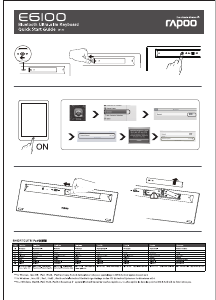
ON


Join the conversation about this product
Here you can share what you think about the Rapoo E6300 Keyboard. If you have a question, first carefully read the manual. Requesting a manual can be done by using our contact form.
reply | This was helpful (8) Read more (Translated by Google)
This was helpful (0) (Translated by Google)
reply | This was helpful (7) (Translated by Google)
reply | This was helpful (0) (Translated by Google)
reply | This was helpful (0) (Translated by Google)
reply | This was helpful (0) (Translated by Google)