
Be careful, the battery strips are sharp.
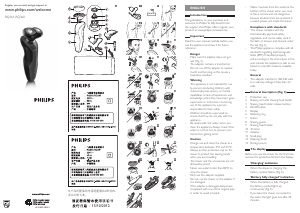
1 Undo the screw in the back panel of
the shaver with a screwdriver (1) and
remove the back panel (2) (Fig. 32).
2 Bend the hooks aside and remove the
power unit (Fig. 33).
3 Break the snap hooks (1) and remove
the front panel of the power unit
(2) (Fig. 34).
4 Take out the battery holder (1) and
cut the battery tags with a pair of
cutting pliers (2) (Fig. 35).
5 Remove the rechargeable battery.
Guarantee and service
If you need service or information or if
you have a problem, please visit the Philips
website at www.philips.com/support or
contact the Philips Consumer Care Centre
in your country. You nd its phone number
in the worldwide guarantee leaet. If there
is no Consumer Care Centre in your
country, go to your local Philips dealer.
Guarantee restrictions
The shaving heads (cutters and guards)
are not covered by the terms of the
international guarantee because they are
subject to wear.
Troubleshooting
This chapter summarises the most common
problems you could encounter with the
appliance. If you are unable to solve the
problem with the information below, visit
www.philips.com/support for a list of
frequently asked questions or contact the
Consumer Care Centre in your country.
Cleaning the trimmer with the
cleaning brush supplied
1 Switch off the trimmer.
2 Clean the trimmer with the short-
bristled side of the cleaning brush.
Brush up and down along the trimmer
teeth. (Fig. 28)
Tip: For optimal trimmer performance,
lubricate the trimmer teeth frequently
with Philips Shaving Head Cleaning Spray
(HQ110).
Storage
Note: Make sure the shaving unit is dry before
you store the shaver.
1 Put the protection cap on the shaver
after use to prevent damage and to
avoid dirt accumulation in the shaving
heads (Fig. 29).
2 Store the shaver in the
pouch supplied.
Replacement
For maximum shaving performance, we
advise you to replace the shaving heads
every two years. Replace damaged shaving
heads right away.
Only replace the shaving heads with original
RQ32 Philips shaving heads. See also
chapter ‘Ordering accessories’.
1 Switch off the shaver.
2 Press the release buttons on the
shaving unit and pull the shaving head
holder off the shaving unit (Fig. 14).
3 To unlock the orange retaining ring,
turn it in the direction of the arrows
indicated in and on the retaining
ring (Fig. 18).
4 Lift the retaining ring out of the
shaving head holder (Fig. 19).
5 Remove the shaving heads and place
new ones in the shaving head holder.
Make sure the two wings of the shaving
heads t exactly into the recesses.
6 Place the retaining ring back onto the
shaving head holder (1). To reattach
the retaining ring, turn it against the
direction of the arrows indicated in
and on the retaining ring (2) (Fig. 25).
Note: Make sure the retaining ring is xed
properly. The four wings of the retaining ring
have to be located exactly under the recesses
of the shaving head holder (Fig. 26).
7 Reattach the shaving head holder to
the shaving unit (‘click’) (Fig. 16).
Note: If the shaving unit does not close
smoothly, check if you have positioned the
shaving heads properly and if the retaining
rings are xed properly.
Ordering accessories
To purchase accessories for this appliance,
please visit our online shop at
www.shop.philips.com/service. If the
online shop is not available in your country,
go to your Philips dealer or a Philips service
centre. If you have any difculties obtaining
accessories for your appliance, please
contact the Philips Consumer Care Centre
in your country. You nd its contact details
in the worldwide guarantee leaet.
The following accessories are available:
- RQ32 Philips shaving heads
- HQ110 Philips Shaving Head Cleaning
Spray
Environment
- Do not throw away the appliance
with the normal household waste at
the end of its life, but hand it in at an
ofcial collection point for recycling.
By doing this, you help to preserve the
environment (Fig. 30).
- The built-in rechargeable shaver battery
contains substances that may pollute
the environment. Always remove the
battery before you discard or hand in
the shaver at an ofcial collection point.
Dispose of the battery at an ofcial
collection point for batteries. If you
have trouble removing the battery, you
can also take the appliance to a Philips
service centre. The staff of this centre
will remove the battery for you and will
dispose of it in an environmentally safe
way (Fig. 31).
Removing the rechargeable
shaver battery
Only remove the rechargeable battery
when you discard the shaver. Make sure
the rechargeable battery is completely
empty when you remove it.
Problem Possible
cause
Solution
The travel
lock is
activated.
To deactivate
the travel lock,
press and hold
the on/off
button until
the travel lock
symbol stops
ashing and
the motor
starts running.
The tem-
perature of
the shaver
is too high.
In this case,
the shaver
does not
work.
Let the shaver
cool down. As
soon as the
temperature
of the shaver
has dropped
sufciently, you
can switch
on the shaver
again.
When you
remove
the adapter
from the
wall socket
and leave
the small
plug in the
shaver, the
shaver does
not work
for a few
seconds.
Remove the
small plug
from the
shaver.
The
shaver
does not
work,
even
though
it is con-
nected to
the mains.
This shaver
is not
designed
to be used
directly
from the
mains.
Remove
the adapter
from the
wall socket
and the small
plug from the
shaver. You can
now switch
on the shaver
again.
Problem Possible
cause
Solution
The
shaver
does not
shave as
well as it
used to.
The shaving
heads are
damaged
or worn.
Replace the
shaving heads
(see chapter
‘Replace-
ment’).
The shaving
heads are
dirty.
Clean the
cutters and
guards with
the cleaning
brush supplied
(see chapter
‘Cleaning and
maintenance’,
section ‘Extra-
thorough
cleaning
method’).
Long hairs
obstruct
the shaving
heads.
Clean the
cutters and
guards with
the cleaning
brush supplied
(see chapter
‘Cleaning and
maintenance’,
section ‘Extra-
thorough
cleaning
method’).
Shaving
foam or
shaving gel
has accu-
mulated in
the shaving
heads.
Rinse the
shaving heads
thoroughly
with a suf-
cient amount
of water.
The
shaver
does not
work
when I
press the
on/off
button.
The re-
chargeable
battery is
empty.
Recharge
the battery
(see chapter
‘Charging’).


Join the conversation about this product
Here you can share what you think about the Philips RQ360 Shaver. If you have a question, first carefully read the manual. Requesting a manual can be done by using our contact form.