
’Battery low’ indication
- When the battery is almost empty, the
plug symbol starts ashing (Fig. 6).
- When you switch off the shaver, the
plug symbol continues to ash for a
few more seconds.
Travel lock
You can lock the shaver when you are going
to travel. The travel lock prevents the shaver
from being switched on by accident.
Note: The travel lock cannot be activated
when the shaver is connected to the mains.
Activating the travel lock
1 Press and hold the on/off button until
the travel lock symbol stops ashing
and the motor stops running (Fig. 7).
The travel lock is now activated.
Note: If you release the on/off button before
the travel lock symbol stops ashing, the travel
lock is not activated.
Deactivating the travel lock
1 Press and hold the on/off button until
the travel lock symbol stops ashing
and the motor starts running.
The shaver is now ready for use again.
Note: When you start charging, the travel lock
is deactivated automatically.
Charging
It takes approx. 60 minutes to fully charge
the battery.
When you charge the shaver for the rst
time or after a long period of disuse, let it
charge for 90 minutes.
A fully charged shaver provides up to 40
shaving minutes.
If you have a heavy beard, the shaver may
provide less than 40 shaving minutes. The
number of shaving minutes may also vary
over time, depending on your shaving
behaviour, cleaning habits and beard type.
Charging
Do not charge the shaver in a closed
pouch or in the packaging.
1 Put the small plug in the shaver.
2 Put the adapter in the wall socket.
, The battery symbol on the shaver
ashes to show that the shaver is
charging (see chapter ‘The display’).
Note: When you remove the adapter from the
wall socket and leave the small plug in the
shaver, the shaver may not work for a few
seconds.
Using the shaver
Note: You cannot use the shaver while it is
connected to the mains.
Shaving
Skin adaptation period
Your rst shaves may not bring you the
result you expect and your skin may even
become slightly irritated. This is normal. Your
skin and beard need time to adapt to any
new shaving system.
We advise you to shave regularly (at least
3 times a week) for a period of 3 weeks to
allow your skin to adapt to the new shaver.
During this period, use your new electric
shaver exclusively and do not use other
shaving methods. If you use different shaving
methods, it is more difcult for your skin to
adapt to the new shaving system.
1 Press the on/off button to switch on
the shaver.
2 Move the shaving heads over your
skin. Make both straight and circular
movements (Fig. 8).
3 Press the on/off button to switch off
the shaver.
4 Clean the shaver after every
shave (see chapter ‘Cleaning and
maintenance’).
Wet shaving
You can also use this shaver on a wet face
with shaving foam or shaving gel.
To shave with shaving foam or shaving gel,
follow the steps below:
1 Apply some water to your skin.
2 Apply shaving foam or shaving gel to
your skin.
3 Rinse the shaving unit under the tap
to ensure that the shaving unit glides
smoothly over your skin.
4 Press the on/off button to switch on
the shaver.
5 Move the shaving heads over your
skin. Make both straight and circular
movements.
Note: Rinse the shaver under the tap regularly
to ensure that it continues to glide smoothly
over your skin.
6 Dry your face and thoroughly rinse
the shaver with a sufcient amount
of water after every shave. Make sure
you rinse all foam or shaving gel off
the shaver (see also chapter ‘Cleaning
and maintenance’).
Trimming
You can use the trimmer to groom
your sideburns and moustache.
1 Pull the shaving unit straight off the
shaver (Fig. 9).
Note: Do not twist the shaving unit while you
pull it off the shaver.
2 Insert the lug of the trimmer into the
slot in the top of the shaver (1). Then
press down the trimmer (2) to attach
it to the shaver (‘click’) (Fig. 10).
3 Press the on/off button to switch
on the trimmer. You can now start
trimming.
4 Press the on/off button to switch off
the trimmer.
5 Pull the trimmer straight off the
shaver (Fig. 11).
Note: Do not twist the trimmer while you pull
it off the shaver.
6 Insert the lug of the shaving unit into
the slot in the top of the shaver
(1). Then press down the shaving
unit (2) to attach it to the shaver
(‘click’) (Fig. 12).
Cleaning and maintenance
Never use scouring pads, abrasive cleaning
agents or aggressive liquids such as petrol
or acetone to clean the shaver and its
accessories.
- Clean the shaver after every shave.
- Clean the shaving heads frequently
with Philips Shaving Head Cleaning
Spray (HQ110) for optimal shaving
performance.
- You can clean the outside of the
shaver with a damp cloth. Do not clean
the shaving unit with a cloth.
Cleaning the shaving unit
Be careful with hot water. Always check if
the water is not too hot, to prevent your
hands from getting burnt.
1 Switch off the shaver.
2 Rinse the shaving unit under a hot tap
for some time (Fig. 13).
Note: You can also clean the shaving unit with
the cleaning brush supplied.
3 After rinsing the appliance under the
tap, hold it upright for 10-15 seconds
to allow water to run out of the
bottom.
4 Press the release buttons on the
shaving unit (1) and pull the shaving
head holder off the shaving unit
(2). (Fig. 14)
5 Rinse the shaving head holder under a
hot tap for 30 seconds (Fig. 15).
Note: You can also clean the shaving head
holder with the cleaning brush supplied.
6 Carefully shake off excess water and
let the shaving head holder dry.
Never dry the shaving head holder with
a towel or tissue, as this may damage the
shaving heads.
7 Reattach the shaving head holder
to the shaving unit (‘click’) (Fig. 16).
Extra-thorough cleaning method
1 Switch off the shaver.
2 Press the release buttons on the
shaving unit (1) and pull the shaving
head holder off the shaving unit
(2) (Fig. 17).
3 To unlock the orange retaining ring,
turn it in the direction of the arrows
indicated in and on the retaining
ring (Fig. 18).
4 Lift the retaining ring out of the
shaving head holder. (Fig. 19)
5 Remove the cutter and the shaving
guard (Fig. 20).
Note: Do not clean more than one cutter
and shaving guard at a time, since they are
all matching sets. If you accidentally put a
cutter in the wrong shaving guard, it may
take several weeks before optimal shaving
performance is restored.
6 Clean the cutter with the cleaning
brush supplied (Fig. 21).
7 Clean the inside of the shaving
guard (Fig. 22).
8 After cleaning, place the shaving guard
back into the shaving head holder.
Make sure the two wings t exactly
into the recesses of the shaving head
holder (Fig. 23).
9 Place the cutter back into the shaving
guard with the cutter legs pointing
downwards (Fig. 24).
10 Place the retaining ring back onto the
shaving head holder (1). To reattach
the retaining ring, turn it against the
direction of the arrows indicated in
and on the retaining ring (2) (Fig. 25).
Note: Make sure the retaining ring is xed
properly. The four wings of the retaining ring
have to be located exactly under the recesses
of the shaving head holder (Fig. 26).
11 Reattach the shaving head holder to
the shaving unit (‘click’). (Fig. 16)
Note: If the shaving unit does not close
smoothly, check if you have positioned the
shaving heads properly and if the retaining
rings are xed properly.
Cleaning the trimmer
Clean the trimmer after every use.
Cleaning the trimmer under the
tap
1 Switch on the appliance with the
trimmer attached.
2 Rinse the trimmer under a hot tap for
some time. (Fig. 27)
3 After cleaning, switch off the appliance.
4 After rinsing the appliance under the
tap, hold it upright for 10-15 seconds
to allow water to run out of the
bottom.


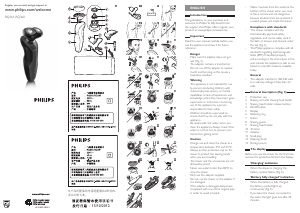

Join the conversation about this product
Here you can share what you think about the Philips RQ360 Shaver. If you have a question, first carefully read the manual. Requesting a manual can be done by using our contact form.