
ENGLISH
Introduction
With Douwe Egberts SENSEO
\
coffee pods, you can
enjoy a perfect cup of coffee at any time of the day. Every
cup is freshly brewed to give you that smooth and full
taste.
Using more than 250 years of coffee expertise, Douwe
Egberts has roasted and ground specially selected coffee
beans that, when prepared using a special brewing
method co-developed with Philips, ensure a full, smooth
taste and delicious foam layer. This joint creation, known
as the SENSEO
\
coffee pod system, consists of the
Philips SENSEO
\
coffee machine and specially developed
Douwe Egberts SENSEO
\
coffee pods. Only when used
together will you be rewarded with a sensational cup of
SENSEO
\
coffee with the delicious SENSEO
\
foam layer.
To ensure a smooth and full coffee taste, you should keep
the following things in mind:
Fresh water
Use fresh water every day. If you have not used the coffee
machine for three days, you have to ush it with fresh
water before you use it again (see section ‘Flushing’ in
chapter ‘Cleaning’).
Fresh coffee pods
Use the SENSEO
\
coffee pods that have been specially
developed by Douwe Egberts for your SENSEO
\
coffee
machine for a full, round taste. The Douwe Egberts
SENSEO
\
coffee pods will stay fresh longer if you store
them in an airtight storage container.
A clean machine
Clean and descale your Philips SENSEO
\
coffee machine
regularly (see chapters ‘Cleaning’ and ‘Descaling’). Remove
used coffee pods after brewing. If a used pod has been
left in the coffee machine and you have not used the
machine for some time, ush the machine before you use
it again (see section ‘Flushing’ in chapter ‘Cleaning’).
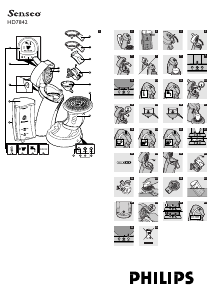
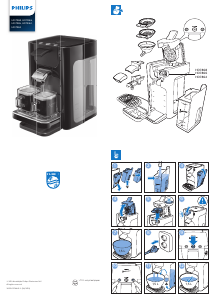
General description (Fig. 1)
A Display
1 Heat-up indication
2 Coffee volume indication
3 Water rell indication
4 Descaling indication
B Volume select button
C Outow valve
D Water reservoir
E Grip area
F Sealing ring
G Water distribution disc
H 1-cup pod holder q
I 2-cup pod holder qq
J Cover of coffee spout
K Coffee spout
L Coffee collector
M Cup tray
N Drip tray
O 1-cup button q
P Water level light rings
Q On/off button with indicator light
R 2-cup button qq
Important
Read these instructions for use carefully before using the
machine and save them for future reference.
Check if the voltage indicated on the bottom of
the machine corresponds to the local mains voltage
before you connect the machine.
If the mains cord is damaged, it must be replaced
by Philips, a service centre authorised by Philips
or similarly qualied persons in order to avoid a
hazard.
To prevent unexpected contact with hot water,
always make sure the lid of the SENSEO
\
machine
is properly locked before you start using the
machine.
Never put normal ground coffee or use torn pods
in the SENSEO
\
machine, as this will cause it to
become blocked.
Do not use the machine in combination with
a transformer, as this could cause hazardous
situations.
Put the machine on a at, stable surface.
Never let the machine operate unattended.
,
,
,
,
,
,
,
Do not use the machine at altitudes higher than
2200 metres above sea level.
The machine does not work at temperatures below
10°C.
Flush the coffee machine with fresh water before
using it for the rst time (see chapter ‘Preparing
the machine for use’). This will cause the boiler to
ll with water, which is essential for the machine to
work properly.
This appliance is not intended for use by persons
(including children) with reduced physical, sensory
or mental capabilities, or lack of experience and
knowledge, unless they have been given supervision
or instruction concerning use of the appliance by a
person responsible for their safety.
Children should be supervised to ensure that they
do not play with the appliance.
Do not use the SENSEO
\
machine in combination
with water softeners based on sodium exchange.
Be careful not to scratch or otherwise damage the
metal housing and the water reservoir with any
hard object or to bang them against a sharp edge.
Electromagnetic elds (EMF)
This Philips appliance complies with all standards
regarding electromagnetic elds (EMF). If handled
properly and in accordance with the instructions in this
instruction manual, the appliance is safe to use according
to scientic evidence available today.
Preparing the machine for use
YOU CANNOT BREW COFFEE IF YOU HAVE NOT
FLUSHED THE SENSEO
\
COFFEE MACHINE FIRST!
Note that the display will not work until you have
ushed the machine.
The ushing cycle causes the boiler to be lled with
water. After this the coffee machine is ready for use.
Flush the machine in the following way:
1 Remove the water reservoir (Fig. 2).
2 Fill the water reservoir with cold water up to the
MAX indication and put it back onto the machine
(Fig. 3).
3 Release the lid by moving the lever upwards (Fig. 4).
4 Open the lid (Fig. 5).
5 Put the 1-cup pod holder q or the 2-cup pod
holder qq in the machine without pod(s) (Fig. 6).
6 Close the lid and lock the lever (Fig. 7).
Note: Make sure the lever is properly locked by pushing it
down until it snaps home with a click.
Note: Never ush the machine with the lid open. The lid
must be properly locked.
7 Put the plug in an earthed wall socket.
8 Put a bowl (with a capacity of at least 1500 ml)
under the spout openings to collect the water
(Fig. 8).
9 Press the on/off button 3 (Fig. 9).
After pressing the on/off button 3, the display lights up
for a moment and the light rings around the 1-cup button
q and the 2-cup button qq burn continuously.
10 Press the 1-cup button q and the 2-cup button
qq briey at the same time. (Fig. 10)
The boiler lls itself with water from the water
reservoir. This may take some time (approx.
90 to 150 seconds). The machine switches off
automatically when the ushing cycle ends. During
the ushing cycle the machine produces more noise
than during a regular brewing cycle.
Never interrupt the ushing cycle halfway. If you do, the
boiler will not ll itself properly.
Note: Before you use the machine for the rst time, clean
the coffee spout, the coffee collector and the pod holders
with hot water and some washing-up liquid or in the
dishwasher. Clean the water reservoir thoroughly in hot
water, if necessary with some washing-up liquid.
Now your Philips SENSEO
\
coffee machine is ready for
use.
,
,
,
,
,
,
,
,
Brewing coffee
1 Fill the water reservoir with cold water up to
the MAX indication and put it back onto the
machine (Fig. 3).
Never pour milk, coffee, hot water or carbonated water
into the water reservoir.
q MIN: minimum amount of water required to brew
1 cup of SENSEO
\
coffee.
qq MIN: minimum amount of water required to
brew 2 cups of SENSEO
\
coffee.
A full reservoir allows you to make 6 large cups h, 7
medium cups g or
10 small cups f of SENSEO
\
coffee. This makes it
unnecessary to ll the water reservoir each time you
want to make a cup of coffee.
2 Press the on/off button 3. (Fig. 9)
The indicator light blinks slowly and the display
shows the heat-up indication D while the water is
heating up. Heating up takes approx. 90 seconds
(Fig. 11).
The coffee machine is ready for use when the
indicator light burns continuously and the light rings
around the 1- cup button q and the 2-cup button
qq go on.
If the indicator light blinks rapidly and the display
shows the water rell indication s, the water
reservoir does not contain enough water for
brewing one cup of coffee. (Fig. 12)
If there is not enough water for brewing two cups
of coffee, the light ring around the 2-cup button
qq will not go on and this button cannot be
operated.
3 Release the lid by moving the lever upwards (Fig. 4).
4 Open the lid.
5 Place the appropriate pod holder in the machine.
Note: Make sure the pod holder is clean and the sieve in the
centre is not clogged, e.g. with loose coffee grounds.
If you want to make one cup of SENSEO
\
coffee,
use 1 coffee pod in combination with the 1-cup pod
holder q and the 1-cup button q (Fig. 13).
If you want to make two cups of SENSEO
\
coffee,
use 2 coffee pods in combination with the deeper
2-cup pod holder qq and the 2-cup button qq
(Fig. 14).
6 Place the SENSEO
\
coffee pod(s) properly in the
centre of the pod holder, with the convex side
pointing downwards.
Note: Use SENSEO
\
coffee pods from Douwe Egberts
specially designed for your SENSEO
\
coffee machine for a
full and round taste.
Note: Make sure the coffee in the pod(s) is evenly distributed
and press the pod(s) lightly into the pod holder.
Note: Never put normal ground coffee or use torn pods
in the SENSEO
\
machine, as this will cause it to become
blocked.
Place 1 SENSEO
\
coffee pod in the 1-cup pod
holder q (Fig. 15).
Place 2 SENSEO
\
coffee pods in the 2-cup pod
holder qq (Fig. 16).
7 Close the lid and lock the lever (Fig. 7).
Always check if the lid is properly locked. The lever must
be pushed down until it snaps home with a click.
Never start brewing with the lid open. The lid must be
properly closed.
8 Place one cup or two cups under the spout
openings. You can adjust the height of the coffee
spout by sliding it upwards or downwards (Fig. 17).
The cups you use should have a capacity of at least
100ml when brewing small cups f, 150ml when brewing
medium cups g and 170ml when brewing large cups h
of SENSEO
\
coffee. Do not use cups that are too large,
as they will cause the coffee to get cold more quickly.
9 Select the desired coffee volume by pressing the
volume select button j.
By varying the volume, you will also affect the
strength of the coffee.
Select 1 bar for a small cup of coffee (80
ml) (Fig. 18)
-
-
-
,
,
,
,
,
,
,
,
,




Join the conversation about this product
Here you can share what you think about the Philips HD7842 Senseo Coffee Machine. If you have a question, first carefully read the manual. Requesting a manual can be done by using our contact form.