Manual Panasonic SC-MAX3500 Stereo-set

Need a manual for your Panasonic SC-MAX3500 Stereo-set? Below you can view and download the PDF manual for free in English. This product currently has 0 frequently asked questions, 5 comments and has 0 votes. If this is not the manual you want, please contact us.

Is your product defective and the manual offers no solution? Go to a Repair Café for free repair services.

Manual

Loading…
Confidential
Until:
23 Apr 2018
6
TQBJ2117
6
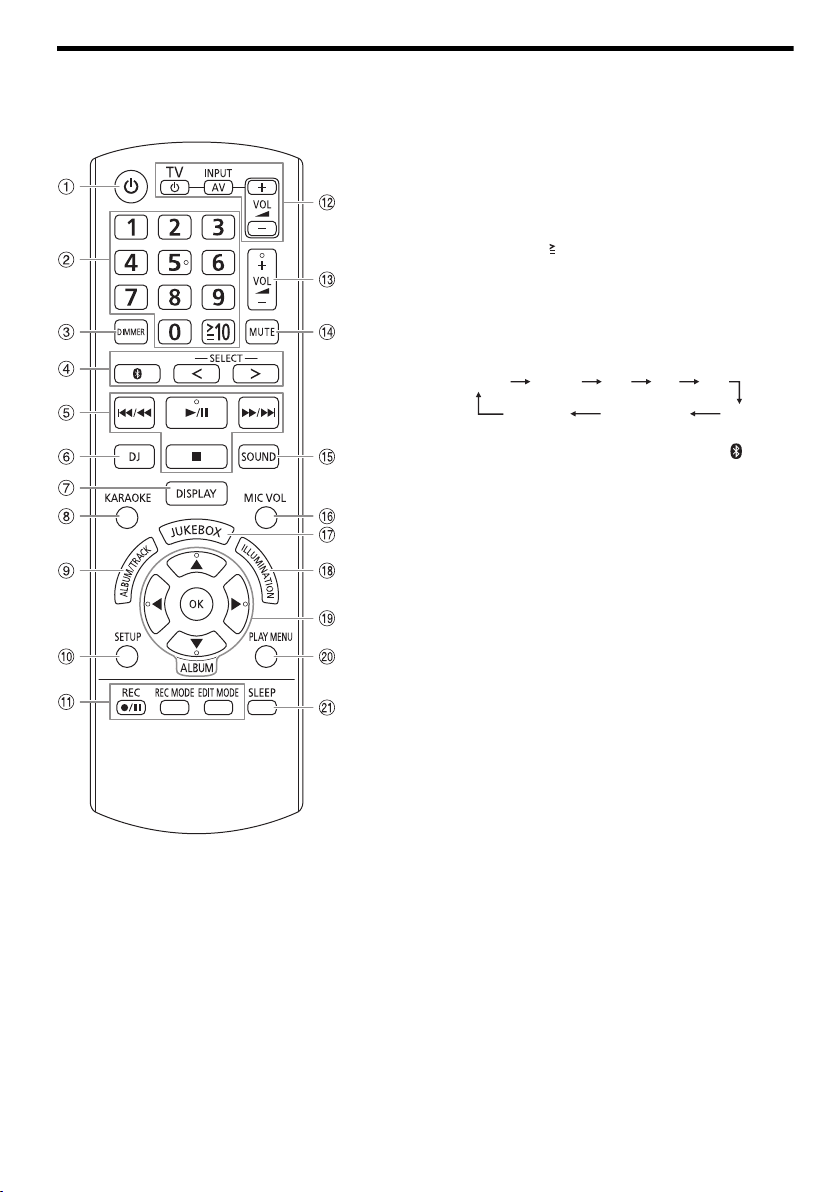
Overview of controls
Do the procedures with the remote control. You can also use the buttons on the main unit if they are the same.
A Standby/on switch [`], [1]
Press to switch the unit from on to standby mode or
vice versa. In standby mode, the unit is still consuming
a small amount of power.
B Numeric buttons
To select a 2-digit number
Example: 16: [ 10]=[1]=[6]
C Decrease the brightness of the display panel
The illumination effect is also switched off.
To cancel, press the button again.
D Select the audio source
Press [SELECT <, >] (main unit: [SELECT])
repeatedly to select the source:
On the main unit:
To start Bluetooth
®
pairing, press and hold [ ].
E Basic playback control
F Select DJ effect or DJ sampler
G View the content information
H Select the Karaoke effects
I Select MP3 album or track
Press [ALBUM/TRACK] to select album or track.
Browse tracks or albums
Press [R, T] or turn [MULTI CONTROL] to browse.
To start playback from the selection, press [4/9].
J View the setup menu
K Recording operation control
L Operate a Panasonic TV (compatible models only)
Point the remote control to a Panasonic TV:
[`/TV]: Switch on or switch off the TV
[AV/INPUT]: Change the video input mode of the TV
[VOL +/–]: Adjust the volume level of the TV
M Adjust the volume level
N Mute the sound
To cancel, press the button again.
“MUTE” is also cancelled when you adjust the volume
or when you switch off the system.
O Select the sound effects
P Adjust the microphone volume level
Q Select DJ jukebox or Karaoke jukebox
R Select the illumination effects
S Select or confirm the option
T View the play menu
U Set the sleep timer
USB A USB B
MEMORY
D-INAUX
BLUETOOTH
FMCD
USB A USB B
BLUETOOTH
CD FM
AUX
MEMORY
AM
SC-MAX 3500.E_TQBJ2117.book Page 6 Sunday, April 8, 2018 9:03 AM
offset printing
Download manual in English (PDF, 11.13 MB)
(Consider the environment and only print this manual if it is really necessary)

Loading…

Rating

Let us know what you think about the Panasonic SC-MAX3500 Stereo-set by leaving a product rating. Want to share your experiences with this product or ask a question? Please leave a comment at the bottom of the page.
Are you satisfied with the Panasonic SC-MAX3500 Stereo-set?
Yes No
Be the first to rate this product
0 votes

Join the conversation about this product

Here you can share what you think about the Panasonic SC-MAX3500 Stereo-set. If you have a question, first carefully read the manual. Requesting a manual can be done by using our contact form.

Daniel Eugen 03-01-2025
Hello, I have a Panasonic SC Max 3500 amplifier, the device suddenly turned off, I opened the cover, I checked the safety, it's ok, what could it be?

reply | This was helpful (0) (Translated by Google)
Bla 08-02-2025
I

reply | This was helpful (0) (Translated by Google)
Lisa 03-04-2025
Hov it Tsonnets Ps5 it Panasonitz 3500m HIFI and BLUET FROM

reply | This was helpful (0) (Translated by Google)
Juraj Ferenc 27-07-2025
Greed

reply | This was helpful (0) (Translated by Google)
Cristian Ion 11-08-2025
Very satisfied, it sounds extraordinarily good even with the volume to the maximum, the high ones, the highs are amazed! Note 10 for the minister!

reply | This was helpful (0) (Translated by Google)

More about this manual

We understand that it’s nice to have a paper manual for your Panasonic SC-MAX3500 Stereo-set. You can always download the manual from our website and print it yourself. If you would like to have an original manual, we recommend you contact Panasonic. They might be able to provide an original manual. Are you looking for the manual of your Panasonic SC-MAX3500 Stereo-set in a different language? Choose your preferred language on our homepage and search for the model number to see if we have it available.

Specifications

Brand Panasonic
Model SC-MAX3500
Category Stereo-sets
File type PDF
File size 11.13 MB

All manuals for Panasonic Stereo-sets
More manuals of Stereo-sets
Manual Panasonic SC-MAX3500 Stereo-set

Related products

Related categories

×
Download