Manual Panasonic RF-SW100 Radio

Need a manual for your Panasonic RF-SW100 Radio? Below you can view and download the PDF manual for free in English. This product currently has 2 frequently asked questions, 0 comments and has 0 votes. If this is not the manual you want, please contact us.

Is your product defective and the manual offers no solution? Go to a Repair Café for free repair services.

Manual

Loading…
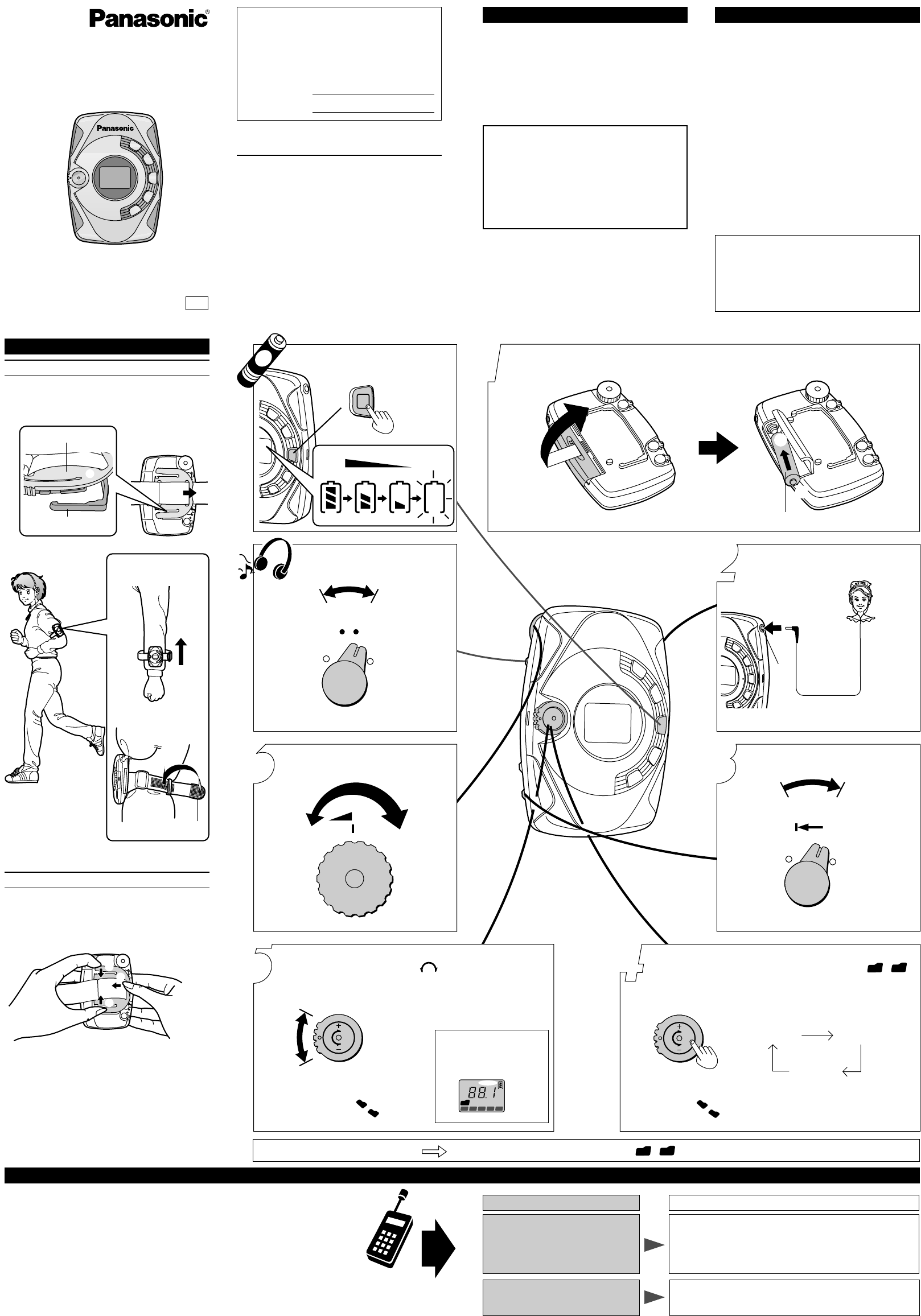
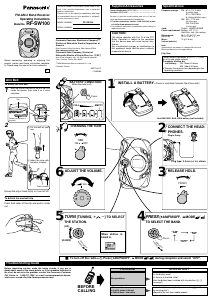
ª To turn off the radio Press [AM/FM/OFF, %MODE / ] during reception and select “OFF”.
1
2
3
5
6
FULL EMPTY
3
XBS
ON OFF
5
6
7
8
9
10
0
1
2
3
4
VOL
$
A
M
/
F
M
/
O
F
F
%
M
O
D
E
/
1
2
T
U
N
I
N
G
PUSH
HOLD
-
+
R
Ë
L
4
$
A
M
/
F
M
/
O
F
F
%
M
O
D
E
/
1
2
T
U
N
I
N
G
PUSH
AM
FM
OFF
FM-AM 2 Band Receiver
Operating Instructions
Model No.
RF-SW100
P
Before connecting, operating or adjusting this
product, please read these instructions complete-
ly. Please keep this manual for future reference.
Rest the clip on the back of the unit so it fits
inside the guides, then slide it so it clicks
into place.
Ensure the clip is fixed firmly or it can fall off.
Press both sides of the clip and push to slide
out.
1
2
1 Put the belt on your
arm.
2 Adjust the strap with
the fabric fastener.
Stereo Headphones (RFEV708P)• • • • • • • • • • • • • • • 1
Arm Belt (RKHT0002) • • • • • • • • • • • • • • • • • • • • • • • 1
Be sure to give the model number and color of the unit
when purchasing replacement headphones.
To order accessories contact 1-800-332-5368 or web
site (http://www.panasonic.com).
Use numbers indicated in parentheses when asking for
replacement parts.
Supplied Accessories
Panasonic Consumer Electronics Company,
p
Division of Matsushita Electric Corporation of
America
One Panasonic Way Secaucus, New Jersey 07094
http://www.panasonic.com
Panasonic Sales Company, Division of
Matsushita Electric of Puerto Rico, Inc. (PSC)
Ave. 65 de Infantería, Km. 9.5 San Gabriel Industrial
Park, Carolina, Puerto Rico 00985
c
2000 Matsushita Electric Industrial Co., Ltd.
Printed in Taiwan
RQTT0415-P
F1200KB0
CAUTION:
This device complies with Part 15 of the FCC
Rules. Operation is subject to the conditions
that this device does not cause harmful inter-
ference.
Any unauthorized changes or modifications to
this equipment would void the user’s authority
to operate this device.
Troubleshooting Guide
Arm Belt
PROBLEM
No operations.
No sounds.
A gritty noise is heard.
Cannot hear too noisy.
CHECKPOINT
Is the battery worn?
Is the unit in the hold state?
Has the battery been installed with its polarities (+,-)
reversed?
Is the headphones plug firmly connected to [Ë] jack?
Is the plug dirty?
Separate the unit from mobile phones.
BEFORE
CALLING
Specifications
Frequency range: FM; 87.9107.9 MHz
(0.2 MHz steps)
87.5–108.0 MHz
(0.1 MHz/0.05 MHz steps)
AM; 5201710 kHz
(10 kHz steps)
522–1629 kHz
(9 kHz steps)
Jack: Output; HEADPHONES
Power requirement: Battery; DC 1.5 V
(R03/LR03, AAA, UM-4 battery)
Dimensions : 68.1k97.8k21.7 mm
(WkHkD) (2
11
16qk3
7
8qk
7
8q)
Mass: 74 g (2.6 oz.)
(without batteries)
[When used in hold mode, at 25eC (77eF) and
on a flat and stable surface]
Panasonic alkaline dry
cell battery; FM; About 25 hours
AM; About 26 hours
The play time may be less depending on the
operating conditions.
Note:
Specifications are subject to change without notice.
Mass and dimensions are approximate.
Play time:
To attach the arm belt
To detach the arm belt clip
Plug type: 3.5 mm (
1
/8 in.) stereo
One R03/LR03, AAA, UM-4 battery (not included)
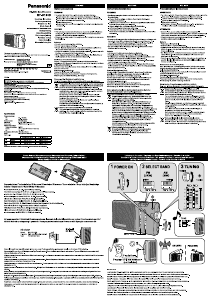
INSTALL A BATTERY. (Press in and down towards the minus end.)
RELEASE HOLD.ADJUST THE VOLUME.
CHANGING THE TONE
BATTERY CONDITION
TURN [TUNING, r s] TO SELECT
THE STATION.
PRESS [AM/FM/OFF, %MODE / ]
TO SELECT THE BAND.
CONNECT THE HEAD-
PHONES.
2
1
Fabric fastener
2
1
1
Guide (on the back of
the unit)
Clip
1
2
1
2
Press.
Press.
(When the radio is off)
1
TUNING
12345
FM
When station is
tuned in.
(UP)
(DOWN)
The serial number of this product can be found on the
back of the cassette compartment cover or inside the
battery compartment.
Please note it in the space provided below and keep
as a permanent record of your purchase to aid identi-
fication in the event of theft.
MODEL NUMBER RF-SW100
SERIAL NUMBER
Plug in firmly.
Before requesting service, make the below checks. If you are in
doubt about some of the check points, or if the remedies indicated in
the chart do not solve the problem, contact the Panasonic Customer
Call Center at 1-800-211-7262, or e-mail consumerproducts@pana-
sonic.com, or web site (http://www.panasonic.com).
Download manual in English (PDF, 0.22 MB)
(Consider the environment and only print this manual if it is really necessary)

Loading…

Rating

Let us know what you think about the Panasonic RF-SW100 Radio by leaving a product rating. Want to share your experiences with this product or ask a question? Please leave a comment at the bottom of the page.
Are you satisfied with the Panasonic RF-SW100 Radio?
Yes No
Be the first to rate this product
0 votes

Join the conversation about this product

Here you can share what you think about the Panasonic RF-SW100 Radio. If you have a question, first carefully read the manual. Requesting a manual can be done by using our contact form.

More about this manual

We understand that it’s nice to have a paper manual for your Panasonic RF-SW100 Radio. You can always download the manual from our website and print it yourself. If you would like to have an original manual, we recommend you contact Panasonic. They might be able to provide an original manual. Are you looking for the manual of your Panasonic RF-SW100 Radio in a different language? Choose your preferred language on our homepage and search for the model number to see if we have it available.

Specifications

Brand Panasonic
Model RF-SW100
Category Radios
File type PDF
File size 0.22 MB

All manuals for Panasonic Radios
More manuals of Radios

Frequently Asked Questions about Panasonic RF-SW100 Radio

Our support team searches for useful product information and answers to frequently asked questions. If you find an inaccuracy in our frequently asked questions, please let us know by using our contact form.

What is DAB+? Verified

DAB+ is the successor of the FM signal and stands for Digital Audio Broadcasting. It is a digital signal that allows for more channels within the same bandwidth and allows for easier switching between channels.

This was helpful (301) Read more

What is the difference between FM and AM? Verified

FM and AM are both forms of modulation used to transmit a signal. FM stands for Frequency Modulation and AM stands for Amplitude Modulation. AM is the oldest form of modulation. The biggest difference is that the FM signal is much stronger than the AM signal.

This was helpful (242) Read more
Manual Panasonic RF-SW100 Radio

Related products

Related categories

×
Download