Manual Panasonic PV-DC352K Camcorder

Need a manual for your Panasonic PV-DC352K Camcorder? Below you can view and download the PDF manual for free in English. This product currently has 5 frequently asked questions, 0 comments and has 0 votes. If this is not the manual you want, please contact us.

Is your product defective and the manual offers no solution? Go to a Repair Café for free repair services.

Manual

Loading…
3
Important Safeguards
1) Read Instructions All the safety and operating
instructions should be read before the unit is operated.
2) Retain Instructions The safety and operating
instructions should be retained for future reference.
3) Heed Warnings All warnings on the unit and in the
operating instructions should be adhered to.
4) Follow Instructions All operating and maintenance
instructions should be followed.
5) Cleaning Unplug this video unit from the wall outlet
before cleaning. Do not use liquid or aerosol cleaners.
Use a dry cloth for cleaning.
6) Attachments Do not use attachments not
recommended by the video product manufacturer as
they may be hazardous.
7) Water and Moisture Do not use this video unit near
water- for example near a bath tub, wash bowl, kitchen
sink, or laundry tub, in a wet basement, or near a
swimming pool, and the like.
8) Accessories Do not place this video unit on an
unstable cart, stand, tripod, bracket, or table. The video
unit may fall, causing serious injury to a child or adult,
and serious damage to the unit. Use only with a cart,
stand, tripod, bracket, or table recommended by the
manufacturer, or sold with the video unit. Any mounting
of the unit should follow the manufacturers instructions
and should use a mounting accessory recommended by
the manufacturer. An appliance
and cart combination should be
moved with care. Quick stops,
excessive force, and uneven
surfaces may cause the
appliance and cart combination
to overturn.
9) Ventilation Slots and
openings in the cabinet are
provided for ventilation and to ensure reliable operation
of the video unit and to protect it from overheating.
These openings must not be blocked or covered. Never
place the video unit on a bed, sofa, rug, or other similar
surface, or near or over a radiator or heat register. This
video unit should not be placed in a built-in installation
such as a bookcase or rack unless proper ventilation is
provided or the manufacturers instructions have been
adhered to.
10) Power Sources This video unit should be operated only
from the type of power source indicated on the marking
label. If you are not sure of the type of power supply to
your home, consult your appliance dealer or local power
company. For video units intended to be operated from
battery power, or other sources, refer to the operating
instructions.
11) Grounding or Polarization This video unit may be
equipped with either a polarized 2-wire AC (Alternating
Current) line plug (a plug having one blade wider than
the other) or 3-wire grounding type plug, a plug having a
third (grounding) pin.
The 2-wire polarized plug will fit into the power outlet
only one way. This is a safety feature. If you are unable
to insert the plug fully into the outlet, try reversing the
plug. If the plug still fails to fit, contact your electrician to
replace your obsolete outlet. Do not defeat the safety
purpose of the polarized plug.
The 3-wire grounding type plug will fit into a grounding
type power outlet. This is a safety feature. If you are
unable to insert the plug into the outlet, contact your
electrician to replace your obsolete outlet. Do not defeat
the safety purpose of the grounding type plug.
12) Power-Cord Protection Power-supply cords should be
routed so that they are not likely to be walked on or
pinched by items placed upon or against them, paying
particular attention to cords of plugs, convenience
receptacles, and the point where they exit from the unit.
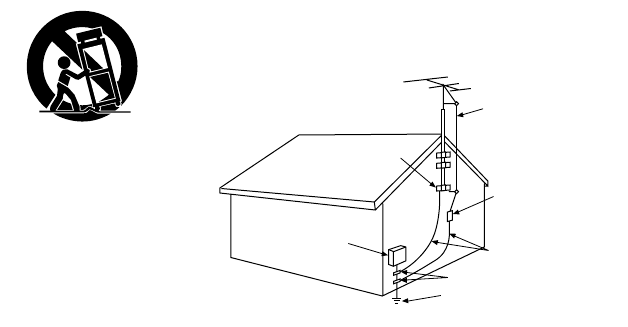
13) Outdoor Antenna Grounding If an outside antenna or
cable system is connected to the video unit, be sure the
antenna or cable system is grounded so as to provide
some protection against voltage surges and built-up
static charges. Part 1 of the Canadian Electrical Code, in
USA Section 810 of the National Electrical Code,
provides information with respect to proper grounding of
the mast and supporting structure, grounding of the lead-
in wire to an antenna discharge unit, size of grounding
conductors, location of antenna discharge unit,
connection to grounding electrodes, and requirements
for the grounding electrode.
14) Lightning For added protection of this video unit
receiver during a lightning storm, or when it is left
unattended and unused for long periods of time, unplug
it from the wall outlet and disconnect the antenna or
cable system. This will prevent damage to the video unit
due to lightning and power-line surges.
15) Power Lines An outside antenna system should not be
located in the vicinity of overhead power lines or other
electric light or power circuits, or where it can fall into
such power lines or circuits. When installing an outside
antenna system, extreme care should be taken to keep
from touching such power lines or circuits as contact with
them might be fatal.
16) Overloading Do not overload wall outlets and
extension cords as this can result in a risk of fire or
electric shock.
GROUND
CLAMP
ANTENNA
LEAD IN
WIRE
ANTENNA
DISCHARGE UNIT
(NEC SECTION 810 - 20)
GROUNDING CONDUCTORS
(NEC SECTION 810 - 21)
GROUND CLAMPS
POWER SERVICE GROUNDING
ELECTRODE SYSTEM
(NEC ART 250, PARTH)
NEC - NATIONAL ELECTRICAL CODE
ELECTRIC
SERVICE
EQUIPMENT
S3125A
MJ147-P.book 3 ペー 200224  56
Download manual in English (PDF, 11.46 MB)
(Consider the environment and only print this manual if it is really necessary)

Loading…

Rating

Let us know what you think about the Panasonic PV-DC352K Camcorder by leaving a product rating. Want to share your experiences with this product or ask a question? Please leave a comment at the bottom of the page.
Are you satisfied with the Panasonic PV-DC352K Camcorder?
Yes No
Be the first to rate this product
0 votes

Join the conversation about this product

Here you can share what you think about the Panasonic PV-DC352K Camcorder. If you have a question, first carefully read the manual. Requesting a manual can be done by using our contact form.

More about this manual

We understand that it’s nice to have a paper manual for your Panasonic PV-DC352K Camcorder. You can always download the manual from our website and print it yourself. If you would like to have an original manual, we recommend you contact Panasonic. They might be able to provide an original manual. Are you looking for the manual of your Panasonic PV-DC352K Camcorder in a different language? Choose your preferred language on our homepage and search for the model number to see if we have it available.

Specifications

Brand Panasonic
Model PV-DC352K
Category Camcorders
File type PDF
File size 11.46 MB

All manuals for Panasonic Camcorders
More manuals of Camcorders

Frequently Asked Questions about Panasonic PV-DC352K Camcorder

Our support team searches for useful product information and answers to frequently asked questions. If you find an inaccuracy in our frequently asked questions, please let us know by using our contact form.

How much footage can I store on my SD card? Verified

This highly depends on the settings, but in general it can be said that 1GB of storage can hold about 5 minutes of HD footage or 1 minute 4K footage.

This was helpful (105) Read more

What does SD stand for? Verified

SD stands for Secure Digital. SD cards are the standard storage medium for many digital cameras.

This was helpful (58) Read more

A battery in my device is oxidized, can I still safely use it? Verified

Ja, the device can still be safely used. Firstly, remove the oxidizd battery. Never use bare hands to do this. Then clean the battery compartment with a cotton swab dipped in vinegar or lemon juice. Let it dry and insert new batteries.

This was helpful (44) Read more

What is a megapixel? Verified

A megapixel (MP) equals one million pixels. Megapixels are, among other things, used to indicate the resolution of digital cameras and camcorders. For example a camera that produces images of 1280x960 pixels has a resolution of about 1,3MP. Though there are many factors that influence the quality of an image it can be said that in general more megapixel results in a better image.

This was helpful (34) Read more

How can I prevent 'red eyes' in my pictures? Verified

The 'red eye' phenomenon is caused by too much light in too little time getting to eyes of the people in the picture. This effect is even stronger in a dark atmosphere. The following can be done to prevent it: don't let people look directly into the camera, create more light, take the picture closer to the subject or decrease the use of the zoom function.

This was helpful (32) Read more
Manual Panasonic PV-DC352K Camcorder

Related products

Related categories

×
Download