Manual Panasonic NV-DS12EG Camcorder

Need a manual for your Panasonic NV-DS12EG Camcorder? Below you can view and download the PDF manual for free in English. This product currently has 5 frequently asked questions, 0 comments and has 0 votes. If this is not the manual you want, please contact us.

Is your product defective and the manual offers no solution? Go to a Repair Café for free repair services.

Manual

Loading…
Basic Operations
12 13
Title Procedure Remarks, etc.
PUSH
CLOSE
1
OPEN
/
EJECT
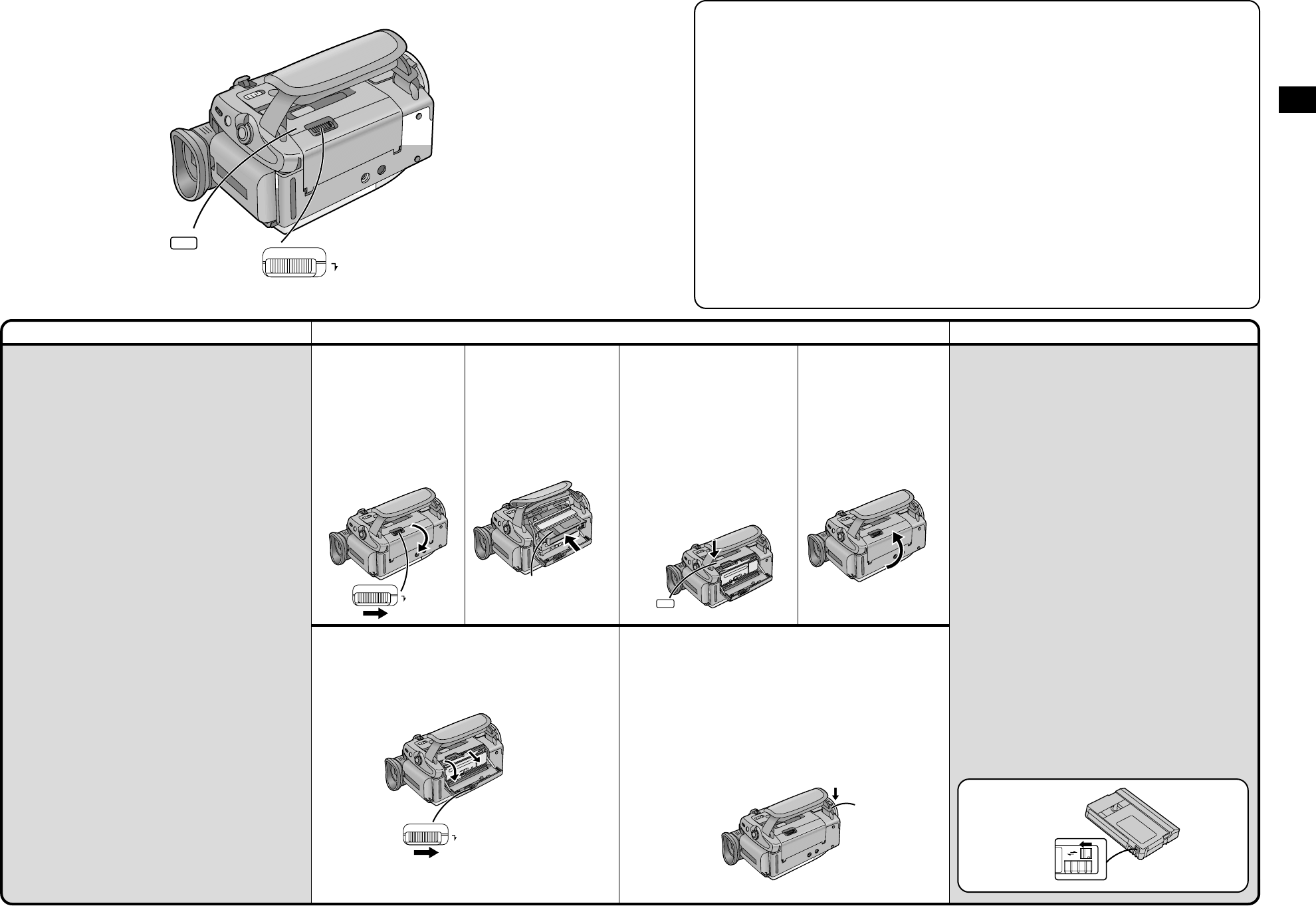
Inserting the Cassette
Ejecting the Cassette
³If the AC Adaptor or Battery is used to supply power,
it is possible to insert or eject the cassette without
turning on the Movie Camera.
2
Insert the cassette with
its window in position
2.
´ LP Mode
The desired recording speed can be
selected with [REC SPEED] on the
[RECORDING SETUP] Sub-Menu. (p. 18)
If you select the LP Mode, the possible
recording time is 1.5 times as long as in
the SP Mode.
Recording in the LP mode does not
deteriorate the picture quality. However, the
playback picture may contain mosaic-like
patterns and certain functions may be
restricted.
³As the recording track width in the LP Mode
is smaller than the head width, recording
new sound onto an already recorded
cassette (audio dubbing) (p. 64) is not
possible.
³In the following cases, mosaic-like patterns
may appear in the playback picture, or the
picture may not be played back correctly:
³
When a cassette recorded in the LP Mode
on this Movie Camera is played back on
other digital video equipment.
³
When a cassette recorded in the LP Mode
on other digital video equipment is played
back on this Movie Camera.
³
When a cassette recorded in the LP Mode
on this Movie Camera is played back on
digital video equipment not featuring the
LP Mode.
³
In the Slow Motion or Still Advance
Playback Mode. (p. 36)
³
When using the Camera Search Function.
(p. 40)
³When inserting the cassette, make sure it faces in the
right direction and then push it in until it stops.
³When you insert a cassette onto which you have
recorded before, use the Camera Search Function
(p. 40) to search for the position from which you want
to continue recording.
³When you insert a new cassette, rewind the tape to
the beginning before starting to record.
If the Cassette Holder Does Not Slide Back In
³Press on the [PUSH CLOSE] mark and close the
Upper Cassette Compartment Cover securely.
³Turn the Movie Camera off and then on again.
³Check if the Battery is discharged.
If the Cassette Holder Does Not Slide Out
³Close the Lower Cassette Compartment Cover
completely and then open it again.
³Check if the Battery is discharged.
Preventing Accidental Erasure of Recordings
Opening the cassettes erasure prevention slider 3
(sliding it in the direction of the [SAVE] arrow) prevents
recording. To record again, close the erasure
prevention slider (slide it in the direction of the [REC]
arrow).
When opening or closing the Cassette
Compartment, push down the buckle
4 of the
Grip Belt in the direction of the arrow so that it
does not obstruct the opening and closing of the
Cassette Compartment.
³Otherwise the Grip Belt may prevent the Cassette
Compartment from opening completely, or it may
get caught under the Cassette Compartment Cover
and prevent it from closing properly.
R E C
SAVE
3
4
Close the Lower
Cassette Compartment
Cover.
1
Slide the [OPEN/EJECT]
Lever
1 to the right
and simultaneously
open the Lower
Cassette Compartment
Cover completely.
The Cassette Holder
slides out.
2
OPEN
/
EJECT
OPEN
/
EJECT
PUSH
CLOSE
3
Press on the [PUSH
CLOSE] mark to close
the Upper Cassette
Compartment Cover.
The Cassette Holder with
the cassette slides back
inside.
Confirm that the
Cassette Holder has
retracted completely.
4
Download manual in English (PDF, 11.2 MB)
(Consider the environment and only print this manual if it is really necessary)

Loading…

Rating

Let us know what you think about the Panasonic NV-DS12EG Camcorder by leaving a product rating. Want to share your experiences with this product or ask a question? Please leave a comment at the bottom of the page.
Are you satisfied with the Panasonic NV-DS12EG Camcorder?
Yes No
Be the first to rate this product
0 votes

Join the conversation about this product

Here you can share what you think about the Panasonic NV-DS12EG Camcorder. If you have a question, first carefully read the manual. Requesting a manual can be done by using our contact form.

More about this manual

We understand that it’s nice to have a paper manual for your Panasonic NV-DS12EG Camcorder. You can always download the manual from our website and print it yourself. If you would like to have an original manual, we recommend you contact Panasonic. They might be able to provide an original manual. Are you looking for the manual of your Panasonic NV-DS12EG Camcorder in a different language? Choose your preferred language on our homepage and search for the model number to see if we have it available.

Specifications

Brand Panasonic
Model NV-DS12EG
Category Camcorders
File type PDF
File size 11.2 MB

All manuals for Panasonic Camcorders
More manuals of Camcorders

Frequently Asked Questions about Panasonic NV-DS12EG Camcorder

Our support team searches for useful product information and answers to frequently asked questions. If you find an inaccuracy in our frequently asked questions, please let us know by using our contact form.

How much footage can I store on my SD card? Verified

This highly depends on the settings, but in general it can be said that 1GB of storage can hold about 5 minutes of HD footage or 1 minute 4K footage.

This was helpful (105) Read more

What does SD stand for? Verified

SD stands for Secure Digital. SD cards are the standard storage medium for many digital cameras.

This was helpful (58) Read more

A battery in my device is oxidized, can I still safely use it? Verified

Ja, the device can still be safely used. Firstly, remove the oxidizd battery. Never use bare hands to do this. Then clean the battery compartment with a cotton swab dipped in vinegar or lemon juice. Let it dry and insert new batteries.

This was helpful (44) Read more

What is a megapixel? Verified

A megapixel (MP) equals one million pixels. Megapixels are, among other things, used to indicate the resolution of digital cameras and camcorders. For example a camera that produces images of 1280x960 pixels has a resolution of about 1,3MP. Though there are many factors that influence the quality of an image it can be said that in general more megapixel results in a better image.

This was helpful (34) Read more

How can I prevent 'red eyes' in my pictures? Verified

The 'red eye' phenomenon is caused by too much light in too little time getting to eyes of the people in the picture. This effect is even stronger in a dark atmosphere. The following can be done to prevent it: don't let people look directly into the camera, create more light, take the picture closer to the subject or decrease the use of the zoom function.

This was helpful (32) Read more
Manual Panasonic NV-DS12EG Camcorder

Related products

Related categories

×
Download