Manual Panasonic DMR-EH50EG DVD Player

Need a manual for your Panasonic DMR-EH50EG DVD Player? Below you can view and download the PDF manual for free in English. This product currently has 2 frequently asked questions, 0 comments and has 0 votes. If this is not the manual you want, please contact us.

Is your product defective and the manual offers no solution? Go to a Repair Café for free repair services.

Manual

Loading…
22
The GUIDE Plus+ System
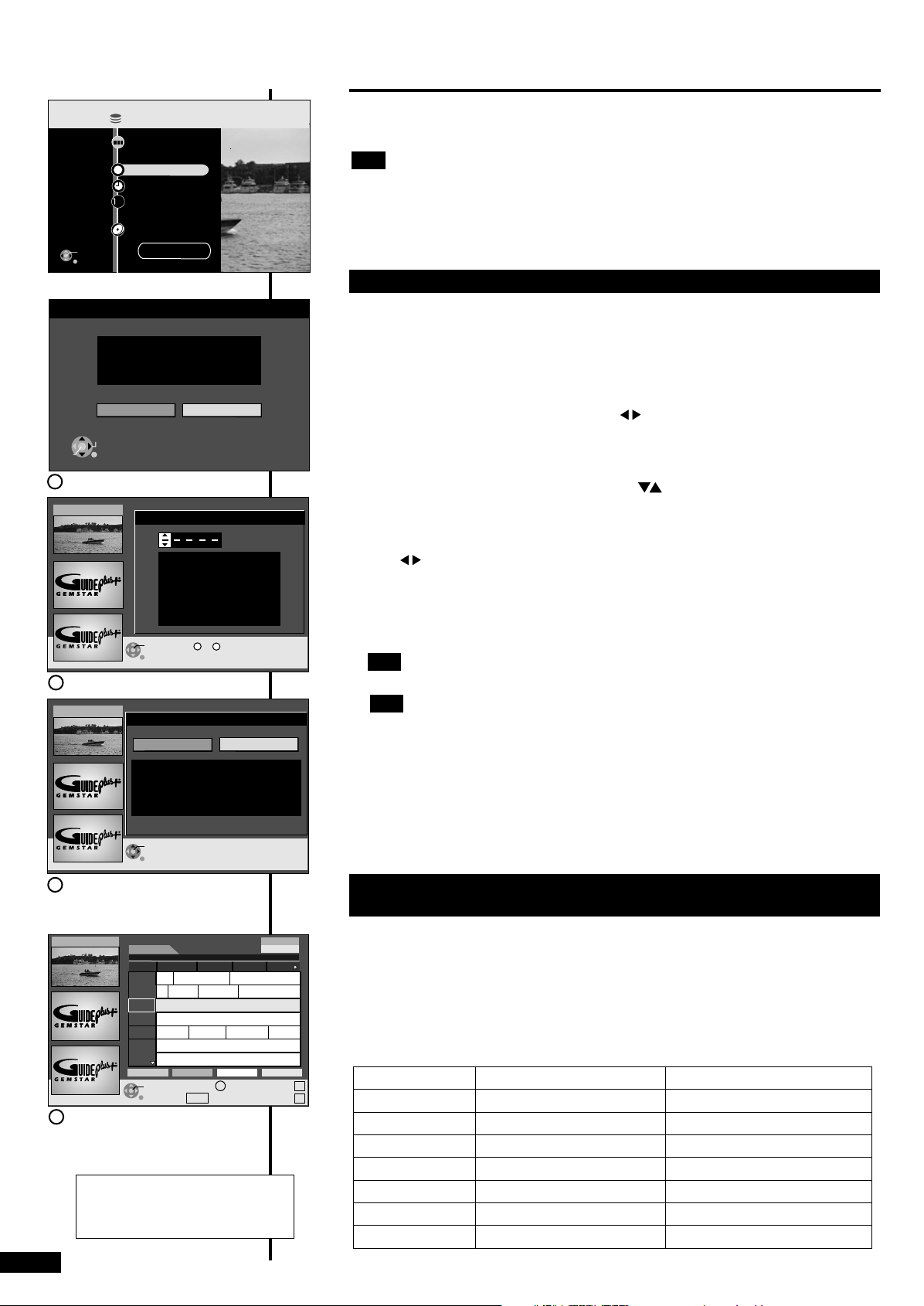
Auto-Setup of the GUIDE Plus+ System
In order to receive data, the country, date and time of your current location must be
set in the basic settings of the unit. When the unit is first set up, the Auto-Setup menu
for the GUIDE Plus+ system will appear (picture A) after the station search or the
automatic station configuration (Q-Link). For more information on the basic
settings, please refer to the operating instructions of your unit.
You can not setup the GUIDE Plus+ system if the clock is not set.
Note: After the GUIDE Plus+ system has been set up, the data is automatically
updated several times each day.
To guarantee an update, switch your unit to standby mode and do not take your
unit offline. During the update, "GUIDE" appears in the display of your unit. If you
turn on the unit while "GUIDE" appears, the data update is interrupted.
After switching your unit to standby mode, the GUIDE Plus+ data is saved and
remains saved if the unit is later taken offline.
If a station changes its programming on short notice, the GUIDE Plus+ programme
information can deviate from the actual programme.
Auto-Setup
No
Yes
Do you want to setup
the GUIDE Plus+ system ?
ENTER
RETURN
SELECT
ENTER
RETURN
12. 1. Wed 14:55
Postal Code
0 9
~
Current Country: Germany
Recording
Dubbing
TIMER RECORDING
ShowView
DUBBING
To Others
Playback
DIRECT NAVIGATOR
ENTER
RETURN
GUIDE Plus+
Disc Remaining 106:51 SP
FUNCTIONS
HDD
HDD
2
3
EPG
It is not possible to receive GUIDE Plus+ in all countries (table: List of Host
Channels). It takes approx. 1 hour to search for the Host Channel. If no Host
Channel was found, a message appears "No Host Channel detected".
Please check whether the right Host Channel has been allocated (table: List of
Host Channels; adjustment page 5). Which channels appear in the GUIDE Plus+
list depends on local reception conditions. Sub-optimum reception quality can
result in missing or incomplete GUIDE Plus+ data (picture D).
SUB MENU
GUIDE
S
Time:
15:30 16:00 16:30
Prog. Type
All Types
15:00
12.1. Wed
Landscape
12.1.Wed 14:55
Abenteuer Wildnis
ARD
ZDF
RTL
SAT1
RTL2
VOX
PRO7
No Data
No Data
No Data
No Data
PAGE-
PAGE+
v
v
If you didn't receive any data, please read the following
information:
For more information, see
www.europe.guideplus.com
...
Abenteuer Wild...Ta...
Fliege-Die Talkshow
Derrick
Heute in...
Bianca-Wege...
Display Mode
Detektiv Duel M...
Beyblade
Yu-...
2
Country Host Channel
Germany
Austria
Switzerland (*)
France
Spain
Netherlands
Belgium (**)
Eurosport
Eurosport
Eurosport
Canal+
Tele5
Eurosport/Music Factory (TMF)
Music Factory(TMF)
EUROS
EUROS
EUROS
EUROS / TMF
TMF
Tele5
Canal+
Display of the Host Channel
RQTD0150-A
1
2
3
ENTER
RETURN
12. 1. Wed 14:55
Setup
Do you want to setup the GUIDE Plus+ system ?
It may take time up to 2 hours.
No
Yes
To set up the GUIDE Plus+ system, use [ ] to select "Yes" and press [ENTER]
(picture A).
If you do not want to setup, select "No". You can perform the Setup at a later point
in time by launching the GUIDE Plus+ system.
Enter the Postal Code of your location with [ ] or the number buttons on the
remote control and press [ENTER] (picture B).
Should your Postal Code change, you can update this information at a later
point in time in the Setup of the GUIDE Plus+ system (page 5).
Use [ ] to select "Yes" and press [ENTER] (picture C). The GUIDE Plus+ data is
loaded. This takes approximately 2 hours. If "No Data" appears for a station after
the loading procedure, check the settings in the Editor of the GUIDE Plus+ system
(page 5). Select "No" if you do not want to load the GUIDE Plus+ data. You can
load the GUIDE Plus+ data at a later point in time using the Setup of the GUIDE
Plus+ system (page 5).
The GUIDE Plus+ data are loaded automatically when you leave your unit in
standby mode for 24 hours.
Note
A
First, connect your DVD Recorder DMR-EH50, DMR-EH52 and perform the basic
settings. Please read the setup information in the operating instructions for your DVD
Recorder DMR-EH50, DMR-EH52.
The receipt of the GUIDE Plus+ system data is only possible via the antenna
input of your DVD Recorder DMR-EH50, DMR-EH52. The receipt of the GUIDE Plus+
data via externally connected satellite receivers or digital set-top boxes is not
possible.
You can then setup the GUIDE Plus+ system.
Note
Note
Note
C
B
List of Host Channels (as of 28th Feb. 2005)
D
+24 Hr
RETURN
TIMER REC
Prog. Type
(*) German speaking part (**) Flemish speaking part
Download manual in English (PDF, 3.33 MB)
(Consider the environment and only print this manual if it is really necessary)

Loading…

Rating

Let us know what you think about the Panasonic DMR-EH50EG DVD Player by leaving a product rating. Want to share your experiences with this product or ask a question? Please leave a comment at the bottom of the page.
Are you satisfied with the Panasonic DMR-EH50EG DVD Player?
Yes No
Be the first to rate this product
0 votes

Join the conversation about this product

Here you can share what you think about the Panasonic DMR-EH50EG DVD Player. If you have a question, first carefully read the manual. Requesting a manual can be done by using our contact form.

More about this manual

We understand that it’s nice to have a paper manual for your Panasonic DMR-EH50EG DVD Player. You can always download the manual from our website and print it yourself. If you would like to have an original manual, we recommend you contact Panasonic. They might be able to provide an original manual. Are you looking for the manual of your Panasonic DMR-EH50EG DVD Player in a different language? Choose your preferred language on our homepage and search for the model number to see if we have it available.

Specifications

Brand Panasonic
Model DMR-EH50EG
Category DVD Players
File type PDF
File size 3.33 MB

All manuals for Panasonic DVD Players
More manuals of DVD Players

Frequently Asked Questions about Panasonic DMR-EH50EG DVD Player

Our support team searches for useful product information and answers to frequently asked questions. If you find an inaccuracy in our frequently asked questions, please let us know by using our contact form.

Can a DVD player also play CD's? Verified

Yes, almost all DVD players are capable of playing CD's.

This was helpful (199) Read more

Can I repair scratches on a DVD myself? Verified

Scratches prevent de laser from reading the disc correctly. When the scratches are only superficial it is possible to repair them yourself by polishing the disc with a slightly abrasive compound. Ideally you use a professional abrasive compound but it’s also possible to use regular toothpaste. After polishing the disc it needs to be washed and let to dry. There are specialised businesses that can do this.

This was helpful (92) Read more
Manual Panasonic DMR-EH50EG DVD Player

Related products

Related categories

×
Download