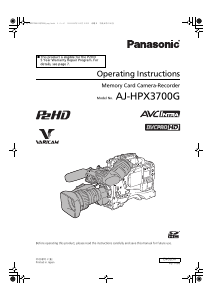
Manual Panasonic AJ-HPX3700G Camcorder

Need a manual for your Panasonic AJ-HPX3700G Camcorder? Below you can view and download the PDF manual for free in English. This product currently has 5 frequently asked questions, 0 comments and has 0 votes. If this is not the manual you want, please contact us.

Is your product defective and the manual offers no solution? Go to a Repair Café for free repair services.

Manual

Loading…

9
General: Features of Camera unit
General
Multi-format
Various image formats are realized by switching the 2.2
Megapixel 2/3 inch 3 CCD between the interlace drive and
the progressive drive.
Chromatic Aberration Compensation function
The unit is equipped with a function to correct the
magnification ratio chromatic aberration of lenses caused by
the fact that the refractive index in lenses varies with the
wavelength of light (hereinafter referred to as chromatic
aberration). By using this function, chromatic aberration
around the lens can be corrected and high definition images
can be obtained. However, a lens supporting chromatic
aberration compensation is must be used. (Refer to
page 105)
Scan Reverse function
The Scan Reverse function, as standard configuration,
cancels the image inversion that occurs when a lens adapter
from Canon or Angenieux is used, and it can be switched
through the menu settings. (Refer to page 171)
Film-REC Gamma function
To facilitate acquisition of pictures with a film-like tone, the
unit is equipped with a film-like gamma function of the type
developed for the Varicam (AJ-HDC27 series). (Refer to
page 184)
2-disk 4-type configuration optical filters
The unit is equipped with CC filters for 3200 K, 4300 K,
5600 K, and 1/2 ND. The 5600 K CC filter setting, often
selected for shooting outdoors, and the 1/2 ND setting to
allow finer adjustments to the lens aperture are provided as
standard. (Refer to page 19)
14-bit A/D conversion digital signal processing
Analog video signals are processed into digital data by a 14-
bit A/D converter with sampling frequencies of 74 MHz. It is
possible to reproduce images that are more finely detailed.
DRS (Dynamic Range Stretcher) function
With this function, the dynamic range of high brightness
areas that may be skipped with white blanks in an ordinary
recording method can be expanded by compressing images
and maintaining the contrast. (Refer to page 59)
Lens file function
The unit has 64 lens files.
By using an SD memory card, 64 lens files can be stored.
(Refer to page 100)
Focus assist function
The unit will display a marker to help with focusing when
shooting videos. This function provides a visual cue for
focusing. (Refer to page 59)
Data management function
Within the unit, one user data file and 16 sets of scene file
data can be saved.
By using an SD memory card as the setup card, up to 8 sets
of setup data can be stored. (Refer to page 91)
Color bar
The unit employs the SMPTE color bar, Split color bar for
SNG (Satellite News Gathering) as well as the conventional
color bar, which is useful for adjusting the color monitor.
(Refer to page 193)
VFR
This unit has a VFR function which allows overcrank and
undercrank shooting. (Refer to page 38)
Monitor Gamma
When the gamma setting is set to “FILM-REC”, images with
FILM-REC gamma characteristics (Nega look images) are
output to the HD SDI A · B outputs, the monitor, the
viewfinder, the remote control unit and the LCD, and
recorded to the P2 card.
It is possible to convert the monitor output image, viewfinder
output image, remote control output image, and LCD output
image, out of different output images, to a higher contrast
image (POSI LOOK image) by operating this function.
P-10LOG
It is possible to select the image signal data format suitable
for workflow of film production DI (DIGITAL
INTERMEDIATE). Color rendering properties are enhanced
by the 2D-CMS (2 dimensional color management system).
It is valid against the output signals of the Dual Link (RGB
4:4:4).
But, it will not be reflected to a recording onto the P2 card.
Cinematographer settings
Only the menu items that are used often for a film production
are collected, and registered in USER MENU. Also, each
menu item is set to a value suitable for film production.
Features of Camera unit
AJ-HPX3700G-VQT1V68_eng.book 9 ページ 2008年10月15日 水曜日 午後6時38分
Download manual in English (PDF, 23.92 MB)
(Consider the environment and only print this manual if it is really necessary)

Loading…

Rating

Let us know what you think about the Panasonic AJ-HPX3700G Camcorder by leaving a product rating. Want to share your experiences with this product or ask a question? Please leave a comment at the bottom of the page.
Are you satisfied with the Panasonic AJ-HPX3700G Camcorder?
Yes No
Be the first to rate this product
0 votes

Join the conversation about this product

Here you can share what you think about the Panasonic AJ-HPX3700G Camcorder. If you have a question, first carefully read the manual. Requesting a manual can be done by using our contact form.

More about this manual

We understand that it’s nice to have a paper manual for your Panasonic AJ-HPX3700G Camcorder. You can always download the manual from our website and print it yourself. If you would like to have an original manual, we recommend you contact Panasonic. They might be able to provide an original manual. Are you looking for the manual of your Panasonic AJ-HPX3700G Camcorder in a different language? Choose your preferred language on our homepage and search for the model number to see if we have it available.

Specifications

Brand Panasonic
Model AJ-HPX3700G
Category Camcorders
File type PDF
File size 23.92 MB

All manuals for Panasonic Camcorders
More manuals of Camcorders

Frequently Asked Questions about Panasonic AJ-HPX3700G Camcorder

Our support team searches for useful product information and answers to frequently asked questions. If you find an inaccuracy in our frequently asked questions, please let us know by using our contact form.

How much footage can I store on my SD card? Verified

This highly depends on the settings, but in general it can be said that 1GB of storage can hold about 5 minutes of HD footage or 1 minute 4K footage.

This was helpful (105) Read more

What does SD stand for? Verified

SD stands for Secure Digital. SD cards are the standard storage medium for many digital cameras.

This was helpful (58) Read more

A battery in my device is oxidized, can I still safely use it? Verified

Ja, the device can still be safely used. Firstly, remove the oxidizd battery. Never use bare hands to do this. Then clean the battery compartment with a cotton swab dipped in vinegar or lemon juice. Let it dry and insert new batteries.

This was helpful (44) Read more

What is a megapixel? Verified

A megapixel (MP) equals one million pixels. Megapixels are, among other things, used to indicate the resolution of digital cameras and camcorders. For example a camera that produces images of 1280x960 pixels has a resolution of about 1,3MP. Though there are many factors that influence the quality of an image it can be said that in general more megapixel results in a better image.

This was helpful (34) Read more

How can I prevent 'red eyes' in my pictures? Verified

The 'red eye' phenomenon is caused by too much light in too little time getting to eyes of the people in the picture. This effect is even stronger in a dark atmosphere. The following can be done to prevent it: don't let people look directly into the camera, create more light, take the picture closer to the subject or decrease the use of the zoom function.

This was helpful (32) Read more
Manual Panasonic AJ-HPX3700G Camcorder

Related products

Related categories

×
Download