Example: To manually water on station 3 for five
minutes, press the [MANUAL] button then press the
[ ] buttons until you see station 3; using the [+/–]
buttons, set duration to five minutes; press [ENTER].
Note: After the [MANUAL] button has been pushed, if a selection
is not made within 5 seconds all stations and programs will
begin watering using the programmed RUN TIMES. If no RUN
TIMES have been set, nothing will happen and the display will
return to the time of day.
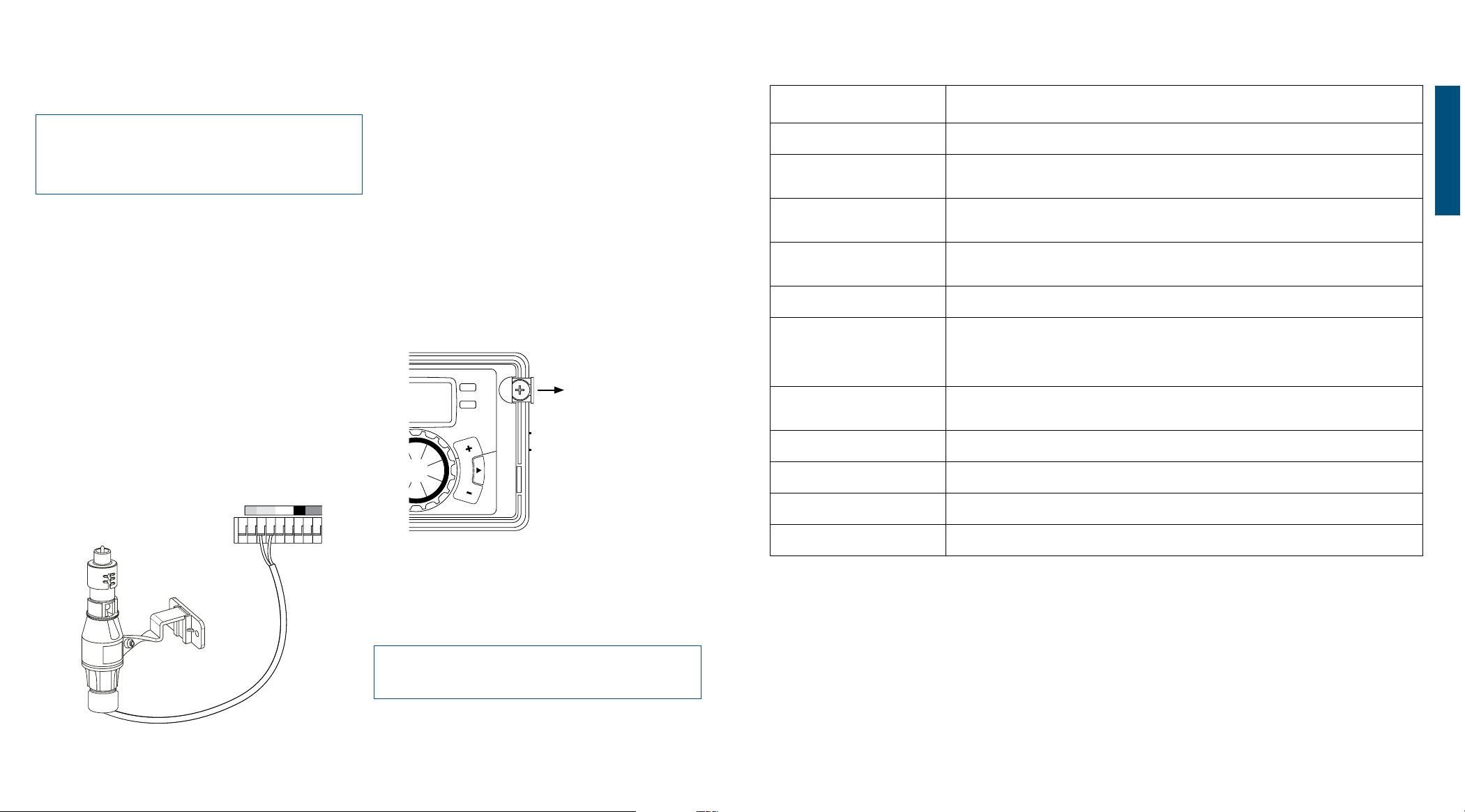
Connecting a Rain Sensor
• Connect the rain sensor wires to the wiring terminal
ports (yellow in color) labeled “Sensor”
Note: Refer to your rain sensor manual for specific wiring
instructions.
• Place the sensor on/off switch to the “on” position to
begin operation (see figure 6)
Rain Sensor Bypass
This sprinkler timer is equipped with a sensor override “on/
off” switch. This switch is for use during maintenance and
repairs, so the sprinkler timer can be operated even if the
rain sensor is in active mode.
Important: If the rain sensor switch is in the “on” position and
no sensor is connected, the sprinkler timer will not operate.
To resume sprinkler timer operation place the switch in the
off position
Pump Start & Master Valve
This sprinkler timer allows a master valve or pump start
relay to operate whenever a station is on.
Note: If you are activating a pump from this timer, you must
purchase a Pump Start Relay. From the pump start relay (or
master valve); connect one wire to the “Pump” terminal and the
other wire to the “Common” terminal.
Replacing the Battery
Timer requires a CR2032 Lithium battery
• The battery will maintain your program in case of an AC
power loss
• Battery should last approximately one year
• Open by sliding the battery tray out to the right
• Insert one CR2032 battery into the compartment with
the + side up
• Slide back into place.
A weak or missing battery can cause the time, date, and
program to be erased after a power failure. If this happens,
you will need to install a fully charged battery and reprogram
the timer.
Tip: Replace battery every year, to avoid loss of programming
Note: A battery alone will not operate the valves in your
sprinkling system. The sprinkler timer has a built-in transformer
that must be connected to an AC line voltage source.
12
ENGLISH
13
Figure 6:
Connecting a
Rain Sensor
TERM DEFINITION
START TIME The time the program begins watering the first programmed station.
VALVE
Supplies water to a specific station or area. The opening and closing of the valve is
accomplished through electrical current supplied by the sprinkler timer.
MASTER VALVE
Typically located at the main water source. Turns on and off water for the entire irrigation
system when not in use.
MULTIPLE
START TIMES
A controller feature that allows a program to be operated multiple times on the same
watering day.
OVERLAPPING PROGRAMS When a “Start Time” is set for a program before the previous program has completed.
PROGRAM
(A, B, OR C)
Individual programs as set by the user. Each program operates independently. If one
program overlaps the other the programs will be “stacked.” After the first program
finishes the next program will begin.
RAIN DELAY
A feature that postpones the running of a scheduled watering program for a specific
duration.
SOLENOID
The electrical part on an irrigation valve that opens and closes the valve.
SPRINKLER TIMER
A device which instructs the station valves to operate.
STATION
A grouping of sprinklers operated by a single valve which is controlled by the timer.
WATERING BUDGETING
Adjusts your overall watering program as a percentage of total watering duration.
Section 5: Reference
Figure 7:
Battery Compartment


Join the conversation about this product
Here you can share what you think about the Orbit 91894 Water Computer. If you have a question, first carefully read the manual. Requesting a manual can be done by using our contact form.