Manual Nintendo DS Pokemon Ranger - Shadows of Almia

Need a manual for your Nintendo DS Pokemon Ranger - Shadows of Almia? Below you can view and download the PDF manual for free in English. This product currently has 0 frequently asked questions, 0 comments and has 0 votes. If this is not the manual you want, please contact us.

Is your product defective and the manual offers no solution? Go to a Repair Café for free repair services.

Manual

Loading…
8
9
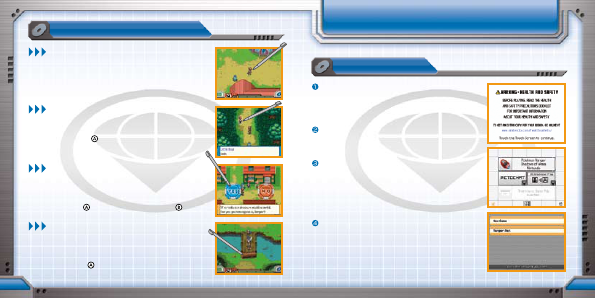
BasIc oPeRatIons
staRtIng the game
Make sure that the Nintendo DS system is turned off.
Insert the Pokémon Ranger: Shadows of Almia Game
Card into the Game Card slot on the back of the
system and push until it clicks into place.
Turn the power on, and the Health and Safety Screen
is displayed (shown to the right). Once you have read
over the information, touch the Touch Screen.
Touch the Pokémon Ranger: Shadows of Almia panel
on the DS Menu Screen to start the game.
* If you set the DS system to Auto Mode, the game will
automatically start after the Health and Safety Screen
is displayed. For more information, please check the
Instruction Booklet of your Nintendo DS.
For instructions beyond this point, please refer to
page 10.
* In this Instruction Booklet, a blue frame surrounds the top
screen and an orange frame surrounds the Touch Screen
(lower screen).
hoW to staRt
MOVING
Touch the stylus on the Touch Screen to make the hero move
toward the touched location. The hero can also be moved by
pressing the Control Pad.
TALKING
Touch any person with the stylus to talk with them. (The
person can be anywhere on the screen.) You can also talk to
a person by pressing
when the hero is facing that person.
MAKING A CHOICE
While talking with people, you may be presented with
“Yes/No” choices. Touch the “Yes” or “No” icon on the
Touch Screen to make your choice. You can also choose
“Yes” by pressing
, or choose “No” by pressing .
CHECKING
Touch any Pokémon or a target with the stylus to obtain
information. (The accessed information is shown on the top
screen.) Signs and other objects can be examined by touching
them or by pressing
when the hero is facing them.
Download manual in English (PDF, 3.1 MB)
(Consider the environment and only print this manual if it is really necessary)

Loading…

Rating

Let us know what you think about the Nintendo DS Pokemon Ranger - Shadows of Almia by leaving a product rating. Want to share your experiences with this product or ask a question? Please leave a comment at the bottom of the page.
Are you satisfied with the Nintendo DS Pokemon Ranger - Shadows of Almia?
Yes No
Be the first to rate this product
0 votes

Join the conversation about this product

Here you can share what you think about the Nintendo DS Pokemon Ranger - Shadows of Almia. If you have a question, first carefully read the manual. Requesting a manual can be done by using our contact form.

More about this manual

We understand that it’s nice to have a paper manual for your Nintendo DS Pokemon Ranger - Shadows of Almia. You can always download the manual from our website and print it yourself. If you would like to have an original manual, we recommend you contact Nintendo DS. They might be able to provide an original manual. Are you looking for the manual of your Nintendo DS Pokemon Ranger - Shadows of Almia in a different language? Choose your preferred language on our homepage and search for the model number to see if we have it available.

Specifications

Brand Nintendo DS
Model Pokemon Ranger - Shadows of Almia
Category Games
File type PDF
File size 3.1 MB

All manuals for Nintendo DS Games
More manuals of Games
Manual Nintendo DS Pokemon Ranger - Shadows of Almia

Related products

Related categories

×
Download