Manual Microsoft Xbox 360 Dead to Rights - Retribution

Need a manual for your Microsoft Xbox 360 Dead to Rights - Retribution? Below you can view and download the PDF manual for free in English. This product currently has 2 frequently asked questions, 0 comments and has 0 votes. If this is not the manual you want, please contact us.

Is your product defective and the manual offers no solution? Go to a Repair Café for free repair services.

Manual

Loading…
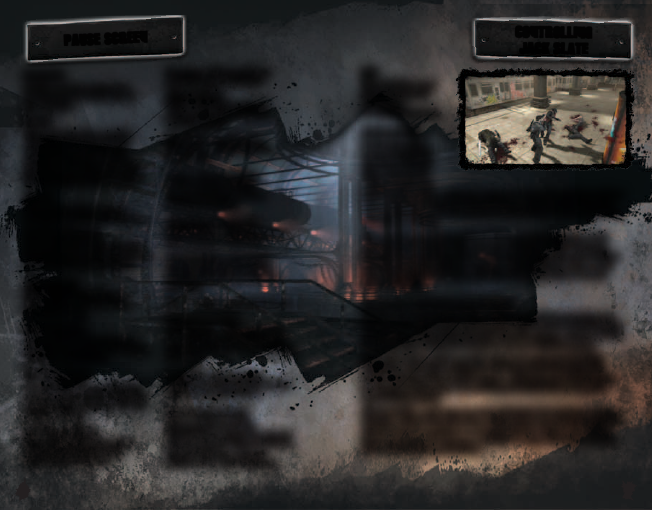
OBJECTIVE
Jacks current objective
is displayed at the top of
the screen.
BADGES
You can view the number
of Badges that Jack has
collected as well as the
number of Badges located
throughout the Chapter in the
bottom right of the screen.
RESUME
Select RESUME to jump
straight back into the action.
RELOAD CHECKPOINT
Select RELOAD CHECKPOINT
to restart gameplay and return
Jack to his last checkpoint.
VIEW COMBOS
Select VIEW COMBOS to
see a full breakdown of all
of Jack’s moves.
VIEW CONTROLS
Select VIEW CONTROLS to
view the controls for Ranged,
Shadow, and Melee.
CAMERA OPTIONS
Access the Camera Options
menu to change the rotation
speed of the camera or invert
the X or Y-axis.
GAMEPLAY OPTIONS
Enter GAMEPLAY OPTIONS
to adjust the Difficulty,
Gore Level, Context
Prompts, Weapon Swap,
and Vibration settings.
GORE LEVEL:
LOW - No blood effects,
only pre-rendered blood
on characters.
MEDIUM - No blood on
TV screen, blood splatter
is reduced.
HIGH - Blood splatter
on TV screen, blood
during takedowns, blood
during gameplay.
CONTEXT PROMPTS:
ESSENTIAL - Only the timer
and compass will show.
IMPORTANT - No button
prompts for Focus meter,
reviving Shadow, or Disarm
prompts.
ALL - Button prompts for all.
WEAPON SWAP:
Intelligent - The player has
to manually switch between
pistol/rifle types after picking
them up.
ALWAYS - The weapon
switches between pistol/rifle
types when picked up.
AUDIO/VIDEO OPTIONS
Select AUDIO/VIDEO
OPTIONS to adjust the Music
Volume, Sound Effect Volume,
Speech Volume, Screen
Brightness, and Subtitles.
PAUSE SCREEN
CONTROLLING
JACK SLATE
QUIT
Select QUIT to end
the current game
and return
to the MAIN MENU.
MELEE COMBAT
If Jack is going
to survive in the
streets of Grant
City, then he is
going to have to
perfect his melee skills in order to keep himself breathing.
Press the Y button for Fast Strikes and the B button for
Strong Strikes. If Jack senses an incoming attack, press the
X button to block.
When facing an enemy with a firearm, Jack can press the
A button to disarm the enemy and take their weapon.
Disarms are easy to perform on lesser thugs, but more skilled
enemies may be able to counter Jacks attack. Once Jack
has mastered the basics, its time to move onto to more
advanced skills.
COMBOS AND ADVANCED MELEE COMBAT
Combos are all about timing. Watch Jacks movements on
screen and execute the next strike right as he is finishing his
current one. For a list of Jack’s Combo moves, check out the
Combo pages within the Combo menu or Options menu.
Jack has a few tricks up his sleeve to get out of sticky
situations. Practice using the X button and the left stick
to have Jack perform dash moves. Jack can use dash moves
to escape an enemy or to quickly get behind the enemy for
a punishing attack.
Alternatively, Jack can use the X button to counter enemy
attacks. Press the X button right when an enemy begins to
attack Jack to perform a counterattack. Cause an enemy
large amounts of damage quickly to open the opportunity
for a devastating takedown.
6 7
Download manual in English (PDF, 6.38 MB)
(Consider the environment and only print this manual if it is really necessary)

Loading…

Rating

Let us know what you think about the Microsoft Xbox 360 Dead to Rights - Retribution by leaving a product rating. Want to share your experiences with this product or ask a question? Please leave a comment at the bottom of the page.
Are you satisfied with the Microsoft Xbox 360 Dead to Rights - Retribution?
Yes No
Be the first to rate this product
0 votes

Join the conversation about this product

Here you can share what you think about the Microsoft Xbox 360 Dead to Rights - Retribution. If you have a question, first carefully read the manual. Requesting a manual can be done by using our contact form.

More about this manual

We understand that it’s nice to have a paper manual for your Microsoft Xbox 360 Dead to Rights - Retribution. You can always download the manual from our website and print it yourself. If you would like to have an original manual, we recommend you contact Microsoft Xbox 360. They might be able to provide an original manual. Are you looking for the manual of your Microsoft Xbox 360 Dead to Rights - Retribution in a different language? Choose your preferred language on our homepage and search for the model number to see if we have it available.

Specifications

Brand Microsoft Xbox 360
Model Dead to Rights - Retribution
Category Games
File type PDF
File size 6.38 MB

All manuals for Microsoft Xbox 360 Games
More manuals of Games

Frequently Asked Questions about Microsoft Xbox 360 Dead to Rights - Retribution

Our support team searches for useful product information and answers to frequently asked questions. If you find an inaccuracy in our frequently asked questions, please let us know by using our contact form.

Can I play my Xbox 360 game on the Xbox One? Verified

Yes, almost all Xbox 360 games can be played on the Xbox One, either by using the disc or by downloading them. The Xbox 360 games can not be played on the original Xbox.

This was helpful (21) Read more

Can I repair scratches on a game disc myself? Verified

Scratches prevent de laser from reading the disc correctly. When the scratches are only superficial it is possible to repair them yourself by polishing the disc with a slightly abrasive compound. Ideally you use a professional abrasive compound but it’s also possible to use regular toothpaste. After polishing the disc it needs to be washed and let to dry. There are specialised businesses that can do this.

This was helpful (12) Read more
Manual Microsoft Xbox 360 Dead to Rights - Retribution

Related products

Related categories

×
Download