Manual Mad Catz Cyborg R.A.T 5 Mouse

Need a manual for your Mad Catz Cyborg R.A.T 5 Mouse? Below you can view and download the PDF manual for free in English. This product currently has 4 frequently asked questions, 0 comments and has 0 votes. If this is not the manual you want, please contact us.

Is your product defective and the manual offers no solution? Go to a Repair Café for free repair services.

Manual

Loading…
www.cyborggaming.com
www.madcatz.com
© 2010 Mad Catz Interactive Asia Limited (MCIA). Cyborg, R.A.T.., the Cyborg logo, Mad Catz and the Mad Catz logo are trademarks or registered trademarks of Mad Catz, Inc., and/or its affiliated companies. The shape and
design of this product are a trade dress of Mad Catz and/or MCIA. All other trademarks or registered trademarks are the property of their respective owners. Made in China. All rights reserved. Product features, appearance
and specifications may be subject to change without notice. Please retain this information for future reference.
© 2010 Mad Catz Interactive Asia Limited (MCIA). Cyborg, R.A.T.., le logo Cyborg, Mad Catz et le logo Mad Catz sont des marques de commerce ou des marques déposées de Mad Catz, Inc., et/ou ses sociétés affiliées. La
forme et le design de ce produit sont caractéristiques de la marque Mad Catz et/ou MCIA. Toutes les autres marques ou marques déposées sont la propriété de leurs propriétaires respectifs. Fabriqué en Chine. Tous droits
réservés. Lʼaspect, les fonctionnalités et les spécifications du produit peuvent changer sans préavis. Veuillez conserver cette notice pour référence ultérieure.
© 2010 Mad Catz Interactive Asia Limited (MCIA). Cyborg, R.A.T. y el logotipo de Cyborg, Mad Catz y el logotipo de Mad Catz son marcas comerciales o marcas comerciales registradas de Mad Catz,
Inc., y/o sus compañías afiliadas. La forma y el diseño de este producto es la imagen de marca de Mad Catz y/o MCIA. Todas las demás marcas o marcas registradas son propiedad de sus
respectivos propietarios. Fabricado en China. Reservados todos los derechos. Las características, el aspecto y las especificaciones del producto pueden ser objeto de modificación sin previo aviso.
Por favor guarde esta información para su consulta en el futuro.
Mad Catz is a publicly traded company on the TSX/AMEX, symbol MCZ. Les actions de Mad Catz sont cotées en bourse sur le TSX/AMEX sous le symbole MCZ.
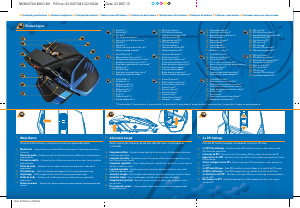
5
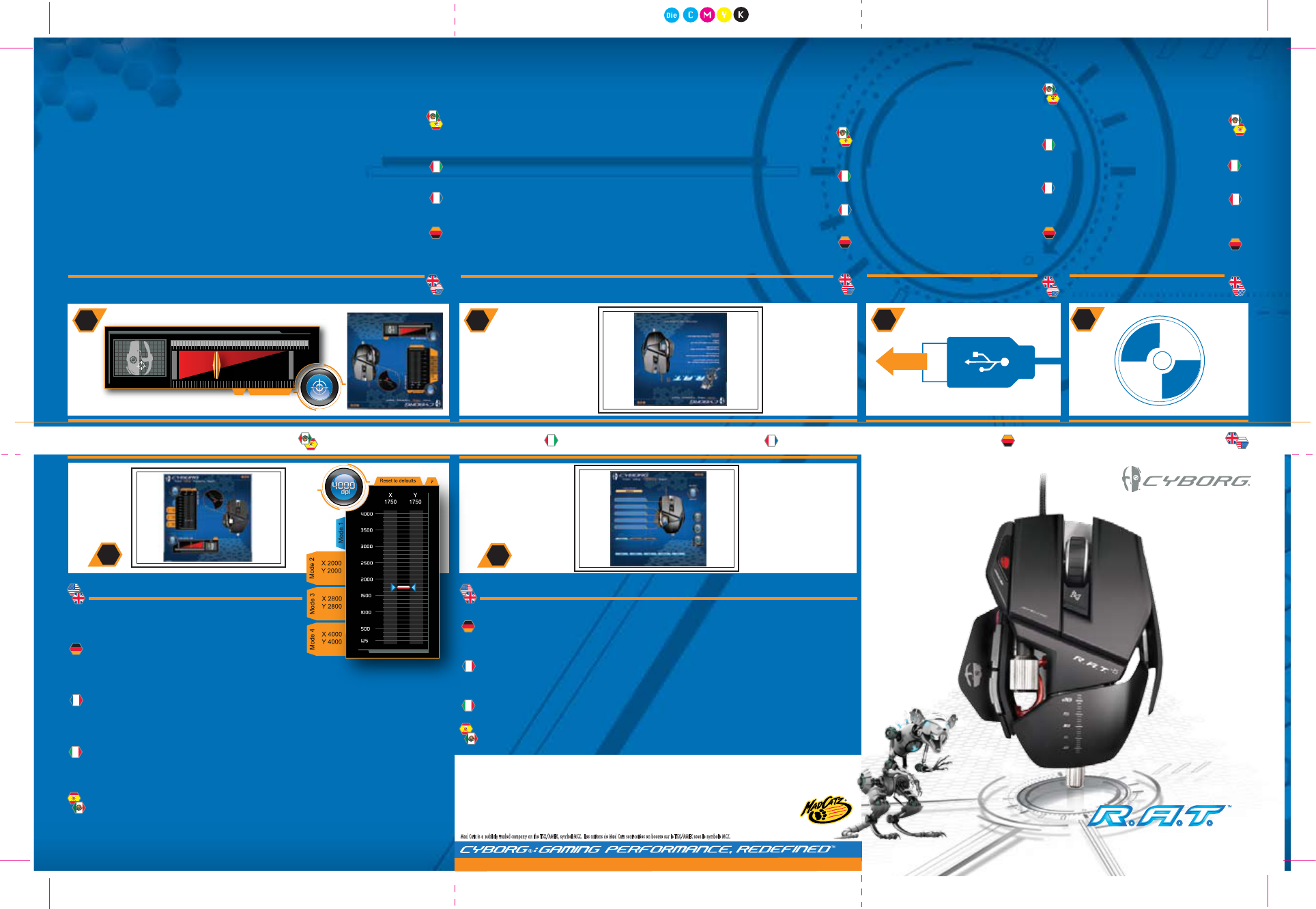
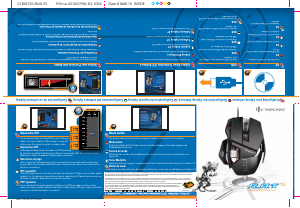
Mode button
Set up three different sets of button assignments and sensitivity levels via ST software
Modustaste
Stellen Sie mithilfe der ST-Software drei verschiedene Gruppen an Tastenbelegungen und
Empfindlichkeitsstufen ein
Touche de mode
Définissez trois sets de contrôle différents de la touche et de niveaux de sensibilité grâce au
logiciel ST
Tasto Modalità
Impostare tre diversi gruppi di assegnazione dei tasti e livelli di sensibilità attraverso il software ST
Botón de modo
Configure tres tipos diferentes de funciones de botones y niveles de sensibilidad con el software ST
Configuring your Cyborg software Konfiguration der Cyborg-Software Configuration du logiciel Cyborg Configurazione del software Cyborg Configuración de su software Cyborg
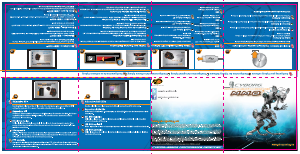
.03
USB
Plug the USB connector into a USB port on
your computer
USB
Schließen Sie den USB-Anschluss an einen
USB-Port Ihres Computers an
USB
Branchez le connecteur USB dans le port
USB de votre ordinateur
USB
Inserire il connettore USB in una porta USB
del computer
USB
Enchufe el conector USB en un puerto USB
de su ordenador
Cyborg Smart Technology (ST) Software
You must use the ST software to program your mouse
Cyborg ST-Software
Verwenden Sie die ST-Software zur Programmierung Ihrer Maus
Logiciel Cyborg ST
Programmez votre souris avec le logiciel ST
Software Cyborg ST
Utilizzare il software ST per programmare il mouse
Software Cyborg ST
Use el software ST para programar su ratón
Setting your Precision Aim Button
Use the slider to set the percentage decrease of mouse sensitivity whilst Precision Aim
button is held (does not affect DPI)
Einstellung der Präzisionszieltaste
Verwenden Sie den Schieberegler zur Empfindlichkeitseinstellung für den Präzisionsmodus
Configuration du bouton de tir de précision
Réglez le niveau de sensibilité du mode de précision à l’aide de la glissière
Impostazione del pulsante mira di precisione
Utilizzare il dispositivo di scorrimento per impostare il livello di sensibilità della modalità di
precisione
Configuración de su Botón de Apunte de Precisión
Use el control deslizante para establecer el nivel de sensibilidad para el modo de precisión
.02
.01
CD
Insert the CD to install the software
CD
Zur Softwareinstallation legen Sie die
CD ein
CD
Insérez le CD pour installer le logiciel
CD
Inserire il CD nell'unità CD-ROM per
installare il software
CD
Introduzca el CD para instalar el
software
Adjustable DPI
Use the primary slider to set the DPI for each of the four
modes. You can set different DPI settings for each axis
of the mouse if you wish, using the secondary sliders
Anpassbare DPI
Verwenden Sie den primären Schieber zur DPI-Einstellung
für jeden der vier Modi. Sie können nach Wunsch verschiedene DPI-Einstellungen für jede
Mausachse mit den sekundären Schiebereglern vornehmen
Résolution réglage
Utilisez la glissière principale pour régler la résolution de chacun des quatre modes. Vous
pouvez obtenir des résolutions différentes pour chacun des axes de la souris en utilisant les
glissières secondaires
DPI regolabili
utilizzare il dispositivo di scorrimento principale per impostare i DPI per ciascuna delle quattro
modalità. Se lo si desidera, è possibile configurare impostazioni DPI diverse per ciascun asse
del mouse, mediante i dispositivi di scorrimento secondari
PPP ajustable
use el control deslizante principal para establecer los PPP para cada uno de los cuatro
modos. Si lo desea, puede establecer diferentes configuraciones PPP para cada eje del ratón,
usando los controles deslizantes secundarios
SENSITIVITY
PRECISION AIM
?
MAX.
MIN.
.04
.06
.05
D21-CCB43705
CCB43705-MUG-R1 P/N no.:43-0437056-D2-1G06 Date: 8 MAR 10 INSIDE
Size: 315mm x 210mm
Download manual in English (PDF, 1.58 MB)
(Consider the environment and only print this manual if it is really necessary)

Loading…

Rating

Let us know what you think about the Mad Catz Cyborg R.A.T 5 Mouse by leaving a product rating. Want to share your experiences with this product or ask a question? Please leave a comment at the bottom of the page.
Are you satisfied with the Mad Catz Cyborg R.A.T 5 Mouse?
Yes No
Be the first to rate this product
0 votes

Join the conversation about this product

Here you can share what you think about the Mad Catz Cyborg R.A.T 5 Mouse. If you have a question, first carefully read the manual. Requesting a manual can be done by using our contact form.

More about this manual

We understand that it’s nice to have a paper manual for your Mad Catz Cyborg R.A.T 5 Mouse. You can always download the manual from our website and print it yourself. If you would like to have an original manual, we recommend you contact Mad Catz. They might be able to provide an original manual. Are you looking for the manual of your Mad Catz Cyborg R.A.T 5 Mouse in a different language? Choose your preferred language on our homepage and search for the model number to see if we have it available.

Specifications

Brand Mad Catz
Model Cyborg R.A.T 5
Category Mice
File type PDF
File size 1.58 MB

All manuals for Mad Catz Mice
More manuals of Mice

Frequently Asked Questions about Mad Catz Cyborg R.A.T 5 Mouse

Our support team searches for useful product information and answers to frequently asked questions. If you find an inaccuracy in our frequently asked questions, please let us know by using our contact form.

What is the best surface to use a mouse on? Verified

A traditional trackball mouse will work best on a padded surface such as a mouse pad. An optical mouse will work on almost any flat surface, with the exception of transparent or reflective surfaces. Surfaces with a printed repetitive pattern might interfere with the functioning of the mouse.

This was helpful (127) Read more

What is an ergonomic mouse? Verified

Daily use of a regular mouse over long periods of time can result in pain in the arm and wrist. This is also called RSI (Repetitive Strain Injury). An ergonomic mouse is shaped to reduce these issues or prevent them.

This was helpful (59) Read more

What is the difference between a normal mouse and a gaming mouse? Verified

Every gaming mouse can be used asa regular mouse. However, a gaming mouse often has additional buttons in specific places to make gaming easier. There even are gaming mice that have buttons that are meant to better play a specific game.

This was helpful (58) Read more

What size mouse is best for my hand? Verified

This partially depends on personal preference and necessity, but in general a mouse should be around 60% of the size of your hand. This is the most comfortable and most ergononical.

This was helpful (53) Read more
Manual Mad Catz Cyborg R.A.T 5 Mouse

Related products

Related categories

×
Download