Manual Logitech K330 Keyboard

Need a manual for your Logitech K330 Keyboard? Below you can view and download the PDF manual for free in English. This product currently has 2 frequently asked questions, 54 comments and has 136 votes with an average product rating of 50/100. If this is not the manual you want, please contact us.

Is your product defective and the manual offers no solution? Go to a Repair Café for free repair services.

Manual

Loading…

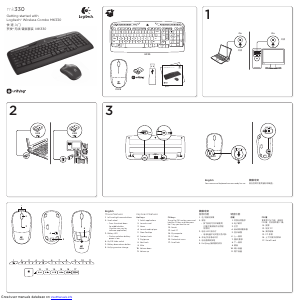
Logitech Wireless Combo MK330
4  English
1 2
3
Your mouse and keyboard are now ready for use.
OnOn
USB USB
Download manual in English (PDF, 10.04 MB)
(Consider the environment and only print this manual if it is really necessary)

Loading…

Rating

Let us know what you think about the Logitech K330 Keyboard by leaving a product rating. Want to share your experiences with this product or ask a question? Please leave a comment at the bottom of the page.
Are you satisfied with the Logitech K330 Keyboard?
Yes No
50%
50%
136 votes

Join the conversation about this product

Here you can share what you think about the Logitech K330 Keyboard. If you have a question, first carefully read the manual. Requesting a manual can be done by using our contact form.

Raul 11-02-2021
The mouse works perfectly, but the keyboard does not connect with the notebook. ON / OFF key is ON I put fresh batteries in it. But it doesn't connect. What should I do?

reply | This was helpful (190) (Translated by Google)
STEPH 29 18-10-2019
Hello, How do I know if we are in upper or lower case, before I had an icon (open or closed padlock) which was displayed on the screen when I switched between the 2 modes, how do I find it?

reply | This was helpful (131) Read more (Translated by Google)
Kathy 15-11-2022
How do I know if we are in upper or lower case, before I had an icon (open or closed padlock) which was displayed on the screen.

This was helpful (45)
Rodolfo Curina 24-11-2022
How do I know if we are in uppercase or lowercase?

This was helpful (19) (Translated by Google)
Sylvain 01-11-2019
I lost my USB drive. what should I do. can we get another one or i have to buy a new device

reply | This was helpful (107) Read more (Translated by Google)
Lynne 24-03-2022
I lost my USB drive. what should I do. can we get another one or i have to buy a new device

This was helpful (57)
ALEX 13-09-2021
HOW CAN I RESET MY K330 WIRELESS KEYBOARD THE KEYBOARD IS LOCKED THE MOUSE DOES WORK BUT THE KEYBOARD DOES NOT

reply | This was helpful (95) (Translated by Google)
asapde 27-06-2019
Is there an indicator light for the shift key?

reply | This was helpful (75) (Translated by Google)

Loading…

Hermann Fath 03-10-2019
The assignment of the additional keys does not match, two EMail keys. How can I change them? It doesn't work with Logitech Setpoint

reply | This was helpful (45) (Translated by Google)
Аврамова Анна Александров 17-10-2019
I'm interested in the Num Lock and Caps Lock key indicators. Why do they not light up and on the keyboard you can’t see whether they are on or off.

reply | This was helpful (27) (Translated by Google)
maria pilar 20-07-2020
I would like to know how the keyboard starts me when I have capital letters active and when not.

reply | This was helpful (22) (Translated by Google)
G desvaux 18-05-2020
How do you know if you are in upper or lower case? Thank you

reply | This was helpful (15) Read more (Translated by Google)
Charles Van Melkebeke 09-08-2021
How do you know if you are in upper or lower case?

This was helpful (18) (Translated by Google)
[email protected] 02-02-2021
Hello, I just bought the MK333 and there is no manual or information that allows me to know the action of each of them. On the Internet I don't see any page that clarifies it for me either. I hope they give me that necessary information. Greetings and I hope your answer. Greetings.

reply | This was helpful (15) (Translated by Google)
Stela 23-08-2019
how do you type an e circumflex accent? thank you

reply | This was helpful (14) (Translated by Google)
michel RIGNY 21-02-2020
Hello when I take a screenshot I can't find it, why where is it ???

reply | This was helpful (10) Read more (Translated by Google)
Marcel 14-11-2022
hello how to get the at on the K330

This was helpful (1) (Translated by Google)
Dani 22-05-2020
Good evening, after a restaurant, I no longer have the lowercase upper case action displayed on the screen Could you help me the keyboard is logitec K330

reply | This was helpful (10) (Translated by Google)
MARIA PILAR TARRAGO 15-07-2020
I WANT TO KNOW HOW TO ACTIVATE CAPITAL LETTERS DIFFERENTLY FROM SMALLER LETTERS BECAUSE WHEN I WRITE IT DOES NOT INDICATE ME THANKS

reply | This was helpful (10) (Translated by Google)
RENE REMY 15-05-2020
how should we make the equal on this keyboard?

reply | This was helpful (5) (Translated by Google)
juan miguel 07-03-2021
as you can distinguish if the letters are activated uppercase or lowercase. Thanks.

reply | This was helpful (5) (Translated by Google)
Frank Faber 25-06-2021
I bought this keyboard K330 years ago and now it needs to be replaced. I was wondering from what year this type of Logitech was made. I've had it for quite some time and it has survived about four desktops. I think I've had it for about 20 years now. But now I'm retiring it because if you want to enter text it takes a while before punctuation marks appear on the screen. Then you lose your patience and enter the same text again and then suddenly it says. follow-up...

reply | This was helpful (5) (Translated by Google)
Julian 26-03-2023
How to enable the keyboard?

reply | This was helpful (5) (Translated by Google)
Dietmar Ley 26-04-2020
Right mouse button has stopped working - what to do?

reply | This was helpful (4) (Translated by Google)
Jean-Pierre 12-03-2021
The screen is black and the text white !! No more color zone !! Which key should I use to return to normal?

reply | This was helpful (4) (Translated by Google)
Robert Josephsson 02-07-2019
WEAK that the supplied mouse cannot be connected to the "settings software"

reply | This was helpful (3) (Translated by Google)
Jean-Pierre 12-03-2021
The screen is black and the text white !! No more color zone !! Which key should I use to return to normal?

reply | This was helpful (3) (Translated by Google)
diane audet 01-08-2020
how to make symbol for apartment the small square thank you

reply | This was helpful (2) (Translated by Google)
julio alcino 01-08-2020
On the logitech k330 keyboard, for Portuguese language, how do I type the EURO symbol?

reply | This was helpful (2) (Translated by Google)
diane audet 15-08-2020
how to make the apartment number with keypad k330

reply | This was helpful (2) (Translated by Google)
José Cedena 10-01-2022
How do I know if we are in uppercase or lowercase?

reply | This was helpful (1) (Translated by Google)
Norbert Sievers 11-03-2022
How can I change it so that when I press the mail keyboard (2nd key at the top from the left) the stupid Outlook does not open, but e.g. my account at gmx?

reply | This was helpful (1) (Translated by Google)
Kelly Dowling 24-01-2023
My Logitech K330 keyboard stopped working. I changed batteries, restarted my PC, updated drivers and still doesn't work?

reply | This was helpful (1)
André Cyr 01-09-2023
How do I sync my Logitech K330 wireless keyboard with my Logitech M310 mouse?

reply | This was helpful (1) (Translated by Google)
Alhj joe 21-09-2024
I lost the USB. Can I buy another one? Does it work with any keyboard?

reply | This was helpful (1) (Translated by Google)
Giuseppe ortino 20-02-2021
How to check if caps lock is set? A leed lit up on my old keyboard

reply | This was helpful (0) (Translated by Google)
emil nolde 21-02-2021
when I look for "operating instructions" for a product, I have expressed myself clearly and precisely. instead I am sent to some pages

reply | This was helpful (0) (Translated by Google)
Frank Faber 25-06-2021
Continuation of my text: Then you lose your patience and enter the same text again and then suddenly the same text appears twice. The superfluous text is difficult to remove. So I wanted to put this text in one frame, but apparently there is a limit on the text to enter. Very clumsy! :(

reply | This was helpful (0) (Translated by Google)
Philip Smith 09-10-2021
no lights to show if caps on or off. no information about how hot keys work two important "fit for purpose" features. therefor: NOT fit FOR purpose. will take back to Argos today. PHILIP SMITH

reply | This was helpful (0)
Sylvain Léonard 21-12-2021
how do we make a '' on the nuro 2 please thank you

reply | This was helpful (0) (Translated by Google)
José Cedena 10-01-2022
There is no indicator light for the shift key, how do I know if I'm in uppercase or lowercase?

reply | This was helpful (0) Read more (Translated by Google)
José Cedena 11-01-2022
Where do I see the response they send me???

This was helpful (0) (Translated by Google)
JUAN AIBAR DUATIS 07-02-2022
WHERE IS THE INDICATOR OF IF WE ARE IN UPPERCASE OR LOWERCASE????

reply | This was helpful (0) (Translated by Google)
JUAN AIBAR DUATIS 07-02-2022
WHERE DO I FIND THE LIGHT INDICATOR OF IF I AM IN UPPERCASE OR LOWERCASE

reply | This was helpful (0) (Translated by Google)
Maurice Paquin 12-05-2022
I would like to save the logitech k330 keyboard manual but it does not work at all. how could I get there?

reply | This was helpful (0) (Translated by Google)
Cesar Morillo 27-07-2022
I have a k330 keyboard, I want to configure it with a maus M150 and its respective receiver

reply | This was helpful (0) (Translated by Google)
Rodolfo Curina 24-11-2022
I WOULD LIKE TO KNOW HOW TO ENTER CAPITALS

reply | This was helpful (0) (Translated by Google)
catherine Paris 06-12-2022
here is what I think of your page: a lot of people ask questions and there is NEVER an answer! there are in all and for all TWO questions with answers in the frequently asked questions. it means you think you are the best and your customer is stupid.......

reply | This was helpful (0) (Translated by Google)
Assandri Noè 20-02-2023
The connection never worked properly until the signal on the mouse disappeared. Disappointing product especially from a brand like Logitech

reply | This was helpful (0) (Translated by Google)
Assandri Noè 20-02-2023
What is the transmission frequency of this device

reply | This was helpful (0) (Translated by Google)
GERSON MORAES 17-03-2023
HOW DO I KNOW IF THE UPPER CAPITAL WAS ACTIVATED OR NOT, SINCE ANY INDICATIVE DOES NOT APPEAR ON THE SCREEN?

reply | This was helpful (0) (Translated by Google)
Jean Claude BERNE BERNET 19-07-2023
How to make the at sign

reply | This was helpful (0) (Translated by Google)
[email protected] 20-07-2023
Documents from keyboard Microsoft +36689oi90Wed

reply | This was helpful (0) (Translated by Google)
Manuel Carrera 02-02-2026
how to put the at sign on my logitech keyboard k330

reply | This was helpful (0) (Translated by Google)

More about this manual

We understand that it’s nice to have a paper manual for your Logitech K330 Keyboard. You can always download the manual from our website and print it yourself. If you would like to have an original manual, we recommend you contact Logitech. They might be able to provide an original manual. Are you looking for the manual of your Logitech K330 Keyboard in a different language? Choose your preferred language on our homepage and search for the model number to see if we have it available.

Specifications

Brand Logitech
Model K330
Category Keyboards
File type PDF
File size 10.04 MB

All manuals for Logitech Keyboards
More manuals of Keyboards

Frequently Asked Questions about Logitech K330 Keyboard

Our support team searches for useful product information and answers to frequently asked questions. If you find an inaccuracy in our frequently asked questions, please let us know by using our contact form.

The letters on the keyboard are not in the places that I am used to, why is that? Verified

Most keyboards use a QWERTY layout, standing for the first six letters on the keyboard. However, there are different keyboard layouts, matching the specific needs of a certain language. It is also possible that the keyboard keys have been swapped. Especially with older keyboards this is easy to do.

This was helpful (1354) Read more

What is the best way to clean my keyboard Verified

Never insert objects between the edges of the keys, as this will mainly push dirt in and damage the keyboard. It is best to clean the keyboard with compressed air while keeping the keyboard upside down. The top of the keys can be cleaned with a slightly damp cloth.

This was helpful (198) Read more

Manual Logitech K330 Keyboard

Related products

Related categories

×
Download