Manual Hotpoint SX 1038N CX S Oven

Need a manual for your Hotpoint SX 1038N CX S Oven? Below you can view and download the PDF manual for free in English. This product currently has 5 frequently asked questions, 0 comments and has 0 votes. If this is not the manual you want, please contact us.

Is your product defective and the manual offers no solution? Go to a Repair Café for free repair services.

Manual

Loading…
6
GB
PLEASE PHONE US TO REGISTER YOUR APPLIANCE AND ACTIVATE YOUR PARTS GUARANTEE ON 08448 24 24 24
Start-up and use
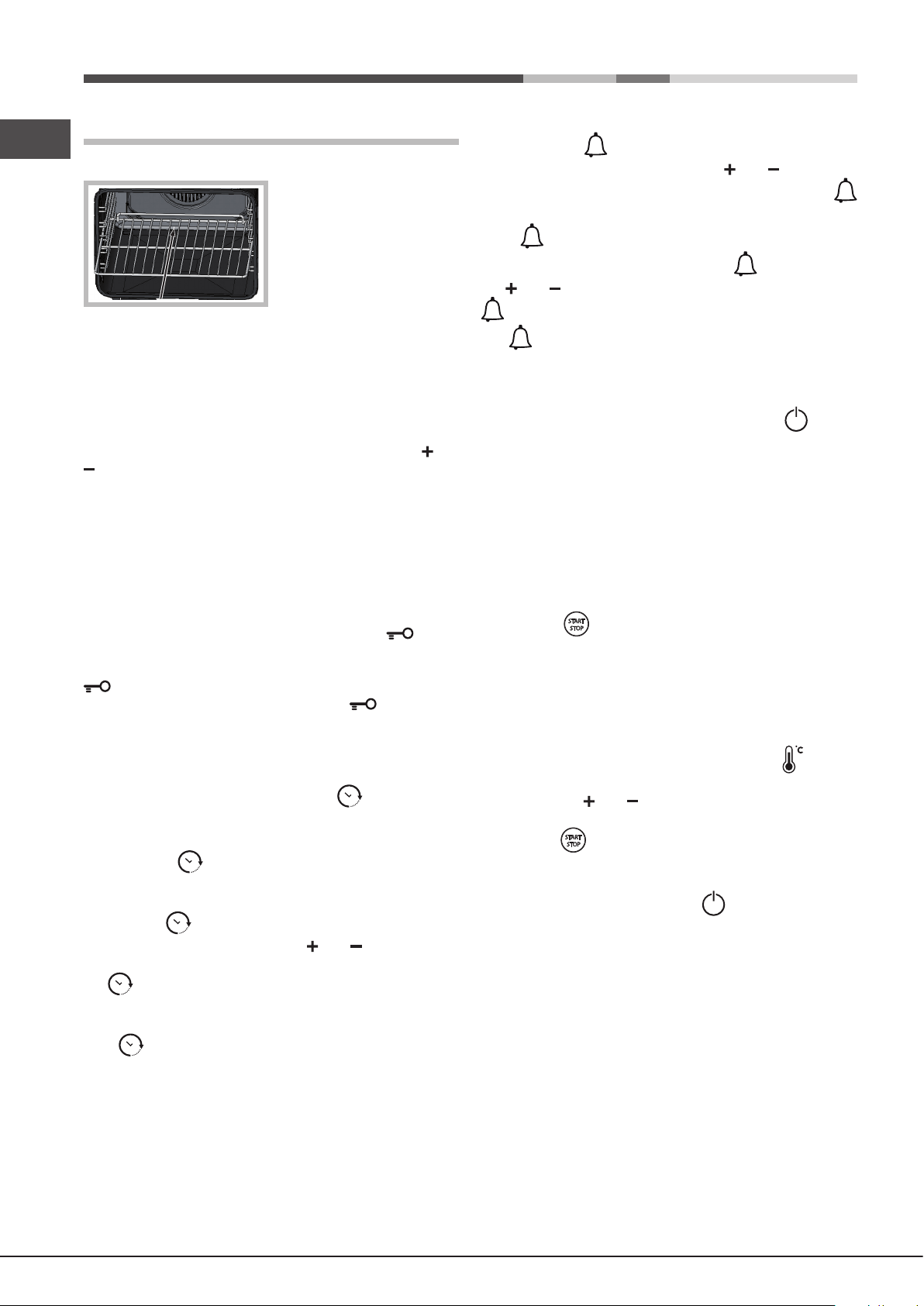
! When inserting the shelf
make sure the backstop is
at the rear of the cavity (see
image).
! The rst time you use your appliance, heat the empty oven
with its door closed at its maximum temperature for at least
half an hour. Make sure that the room is well ventilated
before switching the oven off and opening the oven door.
The appliance may emit a slightly unpleasant odour caused
by protective substances used during the manufacturing
process burning away.
! To make the setting process easier, press and hold the and
buttons to scroll through the numbers on the display rapidly.
! Each setting will automatically be stored in the appliance
memory after 10 seconds.
! The touch controls cannot be activated if the user is
wearing gloves.
Control panel lock
! The control panel can be locked while the oven is off, once
cooking has started or nished and during programming.
To lock the oven controls, press and hold the button
for at least 2 seconds. A buzzer will sound and the
TEMPERATURE display shows the key symbol “O—n”. The
icon will light up to indicate lock activation.
To deactivate the lock, press and hold the button again
for at least 2 seconds.
Setting the clock
! The clock can only be set when the oven is switched off. If
the oven is in standby mode, pressing the button once will
display the current time setting. Press it again to set the time.
After connection to the power supply network or after
a blackout, the button and the digits on the TIME display
will ash for 10 seconds.
To set the clock:
1. Press the button.
2. Adjust the hour gure using the and buttons.
3. Once you have reached the correct hour value, press
the button.
4. Repeat the above process to set the minutes.
If a blackout occurs, it will be necessary to reset the clock.
If the icon ashes on the display, this indicates that the
clock has not been set correctly.
Setting the minute minder
! The minute minder may be set regardless of whether the
oven is switched on or off. It does not switch the oven on or off.
When the set time has elapsed, the timer emits a buzzer
that will automatically stop after 30 seconds or when any
active button on the control panel is pressed.
To adjust the timer proceed as follows:
1. Press button .
2. Set the desired time using buttons and .
3. Once you have reached the desired value, press the
button again.
The lit symbol will remind you that the minute minder is on.
To cancel the minute minder, press the button and use
the and buttons to set the time to 00:00. Press button
again.
The icon will switch off to indicate that the minute minder
has been disabled.
Starting the oven
1. Switch the control panel on by pressing the button.
The appliance buzzer sounds three times (ascending) and
all buttons light up in sequence.
2. Press the button corresponding to the desired cooking
mode. The TEMPERATURE display shows:
- the temperature associated with the mode, if programming
manually;
- “Auto”, if programming is automatic.
The TIME display shows:
- the current time, if programming manually;
- the duration, if programming is automatic.
3. Press the button to begin cooking.
4. The oven will begin its preheating phase, the preheating
indicators will light up as the temperature rises.
5. When the preheating process has nished, a buzzer sounds
and all the preheating indicator lights show that this stage has
been completed: the food can then be placed in the oven.
6. During cooking it is always possible to:
- change the temperature by pressing the button,
followed by the and buttons (manual modes only);
- set the duration of a cooking mode (see Cooking Modes);
- press the button to stop cooking. In this case the
appliance stores the temperature modied previously in its
memory (manual modes only);
- switch off the oven by pressing the button for 3 seconds.
7. If a blackout occurs while the oven is already in operation,
an automatic system within the appliance will reactivate the
cooking mode from the point at which it was interrupted,
provided that the temperature has not dropped below a
certain level. Programmed cooking modes which have not
yet started will not be restored and must be reprogrammed
(for example: a cooking mode has been programmed to
start at 20:30. At 19:30 a blackout occurs. When the power
supply is restored, the mode will have to be reprogrammed).
! There is no preheating stage for the GRILL mode.
! Never put objects directly on the bottom of the oven; this
will prevent the enamel coating from being damaged.
! Always place cookware on the rack(s) provided.
Download manual in English (PDF, 5.57 MB)
(Consider the environment and only print this manual if it is really necessary)

Loading…

Rating

Let us know what you think about the Hotpoint SX 1038N CX S Oven by leaving a product rating. Want to share your experiences with this product or ask a question? Please leave a comment at the bottom of the page.
Are you satisfied with the Hotpoint SX 1038N CX S Oven?
Yes No
Be the first to rate this product
0 votes

Join the conversation about this product

Here you can share what you think about the Hotpoint SX 1038N CX S Oven. If you have a question, first carefully read the manual. Requesting a manual can be done by using our contact form.

More about this manual

We understand that it’s nice to have a paper manual for your Hotpoint SX 1038N CX S Oven. You can always download the manual from our website and print it yourself. If you would like to have an original manual, we recommend you contact Hotpoint. They might be able to provide an original manual. Are you looking for the manual of your Hotpoint SX 1038N CX S Oven in a different language? Choose your preferred language on our homepage and search for the model number to see if we have it available.

Specifications

Brand Hotpoint
Model SX 1038N CX S
Category Ovens
File type PDF
File size 5.57 MB

All manuals for Hotpoint Ovens
More manuals of Ovens

Frequently Asked Questions about Hotpoint SX 1038N CX S Oven

Our support team searches for useful product information and answers to frequently asked questions. If you find an inaccuracy in our frequently asked questions, please let us know by using our contact form.

My oven does not get warm enough, what should I do? Verified

The thermostat makes sure the ovens heats up to the designated temperature. It is likely that the thermostat is defective. Have it replaced. When in doubt, contact the manufacturer.

This was helpful (3192) Read more

What is pyrolysis? Verified

Some ovens are equipped with a pyrolysis function. This is a cleaning system that burns dirt and fat in the oven by using very high temperatures. After pyrolysis, all the dirt will have turned to ash and can be easily removed. If the oven has a pyrolysis function, it is advisable to use it 3 to 4 times a year to keep the oven clean.

This was helpful (3184) Read more

When I use the oven there often food remains that fall on the bottom, causing smoke. How can I prevent this? Verified

Many ovens come with both a grid and a baking tray. When food is prepared on the grid, the baking tray can be placed on the bottom to prevent food remains from burning and causing smoke.

This was helpful (813) Read more

Smoke is accumulating in the oven when warming up, why is that? Verified

Probably there are food remains from previous use left in the oven. Especially greasy food remains can generate smoke when heated. Clean the oven thoroughly.

This was helpful (804) Read more

Can I prepare several items simultaneously by using more grill trays? Verified

Technically this is possible. However, it depends on the type of food if you need to adjust the preparation time or swap the trays halfway during the preparation.

This was helpful (801) Read more
Manual Hotpoint SX 1038N CX S Oven

Related products

Related categories

×
Download