Manual Gigaset AS405A Trio Wireless Phone

Need a manual for your Gigaset AS405A Trio Wireless Phone? Below you can view and download the PDF manual for free in English. This product currently has 2 frequently asked questions, 0 comments and has 2 votes with an average product rating of 50/100. If this is not the manual you want, please contact us.

Is your product defective and the manual offers no solution? Go to a Repair Café for free repair services.

Manual

Loading…
3
Gigaset A415A-AS405-A455A / Großbritannien / A31008-M2501-L101-3-7619 / Penguini.fm / 05.10.2016
Template Bali, Version 1, 16.02.2012
First steps
Check the package contents
Base station and handset package: One Gigaset handset, one Gigaset A415A/AS405A/A455A base station, one mains
adapter, one phone cord, two batteries, one battery cover, one user guide.
Handset and charging cradle package: One Gi
gaset handset, one charging cradle with mains adapter, two batteries,
one battery cover, one user guide.
If you have purchased a model w
ith multiple handsets, the package should contain two batteries, a battery cover and
a charging cradle with mains adapter for each additional handset.
Setting up the base station and charging cradle (if included)
The base station and charging cradle are designed for use in enclosed dry rooms with a temperature range of +5 °C to
+45 °C.
¤ Set up the base station at a central location on a flat, non-slip surface in your house or apartment. You can also
mount the base station and charging cradle on the wall.
The phone's feet do not usually leave any marks on surfaces. However, due to the multitude of different varnishes and
po
lishes used on today's furnishings, the occurrence of marks on the surfaces cannot be completely ruled out.
Care: W
ipe down the base station, the charging cradle and the handset with a damp cloth (no solvents) or an antistatic
cloth. Never use a dry cloth. This can cause static.
Please note:
Never expose the telephone to the influence of heat sources, direct sunlight or other electrical devices.
Protect your Gigaset from moisture, dust, corrosive liquids and vapours.
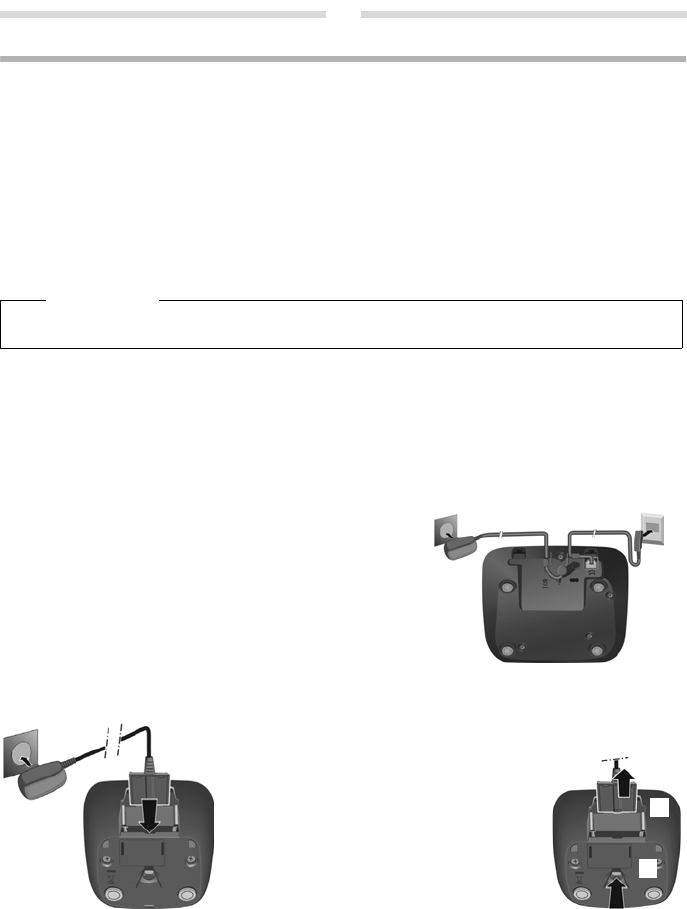
Connecting the base station
Connecting the charging cradle (if included)
Please note
Pay attention to the range of the base station. This is up to 300 m in unobstructed outdoor areas and up to 50 m
inside buildings.
¤ First connect the mains adapter 1.
¤ Then connect the telephone jack 2 and insert the
cables into the cable ducts.
Please note:
The mains adapter must always be connected, as the
phone will not operate without mains connection.
Only use the mains adapter and phone cord supplied.
Pin connections on telephone cables can vary.
The answering machine is ready for use approx. 30 sec-
onds after the base stati
on has been connected.
1
2
1
1
¤ Connect the flat plug from the power
supply
1.
¤ Plug the mains adapter into the plug
socket
2.
If you need to disconnect the plug from the
charging cradle, press the release button
3
and disconnect the plug
4.
1
2
3
4
Download manual in English (PDF, 0.6 MB)
(Consider the environment and only print this manual if it is really necessary)

Loading…

Rating

Let us know what you think about the Gigaset AS405A Trio Wireless Phone by leaving a product rating. Want to share your experiences with this product or ask a question? Please leave a comment at the bottom of the page.
Are you satisfied with the Gigaset AS405A Trio Wireless Phone?
Yes No
50%
50%
2 votes

Join the conversation about this product

Here you can share what you think about the Gigaset AS405A Trio Wireless Phone. If you have a question, first carefully read the manual. Requesting a manual can be done by using our contact form.

More about this manual

We understand that it’s nice to have a paper manual for your Gigaset AS405A Trio Wireless Phone. You can always download the manual from our website and print it yourself. If you would like to have an original manual, we recommend you contact Gigaset. They might be able to provide an original manual. Are you looking for the manual of your Gigaset AS405A Trio Wireless Phone in a different language? Choose your preferred language on our homepage and search for the model number to see if we have it available.

Specifications

Brand Gigaset
Model AS405A Trio
Category Wireless Phones
File type PDF
File size 0.6 MB

All manuals for Gigaset Wireless Phones
More manuals of Wireless Phones

Frequently Asked Questions about Gigaset AS405A Trio Wireless Phone

Our support team searches for useful product information and answers to frequently asked questions. If you find an inaccuracy in our frequently asked questions, please let us know by using our contact form.

What is the difference between a base station and a loading station? Verified

The base station is the unit that creates a connection and also charges the handset. A loading station does nothing but charge the handset.

This was helpful (1416) Read more

What does DECT stand for? Verified

DECT stands for Digital Enhanced Cordless Communications and is a technology that is primilary used in wireless phones.

This was helpful (733) Read more
Manual Gigaset AS405A Trio Wireless Phone

Related products

Related categories

×
Download