Manual GE PT7050SF7SS Oven

Need a manual for your GE PT7050SF7SS Oven? Below you can view and download the PDF manual for free in English. This product currently has 6 frequently asked questions, 0 comments and has 0 votes. If this is not the manual you want, please contact us.

Is your product defective and the manual offers no solution? Go to a Repair Café for free repair services.

Manual

Loading…
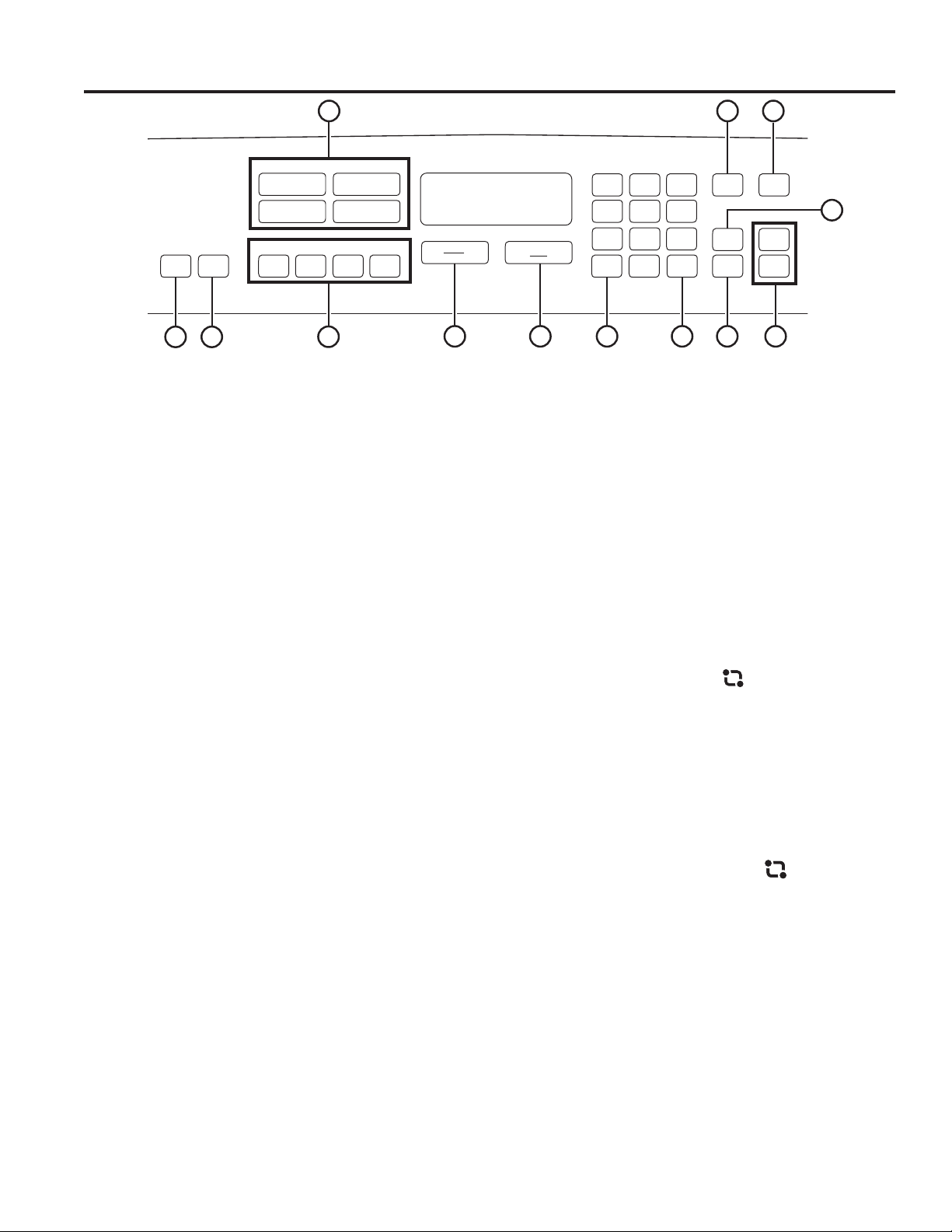
8 49-80754-2
1. Convection Cooking Modes: Convection
cooking modes use increased air circulation to improve
performance. The type of benefit depends on the mode.
Your oven has the following convection cooking modes:
%DNH%DNH0XOWL5DFN5RDVW%URLO+L%URLO/RDQG
%URLO&ULVS6HHWKH&RRNLQJ0RGHVVHFWLRQIRUPRUH
information.
2. Traditional Cooking Modes: Your oven has the
IROORZLQJWUDGLWLRQDOFRRNLQJPRGHV%DNH%URLO+L%URLO
/R3URRIDQG:DUP6HHWKH&RRNLQJ0RGHVVHFWLRQIRU
more information.
3. Clean: Your oven has two cleaning modes: Self Clean
and Steam Clean. See the Cleaning the Oven section for
important information about
using these modes.
4. Start: Must be pressed to start any cooking, cleaning, or
timed function.
5. Cancel/Off: &DQFHOV$//RYHQRSHUDWLRQVH[FHSWWKH
clock and timer.
6. Cook Time: Counts down cooking time and turns off
the oven when the cooking time is complete. Press the
Cook Time pad, use the number pads to program a
cooking time in hours and minutes, then press Start.
7KLVFDQRQO\EHXVHGZLWK7UDGLWLRQDO%DNH&RQYHFWLRQ
%DNH&RQYHFWLRQ%DNH0XOWLDQG&RQYHFWLRQ5RDVW
7. Clock: Sets the oven clock time. Press the Clock pad
and the number pads to program the clock. Make sure to
select AM or PM. Press Start to save the time.
8. Timer: :RUNVDVDFRXQWGRZQWLPHU3UHVVWKHTimer
pad and the number pads to program the time in hours
and minutes. Press the Start pad. The oven will continue
to operate when the timer countdown is complete. To turn
the timer off press the Timer pad.
9. Delay Time: 'HOD\VZKHQWKHRYHQZLOOWXUQRQ8VH
this to set a time when you want the oven to start. Press
the Delay Time pad and use the number pads to program
the time of day for the oven to turn on. Press the desired
cooking mode and temperature then press Start. A cook
time may also be programmed if desired. This can only be
XVHGZLWK7UDGLWLRQDO%DNH&RQYHFWLRQ%DNH&RQYHFWLRQ
%DNH0XOWL5DFN&RQYHFWLRQ5RDVWDQG6HOI&OHDQ
NOTE: :KHQXVLQJWKHGHOD\WLPHIHDWXUH foods that
VSRLOHDVLO\²VXFKDVPLONHJJVILVKVWXIILQJVSRXOWU\
DQGSRUN²VKRXOGQRWEHDOORZHGWRVLWIRUPRUHWKDQ
hour before or after cooking. Room temperature promotes
WKHJURZWKRIKDUPIXOEDFWHULD%HVXUHWKDWWKHRYHQ
light is off because heat from the bulb will speed harmful
bacteria growth.
10. Probe: Monitors internal food temperature and turns
the oven off when the food reaches the programmed
WHPSHUDWXUH,QVHUWWKHSUREHSURJUDPWKHFRRNLQJPRGH
and program the probe temperature. See the Cooking
Modes section for more information. The probe can only
EHXVHGZLWK7UDGLWLRQDO%DNH&RQYHFWLRQ%DNHDQG
Convection Roast.
11. Oven Light(s): Turns the oven light(s) on or off.
12. Remote Enable (on some models):
CONNECTING YOUR OVEN
Off - Oven is not connected. Open the app then press
and hold Remote Enable pad for 5 seconds to begin the
connecting process.
Slow flash - Oven is in discovery mode and looking for a
network.
Rapid flash - An error occurred during the connecting
process.
Solid - Oven is connected to the network and can be
remotely controlled by a connected mobile device when in
operation, but it cannot be started remotely.
REMOTE STARTING YOUR OVEN
To be able to start the oven remotely, press the Remote
Enable pad and the REMOTE icon will turn on in the
display. The oven can now be remotely started with a
connected device. Opening an oven door or turning off
the oven will turn off the REMOTE icon. The REMOTE
icon must be lit to start the oven remotely. The REMOTE
icon is not required to change the oven settings or to turn
the oven off.
After using the oven, remember to verify that the
REMOTE icon is lit if you wish to start the oven remotely
in the future.
13. Lock Controls: /RFNVRXWWKHFRQWUROVRWKDWSUHVVLQJ
the pads does not activate the controls. Press and hold
the Lock Controls pad for three seconds to lock or
unlock the control. Cancel/Off is always active, even
when the control is locked.
123
456
78
0
9
Cook
Time
Cancel
Off
Remote
Enable
Lock
Controls
Start
Bake
Bake
Convection
Traditional
Bake
Multi Rack
Broil
Hi/Lo/Crisp
Broil
Hi/Lo
Proof Warm
Roast
Timer
On/Off
Self
Clean
Steam
Clean
Oven
Lights
Probe
Set
Clock
AM/PM
Delay
Time
AM/PM
Hold 3 Sec
Single Wall Oven
USING THE OVEN: Oven Controls
REMOTE
1
11 10
2
546
783
9
12 13
Control button shapes are representative;
your oven may have alternate button shapes.
Download manual in English (PDF, 1.59 MB)
(Consider the environment and only print this manual if it is really necessary)

Loading…

Rating

Let us know what you think about the GE PT7050SF7SS Oven by leaving a product rating. Want to share your experiences with this product or ask a question? Please leave a comment at the bottom of the page.
Are you satisfied with the GE PT7050SF7SS Oven?
Yes No
Be the first to rate this product
0 votes

Join the conversation about this product

Here you can share what you think about the GE PT7050SF7SS Oven. If you have a question, first carefully read the manual. Requesting a manual can be done by using our contact form.

More about this manual

We understand that it’s nice to have a paper manual for your GE PT7050SF7SS Oven. You can always download the manual from our website and print it yourself. If you would like to have an original manual, we recommend you contact GE. They might be able to provide an original manual. Are you looking for the manual of your GE PT7050SF7SS Oven in a different language? Choose your preferred language on our homepage and search for the model number to see if we have it available.

Specifications

Brand GE
Model PT7050SF7SS
Category Ovens
File type PDF
File size 1.59 MB

All manuals for GE Ovens
More manuals of Ovens

Frequently Asked Questions about GE PT7050SF7SS Oven

Our support team searches for useful product information and answers to frequently asked questions. If you find an inaccuracy in our frequently asked questions, please let us know by using our contact form.

My oven does not get warm enough, what should I do? Verified

The thermostat makes sure the ovens heats up to the designated temperature. It is likely that the thermostat is defective. Have it replaced. When in doubt, contact the manufacturer.

This was helpful (3195) Read more

What is pyrolysis? Verified

Some ovens are equipped with a pyrolysis function. This is a cleaning system that burns dirt and fat in the oven by using very high temperatures. After pyrolysis, all the dirt will have turned to ash and can be easily removed. If the oven has a pyrolysis function, it is advisable to use it 3 to 4 times a year to keep the oven clean.

This was helpful (3189) Read more

When I use the oven there often food remains that fall on the bottom, causing smoke. How can I prevent this? Verified

Many ovens come with both a grid and a baking tray. When food is prepared on the grid, the baking tray can be placed on the bottom to prevent food remains from burning and causing smoke.

This was helpful (816) Read more

Smoke is accumulating in the oven when warming up, why is that? Verified

Probably there are food remains from previous use left in the oven. Especially greasy food remains can generate smoke when heated. Clean the oven thoroughly.

This was helpful (808) Read more

Can I prepare several items simultaneously by using more grill trays? Verified

Technically this is possible. However, it depends on the type of food if you need to adjust the preparation time or swap the trays halfway during the preparation.

This was helpful (806) Read more

Can my GE appliance also run on a generator? Verified

In general this is possible, but always check this with the manufacturer of your generator. Also be aware that some appliances require a lot of power when starting up (ie: refrigerators, freezers and air conditioners). It's also a good idea to use a generator that is voltage regulated and surge protected. When in doubt you should contact the manufacturer.

This was helpful (52) Read more
Manual GE PT7050SF7SS Oven

Related products

Related categories

×
Download