wwwBA_EBCSL90_0806_EN 31.5.2008 11:21 Uhr Seite 1
Probedruck
C M Y CM MY CY CMY K
AnwendungAnwendung
2 x
(2 min.)
BEEPBEEP
1x
1 32
Suitable for…
1 2
1
2
3
Power
1 2 3 54
1
Notes for microwave
M
M
A
Watt
min gr
M
1 2
Packaged convenience foods 3)
- Press button with your finger tip –> set within 5 seconds!
Start-up
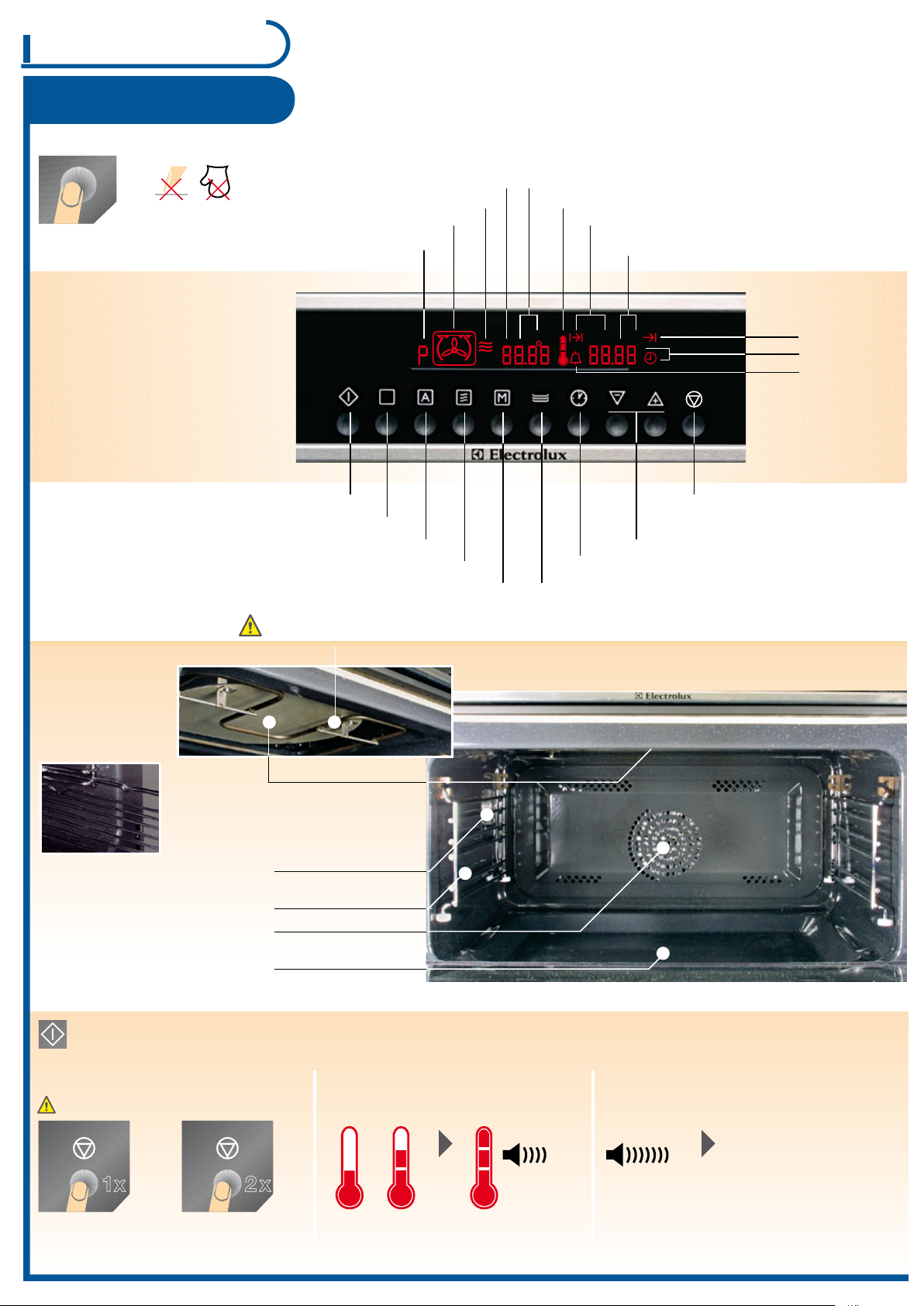
Control panel
Use
Oven function
Automatic programme
Microwave functions
Memory function
Keeping warm
Clock functions
Setting
temperature and time
P =Memory function
(d =Demo function)
Oven functions
Microwave functions
Thermometer symbol
Weight display
End
Time
Microwave generator
Griddle guides
(3 slot levels)
Surface grill
Do not place aluminium foil / aluminium tray on the oven base!
Baking area
Short time
Duration
Stop/reset
Start
Bottom glass
(removable)
Rear panel heating element
Oven light
- is switched on as soon as
a function is started or the
door is open
- goes out after 10 minutes
when the door is open and
appliance is switched off
Interrupting
operation
Continue operation -> Press start button
Switch off
appliance
General
Appliance switches
off automatically
Switch off BEEP:
Press any button
During/at the end of the operation
Temperature display
Appliance heats up Temperature reached
If time / end is up
- If the chosen function is not started within 30 seconds, the appliance switches off.
- If the door opens during operation, the function stops -> close door and press start button within 30 seconds.
After switching off the appliance the fan runs
until the temperature is less than 80 °C.
Roasting / Baking
Select oven function
the temperature can be changed
Evt. switch off first with
stop button
During operation...
Select
function
Select poss.
temperature
Start
Press button repeatedly...
Select poss.
time / end
Press «M» button for 2 seconds until signal is audible
(for new function button press again for 2 seconds)
MEMORY FUNCTION
1. Call up memory storage with «M» button
2. Press start
Start the memory function:
(see clock function, p. 5)
(*optional accessories p. 7)
for…
- Pastry
(up to 2 levels)
- Select temp. 15° C lower than
indicated on recipes
HOT AIR
TemperaturSlot level
Presetting:
170 °C
Setting range:
30-230 °C
Plates / grid
1 or 2 plates 1 plate: 1 or 2
2 plates: 1 + 3
1 grid + 1 plate
SURFACE GRILL
Presetting:
230 °C
Setting range:
30-230 °C
Grid: 2 or 3
Plate: 1 level
below
-
Distance to heating element
can be
varied up or down
by grid curve
- insert the baking tray below as
a collection pan
- For flat grilled food such as steaks,
cutlets, sausages, fish
- Grilled toast
- Melting marzipan/ice cream
- Overcrusting of casseroles
1 grid + 1 plate
TURBOGRILL
Presetting:
180 °C
Setting range:
30-230 °C
Grid: 1 or 2
Plate: 1 level
below
- High joints
- Rollbraten (sliced roast pork)
- Poultry
- Gratins/casseroles
- etc.
- The joint is cooked once it
no longer holds down
- Leave the roast uncovered
for about 10 minutes before
slicing
- Line griddle with
baking paper
- Place dry food in single
layers/close together
- Open oven every now and
then, cool down half-way
- Dry sheets are particularly
suitable
- Check degree of dryness
regularly (moist or crumbly)
- Baking/drying of herbs,
fruit, vegetables (1 to 2 levels,
change plates from time to time)
- Defrosting
BAKING & DEFROSTING
1 or 2 plates Presetting:
30 °C
Setting range:
30-100 °C
1 plate: 2
2 plates: 1 + 2
In order to pre-heat dishware or keep meals warm
Switch on- arrange dishware evenly
- e.g. shift around once (up/down)
Select keep warm function
(Temperature, approx. 80 °C, is controlled automatically)
Breakpoint/
switch off
Keeping warm
(*optional accessories p. 7)
Baking dishes
- Place lean meat, venison, meat loaf directly on the
roasting tray
- Light-coloured moulds extend baking/roasting times
- Place baking dishes/dishware on the griddle
- With hot air use baking ceramic/heat-resistant moulds
(roasting tin, Pyrex or stoneware)
Grill with curve upwards to prevent
slipping of roast/baking dish
Grill
(e.g. Pizza)
- Place the griddle lined with baking paper
to avoid distortion of baking sheet
(Temperature differences)
- Use professional tray*
Frozen pastry
Sauces
- Allow the gravy to brown slightly, then pour on
hot water
-
With a roasting time of over 1h: Do not add
gravy ingredients into the roasting tin until
1/2h before the end
Grill
- Do not insert very fatty grilled food too close under the heating element
- Close oven door when grilling
- Always supervise grilling
- If several items of food have to be grilled in succession; clean the griddle each time
General
Roasting / Baking
Dishware/Material
Suitable dishware / material
Fireproof glass and porcelain, glass baking tray (no metal parts, e.g. Pyrex, Jenaer Glas)
Non fireproof glass and porcelain 1)
Glass and glass ceramics made with fire /rustproof material (e.g. arcoflam), grill
Ceramics 2), stoneware 2)
Heat-resistant plastic up to 200 °C
Cardboard, paper
Cling film
Roasting film with seal suitable for microwave use 3)
Roasting ovenware made in metal e.g. enamel, cast iron
Baking dishes, varnished in black or silicon-coated 3)
Baking tray
1) without silver, gold, platinum or metal plating / decorations
2) without crystal or metal parts, no glaze containing metal
3) please observe maximum temperatures given by the manufacturer
- When heating food in the microwave, stir/turn continuously, as heat is generated in the food itself and
not all places are heated simultaneously.
- Leave food standing inside or outside the appliance, so that heat is distributed evenly.
(*optional accessories p. 7)
Cooking
- Covered up as much as possible, only if
it is to form crust, cook meals uncovered
- Chilled or frozen meals need longer cooking
time
- Stir meals containing sauce from time to time
- Cook vegetables with solid texture (e.g. carrots,
peas, cauliflower) with water
- Cut vegetables into big pieces
- Use flat, wide cookware
Microwave
- Leave meals to stand for a few minutes after
switching off appliance
- Remove aluminium packaging, metal boxes
before preparation
- Metal objects or aluminium backing foil must be
at least 2 cm from the cooking area walls and door
Convenience foods
- Always observe the manufacturer’s instructions
imprinted on the packaging
Defrost
Meat, Poultry, fish:
- Place frozen, unwrapped food on small plate
turned upside down with tin below and turn half
way through the defrosting time
Butter, slice of cake, quark:
- Leave to defrost at room temperature, not
completely in appliance
Fruit, vegetable:
- If it is raw processed, defrost at room temperature,
and not completely in appliance
- If the fruit and vegetables are to be cooked,
directly with higher microwave power, the output
can be changed.
power can be changed
Microwave
Select MW
power output
Set
temperature
StartSet
cooking time
Select oven
function
The microwave can be switched to the various heating forms of oven functions.
Food is cooked in the shortest time and browned at the same time,
See baking and roasting charted suitable dishware /material page 4
TIP
Familiarize yourself with a similar food and
adapt the cooking times according to the following rule:
Double the quantity = almost double the time
Half the quantity = half the time
In 100th steps,
Select power
output (Watt)
Set cooking time
(Time)
Start
Press button repeatedly...
1000 Watt
900 Watt
800 Watt
700 Watt
- Heating fluids
- Parboiling at the start of cooking process
- Cooking vegetables
- Cooking of food
- Melting of gelatine or butter
600 Watt
500 Watt
- Defrosting and heating frozen foods
- Heating meals
- Cooking stews
- Cooking scrambled eggs
400 Watt
300 Watt
200 Watt
- Cooking meals further
- Cooking delicate meals
- Heating baby food
- Preparing rice
- Heating delicate meals
- Melting cheese
100 Watt - Defrosting meat, fish, bread
- Defrosting cheese, cream, butter
- Defrosting fruit and cakes (cream cakes)
- Leaving dough
- Heating cold meals and drinks
The power outputs given are standard values
Microwave
PROGRAMMED RECIPES
see baking and roasting chart and automatic programme
MEMORY FUNCTION
At 700 W to 1000 W, 0 to 7 min. 40 secs
At 100 W to 600 W, 0 to 59 min.
Have you already set the time? See page 7
Microwave power
P =Automatic programme 1-12
Evt. switch off first with
stop button
Crostinoplate (optional accessories p. 7)
Oven
Grill
Microwave
Defrost Heat Cooking
Possible to store a setting that will be used again
and again.
Max. 7 min. on maximum
microwave power output
Microwave Quick Start
Set operating
time
The appliance switches on with maximum
microwave power output.
Do not overcooke food by power and time
that is set too high.
Meals can dry out, burn or inflame in specific
places.
- Only operate microwave with food inside - never empty!
- Only use dishware suitable for microwave p. 4
- Place food on bottom glass or glass baking tray
- Always place coffee spoon or glass stirrer (accessory) in the
container when heating fluid, in order to avoid boiling retardation
(overcooking or splashing)
- Prick food with «peel» or «shell» ((e.g. potatoes, tomatoes,
sausages) several times using a fork to prevent from bursting
- Do not cook eggs in their shells, they can crack.
- Do not use aluminium foil. When using convenience foods
always see that there is a space in the container (sparking)
Setting see microwave
Combinated functions
See roasting / baking
MEMORY FUNCTION
see «baking and roasting»
see «Safety instructions»
Recommendation: Place your food on the glass
baking tray on the bottom glass
While time passes by...
Change durationPress clock function
No function when door opened
The bottom glass is a work space for heating food / liquid and imperative for microwave oven operation!
As a shelf runner safety device,
all insertable components have
a small curved indentation at
the bottom on the right and
left-hand edge.
Always insert insertable
components so that this
indentation is at the
back of the oven interior.
1
P a g e
4
P a g e
2
P a g e
3
P a g e


Join the conversation about this product
Here you can share what you think about the Electrolux EBCSL90CN Oven. If you have a question, first carefully read the manual. Requesting a manual can be done by using our contact form.