Manual Black and Decker FSMH16151 Steam Cleaner

Need a manual for your Black and Decker FSMH16151 Steam Cleaner? Below you can view and download the PDF manual for free in English. This product currently has 4 frequently asked questions, 0 comments and has 0 votes. If this is not the manual you want, please contact us.

Is your product defective and the manual offers no solution? Go to a Repair Café for free repair services.

Manual

Loading…
7
ENGLISH
(Original instructions)
Caution! Never leave the steam mop in one spot on any
surface for any period of time. Always place the steam mop
with the handle (10) in the upright position when stationary
and make sure the steam mop is turned off when not in use.
Caution! Always empty the steam mop after use.
Note: When rst lled or after running dry it can take up to 45
seconds for steam to be produced.
Autoselect
TM
Technology (Fig. I)
This steam mop is tted with an Autoselect
TM
button (6)
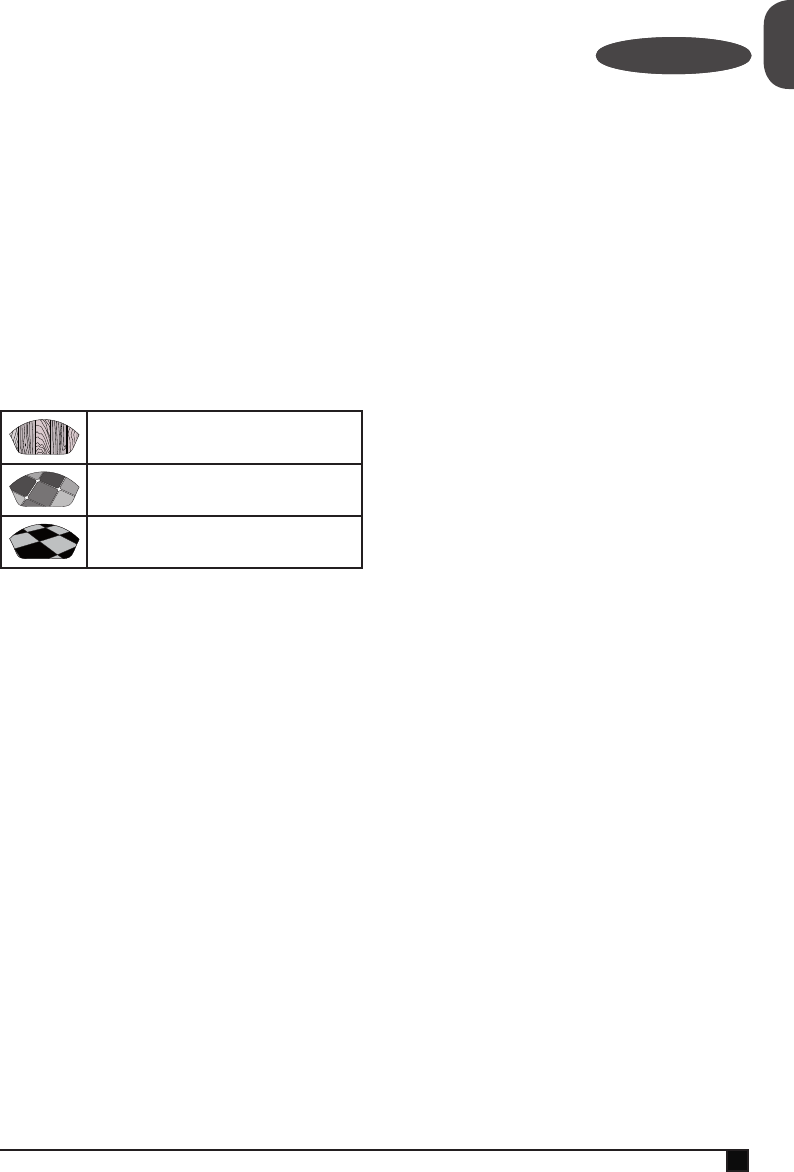
which shows various cleaning applications. They are used to
select the correct operating mode for your particular cleaning
operation.
Using Autoselect
TM
, choose from one of the following applica-
tions by pressing the autoselect button (6) until the required
setting is selected:
Wood/Laminate
Stone/Marble
Tiles/Vinyl
The steam mop will select the correct volume of steam
required for your particular cleaning operation.
Note: Always check you are using the correct setting before
using your steam mop. For convenience the steam mop will
remember the last setting you chose.
Steam burst (Fig. I)
The steam mop is equipped with a steam burst button to aid in
the removal of stubborn marks and stains.
u During use, press the steam burst button (25) to apply
extra cleaning power.
Note: The steam burst will last for 10 seconds then the steam
mop will return to the chosen setting.
Switching on and off (Hand held steam cleaner)
(Fig. M)
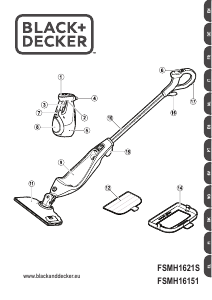
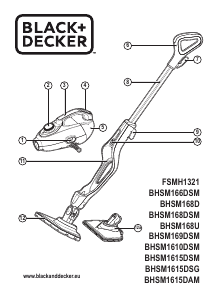
u To switch the appliance on, press the ON/OFF button (1).
It takes approximately 15 seconds for the hand held steam
cleaner to heat up.
Note: When the hand held steam cleaner is rst turned on
the water reservoir will glow red. Once the hand held steam
cleaner is ready to use the water reservoir will glow blue.
u Lift the lock off switch (2) and pull the trigger switch (3).
After a few seconds steam will be produced.
u To switch the appliance off, release the trigger switch (3)
then press the ON/OFF button (1).
Caution! Always empty the hand held steam cleaner after
use.
Caution! Steam may continue to be produced for a short time
after the trigger switch (3) is released, this is normal. Switch
off and allow the unit to cool before removing any accessories.
Hints for optimum use
General
Caution! Never use the steam mop without rst attaching a
cleaning pad.
u During steam mop use you can use the cable manage-
ment clip (17) to keep your cable out of the way of the
work area..
u Always vacuum or sweep the oor before using the steam
mop.
u The easiest way to use the machine is to tilt the handle to
a 45˚ angle and clean slowly, covering a small area at a
time.
u Do not use chemical cleaners with your steam mop. To
remove stubborn stains from vinyl or linoleum oors, you
can use the steam burst button to apply extra steam to
the area or pre-treat with a mild detergent and some water
before using the steam mop.
Steam cleaning with the mop
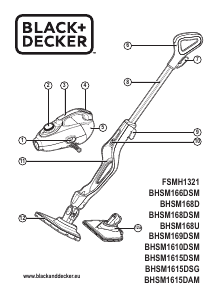
u Fit hand held steam cleaner (5) to the steam mop body
(9).
u Place a cleaning pad (12) on the oor with the ‘hook &
loop’ side facing up.
u Lightly press the steam mop down onto the cleaning pad
(12).
u Connect the steam mop to the mains.
u Press the ON/OFF button (1). It takes approximately 15
seconds for the steam mop to heat up.
u Press the Autoselect
TM
button (6) till the required setting is
reached.
u Pulling the handle (10) back will activate the steam pump.
After a few seconds steam will start to come out of the
steam head.
Note: When rst lled or after running dry it can take up to 45
seconds for steam to be produced.
u It takes a few seconds for steam to enter the cleaning pad.
The steam mop will now glide easily over the surface to be
sanitised/cleaned.
u Push and pull the steam mop slowly across the oor to
thoroughly steam clean each section.
Note: During use you may turn off the steam pump by return-
ing the handle to the upright position, this convenient feature
will allow you to leave the steam mop for a short time so that
you may move items of furniture, then continue cleaning
without the need to switch the appliance off.
Download manual in English (PDF, 5.65 MB)
(Consider the environment and only print this manual if it is really necessary)

Loading…

Rating

Let us know what you think about the Black and Decker FSMH16151 Steam Cleaner by leaving a product rating. Want to share your experiences with this product or ask a question? Please leave a comment at the bottom of the page.
Are you satisfied with the Black and Decker FSMH16151 Steam Cleaner?
Yes No
Be the first to rate this product
0 votes

Join the conversation about this product

Here you can share what you think about the Black and Decker FSMH16151 Steam Cleaner. If you have a question, first carefully read the manual. Requesting a manual can be done by using our contact form.

More about this manual

We understand that it’s nice to have a paper manual for your Black and Decker FSMH16151 Steam Cleaner. You can always download the manual from our website and print it yourself. If you would like to have an original manual, we recommend you contact Black and Decker. They might be able to provide an original manual. Are you looking for the manual of your Black and Decker FSMH16151 Steam Cleaner in a different language? Choose your preferred language on our homepage and search for the model number to see if we have it available.

Specifications

Brand Black and Decker
Model FSMH16151
Category Steam Cleaners
File type PDF
File size 5.65 MB

All manuals for Black and Decker Steam Cleaners
More manuals of Steam Cleaners

Frequently Asked Questions about Black and Decker FSMH16151 Steam Cleaner

Our support team searches for useful product information and answers to frequently asked questions. If you find an inaccuracy in our frequently asked questions, please let us know by using our contact form.

Can I use a steam cleaner on wooden floors like laminate? Verified

Yes, but wooden floors are more vulnerable than for example tiles. Use the lowest setting on the steam cleaner and use a cloth to prevent damage.

This was helpful (385) Read more

My steam cleaner is generating very little steam, what can I do? Verified

First check the water container to see if there is enough water. Another reason for decreased steam output can be scale buildup. Consult the manual of your specific steam cleaner to learn how to descale your model.

This was helpful (154) Read more

I can’t press the steam button/lever, why is that? Verified

Some steam cleaners have a child safety lock. If this is activated, the steam button or lever will not work. Deactivate the child safety lock to use the steam cleaner.

This was helpful (128) Read more

Can I use detergents or other chemicals in a steam cleaner? Verified

No, detergents or other chemicals can damage the steam cleaner and in many cases will void the warranty on the product.

This was helpful (60) Read more
Manual Black and Decker FSMH16151 Steam Cleaner

Related products

Related categories

×
Download