4 5
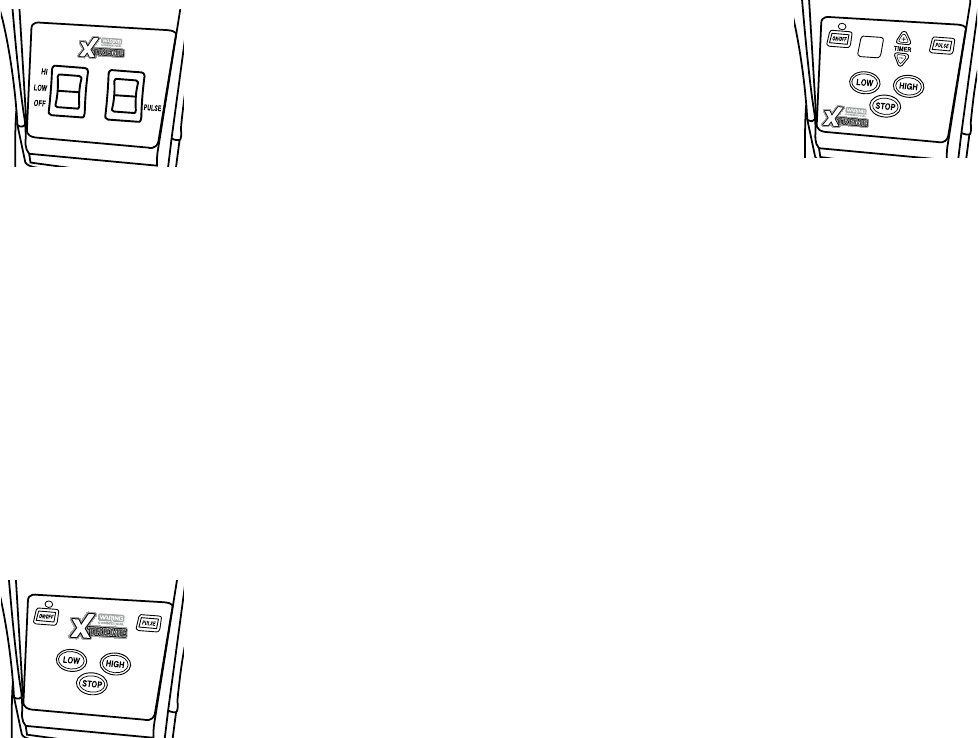
MX1000XTX/MX1000XTP/MX1000XTS OPERATION
1. Before starting, make sure that the blender
is unplugged.
2. With the unit in Off position, place container on
blender base. Be sure container is fully seated and
that drive coupling is properly engaged. Plug
blender cord into outlet.
3. Put ingredients into container and cover it. Do not
fill above MAX line.
4. This blender has 2 speed settings: Hi and Low. Press paddle switch
to desired position. To crush ice quickly, use high speed setting.
5. When finished blending, set paddle switch to Off position.
6. This blender is equipped with a pulse option. Hold paddle switch in
down position to engage pulse function. Unit will run on high speed
until the paddle switch is released.
7. Allow motor to come to a complete stop before removing container
from blender base. Never place the container on the motor base or
remove it from the motor base while motor is running.
8. Always hold container with one hand when starting and while blending.
Never operate without jar lid.
9. Wash and dry container after each use. See cleaning and sanitizing
instructions, pages 6-8.
MX1050XTX/MX1050XTP/MX1050XTS OPERATION
Follow steps 1-3 above.
1. This blender is equipped with an electronic
membrane keypad. The keypad has a main power
On/Off button, and High and Low, Stop and
Pulse buttons.
2. Press the On/Off button to turn on the blender.
Green LED will illuminate. For continuous opera-
tion, press either Low or High button. When finished
blending, press Stop. For momentary operation, press the Pulse button;
motor will run on High speed until the button is released.
NOTE: Your MX1050XTX utilizes a Slow Start
™
feature. When pressing
High, the unit will start in the low speed for 2 seconds and then switch
to high speed. This allows for a more even blending of ingredients
in container.
3. Allow motor to come to a complete stop before removing container from
blender base. Never place the container on the motor base or remove it
from the motor base while motor is running.
4. Always hold container with one hand when starting and while blending.
Never operate without jar lid.
5. Wash and dry container after each use. See cleaning and sanitizing
instructions, pages 6-8.
6. To turn the unit off, press On/Off button. Green LED light will go off.
MX1100XTX/MX1100XTP/MX1100XTS OPERATION
Follow steps 1-3 in the MX1000XTX Operation section.
1. This blender is equipped with an electronic
membrane keypad. The keypad has a main power
On/Off button, plus High, Low, Stop and Pulse
buttons and a 30-second countdown timer with Up
and Down arrows to set time.
2. Press the On/Off button to turn on the blender.
Green LED will illuminate. The electronic timer will
indicate 10 seconds (default). Press the Up or Down arrow to set the
desired time. The electronic timer will indicate run time in 5-second inter-
vals up to a maximum of 30 seconds. After the desired time is set, press
High or Low to start the blender. The timer will count down to
0 in 1-second intervals and blender will shut off. Pressing the Pulse
button, the Stop button or the On/Off button will override the timer and
the blender will stop regardless of time left on timer.
NOTE: If you want to increase or decrease time while timer is counting
down, press Up or Down arrows. Time will increase or decrease in
5-second intervals.
3. If the blender is not used for five seconds, the timer function will turn
off and return to manual mode. To reactivate timer, press Up or Down
arrows. When using the electronic timer again, the initial time will be the
last time set. Note: If unit has been turned off or unplugged, the timer will
default back to 10 seconds.
4. For continuous operation, press either Low or High button. When
finished blending, press Stop. For momentary operation, press the
Pulse button. Motor will run on high speed until the button is released.
NOTE: Your MX1100XTX utilizes a Slow Start
™
feature. When
pressing High, the unit will start in the low speed for 2 seconds
and then switch to high speed. This allows for a more even blending of
ingredients in container.
5. Allow motor to come to a complete stop before removing container from
blender base. Never place the container on the motor base or remove it
from the motor base while motor is running.
6. Wash and dry container after each use. See cleaning and sanitizing
instructions, pages 6-8.
7. To turn the unit off, press On/Off button. Green LED light will go off.
RESETTING THERMAL PROTECTION
• Your blender is equipped with an automatic reset function to protect the
motor from overheating.
• If your blender stops running under heavy use, turn the power switch to
Off and unplug the power cord. Empty the blender container of all
its contents and allow between 5 and 30 minutes for the motor to
cool down.
• Plug the power cord back into the outlet and continue blending.
• If your blender does not function properly following this procedure,
discontinue use and contact a certified Waring Customer Service Center.









Join the conversation about this product
Here you can share what you think about the Waring Commercial MX1100XTS Blender. If you have a question, first carefully read the manual. Requesting a manual can be done by using our contact form.