Manual Victor 1460-4 Printing Calculator

Need a manual for your Victor 1460-4 Printing Calculator? Below you can view and download the PDF manual for free in English. This product currently has 0 frequently asked questions, 0 comments and has 0 votes. If this is not the manual you want, please contact us.

Is your product defective and the manual offers no solution? Go to a Repair Café for free repair services.

Manual

Loading…
General Maintenance
1. Do not place the calculator in hot, dusty, or damp locations.
2. To clean the housing, use a silicon-treated cloth. Do not use water or detergents.
3. Do not place anything on the housing, particularly on the head of the printer mechanism.
4. Turn off the power switch before removing the plug from AC wall outlet.
5. Turn the power switch off while not in use.
How to Feed the Paper Tape
1. Plug in the calculator and turn it on.
2. Cut or tear evenly the end of the paper roll to get a straight edge.
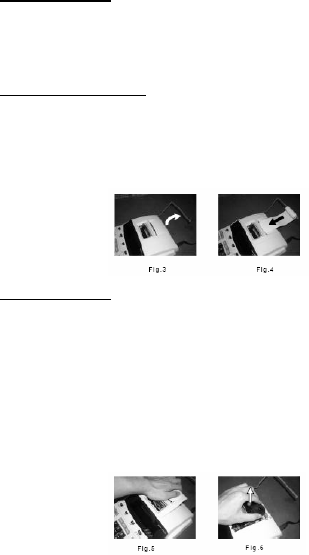
3. Place the paper holder into position. (Fig.
4. Install the paper roll on the paper holder.
5. Insert the paper end into the printer slot. (Fig.
6. Press the Paper Feed () key to feed the paper to an adequate length.
Replacing the Ribbon
Your calculator is shipped with a 2-color ribbon already in place. You do not need to install or change it before you
begin using the calculator. When you have been using your calculator for some time, however, the print will
gradually become faint, indicating that you should change the ribbon. To change the ribbon, follow these steps.
1. Remove the paper roll, tearing the paper at the rear of the calculator. Use the Paper Advance () key to
feed the remaining paper tape through the printer. Then remove the printer cover.
2. Remove the old ribbon by pulling it upward.
3. Install the ribbon spool with the black edge up. Roll from the outside of the full spool and place the
first spool on the spindle not engaged by the lever. Thread the new ribbon along the outside of the
guides and in front of the print wheels. Switch the lever to the other side and replace the second spool.
4. Rotate the spools to take up any slack. Replace the printer cover and the paper tape.
(Replace with the Victor #7010 Ink Ribbon)
Download manual in English (PDF, 0.25 MB)
(Consider the environment and only print this manual if it is really necessary)

Loading…

Rating

Let us know what you think about the Victor 1460-4 Printing Calculator by leaving a product rating. Want to share your experiences with this product or ask a question? Please leave a comment at the bottom of the page.
Are you satisfied with the Victor 1460-4 Printing Calculator?
Yes No
Be the first to rate this product
0 votes

Join the conversation about this product

Here you can share what you think about the Victor 1460-4 Printing Calculator. If you have a question, first carefully read the manual. Requesting a manual can be done by using our contact form.

More about this manual

We understand that it’s nice to have a paper manual for your Victor 1460-4 Printing Calculator. You can always download the manual from our website and print it yourself. If you would like to have an original manual, we recommend you contact Victor. They might be able to provide an original manual. Are you looking for the manual of your Victor 1460-4 Printing Calculator in a different language? Choose your preferred language on our homepage and search for the model number to see if we have it available.

Specifications

Brand Victor
Model 1460-4
Category Printing Calculators
File type PDF
File size 0.25 MB

All manuals for Victor Printing Calculators
More manuals of Printing Calculators
Manual Victor 1460-4 Printing Calculator

Related products

Related categories

×
Download