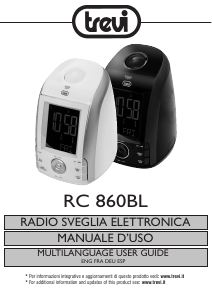
Manual Trevi RC 860 BL Alarm Clock Radio

Need a manual for your Trevi RC 860 BL Alarm Clock Radio? Below you can view and download the PDF manual for free in English. This product currently has 3 frequently asked questions, 0 comments and has 1 vote with an average product rating of 0/100. If this is not the manual you want, please contact us.

Is your product defective and the manual offers no solution? Go to a Repair Café for free repair services.

Manual

Loading…
RC 860 BL FM ALARM CLOCK
2
2
ITALIANO
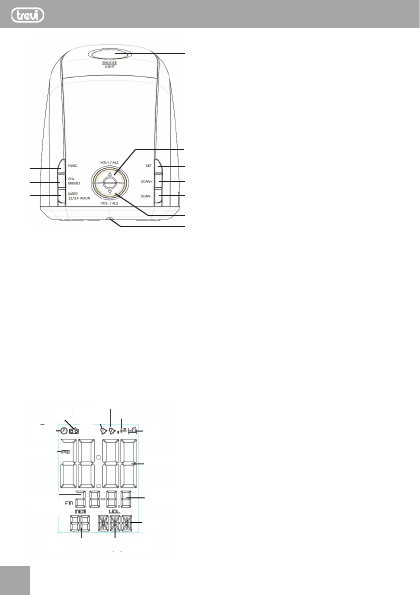
1. Tasto SNOOZE/LIGHT, spegnimento temporaneo dell’allarme
sveglia/illuminazione display
2. Tasto VOL+/AL1, regolazione volume/modo allarme sveglia 1
3. Tasto SET, regolazione orario
4. Tasto SCAN+, ricerca stazioni radio
5. Tasto SCAN-, ricerca stazioni radio
6. Tasto VOL-/AL2, regolazione volume/modo allarme sveglia 2
7. Vano batterie
8. Tasto FUNC, accensione/spegnimento radio
9. Tasto CH+/MEMO, selezione/memorizzazione delle stazioni
radio
10.Tasto SLEEP / 12/24 HOUR, regolazione timer di spegnimento/
selezione visualizzazione 12/24H
1
10
9
8
7
6
5
4
3
2
COMANDI
INFORMAZIONI DISPLAY
ICONA
RADIO
ALLARME
SVEGLIA 1
ALLARME
SVEGLIA 2
SNOOZE
SLEEP
TIMER
VISUALIZZAZIONE
ORARIO
ICONA
OROLOGIO
INDICAZIONE
AM/PM
CALENDARIO
INDICAZIONE
FREQUENZA RADIO
NUMERO MEMORIA
RADIO
GIORNO DELLA
SETTIMANA
LIVELLO
VOLUME
INSTALLAZIONE
Inserire la spina del cavetto di alimentazione in una presa
di corrente 230V - 50Hz.
Per mantenere in funzione l’orologio e la memorizzazione
dell’orario anche durante una momentanea man canza di
energia elettrica, inserire due batterie AAA (non fornite)
nell’apposito vano (7) sul fondo dell’apparecchio seguendo
le indicazioni di polarita’ stampate sul mobile.
REGOLAZIONE OROLOGIO/DATA E 12/24H
Durante la visualizzazione dell’ora/calendario premere a lungo
il tasto SET(3), si attivera’ la funzione di regolazione data/
ora. Tramite i tasti SCAN+(4) e SCAN-(5) e confermando
con il tasto SET(3) regolare in sequenza anno, mese, giorno,
ora e minuti.
Durante la visualizzazione dell’ora/calendario premere il
tasto 12/24HOUR(10) per passare dalla visualizzazione
12H a quella 24H.
RADIO
Accendete la radio premendo il tasto FUNC(8); premetelo
di nuovo a lungo per spegnerla.
Sintonizzatevi sulla vostra stazione preferita selezionando
la giusta frequenza con i tasti SCAN+(4) e SCAN-(5); pre-
mendo i tasti SCAN+ e SCAN- a lungo si attiva la ricerca
automatica, la radio effettua una scansione della frequenza
fino a fermarsi alla prima stazione radio trovata.
Ascolto di stazioni radio memorizzate e memorizzazione
di una stazione radio: e’ possibile memorizzare fino a 10
stazioni radio. Per ascoltare una stazione radio salvata in
memoria premere il tasto MEMO(9) fino a visualizzare il
numero di memoria desiderato.
Per salvare una stazione radio in memoria sintonizzare la
radio desiderata, premere a lungo il tasto MEMO(9) fino a
quando l’icona MEM lampeggera’ sul display. Premere i
tasti SCAN+(4) o SCAN-(5) fino a selezionare il numero
di memoria sul quale si desidera salvare la stazione radio,
premere infine il tasto MEMO(9) per conferma, la radio e’
ora salvata.
REGOLAZIONE VOLUME
Durante l’ascolto della radio premere i tasti VOL+(2) e
VOL-(6) per regolare il volume di ascolto.
SVEGLIA
Questa radiosveglia e’ dotata di 2 allarmi-sveglia indipendenti;
durante la visualizzazione dell’ora/calendario premere a lungo
il tasto AL1(2) per attivare l’allarme-sveglia 1 (sul display
compare l’indicazione ALLARME SVEGLIA 1), premere a
lungo il tasto AL2(6) per attivare l’allarme-sveglia 2 (sul
display compare l’indicazione ALLARME SVEGLIA 2). E’
Download manual in English (PDF, 0.87 MB)
(Consider the environment and only print this manual if it is really necessary)

Loading…

Rating

Let us know what you think about the Trevi RC 860 BL Alarm Clock Radio by leaving a product rating. Want to share your experiences with this product or ask a question? Please leave a comment at the bottom of the page.
Are you satisfied with the Trevi RC 860 BL Alarm Clock Radio?
Yes No
0%
100%
1 vote

Join the conversation about this product

Here you can share what you think about the Trevi RC 860 BL Alarm Clock Radio. If you have a question, first carefully read the manual. Requesting a manual can be done by using our contact form.

More about this manual

We understand that it’s nice to have a paper manual for your Trevi RC 860 BL Alarm Clock Radio. You can always download the manual from our website and print it yourself. If you would like to have an original manual, we recommend you contact Trevi. They might be able to provide an original manual. Are you looking for the manual of your Trevi RC 860 BL Alarm Clock Radio in a different language? Choose your preferred language on our homepage and search for the model number to see if we have it available.

Specifications

Brand Trevi
Model RC 860 BL
Category Alarm Clock Radios
File type PDF
File size 0.87 MB

All manuals for Trevi Alarm Clock Radios
More manuals of Alarm Clock Radios

Frequently Asked Questions about Trevi RC 860 BL Alarm Clock Radio

Our support team searches for useful product information and answers to frequently asked questions. If you find an inaccuracy in our frequently asked questions, please let us know by using our contact form.

What do AM and PM stand for? Verified

AM stands for Ante Meridiem and indicates that the time is before midday. PM stands for Post Meridiem and indicates that the time is past midday.

This was helpful (292) Read more

What is GMT? Verified

GMT stands for Greenwich Mean Time (sometimes called UTC, standing for Coordinated Universal Time). It is the time for the longitude 0, that passes through Greenwich near London.

This was helpful (167) Read more

What is the difference between FM and AM? Verified

FM and AM are both forms of modulation used to transmit a signal. FM stands for Frequency Modulation and AM stands for Amplitude Modulation. AM is the oldest form of modulation. The biggest difference is that the FM signal is much stronger than the AM signal.

This was helpful (166) Read more
Manual Trevi RC 860 BL Alarm Clock Radio

Related products

Related categories

×
Download