Manual TOMY SRV400 Digital Video Baby Monitor

Need a manual for your TOMY SRV400 Digital Video Baby Monitor? Below you can view and download the PDF manual for free in English. This product currently has 2 frequently asked questions, 1 comment and has 0 votes. If this is not the manual you want, please contact us.

Is your product defective and the manual offers no solution? Go to a Repair Café for free repair services.

Manual

Loading…
GB GB
6 7
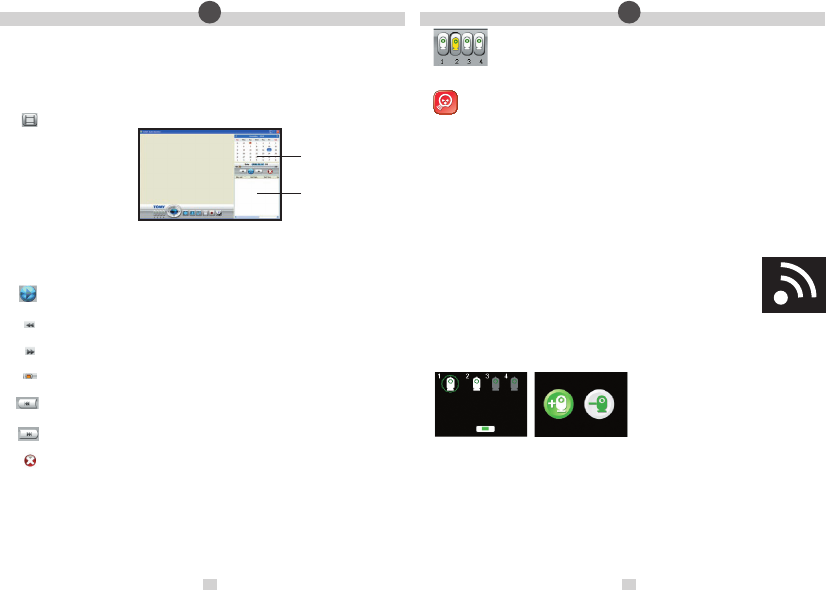
Fig. 4
Calendar View
Recorded Video List
Fig. 5
2
• CREATING A VIDEO LIBRARY
When your Tomy PC Viewer starts up, it will default to monitoring live video from any selected Baby Unit. If no pictures
appear on the screen, see our PC Troubleshooting guide below or use the on-screen help section.
Click on the Record button to store treasured footage of your baby. Showing or hiding the screen icons will not affect your
recording. If left unattended, recording will continue for one hour and then stop automatically. While recording is in
progress, you cannot use the Baby Unit selector to choose another camera.
Any recorded video will be saved to your PC’s hard disk, in a location and format of your choice. NOTE: no sound will be
recorded to your PC.
Click on the View video library button to playback the recorded video. The following screen will appear:
Calendar View The current date is highlighted in blue. If a recording has been made on a given date, it will be
highlighted in orange. Click on that date to play the recorded video.
Recorded Video List This panel shows the list of recorded video les shot on the selected date.
Play/Pause – Click to playback or pause the selected video. Alternatively, double-click a title in the Recorded
Video List.
Slow motion Click to toggle in and out of slow motion.
Fast forward Click to toggle in and out of accelerated view.
Progress Bar – Shows how much video has elapsed/is left to run.
Restart/ previous Click to restart video (if currently selected le is rst in the list) or to skip to the previous le
listed in the Recorded Video List.
Next – Click to skip to the next le listed in the Recorded Video List.
Delete – To delete a le from the Recorded Video List, rst select it from the list with your cursor and then click
on the Delete button.
• USING MULTIPLE BABY UNITS WITH THE PC VIEWER
Full instructions on how to connect additional Baby Units are supplied when purchasing the
units from www.tomy.eu
With up to 4 Baby Units connected to a single Parent Unit, you can manually toggle between video
feeds on your PC screen by clicking on the matching numbered icon on the Baby Unit selector.
Switching between video feeds automatically
When you select Sound Activated Monitoring from the Parent Unit’s Main Menu and you have more than one
Baby Unit connected, the video feed to your PC will automatically come from whichever Baby Unit detects
sound above the preset threshold.
If only one Baby Unit is detecting sound above the threshold, video pictures will continue to be transmitted from that
unit until that baby settles or until another Baby Unit picks up sound above the preset threshold.
If more than one Baby Unit detects sound above the threshold, the two video feeds (or more) will toggle at 3-second
intervals between those Baby Units. For example, if Baby Units #2 and #4 pick up sound above the preset threshold,
the video feed will toggle between these two cameras. Pictures from Baby Units #1 and #3 will not appear unless they
in turn pick up sound above the threshold.
If all the babies being monitored are quiet (with their sound levels below the preset threshold) for a period longer
than 10 seconds, the video pictures on your PC will simply toggle between ALL connected Baby Units at regular
intervals until one or more of the babies stirs and trips Sound Activated Monitoring.
IMPORTANT! If you choose to record video while in Sound Activated Monitoring mode, the automatic switching
between Baby Units described above will affect what is recorded.
Losing a connection
If a connection is lost with one or more Baby Units, the video feed on your PC will be replaced with
the ‘Loss of Link’ icon opposite, together with a number indicating which Baby Unit is affected. See
Figure 4.
To avoid the Loss of Link icon appearing on your PC screen when you turn off one of the Baby
Units, be sure to remove it from the Parent Unit’s Main Menu (see below) so that the other
Baby Units can go on monitoring without interruption.
Removing a Baby Unit
Select the Add/Remove Baby Unit(s) option from the Parent Unit’s Main Menu. Next, choose the number Baby Unit you
want to stop monitoring by moving the green circle using the Navigation Keys. Press the Mode/Enter Key and then select
the ‘Remove’ icon with the minus symbol. See Figure 5.
Download manual in English (PDF, 7.94 MB)
(Consider the environment and only print this manual if it is really necessary)

Loading…

Rating

Let us know what you think about the TOMY SRV400 Digital Video Baby Monitor by leaving a product rating. Want to share your experiences with this product or ask a question? Please leave a comment at the bottom of the page.
Are you satisfied with the TOMY SRV400 Digital Video Baby Monitor?
Yes No
Be the first to rate this product
0 votes

Join the conversation about this product

Here you can share what you think about the TOMY SRV400 Digital Video Baby Monitor. If you have a question, first carefully read the manual. Requesting a manual can be done by using our contact form.

Enjay 24-08-2019
How do I increase the range of my SRV400? Currently I need to be right next to the camera.. Before I could get reception about 10 meters away

reply | This was helpful (0)

More about this manual

We understand that it’s nice to have a paper manual for your TOMY SRV400 Digital Video Baby Monitor. You can always download the manual from our website and print it yourself. If you would like to have an original manual, we recommend you contact TOMY. They might be able to provide an original manual. Are you looking for the manual of your TOMY SRV400 Digital Video Baby Monitor in a different language? Choose your preferred language on our homepage and search for the model number to see if we have it available.

Specifications

Brand TOMY
Model SRV400 Digital Video
Category Baby Monitors
File type PDF
File size 7.94 MB

All manuals for TOMY Baby Monitors
More manuals of Baby Monitors

Frequently Asked Questions about TOMY SRV400 Digital Video Baby Monitor

Our support team searches for useful product information and answers to frequently asked questions. If you find an inaccuracy in our frequently asked questions, please let us know by using our contact form.

Why is the range of my baby monitor less than the brochure/manual describes? Verified

Brands tend to state a range that is based on use without obstacles like walls or a distance that covers multiple floors. If the range is insufficient, try to place the baby monitor so that it has minimum obstacles.

This was helpful (685) Read more

When listening to my baby I can clearly hear breathing, but the baby monitor doesn't let me hear this. Why is that? Verified

This is due to the sensitivity of the baby monitor. Adjust the settings to be more sensitive and pick up quieter sounds.

This was helpful (374) Read more

Manual TOMY SRV400 Digital Video Baby Monitor

Related products

Related categories

×
Download