Manual Timex TW5M16200JT Ironman Watch

Need a manual for your Timex TW5M16200JT Ironman Watch? Below you can view and download the PDF manual for free in English. This product currently has 6 frequently asked questions, 0 comments and has 0 votes. If this is not the manual you want, please contact us.

Is your product defective and the manual offers no solution? Go to a Repair Café for free repair services.

Manual

Loading…
1
ENGLISH 170-095004
EXTENDED WARRANTY
Available in U.S. only. Extend your warranty for an additional 4 years from date
of purchase for $5. You can pay with AMEX, Discover, Visa or MasterCard by
calling 1 800-448-4639 during normal business hours. Payment must be made
within 30 days of purchase. Name, address, telephone number, purchase date,
and 5-digit model number required. You can also mail a check for $5 to: Timex
Extended Warranty, P.O. Box 1676, Dept. EF, Little Rock, AR 72203.
Please read instructions carefully to understand how to operate your Timex
®
watch. Your model may not have all of the features described in this
booklet.
FEATURES
Time with 12- or 24-hour format
Date with MM-DD or DD.MM format
3 time zones
Optional hourly chime
100-hour chronograph with memory for 30 laps/splits
24-hour countdown timer (count down and stop or repeat)
Occasion reminders
3 daily/weekday/weekend alarms with 5-minute backup
Customizable mode set (Select “HIDE” for unwanted modes – they are
removed from mode sequence)
INDIGLO
®
night-light with NIGHT-MODE
®
feature
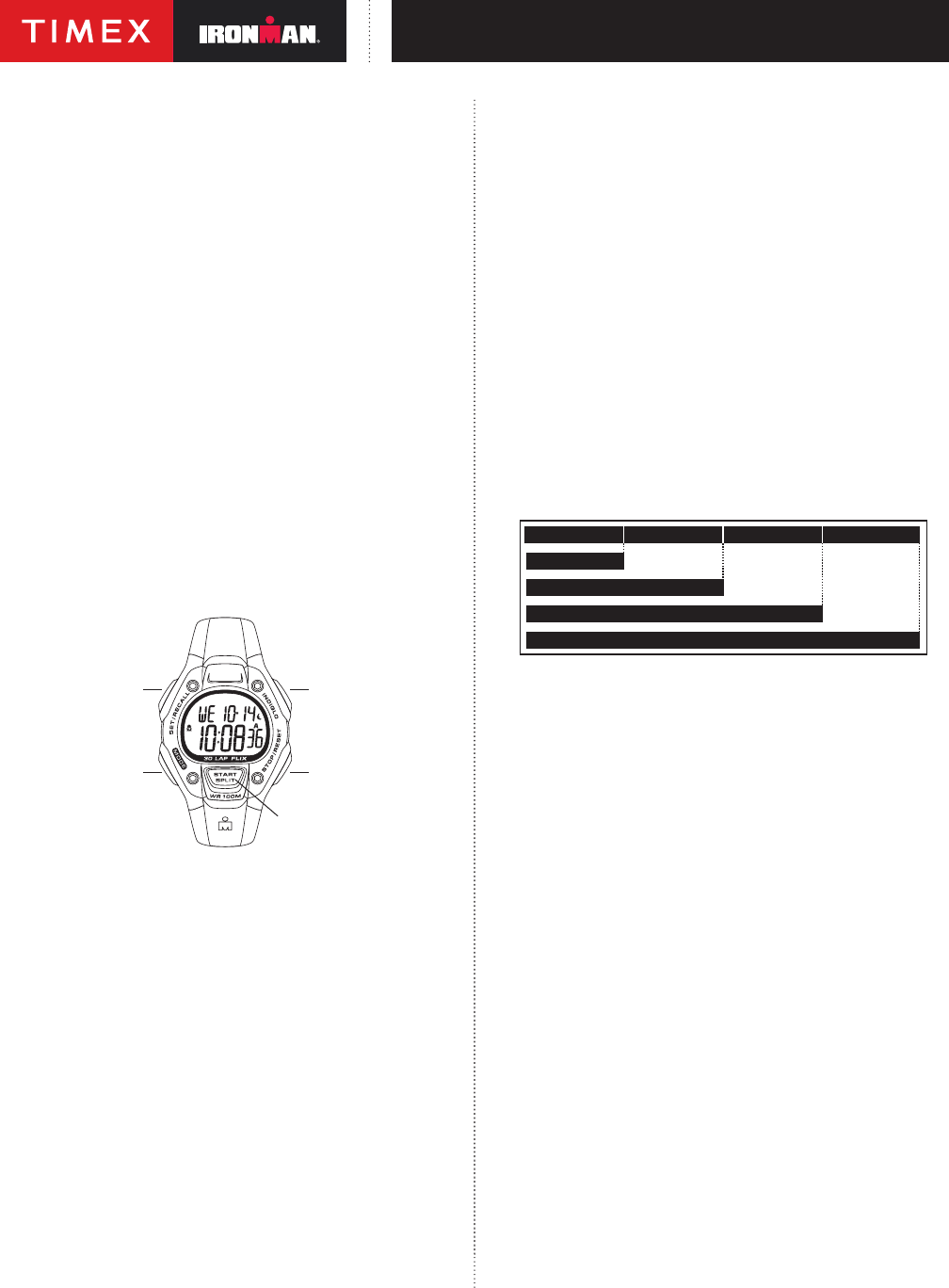
Press MODE repeatedly to step through modes: Chrono, Timer, Occasion,
Alarm 1, Alarm 2, and Alarm 3. Press MODE to exit current mode and return to
Time mode.
BASIC OPERATION
SET·RECALL (DONE)
MODE (NEXT)
INDIGLO
®
BUTTON
STOP·RESET ()
START·SPLIT (+)
Button functions shown with secondary functions in parentheses.
Watch displays may vary. Button operations are the same.
TIME
To set time, date, and options:
1) With time and date showing, press and hold SET·RECALL.
2) Current time zone (1, 2, or 3) ashes. Press + or to select time zone to set,
if desired.
3) Press NEXT. Hour ashes. Press + or to change hour (including AM/PM);
hold button to scan values
4) Press NEXT. Minutes ash. Press + or to change minutes
5) Press NEXT. Seconds ash. Press + or to set seconds to zero.
6) Press NEXT. Month ashes. Press + or to change month.
7) Press NEXT. Day ashes. Press + or to change day.
8) Press NEXT. Year ashes. Press + or to change year.
9) Press NEXT to set options. Press + or to change value and then
press NEXT to go to next option. Press DONE at any step to exit and
save settings. Available options are 12- or 24-hour time format, MM-DD
or DD.MM date format, hourly chime beep for button presses, mode
customization set (Select “HIDE” for unwanted modes – they are removed
from mode sequence).
If you hide a mode, you can turn it back on later using procedure above.
Press START·SPLIT once and hold to see 2nd time zone. Press START·SPLIT
twice and hold to see third time zone. Continue to hold button for 4 seconds to
switch to displayed time zone.
Press and hold STOP·RESET to see next upcoming occasion (see description
of Occasion mode). Release and immediately press and hold again to see
subsequent occasions.
CHRONOGRAPH
This mode provides a chronograph (stopwatch) function. Press MODE to go to
Chrono mode.
To start, press START·SPLIT. Chrono counts up by hundredths of a second
up to one hour, then by seconds up to 100 hours. Stopwatch icon w ashes to
indicate chrono is running.
To stop, press STOP·RESET. Stopwatch icon w freezes to indicate chrono is
stopped.
To resume, press START·SPLIT, or to reset (clear) chrono, press and hold
STOP·RESET.
When chrono is already running, chrono continues to run if you exit mode.
Stopwatch icon w appears in TIME mode.
While chrono is running, press START·SPLIT to take a split. Lap and split times
will be displayed with lap number.
Lap and split times are stored in memory until a new workout is started (chrono
started from zero).
LAP 1 = 7.11 LAP 2 = 7.50
SPLIT 2 = 15.01
LAP 3 = 7.08
SPLIT 3 = 22.09
LAP 4 = 7.30
SPLIT 4 = 29.39
SPLIT 1 = 7.11
To recall split times during or after workout, press SET·RECALL. Then, press +
or to step through splits. Press DONE to exit.
To set display format, press SET·RECALL while chrono is reset. Then, press +
or to select desired format. Press DONE to exit.
NOTES:
When a split is taken, times are frozen on the display for 10 seconds. Press
MODE to release display and show running chrono immediately.
Press NEXT to switch between recall and format setting.
TIMER
Timer mode provides a countdown timer with alert. Press MODE repeatedly
until TIMER appears.
To set countdown time:
1) Press SET·RECALL. Hours ash. Press + or to change hours; hold button
to scan values.
2) Press NEXT. Minutes ash. Press + or to change minutes.
3) Press NEXT. Seconds ash. Press + or to change seconds.
4) Press NEXT. Action at end of countdown ashes. Press + or – to select
STOP or REPEAT, indicated by hourglass icon with arrow i.
5) Press DONE at any step when done setting.
To start timer, press START·SPLIT. Timer counts down every second from
countdown time. Hourglass icon H ashes to indicate timer is running.
To pause countdown, press STOP·RESET. Hourglass icon H freezes to indicate
timer is stopped.
To resume countdown, press START·SPLIT, or to reset countdown, press
STOP·RESET.
Watch beeps and night-light ashes when countdown ends (timer reaches
zero). Press any button to silence. If REPEAT AT END was selected, timer
repeats countdown indenitely.
Timer continues to run if you exit mode. Hourglass icon H appears in Time
mode.
Download manual in English (PDF, 1.78 MB)
(Consider the environment and only print this manual if it is really necessary)

Loading…

Rating

Let us know what you think about the Timex TW5M16200JT Ironman Watch by leaving a product rating. Want to share your experiences with this product or ask a question? Please leave a comment at the bottom of the page.
Are you satisfied with the Timex TW5M16200JT Ironman Watch?
Yes No
Be the first to rate this product
0 votes

Join the conversation about this product

Here you can share what you think about the Timex TW5M16200JT Ironman Watch. If you have a question, first carefully read the manual. Requesting a manual can be done by using our contact form.

More about this manual

We understand that it’s nice to have a paper manual for your Timex TW5M16200JT Ironman Watch. You can always download the manual from our website and print it yourself. If you would like to have an original manual, we recommend you contact Timex. They might be able to provide an original manual. Are you looking for the manual of your Timex TW5M16200JT Ironman Watch in a different language? Choose your preferred language on our homepage and search for the model number to see if we have it available.

Specifications

Brand Timex
Model TW5M16200JT Ironman
Category Watches
File type PDF
File size 1.78 MB

All manuals for Timex Watches
More manuals of Watches

Frequently Asked Questions about Timex TW5M16200JT Ironman Watch

Our support team searches for useful product information and answers to frequently asked questions. If you find an inaccuracy in our frequently asked questions, please let us know by using our contact form.

A battery in my device is oxidized, can I still safely use it? Verified

Ja, the device can still be safely used. Firstly, remove the oxidizd battery. Never use bare hands to do this. Then clean the battery compartment with a cotton swab dipped in vinegar or lemon juice. Let it dry and insert new batteries.

This was helpful (932) Read more

My mechanical watch runs fast, what can I do? Verified

This might be caused by exposure to a magnetic field. It can be solved by a demagnetisation process performed by a professional watchmaker.

This was helpful (871) Read more

What do AM and PM stand for? Verified

AM stands for Ante Meridiem and indicates that the time is before midday. PM stands for Post Meridiem and indicates that the time is past midday.

This was helpful (747) Read more

What is a 'Chronograph'? Verified

A 'Chronograph' is literally a 'writer of time'. The term is used to describe clocks and watches that tell the time of day as well as measure a certain period of time, like a stopwatch.

This was helpful (653) Read more

What is GMT? Verified

GMT stands for Greenwich Mean Time (sometimes called UTC, standing for Coordinated Universal Time). It is the time for the longitude 0, that passes through Greenwich near London.

This was helpful (493) Read more

What is a quartz movement? Verified

Watches and clocks with a quartz movement are driven by a battery. This sends an electric current through quartz crystals that will vibrate. These vibrations are passed on to the movement. Because the vibrations have a fixed frequency, watches and clocks with a quartz movement are extremely precise.

This was helpful (482) Read more
Manual Timex TW5M16200JT Ironman Watch

Related products

Related categories

×
Download