Wireless Charger
USER'S MANUAL
EN
www.techly.com
Dear Customer
Thanks for purchasing this product. Before getting started, please read
the user’s manual carefully in order to ensure proper operation and
optimized performance of this product.
IntroductIon
The wireless charger works with Qi standard mobile phone and devices.
Just put the phone on the stand, no need to insert power cord in the
phone. It is very convenient and efficient.
InstructIon
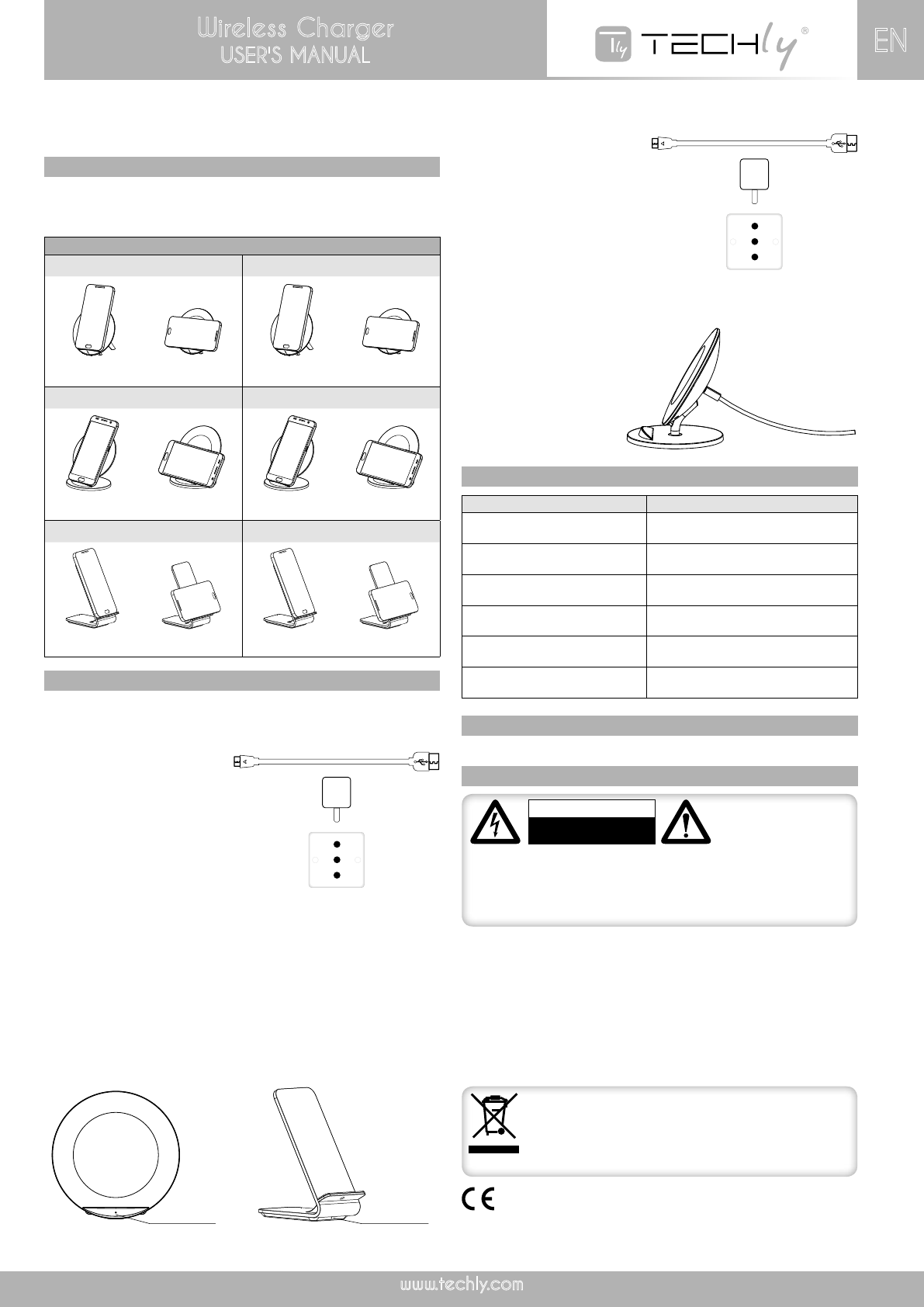
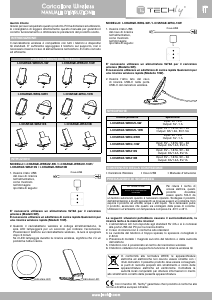
MODELS: I-CHARGE-WRKUV-5W / I-CHARGE-WRKUV-10W /
I-CHARGE-WRA10S / I-CHARGE-WRA10B
1. Insert the USB side
of charging cable
into power adapter,
show as below:
Must use 5V/2A adapter for wireless charging (5W models).
Must use Qualcomm quick charge adapter for quick wireless
charging. (10W models).
2. When wireless charger connects with power, the LED light will flash
on for a second to indicate the power on. Place the phone on the
wireless charger and the light will turn off after 3 minutes to avoid
lighting affecting sleep.
When the LED light flashes during the wireless charging, this indicates
a charging failure.
MODEL: I-CHARGE-WRQ-5W / I-CHARGE-WRQ-10W
1. Insert the USB side
of charging cable
into power adapter,
show as below:
Must use 5V/2A adapter for wireless charging (5W model).
Must use Qualcomm quick charge adapter for quick wireless
charging. (10W model)
2. Insert another end of Type-C
charging cable into Type-C port
to the wireless charger.
specIfIcatIon
package contents
• Wireless charger • USB cable • User’s manual
safety precautIon
To reduce risk of electric
shock, this product
should ONLY be opened
by an authorized
technician when service is required. Disconnect the product from mains and
other equipment if any problem should occur. Do not expose the product
to moisture, water or other liquids. If you need to clean the charger, please
make sure it is not connected power supply. Using environment temperature
remains -20°C to 45°C.
CAUTION
RISK OF ELECTRIC SHOCK
DO NOT OPEN
The following situations will be caused high temperature, slow
charging and without charging!
1. AC adapter not meet standard 5V/2A, or connect PC USB output for
charging directly.
2. The charging cable is not up to standard
3. The phone case is too thick; recommended phone case thickness
within 2-3mm
4. There with metal/magnet on the back of the phone or phone case
5. The phone is not placed at the center of the wireless charger
6. Cell phone do not support Qi wireless charge function
In compliance with EU Directive WEEE this product is marked
with this symbol. It means that used electrical and electronic
products should not be mixed with general household waste.
There is a separate collections system for these products in
compliance with WEEE directive, otherwise contaminative
and hazardous substances can pollute the environment.
With the CE sign, Techly
®
ensures that the product is conformed to
the basic European standards and directives.
PHONE POSITION
I-CHARGE-WRKUV-5W I-CHARGE-WRKUV-10W
✔ ✘ ✔ ✔
I-CHARGE-WRQ-5WH I-CHARGE-WRQ-10W
✔ ✘ ✔ ✔
I-CHARGE-WRA10S I-CHARGE-WRA10B
✔ ✔ ✔ ✔
Model no. Specification
I-CHARGE-WRKUV-5W
Input: 5V – 2A
Output: 5V -1 A
I-CHARGE-WRKUV-10W
Input: 9V – 1.67A, 5V – 2A
Output: 9A/1.2A,5V/1.5A
I-CHARGE-WRQ-5WH
Input: 5V – 2A
Output: 5V -1 A
I-CHARGE-WRQ-10W
Input: 9V – 1.67A, 5V – 2A
Output: 9A/1.2A,5V/1A
I-CHARGE-WRA10S
Input: 9V – 1.67A, 5V – 2A
Output: 9A/1.2A,5V/1A
I-CHARGE-WRA10B
Input: 9V – 1.67A, 5V – 2A
Output: 9A/1.2A,5V/1A
LED indicatorLED indicator
USB Cable
USB Cable



Join the conversation about this product
Here you can share what you think about the Techly I-CHARGE-WRKUV-5W Wireless Charger. If you have a question, first carefully read the manual. Requesting a manual can be done by using our contact form.