Manual Sylvania 6615LG LCD Television

Need a manual for your Sylvania 6615LG LCD Television? Below you can view and download the PDF manual for free in English. This product currently has 13 frequently asked questions, 0 comments and has 0 votes. If this is not the manual you want, please contact us.

Is your product defective and the manual offers no solution? Go to a Repair Café for free repair services.

Manual

Loading…
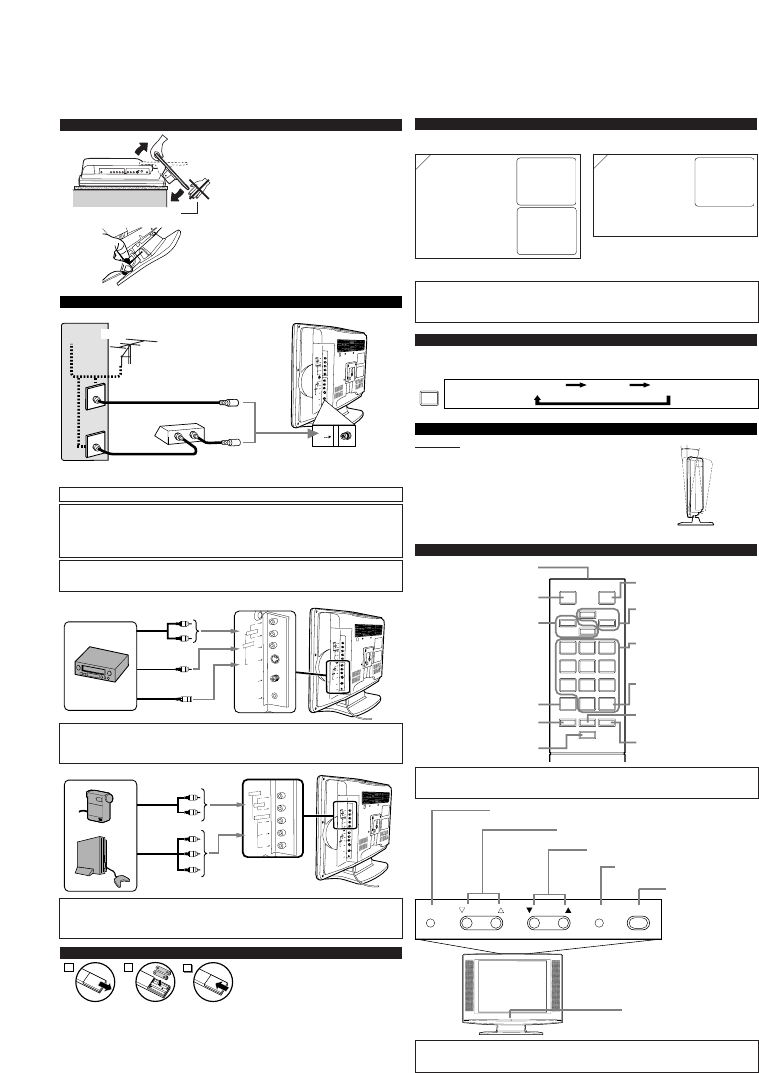
INSTALLING THE BATTERIES
Install two AAA batteries (supplied) matching
the polarity indicated inside battery compart-
ment of the remote control.
[BATTERY PRECAUTIONS]
Be sure to follow the correct polarity as indicated in the battery compartment.
Reversed batteries may cause damage to the device.
Do not mix different types of batteries together (e.g. Alkaline and Carbon-Zinc) or old batteries with fresh ones.
If the device is not to be used for a long period of time, remove the batteries to prevent
damage or injury from possible battery leakage.
Do not try to recharge batteries not intended to be recharged; they can overheat and rupture.
PREPARATION FOR USE
2
1
3
CONNECTIONS
L
Y
P
b
P
r
R
L
VIDEO2
A
U
D
I
O
R
VIDEO1
S
-
V
I
D
E
O
V
I
D
E
O
H
E
A
D
P
H
O
N
E
A
N
T
A
U
D
I
O
C
O
M
P
O
N
E
N
T
R
L
S
-V
ID
E
O
VIDEO
A
N
T
H
E
A
D
PH
O
N
E
VIDEO1
A
U
D
IO
OPERATIONS
VIDEO2 input
L
Y
P
b
P
r
R
L
VIDEO2
A
U
D
I
O
R
VIDEO1
S
-
V
I
D
E
O
V
I
D
E
O
H
E
A
D
P
H
O
N
E
A
N
T
A
U
D
I
O
C
O
M
P
O
N
E
N
T
L
Y
P
b
P
r
R
C
O
M
P
O
N
E
N
T
V
ID
E
O
2
AUDIO
Note:
If some digits appear in the corner of the screen when the unit is turned on at the first time,
press
[POWER] without unplugging the power cord.
Audio Cable
Video Cassette
Recorder
Notes:
The AUDIO L jack is for mono input. The sound is heard from both speakers. Use this jack for
connecting monaural audio equipment.
The S-VIDEO jack is given priority over the VIDEO jack.
Component
Video Cable
Audio Cable
Video Game
Video Camera
Rear of this TV
Rear of this TV
Notes:
This TV can accept 480p / 480i / simplified 1080i video signal.
Simplified 1080 video signal differs to the original 1080i video signal because it is displayed
after converted into 480p signal.
REMOTE CONTROL AND FRONT PANEL FUNCTION
MENU
SELECT
POWER
VOLUME
CHANNEL
CAUTION: TO PREVENT ELECTRIC SHOCK, MATCH WIDE BLADE OF PLUG TO
WIDE SLOT, FULLY INSERT.
ATTENTION: POUR ÉVITER LES CHOC ÉLECTRIQUES, INTRODUIRE LA LAME LA
PLUS LARGE DE LA FICHE DANS LA BORNE CORRESPONDANTE DE LA PRISE ET
POUSSER JUSQU’AU FOND.
[EXTERNAL CONNECTION]
ex.
ex.
L
Y
P
b
P
r
R
L
VID
EO2
A
U
D
I
O
R
VIDEO1
S
-
V
I
D
E
O
V
I
D
E
O
H
E
A
D
P
H
O
N
E
A
N
T
A
U
D
I
O
C
O
M
P
O
N
E
N
T
AN
T
IN
OUT
(OUT)
(OUT)
(IN)
(IN)
(OUT)
(OUT)
(IN)
(IN)
Note:
For your safety and to avoid damages to the unit, unplug the antenna cable from the
ANT jack before moving the unit.
(OUT)
Video Cable
S-Video Cable
(IN)
SELECTING AUDIO/VIDEO INPUT
When you use the AUDIO/VIDEO input jacks, select “VIDEO1” or “VIDEO2” mode by
pressing [INPUT SELECT] on the remote control or [SELECT] on the main unit. The input
mode changes by pressing the button as following:
TV channel VIDEO1 VIDEO2
INPUT
SELECT
VIDEO1 input
You can bracket this product as wall mounting TV using the arm adapted for 100mm (commercially available).
OR
POWER button
To turn TV on/off
VOLUME
XX
/
YY
buttons
To adjust volume
SELECT button
To select TV or external input
CHANNEL
KK
/
LL
buttons
To select channels
MENU button
To view on-screen menu
Infrared Sensor Window
Plug the incoming cable into the ANT jack on the rear of the TV.
*
NOTE (DO NOT DISCONNECT FROM BOX)
Some cable TV systems use scrambled signals and require
a special converter to receive these channels. Consult
your local cable company.
Rear of this TV
OR
Incoming cable from home Antenna /
Cable Company (No Cable Box)
Incoming cable from Cable
Company or Satellite Antenna
Cable Box or
Satellite Box*
Cable
TV signal
Antenna
OR
Note:
You can test if the remote control sends out the infrared signal with an AM radio.
(Refer to “TROUBLESHOOTING GUIDE”.)
123
456
789
0
+100
MENU
o
n
p
m
MUTE SLEEP
DISPLAY
CH RET
INPUT
SELECT
POWER
CH
VOL
POWER button
To turn TV on/off
Channel number buttons
Press two digits to directly access the
desired channel. Remember to press
a "0" before a single digit channel.
CH
KK
/
LL
buttons
To select channels and move
up/down through menu items
MENU button
To view on-screen menu
SLEEP button
To set Sleep Timer
DISPLAY button
To display CH No./Audio Status
CH RET button
To return to previous channel
INPUT SELECT button
To select TV or external input
MUTE button
To mute sound
VOL
XX
/
YY
buttons
To adjust volume
To decide the command of settings
IR transmitter
To send infrared ray (IR) signal
+100 button
Press to select cable channels
higher than 99.
Notes:
In case no channel can be received by the channel scanning, “NO TV SIGNALS” is displayed on
the screen. Turn off the unit and check the antenna connection, then follow step 1 again.
If those settings do not work properly, please call our help line on the front page of this owner's manual.
2
2
If the TV screen shows
snow noise and there is
no operation for more
than 5 seconds,
“HELPFUL HINTS”
appears. Follow the
instructions listed on-
screen.
Select the desired
language according to
the screen indication.
After that, the TV
performs “AUTO
PRESET CH” to scan
channels available for
the broadcasting in
your area.
When the scanning is completed, or
[MENU] is pressed during channel scanning to cancel it, the
tuner stops on the lowest memorized channel.
SELECT LANGUAGE
ENGLISH NEXT:PRESS CH
K
ESPAÑOL DESPUÉS:PRESIONE CH
L
FRANÇAIS APRÈS:PRESSEZ VOL
X
– INITIAL SETUP –
PLEASE CONNECT ANTENNA OR CABLE
OR SATELLITE TO THIS UNIT.
THEN PRESS CH
K
,
IN ORDER TO PERFORM
“AUTO PRESET CH ”.
INITIAL SETUP
When you turn on the power for the first time, the “SELECT LANGUAGE” menu is displayed.
The “INITIAL SETUP” menu is displayed every time you turn on the unit unless the scanning is completed.
1
1
- HELPFUL HINTS -
1. PLEASE CHECK TO SEE IF THE
ANTENNA/CABLE/SATELLITE IS
PROPERLY CONNECTED.
2. DID YOU PERFORM “AUTO PRESET CH” ?
3. PLEASE REFER TO FRONT PAGE OF THE
OWNER’S MANUAL OR REAR PANEL FOR
SUPPORT LINE INFORMATION.
UNPACKING
The stand of this TV is folded when you pur-
chased. Place this TV face-down on a flat sur-
face covered with the soft cloth. Bend the
stand slowly to forward until it clicks.
If you want to fold the stand again, insert a
thin rod into the hole in the right side of the
stand as illustrated, bend the stand backward
while you keep pushing the hole.
T
ilt Stand
Adjust the stand to change the angle of TV (-5° ~ 10°).
-5°
10°
TILT STAND
Download manual in English (PDF, 0.76 MB)
(Consider the environment and only print this manual if it is really necessary)

Loading…

Rating

Let us know what you think about the Sylvania 6615LG LCD Television by leaving a product rating. Want to share your experiences with this product or ask a question? Please leave a comment at the bottom of the page.
Are you satisfied with the Sylvania 6615LG LCD Television?
Yes No
Be the first to rate this product
0 votes

Join the conversation about this product

Here you can share what you think about the Sylvania 6615LG LCD Television. If you have a question, first carefully read the manual. Requesting a manual can be done by using our contact form.

More about this manual

We understand that it’s nice to have a paper manual for your Sylvania 6615LG LCD Television. You can always download the manual from our website and print it yourself. If you would like to have an original manual, we recommend you contact Sylvania. They might be able to provide an original manual. Are you looking for the manual of your Sylvania 6615LG LCD Television in a different language? Choose your preferred language on our homepage and search for the model number to see if we have it available.

Specifications

Brand Sylvania
Model 6615LG
Category LCD Televisions
File type PDF
File size 0.76 MB

All manuals for Sylvania LCD Televisions
More manuals of LCD Televisions

Frequently Asked Questions about Sylvania 6615LG LCD Television

Our support team searches for useful product information and answers to frequently asked questions. If you find an inaccuracy in our frequently asked questions, please let us know by using our contact form.

How do I connect a universal remote control to my television? Verified

To connect your universal remote control, you need the model number and brand name of both the remote control and the television. There is a list of codes for brands and model numbers in the manual of the remote control .

This was helpful (2260) Read more

I want to connect a speaker to my LCD television with HDMI, which port should I use? Verified

You need to use the HDMI-ARC port, which is specifically made for connecting audio equipment.

This was helpful (1583) Read more

Does it matter to which HDMI port I connect my device? Verified

In general you can connect a device like a blu-ray player or game console to any HDMI port. The device can then be used by selecting the corresponding HDMI channel on your television.

This was helpful (798) Read more

How do I measure the inches of my LCD television? Verified

Measuring the inches on your LCD television is done by measuring the diagonal distance between for example the upper left corner and the lower right corner of the screen (not the edge). One inch equals 2,54 centimeter, so when you measure 99 centimeter, this means your LCD television is 39 inches.

This was helpful (543) Read more

Will my remote control also work on other television models of the same brand? Verified

Often a remote control of a television will also work on similar models of the same brand. However, it is unusual that it will work on all models of that brand. Universal remote controls are more suited to do this.

This was helpful (340) Read more

What is the difference between LCD and LED? Verified

Both techniques use an LCD screen that emits no light by itself. The difference is in the lighting behind the screen. With LCD screens this is done by CCFL (cold-cathode fluorescent lamp) and LED makes use of LED lights.

This was helpful (304) Read more

Can I repair a dead pixel myself? Verified

There is a difference between a dead pixel and a stuck pixel. A stuck pixel is still coloured and might be fixed by applying light pressure exactly onto the pixel until it restores itself. A dead pixel is always black or white and can't be repaired by yourself.

This was helpful (300) Read more

What does HDMI stand for? Verified

HDMI stands for High-Definition Multimedia Interface. HDMI is a connection to send high quality video and audio from one device to another.

This was helpful (276) Read more

Why are there letters next to the numbers on the remote control? Verified

Certain television settings may require you to enter letters. There are usually three letters or other characters on a button. When letter input is required, you can press that button once for the first letter, press twice for the second letter and press 3 times for the third letter. This way, text can be written with a minimum number of buttons.

This was helpful (247) Read more

What is the contrast ratio? Verified

The contrast ratio tells how far the whitest white is from the blackest black. A contrast ratio of for example 400:1 means that the blackest black on screen is 400 times darker than the whitest white. A high contrast ratio contributes to the sharpness of the image.

This was helpful (212) Read more

How can I properly clean my LCD television? Verified

Turn off the television and wipe dust and dirt off the screen with a microfiber cloth. Do not use paper, this can cause scratches. Do not apply too much pressure or you might cause damage to pixels. Use a specialized detergent or make one by mixing 1 part vinegar with 1 part water. Moisten the cloth with the detergent and clean the screen. Make sure the cloth is not too wet. Remove stains by making rotating movements. Dry the screen with a second microfiber cloth to prevent stripes.

This was helpful (209) Read more

What is the optimal viewing distance for my television? Verified

This partially depends on personal preference, but as a rule of thumb the optimal viewing distance is about 3x the diagonal screen size of the television. For a television of 60 inch (152cm) the optimal viewing distance would be 180 inch or about 4.5 meter.

This was helpful (206) Read more

What does LCD stand for? Verified

LCD stands for Liquid Crystal Display and is a technology that allows liquid crystals to polarise light to generate colours.

This was helpful (205) Read more
Manual Sylvania 6615LG LCD Television

Related products

Related categories

×
Download