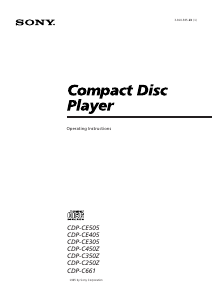
Manual Sony CDP-CE505 CD Player

Need a manual for your Sony CDP-CE505 CD Player? Below you can view and download the PDF manual for free in English. This product currently has 1 frequently asked question, 0 comments and has 1 vote with an average product rating of 100/100. If this is not the manual you want, please contact us.

Is your product defective and the manual offers no solution? Go to a Repair Café for free repair services.

Manual

Loading…
2
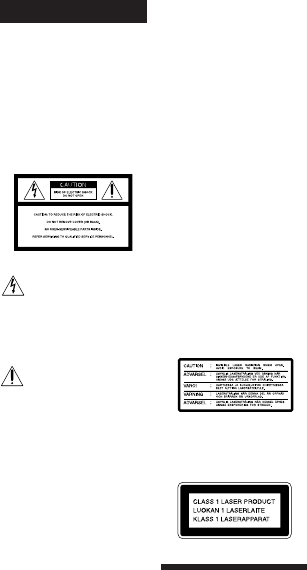
WARNING
To prevent fire or shock
hazard, do not expose
the unit to rain or
moisture.
To avoid electrical shock,
do not open the cabinet.
Refer servicing to
qualified personnel only.
Reorient or relocate the receiving
antenna.
Increase the separation between the
equipment and receiver.
Connect the equipment into an outlet
on a circuit different from that to
which the receiver is connected.
Consult the dealer or an experienced
radio/TV technician for help.
CAUTION
You are cautioned that any changes or
modification not expressly approved in
this manual could void your authority to
operate this equipment.
Owner’s Record
The model and serial numbers are
located at the rear of the unit.
Record the serial number in the space
provided below. Refer to them whenever
you call upon your Sony dealer
regarding this product.
Model No. _________________________
Serial No. _________________________
This symbol is intended to alert
the user to the presence of
uninsulated “dangerous voltage”
within the product’s enclosure
that may be of sufficient
magnitude to constitute a risk of
electric shock to persons.
This symbol is intended to alert
the user to the presence of
important operating and
maintenance (servicing)
instructions in the literature
accompanying the appliance.
INFORMATION
This equipment has been tested and
found to comply with the limits for a
Class B digital device, pursuant to Part
15 of the FCC Rules. These limits are
designed to provide reasonable
protection against harmful interference
in a residential installation. This
equipment generates, uses, and can
radiate radio frequency energy and, if
not installed and used in accordance
with the instructions, may cause harmful
interference to radio communications.
However, there is no guarantee that
interference will not occur in a particular
installation. If this equipment does cause
harmful interference to radio or
television reception, which can be
determined by turning the equipment off
and on, the user is encouraged to try to
correct the interference by one or more of
the following measures:
On power sources
Before operating the player, check that
the operating voltage of the player is
identical with your local power
supply. The operating voltage is
indicated on the nameplate at the rear
of the player.
The player is not disconnected from
the AC power source (mains) as long
as it is connected to the wall outlet,
even if the player itself has been
turned off.
If you are not going to use the player
for a long time, be sure to disconnect
the player from the wall outlet. To
disconnect the AC power cord (mains
lead), grasp the plug itself; never pull
the cord.
AC power cord must be changed only
at the qualified service shop.
On placement
Place the player in a location with
adequate ventilation to prevent heat
build-up in the player.
Do not place the player on a soft
surface such as a rug that might block
the ventilation holes on the bottom.
Do not place the player in a location
near heat sources, or in a place subject
to direct sunlight, excessive dust or
mechanical shock.
On operation
If the player is brought directly from a
cold to a warm location, or is placed in
a very damp room, moisture may
condense on the lenses inside the
player. Should this occur, the player
may not operate properly. In this case,
remove the disc and leave the player
turned on for about an hour until the
moisture evaporates.
On adjusting volume
Do not turn up the volume while
listening to a portion with very low
level inputs or no audio signals. If you
do, the speakers may be damaged
when a peak level portion is played.
On cleaning
Clean the cabinet, panel and controls
with a soft cloth slightly moistened
with a mild detergent solution. Do not
use any type of abrasive pad, scouring
powder or solvent such as alcohol or
benzine.
If you have any questions or
problems concerning your player,
please consult your nearest Sony
dealer.
For the customers in Australia
The following caution label is located
inside the unit.
This appliance is classified as a CLASS 1
LASER product.
The CLASS 1 LASER PRODUCT
MARKING is located on the rear
exterior.
Precautions
On safety
Caution — The use of optical
instruments with this product will
increase eye hazard.
Should any solid object or liquid fall
into the cabinet, unplug the player and
have it checked by qualified personnel
before operating it any further.
Download manual in English (PDF, 0.64 MB)
(Consider the environment and only print this manual if it is really necessary)

Loading…

Rating

Let us know what you think about the Sony CDP-CE505 CD Player by leaving a product rating. Want to share your experiences with this product or ask a question? Please leave a comment at the bottom of the page.
Are you satisfied with the Sony CDP-CE505 CD Player?
Yes No
100%
0%
1 vote

Join the conversation about this product

Here you can share what you think about the Sony CDP-CE505 CD Player. If you have a question, first carefully read the manual. Requesting a manual can be done by using our contact form.

More about this manual

We understand that it’s nice to have a paper manual for your Sony CDP-CE505 CD Player. You can always download the manual from our website and print it yourself. If you would like to have an original manual, we recommend you contact Sony. They might be able to provide an original manual. Are you looking for the manual of your Sony CDP-CE505 CD Player in a different language? Choose your preferred language on our homepage and search for the model number to see if we have it available.

Specifications

Brand Sony
Model CDP-CE505
Category CD Players
File type PDF
File size 0.64 MB

All manuals for Sony CD Players
More manuals of CD Players

Frequently Asked Questions about Sony CDP-CE505 CD Player

Our support team searches for useful product information and answers to frequently asked questions. If you find an inaccuracy in our frequently asked questions, please let us know by using our contact form.

Can I repair scratches on a CD myself? Verified

Scratches prevent de laser from reading the disc correctly. When the scratches are only superficial it is possible to repair them yourself by polishing the disc with a slightly abrasive compound. Ideally you use a professional abrasive compound but it’s also possible to use regular toothpaste. After polishing the disc it needs to be washed and let to dry. There are specialised businesses that can do this.

This was helpful (42) Read more
Manual Sony CDP-CE505 CD Player

Related products

Related categories

×
Download