Manual SilverStone HE01 CPU Cooler

Need a manual for your SilverStone HE01 CPU Cooler? Below you can view and download the PDF manual for free in English. This product currently has 0 frequently asked questions, 0 comments and has 0 votes. If this is not the manual you want, please contact us.

Is your product defective and the manual offers no solution? Go to a Repair Café for free repair services.

Manual

Loading…
3
NITROGON/HELIGON SERIES
INTEL
1.
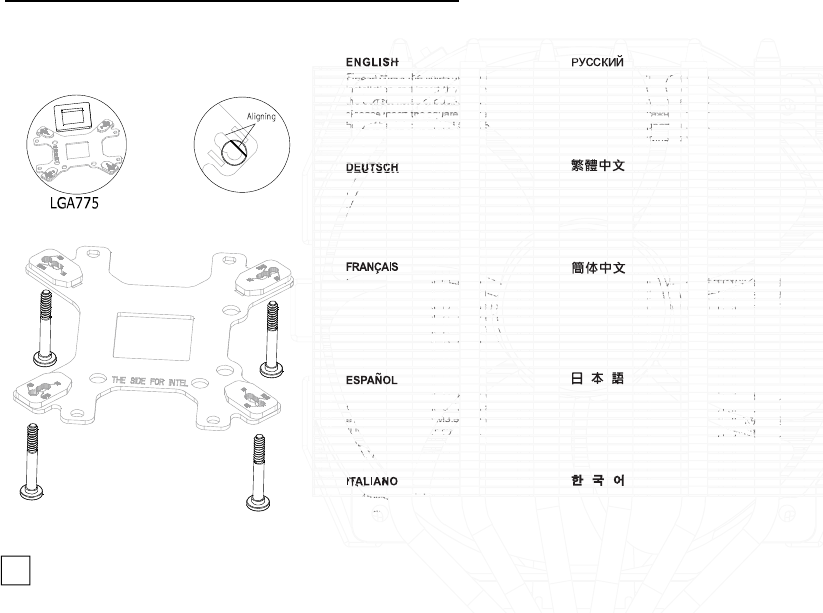
Please check the holes of motherboard before
installation and insert the screws M3.5*30 into
the correct holes of back-board.
*Please insert the square spacer into the centric
hole of back-board with LGA775 installation only.
Перед установкой кулера проверьте и выберите
соответсвующие отверстия на материнской плате
и проведите винты типа м3.5*30 к соответсвующим
отверстиям монтажной пластины.
*Установите квадратный вкладыш по середине
монтажной пластины (для INTEL только).
Uberprufen Sie die Lochfuhrungen des Mainboards
vor der Installation und setzen Sie die Schrauben
M3.5*30 korrekt von unten durch die Backplate.
*Setzen Sie bitte nur bei dem Sockel 775 die
Schraubbegrenzungen zentrisch auf die
Lochfuhrungen der Backplate.
確定背板正確的使用面,將螺柱依CPU平臺類型插入
背板對應的孔位;安裝LGA775主板時,須先將方形墊
板壓入背板中心孔,LGA1155/1156/1366主板則不需要。
Repérer les trous de fixation de la carte mère
avant l'installation, puis insérer les vis M3.5*30
dans les trous de fixation correspondant sur la
plaque arrière. *Seulement dans le cas d'une
installation pour Socket LGA 775, veiller à
disposer le carré de mousse au centre de la
plaque arrière.
确定背板正确的使用面,将螺柱依CPU平台类型插入
背板对应的孔位;安装LGA775主板时,须先将方形垫
板压入背板中心孔,LGA1155/1156/1366主板则不需要。
Por favor, seleccione los agujeros adecuados
de la placa base, antes de realizar la instalación,
e inserte los tronillos M3.5*30 en el lugar correcto.
*Utilice el espaciador cuadrado en el centro del
anclaje, únicamente cuando se trate de socket
LGA775.
インストールの前にマザーボードの穴を確認して、
M3.5*30ネジをバックプレートの穴に正しく差して
ください。*LGA775のインストールにのみ、角型ス
ペーサーをバックプレートの中心の穴に装着して
ください。
Controllare i fori della scheda madre prima
dell'installazione ed inserire le viti M3.5x30 nei
fori corretti della piastra.
*Inserire il distanziale quadrato nel foro centrale
della piastra solo con l'installazione LGA775.
설치 전에 메인보드의 구멍을 확인하고 M3.5*30
나사를 백보드의 올바른 구멍에 끼우십시오.
*사각 스페이서를 LGA775만 설치된 백보드의 중심
구멍에 끼우십시오.
Download manual in English (PDF, 9.16 MB)
(Consider the environment and only print this manual if it is really necessary)

Loading…

Rating

Let us know what you think about the SilverStone HE01 CPU Cooler by leaving a product rating. Want to share your experiences with this product or ask a question? Please leave a comment at the bottom of the page.
Are you satisfied with the SilverStone HE01 CPU Cooler?
Yes No
Be the first to rate this product
0 votes

Join the conversation about this product

Here you can share what you think about the SilverStone HE01 CPU Cooler. If you have a question, first carefully read the manual. Requesting a manual can be done by using our contact form.

More about this manual

We understand that it’s nice to have a paper manual for your SilverStone HE01 CPU Cooler. You can always download the manual from our website and print it yourself. If you would like to have an original manual, we recommend you contact SilverStone. They might be able to provide an original manual. Are you looking for the manual of your SilverStone HE01 CPU Cooler in a different language? Choose your preferred language on our homepage and search for the model number to see if we have it available.

Specifications

Brand SilverStone
Model HE01
Category CPU Coolers
File type PDF
File size 9.16 MB

All manuals for SilverStone CPU Coolers
More manuals of CPU Coolers
Manual SilverStone HE01 CPU Cooler

Related products

Related categories

×
Download