0 1 2 3 4 5 6 7 8 9 0 . ,
0 1 2 3 4 5 6 7 8 9 0 . ,
0 1 2 3 4 5 6 7 8 9 0 . ,
0 1 2 3 4 5 6 7 8 9 0 . ,
0 1 2 3 4 5 6 7 8 9 0 . ,
0 1 2 3 4 5 6 7 8 9 0 . ,
0 1 2 3 4 5 6 7 8 9 0 . ,
0 1 2 3 4 5 6 7 8 9 0 . ,
0 1 2 3 4 5 6 7 8 9 0 . ,
0 1 2 3 4 5 6 7 8 9 0 . ,
0 1 2 3 4 5 6 7 8 9 0 . ,
0 1 2 3 4 5 6 7 8 9 0 . ,
0 1 2 3 4 5 6 7 8 9 0 . ,
0 1 2 3 4 5 6 7 8 9 0 . ,
0 1 2 3 4 5 6 7 8 9 0 . ,
0 1 2 3 4 5 6 7 8 9 0 . ,
0 1 2 3 4 5 6 7 8 9 0 . ,
0 1 2 3 4 5 6 7 8 9 0 . ,
0 1 2 3 4 5 6 7 8 9 0 . ,
0 1 2 3 4 5 6 7 8 9 0 . ,
0 1 2 3 4 5 6 7 8 9 0 . ,
0 1 2 3 4 5 6 7 8 9 0 . ,
0 1 2 3 4 5 6 7 8 9 0 . ,
0 1 2 3 4 5 6 7 8 9 0 . ,
STATUS DISPLAY AND COUNTER / STATUSANZEIGE UND ZÄHLER /
AFFICHAGE DES OPÉRATEURS ET COMPTEUR / VISUALIZACIÓN DE
ESTADO Y CONTADOR / DISPLAY DELLO STATO E CONTATORE /
STATUSVISNING OCH RÄKNEVERK / STATUS-DISPLAY EN TELLER
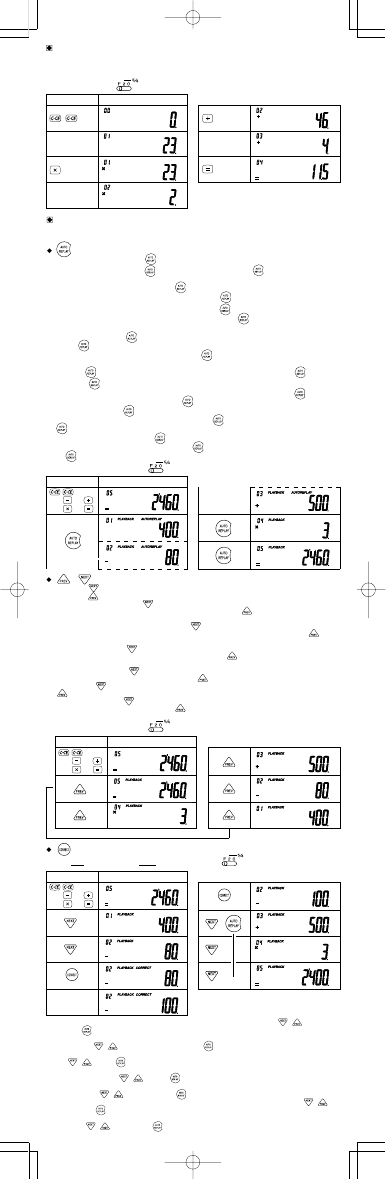
(1) 23×2÷4=11.5
CHECK & CORRECT / PRÜFEN UND KORRIGIEREN / VÉRIFICATION ET
CORRECTION / COMPROBACIÓN Y CORRECCIÓN / CONTROLLO E
CORREZIONE / KONTROLL & KORRIGERING / CONTROLE & CORRECTIE
• Auto Scroll starts by pressing and you can recall a calculation formula automatically.
Auto Scroll stops by pressing
during Auto Scroll and pressing again starts Auto Scroll
to resume.
• Diese Funktion wird durch Drücken von gestartet. Damit können Sie eine Formel für eine
Berechnung wiederholt verwendet. Durch Drücken von
während einer Wiederholung wird
die Funktion beendet und durch erneutes Drücken von
wieder aktiviert.
• La relecture automatique démarre en appuyant sur la touche
et vous permet relire une
formule de calcul automatiquement. La relecture automatique peut être interrompue en
appuyant sur la touche
pendant la relecture et reprise en appuyant de nouveau sur la
touche
.
• La revisualización automática se inicia pulsando
, lo que le permite volver a visualizar
automáticamente una fórmula de cálculo. La revisualización automática puede detenerse
pulsando
durante la revisualización, y puede reiniciarse pulsando de nuevo .
• Premendo viene avviato il replay automatico che consente di ripetere automaticamente una
formula di calcolo. È possibile interrompere la ripetizione automatica premendo
durante la
ripetizione e riavviarla premendo di nuovo
.
• Ett tryck på tangenten
gör det möjligt att automatiskt återge en räkneformel. Pågående
automatisk återgivning kan stoppas med ett tryck på
och startas igen med ett nytt tryck på
.
• Auto replay begint wanneer u op
drukt en stelt u in staat automatisch een rekenformule
opnieuw te tonen. Druk tijdens auto replay op
om auto replay te stoppen en druk nogmaals
op
om auto replay weer te starten.
23
2
(2) (3)
4
(1) (400−80+500)×3=2460
400 80
500 3
(2) (3)
(1) (400−80+500)×3=2460
400 80
500 3
(2) (3)
▲
EL-771C(LC7)-1
➁
• To check a calculation formula after performing the Correct function, press / repeatedly
or press
.
• Zum Überprüfen eines Berechnungsergebnisses nach dem Ausführen der Funktion Korrigieren
drücken Sie
/ mehrfach oder drücken Sie .
• Pour vérifiez une formule de calcul après avoir réalisé une correction, appuyez répétitivement
sur
/ ou sur .
• Para comprobar una fórmula de cálculo después de haber realizado la función de corrección,
pulse repetidamente
/ o pulse .
• Per controllare una formula di calcolo dopo l’esecuzione della funzione Correzione, premere
ripetutamente
/ oppure premere .
• Kontrollera en räkneformel efter att ha utfört korrigering genom upprepade tryck på
/
eller tryck på .
• Om een rekenformule te controleren nadat u de Correctie functie hebt gebruikt, drukt u enkele
malen op
/ of u drukt op .
400 80
500 3
(2) (3)
100
(1) (400−80+500)×3→(400−100+500)×3=2400
▼
/
• Each time is pressed, calculation formulas are recalled in the order they are entered, while
each time
is pressed, calculation is recalled in the order of its answer.
• Jedesmal beim Drücken von
werden die Formeln für Berechnungen in der Reihenfolge
abgerufen, in der sie eingegeben wurden. Durch Drücken von
werden sie in der
umgekehrten Reihenfolge der Eingabe abgerufen.
• Chaque fois que vous appuyez sur la touche
, la formule de calcul est affichée dans l’ordre
dans lequel elle a été entrée tandis que chaque fois que vous appuyez sur la touche
, elle
est affichée dans l’ordre inverse.
• Cada vez que se pulsa
, las fórmulas de cálculo vuelven a visualizarse en el orden en que
fueron introducidas, mientras que cada vez que se pulsa
, éstas vuelven a visualizarse en
orden inverso.
• Ogni volta che si preme
, le formule di calcolo vengono riprodotte nell'ordine in cui sono
state immesse, mentre ogni volta che si preme
, esse vengono riprodotte in ordine inverso.
• Vart tryck på
gör att räkneformler avspelas i den ordning de matades in, medan ett tryck på
avspelar dem i omvänd ordning.
• Telkens wanneer u op
drukt, worden de rekenformules weergegeven in de volgorde waarin
ze werden ingevoerd; bij indrukken van
worden de formules in de omgekeerde volgorde
weergegeven.



Join the conversation about this product
Here you can share what you think about the Sharp EL-771C Calculator. If you have a question, first carefully read the manual. Requesting a manual can be done by using our contact form.