Manual Sharkoon Skiller SGK50 S4 Keyboard

Need a manual for your Sharkoon Skiller SGK50 S4 Keyboard? Below you can view and download the PDF manual for free in English. This product currently has 2 frequently asked questions, 3 comments and has 2 votes with an average product rating of 50/100. If this is not the manual you want, please contact us.

Is your product defective and the manual offers no solution? Go to a Repair Café for free repair services.

Manual

Loading…
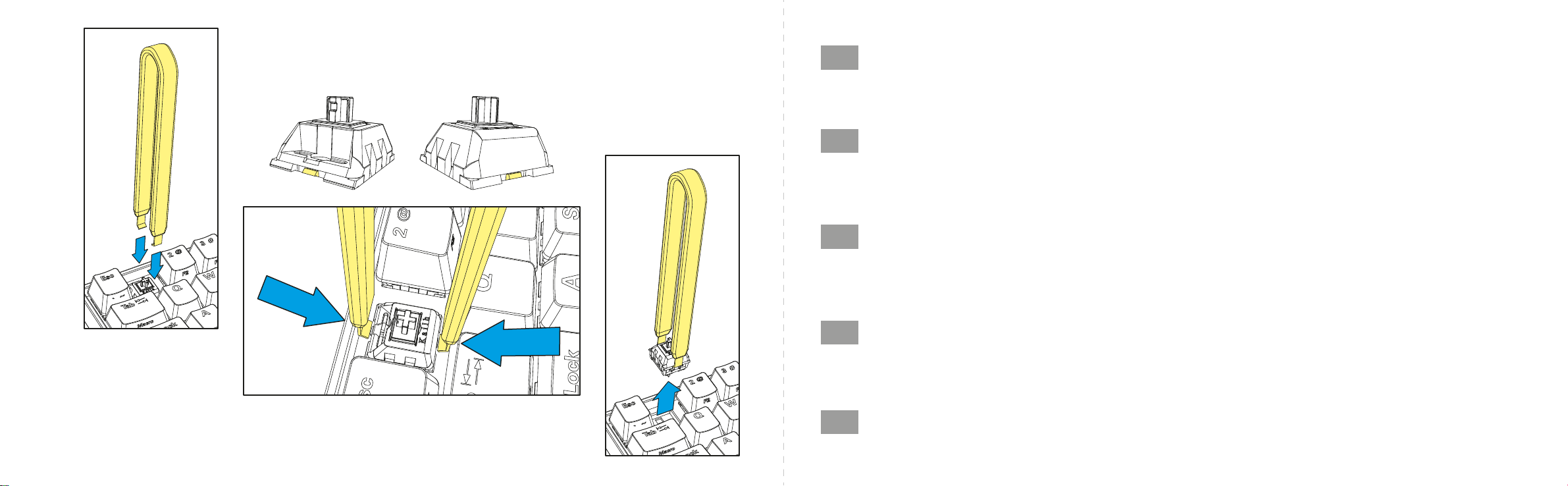
REMOVE OF SWITCHES
03
EN
Once you have removed the keycap from the switch, position the switch puller tool correctly on the tabs of the switch. These are positioned to the front and
the back of the switch. Before pulling out the switch, make sure that both tabs are securely pressed with the switch puller tool and that the switch can be
removed from the socket without resistance. If necessary, remove the adjacent keycaps to allow the switch puller tool sucient freedom of movement.
After you have removed the keycap, press both tabs of the switch with the switch puller tool and then slowly pull the switch out of the socket. Be sure to
always pull vertically from the socket with a straight, upward direction. Avoid pulling in a slanted direction, as this can result in damage.
DE
Sobald Sie die Tastenkappe vom Schalter entfernt haben, positionieren Sie den Switch-Puller korrekt an den Füßen. Diese befinden sich auf der Ober- und
Unterseite des Schalters. Stellen Sie außerdem vor dem Herausziehen des Schalters sicher, dass beide Füße sicher mit dem Switch-Puller gedrückt wurden
und sich der Schalter ohne Widerstand aus der Fassung entnehmen lässt. Entfernen Sie gegebenenfalls die angrenzenden Tastenkappen, um dem Switch-
Puller genügend Bewegungsspielraum einzuräumen. Sobald Sie die Tastenkappe entfernt haben, drücken Sie mit dem Switch-Puller die beiden Füße des
Schalters, und ziehen Sie den Schalter danach langsam aus der Fassung heraus. Bewahren Sie auch dabei stets einen senkrechten Zug nach oben.
Vermeiden Sie schräge Bewegungen, da auf diese Weise Beschädigungen auftreten können.
FR
Une fois que vous avez retiré le capuchon du commutateur, positionnez correctement l'outil d’extraction de commutateur sur les languettes du commutateur.
Celles-ci sont positionnées à l'avant et à l'arrière du commutateur. Avant de retirer le commutateur, assurez-vous que les deux languettes soient bien
enfoncées avec l'outil d'extraction de commutateur et que le commutateur puisse être retiré du circuit sans résistance. Si nécessaire, retirez les capuchons
de touche adjacents pour permettre à l'outil d'extraction de commutateur une liberté de mouvement susante. Après avoir retiré le capuchon de la touche,
appuyez sur les deux languettes du commutateur avec l'outil d’extraction de commutateur, puis retirez lentement le commutateur du circuit. Assurez-vous
de toujours tirer verticalement par rapport au circuit avec une direction droite vers le haut. Évitez de tirer dans une direction inclinée, car cela peut entraîner
des dommages.
IT
Una volta rimosso il copritasto, posiziona la pinza per estrarre gli switch esattamente sulle linguette dello switch. Queste ultime si trovano nella parte
anteriore e posteriore dello switch. Prima di estrarre lo switch, assicurati che la pressione della pinza per estrarre gli switch sulle linguette sia ben salda e
che lo switch possa essere rimosso dall'attacco senza resistenze. Se necessario, rimuovi i copritasti adiacenti per permettere alla pinza per estrarre gli
switch la suciente libertà di movimento. Dopo aver rimosso il copritasto, premi entrambe le linguette dello switch con la pinza per estrarre gli switch e
rimuovi lentamente lo switch dall'attacco. Assicurati sempre di eettuare un'estrazione verticale e diretta verso l'alto. Un'eventuale estrazione eettuata
in senso obliquo può provocare danni.
ES
Una vez extraído el casquete del interruptor, posicione el extractor de interruptores correctamente sobre las pestañas del interruptor. Estos están
posicionados en la parte frontal y trasera del interruptor. Antes de extraer hacia arriba el interruptor, asegúrese de que ambas pestañas están presionadas
con seguridad con el extractor de interruptores y que el interruptor se puede retirar de la cavidad sin resistencia. Si es necesario, retire los casquetes
contiguos para permitir libertad de movimiento al extractor de interruptores. Después de haber retirado el casquete, presione ambas pestañas del
interruptor con el extractor de interruptores y luego extraiga despacio el interruptor de la cavidad. Asegúrese de que siempre extrae verticalmente en
dirección hacia arriba desde la cavidad. Evite extraer en una dirección inclinada, esto puede provocar daños.
04
Download manual in English (PDF, 5.34 MB)
(Consider the environment and only print this manual if it is really necessary)

Loading…

Rating

Let us know what you think about the Sharkoon Skiller SGK50 S4 Keyboard by leaving a product rating. Want to share your experiences with this product or ask a question? Please leave a comment at the bottom of the page.
Are you satisfied with the Sharkoon Skiller SGK50 S4 Keyboard?
Yes No
50%
50%
2 votes

Join the conversation about this product

Here you can share what you think about the Sharkoon Skiller SGK50 S4 Keyboard. If you have a question, first carefully read the manual. Requesting a manual can be done by using our contact form.

diego 01-01-2023
but how do you do the f2? I've tried everything but it's impossible

reply | This was helpful (0) Read more (Translated by Google)
GlitchDev 19-01-2023
With the Sharkoon key + 1 to ´ key

This was helpful (1) (Translated by Google)
GlitchDev 19-01-2023
Hey how can you keep the RGB lighting that has been set and not have to reset it every time you start?

reply | This was helpful (0) (Translated by Google)

More about this manual

We understand that it’s nice to have a paper manual for your Sharkoon Skiller SGK50 S4 Keyboard. You can always download the manual from our website and print it yourself. If you would like to have an original manual, we recommend you contact Sharkoon. They might be able to provide an original manual. Are you looking for the manual of your Sharkoon Skiller SGK50 S4 Keyboard in a different language? Choose your preferred language on our homepage and search for the model number to see if we have it available.

Specifications

Brand Sharkoon
Model Skiller SGK50 S4
Category Keyboards
File type PDF
File size 5.34 MB

All manuals for Sharkoon Keyboards
More manuals of Keyboards

Frequently Asked Questions about Sharkoon Skiller SGK50 S4 Keyboard

Our support team searches for useful product information and answers to frequently asked questions. If you find an inaccuracy in our frequently asked questions, please let us know by using our contact form.

The letters on the keyboard are not in the places that I am used to, why is that? Verified

Most keyboards use a QWERTY layout, standing for the first six letters on the keyboard. However, there are different keyboard layouts, matching the specific needs of a certain language. It is also possible that the keyboard keys have been swapped. Especially with older keyboards this is easy to do.

This was helpful (1359) Read more

What is the best way to clean my keyboard Verified

Never insert objects between the edges of the keys, as this will mainly push dirt in and damage the keyboard. It is best to clean the keyboard with compressed air while keeping the keyboard upside down. The top of the keys can be cleaned with a slightly damp cloth.

This was helpful (202) Read more

Manual Sharkoon Skiller SGK50 S4 Keyboard

Related products

Related categories

×
Download