Manual Sanyo ICC-807D Calculator

Need a manual for your Sanyo ICC-807D Calculator? Below you can view and download the PDF manual for free in English. This product currently has 1 frequently asked question, 1 comment and has 0 votes. If this is not the manual you want, please contact us.

Is your product defective and the manual offers no solution? Go to a Repair Café for free repair services.

Manual

Loading…
o
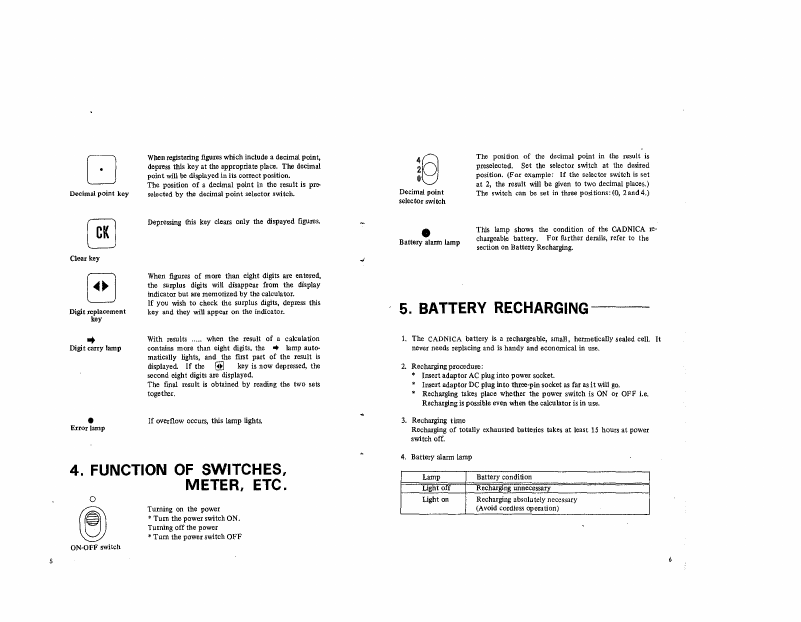
Decimal
poin
t
key
Clear
key
When
registering
figures
which include a decimal point,
depress this key
at
the appropriate place. The decimal
point
will
be
displayed
in
its correct position.
The position
of
a decimal point in the result
is
pre-
selected
by
the decimal
point
selector switch.
Depressing this key clears only the dispayed figures.
Decimal
point
selector switch
Battery alarm lamp
The position
of
the decimal point in the result
is
preselected. Set the selector switch at the desired
position. (For example:
If
the selector switch
is
set
at
2,
the result will be given to two decimal places.)
The switch can be set
in
three positions: (0, 2and4.)
This lamp shows
the
condition
of
the CADNICA re-
chargeable battery. For further derails, refer to the
section on Battery Recharging.
4.
FUNCTION
OF
SWITCHES,
METER,
ETC.
Digit
replacement
key
..
Digit carry
lamp
Error lamp
o
(eJ
ON-OFF switch
When figures of more than eight digits are entered,
the surplus digits
will disappear from the display
indicator
but
are memorized by the calculator.
If
you wish to check the surplus digits, depress this
key and they
will appear
on
the indicator.
With results ..... when the result
of
a calculation
contains more than eight digits, the
..
lamp auto-
matically lights, and the first part of the result
is
displayed.
If
the
HB
key
is
now depressed, the
second eight digits are displayed.
The
final result
is
obtained by reading the two sets
together.
If
overflow occurs, this lamp lights.
Turning on the power
'"
Turn the power switch
ON.
Turning
off
the power
'"
Tum
the power switch OFF
5.
BATTERY
RECHARGING---
1.
The
CADNICA
battery
is
a rechargeable, small, hermetically sealed cell.
It
never needs replacing and
is
handy and economical in use.
2.
Recharging procedure:
>to
Insert adaptor AC plug into power socket.
* Insert adaptor
DC
plug into three-pin socket
as
far
as
it
will
go.
* Recharging takes place whether the power switch is
ON
Or
OFF i.e.
Recharging
is
possible even when the calculator is in use.
3.
Recharging time
Recharging of totally exhausted batteries takes
at
least
15
hours at power
switch off.
4.
Battery
alarm
lamp
Lamp
Battery condition
Light
off
Recharging unnecessary
Light on
Recharging absolutely necessary
(Avoid cordless operation)
6
Download manual in English (PDF, 0.23 MB)
(Consider the environment and only print this manual if it is really necessary)

Loading…

Rating

Let us know what you think about the Sanyo ICC-807D Calculator by leaving a product rating. Want to share your experiences with this product or ask a question? Please leave a comment at the bottom of the page.
Are you satisfied with the Sanyo ICC-807D Calculator?
Yes No
Be the first to rate this product
0 votes

Join the conversation about this product

Here you can share what you think about the Sanyo ICC-807D Calculator. If you have a question, first carefully read the manual. Requesting a manual can be done by using our contact form.

M Stevenson 31-05-2023
Sanyo ICC-807D Calculator S/N: 72811222 T Has anyone got a wiring diagram for this?

reply | This was helpful (0)

More about this manual

We understand that it’s nice to have a paper manual for your Sanyo ICC-807D Calculator. You can always download the manual from our website and print it yourself. If you would like to have an original manual, we recommend you contact Sanyo. They might be able to provide an original manual. Are you looking for the manual of your Sanyo ICC-807D Calculator in a different language? Choose your preferred language on our homepage and search for the model number to see if we have it available.

Specifications

Brand Sanyo
Model ICC-807D
Category Calculators
File type PDF
File size 0.23 MB

All manuals for Sanyo Calculators
More manuals of Calculators

Frequently Asked Questions about Sanyo ICC-807D Calculator

Our support team searches for useful product information and answers to frequently asked questions. If you find an inaccuracy in our frequently asked questions, please let us know by using our contact form.

A battery in my device is oxidized, can I still safely use it? Verified

Ja, the device can still be safely used. Firstly, remove the oxidizd battery. Never use bare hands to do this. Then clean the battery compartment with a cotton swab dipped in vinegar or lemon juice. Let it dry and insert new batteries.

This was helpful (484) Read more
Manual Sanyo ICC-807D Calculator

Related products

Related categories

×
Download